
In this guide, we’ll cover:
A revenue-first way to compare DIY GoHighLevel setup cost against the commercial risk of missed leads, weak routing, bad attribution and rebuild work.
DIY Looks Cheaper Before The First Missed Lead
Why the invoice is only one part of cost: a build also has to protect response speed, ownership and sales handoff.
Broken Routing Turns Cheap Setup Into Lost Pipeline
Where the real bill appears: unassigned leads, duplicate messages, weak notifications and calendar logic that sales cannot trust.
Bad Data Makes Scaling Decisions Expensive
How DIY builds lose source truth when forms, funnels, calls and calendars do not pass campaign data into opportunities.
A Specialist Designs The Revenue System First
What a GoHighLevel expert should map before workflows: lifecycle stages, owner rules, stop conditions, QA and reporting.
Choose The Route That Matches Commercial Risk
How to decide when DIY is fine, when a freelancer is enough and when a SCALE GoHighLevel expert build is the safer route.
Hiring a GoHighLevel expert can look expensive when you compare it against a DIY setup, a snapshot or a cheap freelancer. However, that comparison is incomplete if the system will handle paid leads, booked calls, sales reps, attribution and revenue reporting.
If you are still deciding whether to hire a GoHighLevel expert, the real question is not whether someone can connect pages, forms and workflows. The better question is whether the build can keep protecting the commercial path once volume, campaign spend and sales accountability increase.
SCALE builds GoHighLevel CRM, funnel, and automation systems for businesses that need better lead quality, faster follow-up, and clearer attribution. That means we judge cost by the revenue system, not by how many tasks were completed inside the platform. Before you commit to the cheaper route, pressure-test the account against the pre-migration implementation checklist so cost decisions are tied to routing, data and handoff risk.
“The cheapest GoHighLevel setup is only cheap if it still protects leads, attribution and booked calls.”
Quick Answer
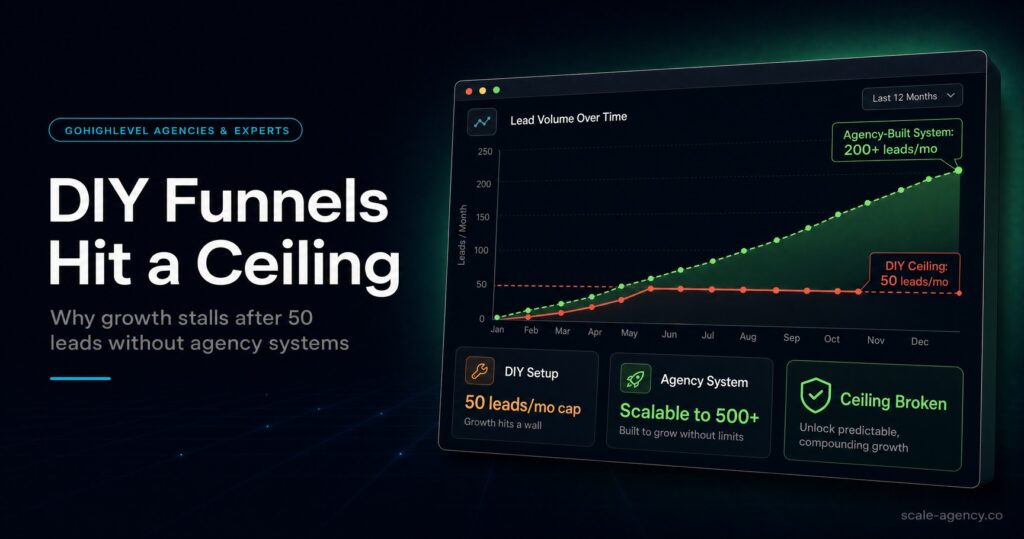
A DIY GoHighLevel setup is cheaper upfront, but it can cost more long-term if leads go unassigned, automations fire incorrectly, attribution breaks, sales teams ignore the CRM or the account needs rebuilding. Hire a GoHighLevel expert when paid traffic, booked calls, multiple reps or revenue reporting depend on the system working correctly.
TL;DR
- DIY is fine for a small test, one offer, one user and low lead volume.
- DIY becomes expensive when broken follow-up, weak routing or unclear attribution costs more than the original build.
- A cheap freelancer can make the account look finished while missing pipeline logic, QA and handover.
- A specialist GoHighLevel expert should design the operating model before adding automations.
- Use the GoHighLevel expert guide as the parent checklist, then use this page to judge the DIY cost tradeoff.
- Before you pay for help, use these GoHighLevel expert questions before hiring to expose whether the candidate understands CRM risk, attribution and handoff.
Decision Table: DIY Vs Freelancer Vs GoHighLevel Expert
The right route depends on commercial risk. A simple account can stay lean. A revenue-critical account needs stronger architecture because the cost of failure shows up in missed conversations, wasted ad spend and weak decisions.
| Route | Best Fit | Hidden Cost | Better Next Step |
|---|---|---|---|
| DIY setup | Simple test, low lead volume, one owner, one offer | Your time, missed edge cases, slow QA and limited reporting | Keep the setup narrow and document every workflow. |
| Snapshot or cheap freelancer | Basic landing page, one calendar, simple nurture | Looks finished but may miss routing, attribution and sales handoff logic | Ask for QA evidence, field rules and handover notes before launch. |
| SCALE GoHighLevel expert build | Paid traffic, multiple sources, sales reps, high-ticket offers | Higher upfront cost, but lower rebuild risk and clearer revenue visibility | Book a Growth Systems Audit. |
Who Is This For?
- Business owners considering whether GoHighLevel should be built in-house or by a specialist.
- Local service businesses paying for Google, Meta or referral leads that need fast follow-up.
- Agencies, consultants and high-ticket providers that sell through booked calls.
- Teams migrating from HubSpot, Pipedrive, ActiveCampaign, spreadsheets or disconnected tools.
- Operators who cannot confidently explain which source produces booked calls and closed revenue.
If the build is for a local service business, also read the local business GoHighLevel expert guide. It shows where generic setups usually miss real-world routing, booking and reporting edge cases.
The Real Cost Is Leakage, Not Setup
The visible cost of a GoHighLevel build is easy to compare. You can count software subscriptions, setup fees and freelancer invoices. Yet the more important cost is usually operational leakage. That is the revenue lost when the system does not move a hot lead into the right conversation quickly enough.
For example, a DIY build may save money on day one. However, if forms create duplicate contacts, new leads do not get assigned, calendars fail to update pipeline stages or reps cannot see source data, the cheaper build starts charging you every week through missed calls and unclear decisions.
The same issue appears when a business uses a snapshot without adapting it to the real sales motion. The pages may look acceptable. The workflows may send messages. But if owner assignment, stop conditions and reporting rules are not designed around the business, the system is still incomplete.
Why DIY GoHighLevel Builds Get Expensive
Most DIY GoHighLevel builds become expensive for one of seven reasons. First, the CRM has no clean data model. Second, pipeline stages describe activity instead of commercial progress. Third, routing is too basic. Fourth, automations overlap. Fifth, attribution is not preserved from the click to the opportunity. Sixth, dashboards report what is easy to count, not what matters. Finally, the handover exists only in the builder’s head.
That does not mean DIY is always wrong. If you are validating one simple offer with one operator and a low lead volume, a lean setup can be sensible. In that case, the goal is to keep the system narrow and avoid complexity.
The problem starts when the business grows beyond that test. More campaigns create more source data. More calls create more booking outcomes. More reps create more ownership questions. At that point, the system needs commercial logic. Otherwise, every new layer adds risk.
Cost Table: Where DIY Usually Becomes Expensive
Use this table to diagnose whether your current setup is still cheap or quietly costing you revenue.
| Cost Area | What Breaks | Business Impact | What An Expert Should Fix |
|---|---|---|---|
| CRM structure | Fields, tags and lifecycle stages are inconsistent | Sales cannot trust the record | Define clean fields, required data and lifecycle rules |
| Lead routing | New enquiries do not have a clear owner | Hot leads wait too long | Assign owners, tasks, alerts and escalation paths |
| Automation logic | Workflows overlap or keep firing after a booking | Prospects receive confusing messages | Separate modules and add stop conditions |
| Attribution | Source data is not passed into opportunities | Ad spend decisions become guesswork | Map UTMs, forms, calls, calendars and source fields |
| Reporting | Dashboards show leads but not sales movement | Owners cannot see what to fix | Report contact rate, booking rate, show rate and revenue by source |
How To Decide: Hire A GoHighLevel Expert Vs DIY Cost
Start with the commercial dependency. If GoHighLevel is only a place to test a simple funnel, DIY may be enough. If GoHighLevel is expected to support acquisition, follow-up, sales management and reporting, the cost of a weak build becomes much higher.
Next, look at lead value. If one additional booked call is worth hundreds or thousands of pounds, the speed-to-lead and routing layer deserves proper design. The speed-to-lead GoHighLevel expert guide explains how small routing issues can become revenue problems.
Finally, check who will maintain the system. DIY becomes dangerous when nobody owns QA, documentation, naming conventions and change control. A good expert does not just build the first version. They make the system easier to run after launch.
What An Expert Build Should Include
A proper GoHighLevel expert build starts before the platform work. The first step is mapping the operating model: lead sources, forms, calls, calendars, pipeline stages, rep assignment, booking outcomes, no-show recovery and reporting definitions.
After that, the build should define custom fields, tags, opportunity stages and workflow modules. Each module should have a clear trigger, exit condition and QA test. This is what separates a revenue system from a collection of automations.
The final step is handover. That includes admin rules, workflow naming, dashboard notes, testing evidence and a simple explanation of what the team should do when something changes. Without that, the business is left with a system it cannot safely improve.
The Implementation Process
A stronger implementation does not begin with a list of features. It begins with the path from enquiry to revenue. First, map each lead source. That includes paid ads, organic forms, landing pages, calls, chat widgets, referrals and manual imports. If the source is unclear at intake, reporting will be weak later.
Second, define the sales stages before building the pipeline. A stage should mean a real action has happened, not that a workflow moved a contact for convenience. For example, New Lead, Attempting Contact, Booked, Showed, Proposal Sent, Won and Lost are useful only when each stage has a clear owner, rule and next action.
Third, build workflows in modules. Intake, assignment, first-touch follow-up, booking reminders, no-show recovery, sales nurture and customer onboarding should not be one tangled automation. Modular workflows are easier to test, easier to explain and easier to fix when the offer changes.
Fourth, test the account with real scenarios. Submit the forms. Book the calendar. Reply to the SMS. Miss the appointment. Change the opportunity stage. Then check whether the right fields, tasks, messages and reports update. This is where many cheap builds fail, because nobody tests the edge cases that happen in real sales conversations.
Finally, hand over the operating rules. The business should know what each field means, which workflows matter, how to pause a sequence, how to add a rep and which dashboard answers weekly performance questions. If the system cannot be explained simply, it will become fragile after launch.
When DIY Is Still The Right Move
DIY is not automatically wrong. It can be the right route when the offer is still unproven, the lead volume is low and the downside of a missed lead is small. In that situation, a heavy build can slow learning. A simple funnel, one calendar, one pipeline and a short nurture sequence may be enough.
The key is to keep the scope honest. Do not build ten workflows before the offer has traction. Do not create complex tags before you know which segments matter. Do not pretend the first version is a scalable sales system if it is only a test. Treat DIY as a controlled experiment, not a permanent operating model.
How To Reduce Cost If You Hire An Expert
You can reduce expert cost without weakening the build by preparing the right inputs. Gather your offers, lead sources, current forms, funnel pages, calendar rules, sales stages, follow-up messages and reporting questions before the build starts. Clean inputs reduce discovery time and prevent rework.
Next, decide what must be custom and what can stay simple. A premium build does not mean every feature must be over-engineered. It means the revenue-critical paths are protected first. Lead capture, routing, speed-to-lead, attribution, booking logic and reporting deserve more attention than cosmetic automations.
Finally, ask for phased delivery. Phase one should protect the core revenue path. Phase two can add deeper nurture, segmentation, dashboard refinement and internal training. This keeps the first build commercially useful without turning the project into an open-ended wish list.
Common Problems And How To Fix Them
| Problem | What It Usually Means | Fix | Metric To Watch |
|---|---|---|---|
| Leads are created but nobody follows up | No owner, weak notification or missing escalation | Add assignment, task creation and manager alert rules | Time to first attempt |
| Automation messages keep firing | Stop conditions were not designed | Split workflows into modules and suppress after reply, booking or stage change | Opt-outs and complaints |
| Reports show activity but not revenue | Pipeline stages and values do not match sales motion | Redesign stages around contact, booking, show and close outcomes | Stage aging and close rate |
| Source reporting is blank | UTMs, forms and calls are not mapped consistently | Add hidden fields and inherit source into opportunities | Opportunities with known source |
| The team ignores the CRM | The setup adds admin work without clarifying the next action | Simplify fields and train users around pipeline movement | Weekly opportunity update rate |
What This Means For Revenue
The best reason to hire a GoHighLevel expert is not convenience. It is the gap between software setup and revenue control. A better build can improve response speed, call booking, show rate, follow-up consistency, source clarity and sales accountability.
That does not guarantee revenue on its own. Offers, ads, sales process and lead quality still matter. However, when the backend is weak, even good demand can be wasted. The owner sees leads coming in but cannot see why sales are slow, which rep is responsible or which source deserves more budget.
For a high-ticket business, one extra booked call can justify a stronger implementation. For a local service business, a few faster responses can change monthly revenue. Therefore, the build should be judged against commercial risk, not just setup cost.
Conclusion
SCALE treats GoHighLevel as a connected growth system: CRM, funnels, calendars, workflows, follow-up, attribution and reporting working together. That is why our first questions are commercial questions. What happens when a lead calls? Who owns it? Which source gets credit? What should sales do next? Which dashboard decides whether spend scales or stops?
If those answers are unclear, the implementation is not ready. The work begins with the operating model. Then GoHighLevel is configured to enforce it. In practice, that is where the long-term cost difference sits.
Use this post as a support guide for the parent GoHighLevel expert checklist. If DIY still looks attractive after reading both, keep the first build small. If the system already supports paid traffic, sales reps or high-value calls, get senior design involved before the account becomes harder to untangle.
Want to learn more?
Watch the video below:
FAQs
Is Hiring A GoHighLevel Expert Cheaper Than Doing It Yourself?
It is usually more expensive upfront, but it can be cheaper commercially when paid leads, sales reps, booked calls, attribution and follow-up depend on the system working correctly.
When Is DIY GoHighLevel Setup Good Enough?
DIY setup can work for a small test, one offer, one user and low lead volume. It becomes risky when multiple sources, calendars, reps, funnels or revenue reports need to stay reliable.
What Makes DIY GoHighLevel Setup Expensive Long-Term?
DIY setup becomes expensive when it creates missed follow-up, duplicate messages, weak source tracking, unclear pipeline stages, poor reporting and rework after the business starts depending on the CRM.
What Should A GoHighLevel Expert Build First?
A GoHighLevel expert should define the commercial model first: lead sources, lifecycle stages, owner rules, routing, calendar flow, stop conditions, attribution and reporting before adding more automation.
How Does SCALE Help With GoHighLevel Builds?
SCALE builds GoHighLevel CRM, funnel and automation systems for businesses that need better lead quality, faster follow-up, clearer attribution and a stronger path from lead capture to revenue.
