
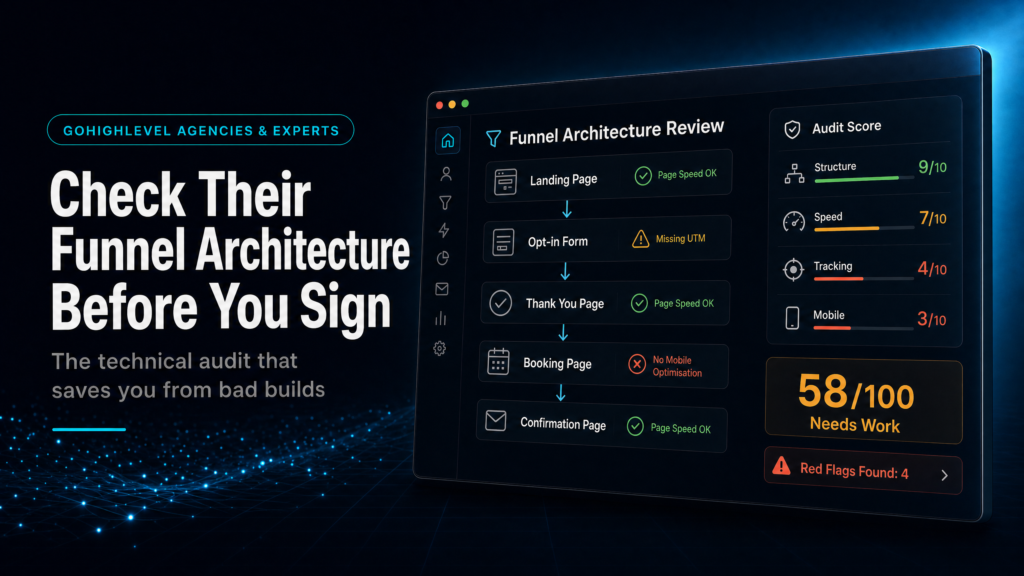
In this guide, we will cover:
How to review a GoHighLevel expert before you sign by checking the funnel map, evidence, sales-call answers and red flags that reveal weak architecture.
What Should The Funnel Map Show?
Check page states, form fields, route outcomes, booking logic, SLA follow-up, source tracking and ownership handoff.
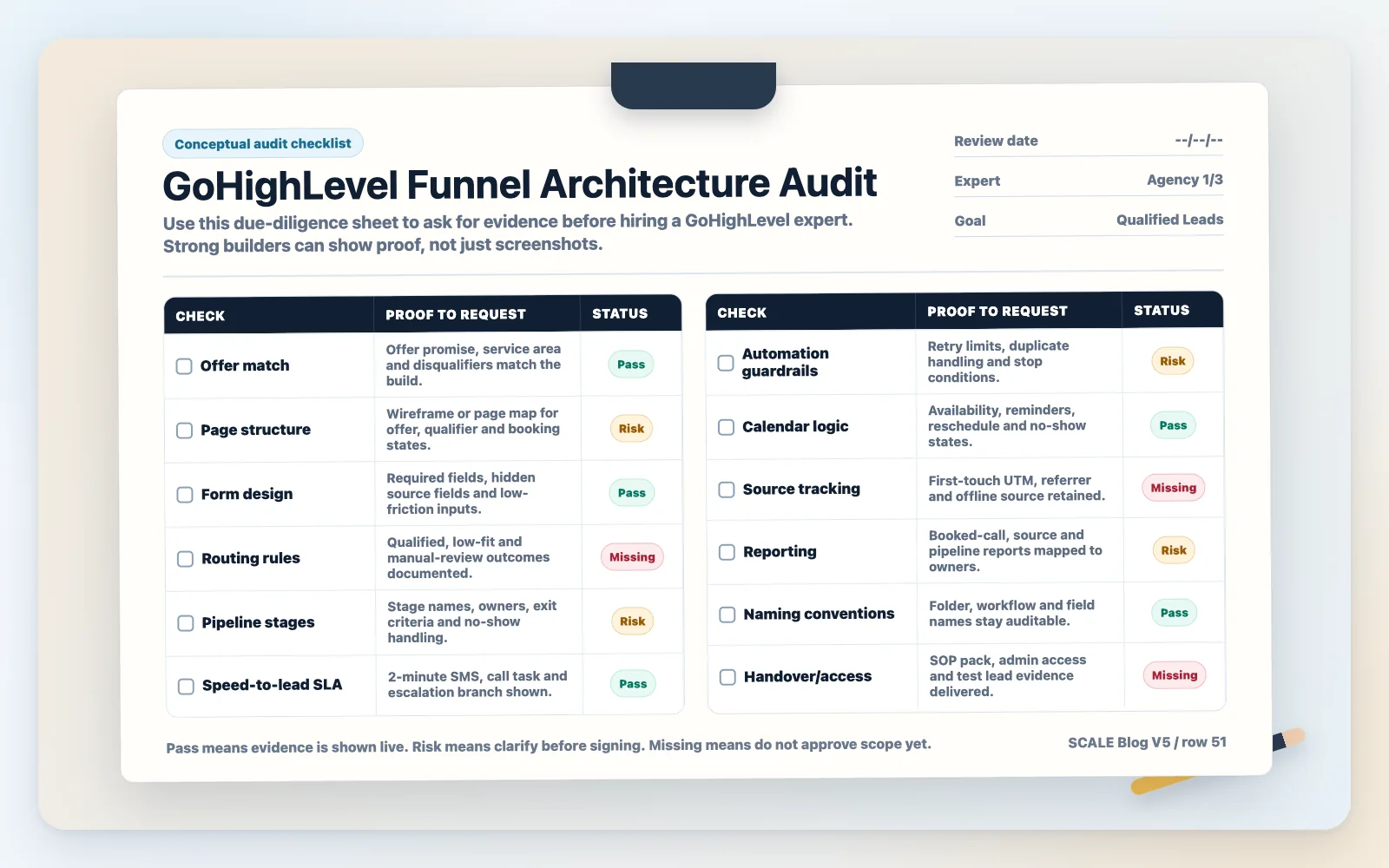
Which 12 Checks Matter?
Use the architecture checklist to ask for proof on offer fit, forms, pipeline stages, automation guardrails, reporting and handover.
What Should Strong Answers Sound Like?
Ask for a live walkthrough of test leads, routing branches, attribution and handover so the expert proves they understand the system.
Where Do Leaky Builds Hide?
Spot template-only scope, vague stages, slow follow-up, lost source data and missing handover before the build goes live.
Quick Answer
Before you hire GoHighLevel expert funnel check their funnel architecture: how traffic is routed, how leads are captured, how speed-to-lead is handled, how attribution is recorded, and how pipeline stages map to real sales actions. Ask for a live walkthrough of one funnel end-to-end, including automations, reporting, and handover.
TL;DR
- Don’t judge by “pretty pages”; judge by routing, follow-up logic, and reporting accuracy.
- Ask for a 20-minute live walkthrough: ad click → landing page → form → pipeline → automation → booked call → reporting.
- Red flag: “We use snapshots/templates for everyone” without explaining offer, lead source, and pipeline differences.
- Require a written funnel architecture map (stages, triggers, tags, UTM rules, notifications, SLAs).
- Insist on attribution basics: UTMs, source fields, and a reporting view that matches how you buy traffic.
- Make handover non-negotiable: documentation, naming conventions, and “break glass” admin access.
- If revenue depends on speed-to-lead, pay for a specialist build; cheap builds usually leak leads silently.
| Option | Best fit | Risk | Speed | Revenue visibility | When to choose it |
|---|---|---|---|---|---|
| DIY / internal build | Operators with time, technical confidence, and simple sales motion | Medium to high: missed edge cases, inconsistent tracking, fragile automations | Slow to medium | Low to medium unless you’re disciplined with UTMs and reporting | You have low ad spend, low lead volume, and can iterate weekly without revenue pressure |
| Cheap freelancer / template implementer | Basic landing pages and a single pipeline with minimal automation | High: “it works” but doesn’t scale; poor attribution; weak handover; hidden deliverable gaps | Fast | Low: often no source-of-truth fields or reporting alignment | You need a temporary stopgap and can tolerate rework in 30–60 days |
| Specialist GoHighLevel expert (SCALE-style growth systems build) | Businesses buying leads (Meta/Google), needing speed-to-lead, and clean pipeline visibility | Low to medium: higher upfront cost, but fewer revenue leaks and clearer ownership | Medium (fast once discovery is done) | High: structured fields, UTM rules, pipeline definitions, and reporting that matches your funnel | You want a durable system: lead quality, follow-up, attribution, and sales ops that can be managed |
Who this is for
- Local service businesses running Meta Ads and missing calls because follow-up is slow or inconsistent
- Agency owners building client sub-accounts and needing repeatable, auditable funnel architecture
- Coaches/consultants selling high-ticket offers where booked calls are the core conversion event
- Founders migrating from HubSpot, ActiveCampaign, ClickFunnels, or spreadsheets into GoHighLevel
- Operators who suspect “leads are coming in” but can’t see which source or which step is failing
- Teams with setters/closers who need clean pipeline stages, tasks, and handoff rules
- Businesses scaling ad spend and needing attribution that matches how money is actually spent
Start with the only question that matters: “Show me the funnel architecture”
If you’re about to hire GoHighLevel expert funnel check their architecture, not their portfolio screenshots. A screenshot proves they can design. However, architecture proves they can produce revenue outcomes: captured leads, fast follow-up, booked calls, and clean reporting.
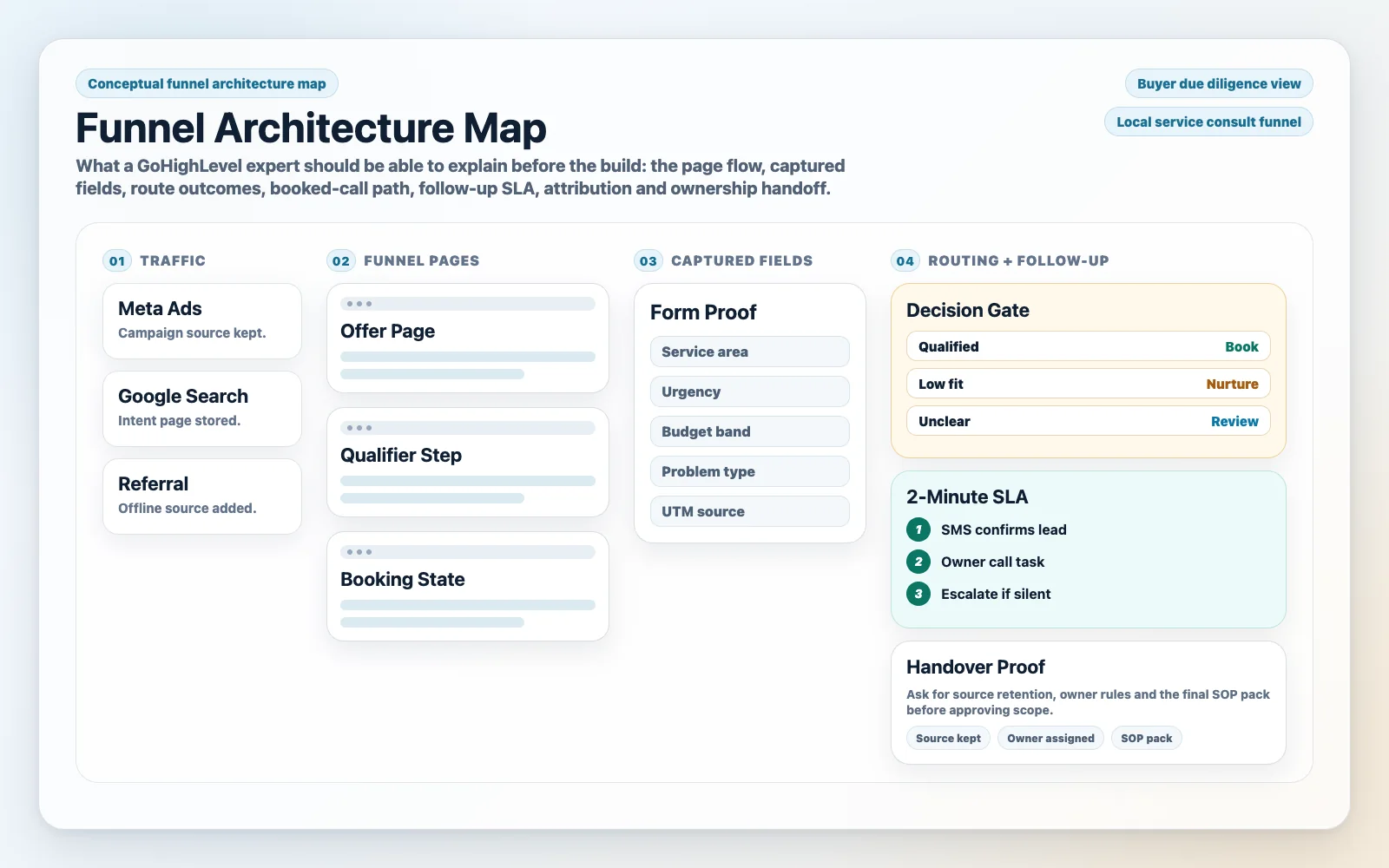
What “funnel architecture” means in GoHighLevel (in plain English)
Funnel architecture is the system design that connects:
- Traffic source (Meta/Google/organic/referrals)
- Landing page or funnel step
- Form or chat capture
- Contact record fields (source, campaign, intent)
- Pipeline stage and ownership (who follows up)
- Automations (SMS/email/calls/tasks)
- Calendar booking and reminders
- Reporting and attribution (what produced revenue)
Commercial reason this matters
Most funnel failures aren’t “bad ads” or “bad copy.” Instead, they’re operational leaks: leads not routed, no SLA, wrong stage definitions, duplicate contacts, broken UTMs, or automations that fire at the wrong time. As a result, those leaks don’t show up as errors; they show up as “we’re spending money and it feels inconsistent.”
How to diagnose in 10 minutes (live)
- Ask them to open a real sub-account and trace one lead from capture to close.
- Next, ask where UTMs are stored and how “source” is defined.
- Then test what happens if a lead submits twice, books then cancels, or replies “stop.”
- Finally, confirm what the sales team sees at each stage and what they’re expected to do next.
Weak vs strong setup (what it looks like)
Weak: “We have a funnel, a form, and a workflow.” No mention of routing, SLAs, attribution, or stage definitions. Reporting is “check the opportunities.”
Strong: “Here’s the stage map, here’s the trigger logic, here’s the UTM capture, here’s the speed-to-lead SLA, here’s the exception handling, and here’s the dashboard that matches your ad account structure.”
Hire GoHighLevel expert funnel check: the 12-point architecture checklist
Use this checklist as your non-negotiable due diligence. A real builder will answer quickly and specifically. In contrast, a template implementer will stay vague.
1) Offer-to-funnel alignment (message match)
What to check: Does the funnel reflect the actual offer and qualification criteria (price range, service area, eligibility, timeline)?
Why it matters commercially: If the funnel captures the wrong people, your follow-up cost rises and close rate drops. You’ll blame ads, but it’s offer-message mismatch.
How to diagnose: Ask: “What are the top 3 disqualifiers and where do we filter them: page copy, form fields, or post-submit automation?”
Weak: Generic “Name/Email/Phone” for every business.
Strong: Minimal friction but intentional qualification (e.g., service area, budget band, urgency) with routing rules.
2) Landing page structure that supports conversion and routing
What to check: Above-the-fold promise, proof, CTA placement, and how the page ties to the form and tracking.
Why it matters commercially: For example, a 10–20% swing in conversion rate changes your cost per lead immediately.
How to diagnose: Ask for their standard section order and why (hero, proof, process, FAQ, CTA, compliance).
Weak: Long page, multiple CTAs, no clear primary action, no tracking plan.
Strong: One primary conversion event, clear micro-commitments, and tracking tied to that event.
3) Form design: fields, validation, and intent signals
What to check: Which fields are required, how phone/email are validated, and how intent is captured (e.g., “what are you looking for?”).
Why it matters commercially: As a result, bad data creates bad follow-up. If phone numbers are wrong or names are junk, your team wastes time and your speed-to-lead advantage disappears.
How to diagnose: Ask: “What’s your approach to reducing fake leads without killing conversion rate?”
Weak: No validation, no hidden fields for UTMs, no consent language where needed.
Strong: Balanced friction, clean field mapping, and clear consent capture for SMS/email where applicable.
4) Lead routing rules (ownership, location, product line)
What to check: How leads are assigned: round-robin, by region, by service, by calendar selection, or by pipeline.
Why it matters commercially: Therefore, unowned leads are dead leads. Routing is the difference between “we got leads” and “we booked calls.”
How to diagnose: Ask: “If two reps are off today, what happens to new leads?”
Weak: Everything goes to one inbox or one user; no backup rules.
Strong: Deterministic routing with fallbacks and visibility (tasks + notifications + stage movement).
5) Pipeline architecture (stages that match actions, not vibes)
What to check: Stage names and definitions. Each stage should correspond to a real-world action and next step.
Why it matters commercially: If stages aren’t defined, reporting is fiction. Otherwise, forecasting becomes guesswork and follow-up becomes inconsistent.
How to diagnose: Ask: “What does a rep do in each stage, and what moves it forward?”
Weak: Stages like “New / Contacted / Won” with no SLA or tasks.
Strong: Stages like “New Lead (SLA 5 min) / Attempted / Connected / Qualified / Booked / Showed / Closed Won/Lost” with clear triggers.
6) Speed-to-lead system (SLA + escalation)
What to check: How fast the first touch happens and what happens if nobody responds.
Why it matters commercially: The first minutes after opt-in are where most booking momentum exists.
How to diagnose: Ask: “What’s the exact sequence in the first 10 minutes after a lead submits?”
Weak: One email confirmation and “we’ll call you soon.”
Strong: Immediate SMS + call attempt task + rep notification + fallback to manager + automated reschedule prompts.
7) Automation logic (triggers, guardrails, and exceptions)
What to check: Triggers, stop conditions, and exception handling (booked, replied, do-not-contact, duplicate).
Why it matters commercially: Over-automation burns leads (spammy) and under-automation loses leads (silent). Therefore, guardrails protect deliverability and brand trust.
How to diagnose: Ask: “What stops the nurture when someone books? What if they reply ‘stop’? What if they book twice?”
Weak: Workflows that keep firing after booking; no global DND logic.
Strong: Clear entry/exit rules, suppression lists, and human task creation where needed.
8) Calendar architecture (availability, qualification, and reminders)
What to check: Calendar type, buffers, round-robin, required questions, and reminder sequences.
Why it matters commercially: Calendars are where leads become revenue events. Consequently, bad calendar setup increases no-shows and wastes sales capacity.
How to diagnose: Ask: “How do you reduce no-shows: reminders, confirmations, reschedule links, and pre-call prep?”
Weak: One calendar link for everyone; no buffers; no reminders beyond a single email.
Strong: Role-based calendars, confirmation steps, multi-channel reminders, and pre-call qualification routing.
9) Lead source tracking (UTMs, referrers, offline sources)
What to check: Where UTMs are captured, how “source” is normalized, and how offline sources are handled (calls, referrals).
Why it matters commercially: If you can’t trust source data, you can’t scale spend confidently. Otherwise, you’ll cut winners and fund losers.
How to diagnose: Ask: “Show me the contact fields where UTMs live and how they populate from the form.”
Weak: Source is manually typed by reps; UTMs are missing or overwritten.
Strong: Hidden fields + UTM persistence rules + standardized source taxonomy.
10) Reporting that matches your buying decisions
What to check: Whether reporting answers: cost per lead, cost per booked call, show rate, close rate, and revenue by source.
Why it matters commercially: “Leads” are not the KPI. Instead, booked calls and closed revenue are the metrics that matter. Reporting must mirror your funnel stages and ad account structure.
How to diagnose: Ask: “What dashboard would you put in front of an owner weekly?”
Weak: Only a list of contacts and a pipeline board.
Strong: A weekly operating view: leads → contacted within SLA → booked → showed → closed, segmented by source/campaign.
11) Naming conventions and maintainability
What to check: How they name workflows, triggers, tags, custom fields, and pipelines.
Why it matters commercially: In short, maintainability is revenue protection. If your system becomes a “mystery box,” every change costs more and breaks more.
How to diagnose: Ask: “If we hire an internal ops person later, can they understand this in a day?”
Weak: “Workflow 12” and tags like “test1.”
Strong: Clear prefixes (e.g., LEADGEN_, APPT_, NURTURE_), documented purpose, and change logs.
12) Handover and access control
What to check: Admin access, documentation, and what happens if you stop working together.
Why it matters commercially: You’re buying an asset. If you can’t operate it without them, you’re renting your own revenue system.
How to diagnose: Ask: “What documentation do we get? What’s the handover checklist?”
Weak: No documentation; everything built under their master account; unclear ownership.
Strong: You own the account, you have admin, and you receive a system map + SOPs.
What to ask in the sales call (and what answers should sound like)
If you want to hire GoHighLevel expert funnel check their answers to these questions. You’re listening for specificity, not confidence.
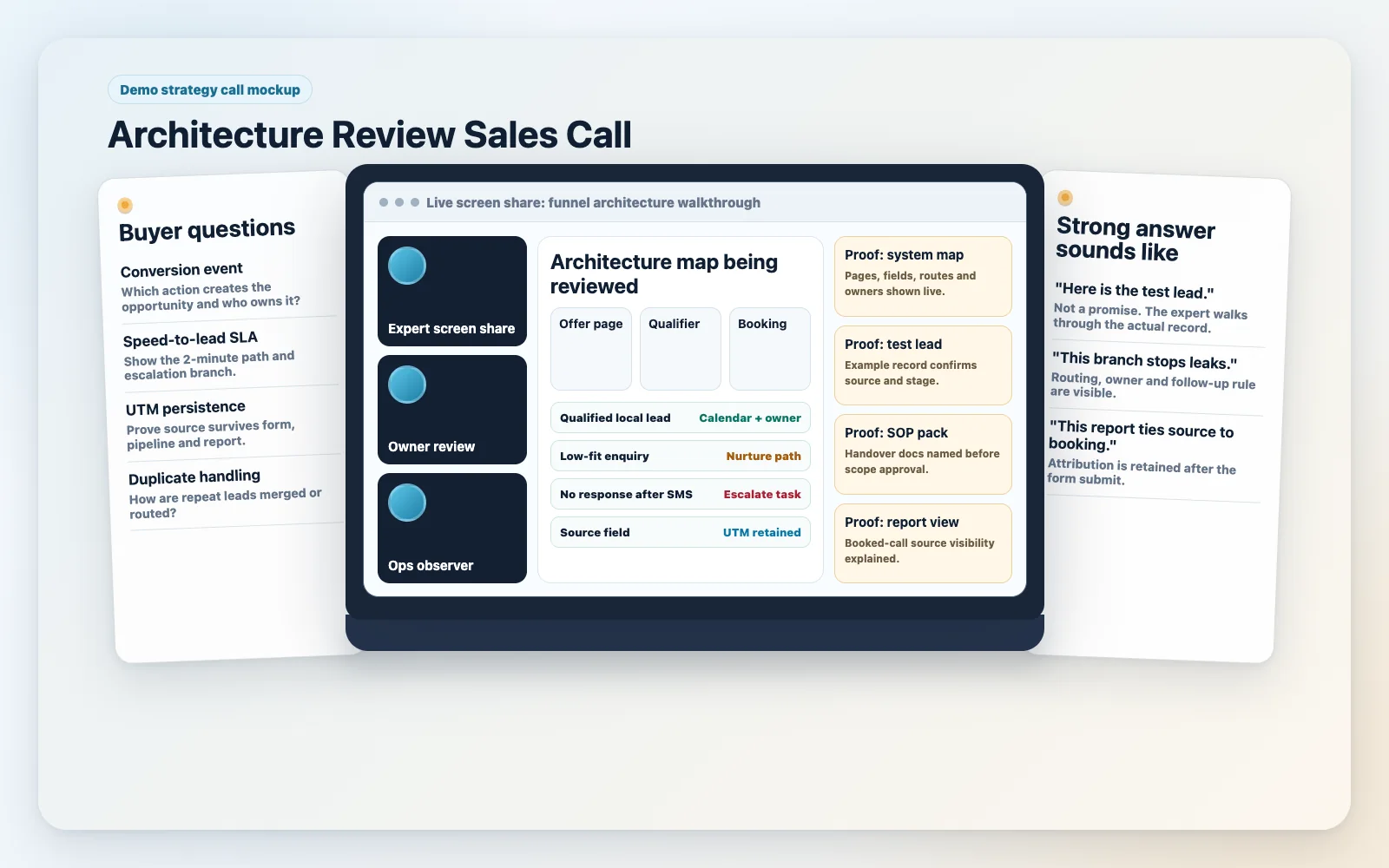
Question set A: architecture and outcomes
- “What is the primary conversion event?” Strong answer: “Booked call” or “Qualified lead” with a defined threshold, not “lead.”
- “What’s the speed-to-lead SLA and how is it enforced?” Strong answer: tasks + notifications + escalation + reporting.
- Ask how the expert prevents automations from spamming booked leads. Look for stop conditions and suppression logic.
- Confirm how duplicate records are handled. The response should cover merge rules, field precedence, and workflow entry conditions.
- Check how pipeline stages are defined. Strong operators tie each stage definition to actions and next steps.
Attribution And Reporting Questions
- “Where do UTMs live and how do they persist?” Strong answer: hidden fields + custom fields + rules to avoid overwriting first-touch.
- “What weekly dashboard do you recommend?” Strong answer: lead-to-revenue funnel with segmentation by source/campaign.
- “How do you reconcile ad platform data vs CRM outcomes?” Strong answer: align naming, track conversion events, and use consistent source taxonomy.
Question set C: build quality and ownership
- “What does your handover include?” Strong answer: documentation, loom walkthrough, naming conventions, and admin access.
- “How do you test before launch?” Strong answer: test leads, stage movement, notifications, booking flow, and reporting validation.
- “What do you do in week 2 after launch?” Strong answer: monitor SLA, booking rate, deliverability, and fix edge cases.
Red flags that predict a leaky funnel (even if it looks good)
These are patterns that repeatedly create revenue leaks in GoHighLevel builds.
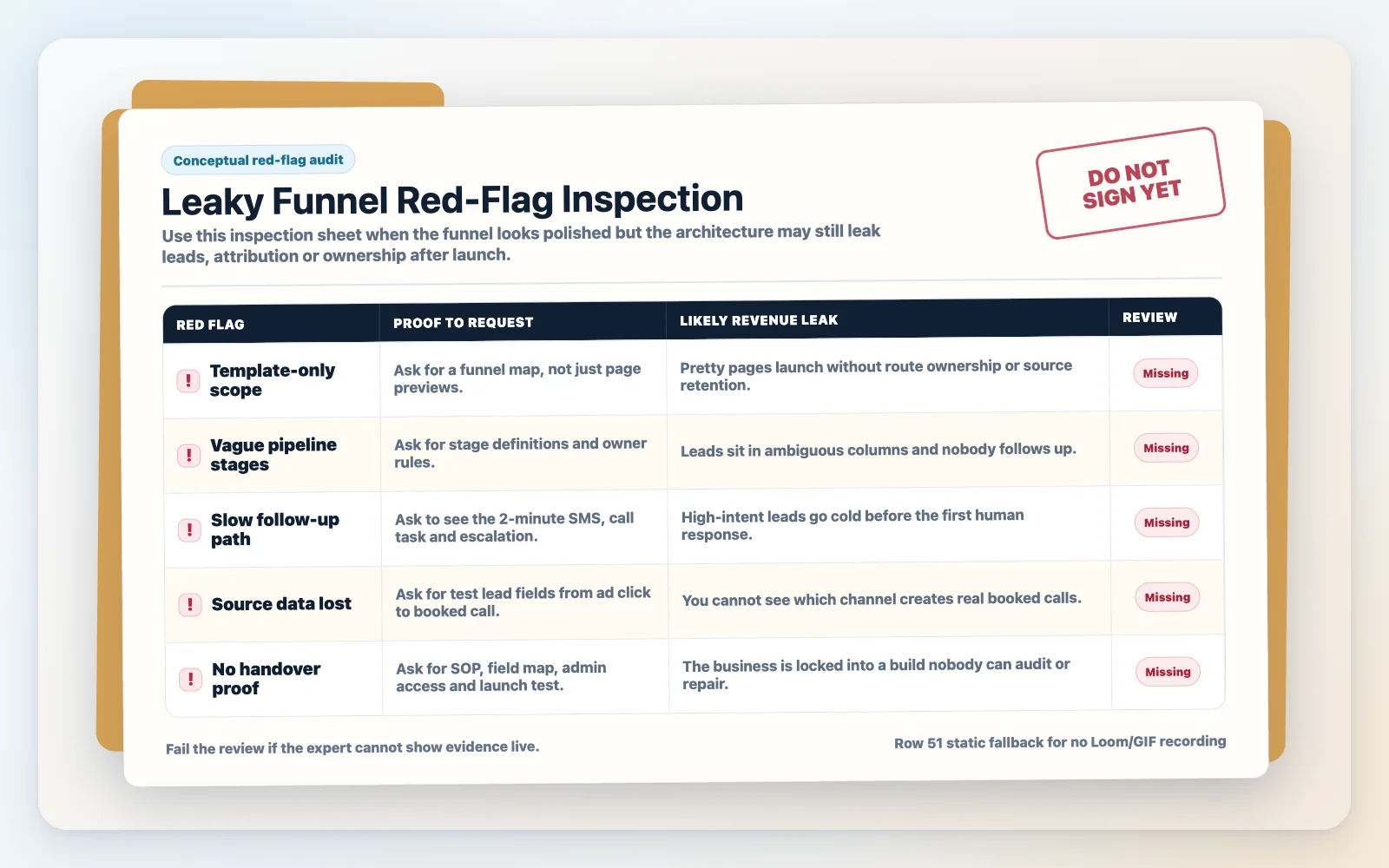
Red flag 1: “We’ll just install a snapshot” as the strategy
Snapshots can accelerate setup, but they’re not a strategy. If they can’t explain what they will remove, modify, and document, you’ll inherit a bloated system with conflicting workflows.
Red flag 2: No written stage definitions
If “Contacted” means five different things to five reps, your pipeline is not a pipeline; it’s a mood board. You need stage definitions and SLAs.
Red flag 3: Attribution is an afterthought
If they say “GoHighLevel tracking is fine” but can’t show UTM capture and reporting alignment, you’ll lose the ability to scale spend rationally.
Red flag 4: Automations that replace sales process
Automation should support humans, not pretend humans don’t exist. If the build has no tasks, no ownership, and no escalation, it’s not operational.
Red flag 5: No test plan
If they don’t have a launch checklist (test lead, test booking, test reminders, test replies, test DND, test reporting), you are the QA department.
The implementation process
- Discovery and funnel map (owner + sales input): Define the offer, qualification rules, target geography, and the primary conversion event (e.g., booked call). Then document the funnel steps and the “definition of qualified.”
- CRM data model: Create/confirm custom fields (UTMs, lead source, service line, location, budget band), tags (intent/status), and naming conventions. Next, decide first-touch vs last-touch rules.
- Pipeline architecture: Build pipeline stages with written definitions, required actions, and SLAs. Then assign ownership rules (round-robin, by region, by service) and escalation paths.
- Landing page and form build: Build the landing page with one primary CTA. Create the form with validation, consent language where applicable, and hidden UTM fields. Map fields to the CRM correctly.
- Calendar setup: Configure calendars (buffers, availability, round-robin), required booking questions, confirmation page, and reschedule/cancel flows. Afterward, add reminders (SMS/email) and pre-call instructions.
- Automation and lead follow-up logic: Build workflows for: new lead speed-to-lead, no-response sequences, booked appointment reminders, no-show recovery, and long-term nurture. In addition, add stop conditions (booked, replied, DND) and exception handling (duplicate, invalid phone).
Attribution, QA, And Handover
- Lead source tracking and attribution: Implement UTM persistence, standardized source taxonomy, and reporting views that match your ad account structure (campaign/ad set where possible). Then validate that source fields populate reliably.
- Notifications and tasks: Configure rep notifications (app/email/SMS), task creation, and manager alerts for SLA breaches. As a result, ensure every new lead becomes “owned” within minutes.
- Testing and QA: Run test leads from each traffic source. Verify: form submission, contact creation, pipeline stage, assignment, notifications, workflow timing, booking, reminders, replies, and reporting accuracy.
- Launch and monitoring: Launch with daily checks for the first week: speed-to-lead, booking rate, deliverability, and pipeline hygiene. Then fix edge cases quickly.
- Reporting and operating rhythm: Set a weekly review: leads by source, SLA compliance, booked calls, show rate, close rate, and revenue by source. Decide what gets changed based on the numbers.
- Handover and documentation: Deliver a system map (pipelines, workflows, fields), a change log, and a “how to operate” SOP for your team. Confirm admin access and ownership.
Common problems and how to fix them
| Problem | What it usually means | Commercial risk | Fix | Metric to watch |
|---|---|---|---|---|
| Leads submit but nobody follows up | No routing/ownership; notifications not configured; no tasks | Wasted ad spend; lost bookings | Assignment rules + task creation + escalation workflow | Speed-to-lead (median minutes), % leads contacted within SLA |
| Pipeline is “full” but revenue is flat | Stages aren’t defined; reps park leads; no next actions | False forecasting; low close rate | Rewrite stage definitions; enforce tasks per stage; add aging rules | Stage aging, close rate by stage, time-to-close |
| Booked calls are low despite high lead volume | Weak qualification; poor calendar flow; no immediate booking push | High CPL with low ROI | Improve page CTA, add post-submit booking step, speed-to-lead sequence | Lead-to-booked rate, booking within 10 minutes |
| No-shows are high | Reminders weak; no confirmation; poor pre-call prep | Wasted sales capacity; lower revenue per lead | Multi-channel reminders + confirmation + reschedule links + pre-call instructions | Show rate, reschedule rate |
| Attribution is unreliable (“source unknown”) | UTMs not captured/persisted; manual source entry; overwritten fields | Bad budget decisions; scaling losers | Hidden UTM fields + standardized taxonomy + field precedence rules | % leads with source populated, revenue by source consistency |
| Automation keeps messaging after booking | No stop conditions; missing appointment triggers | Brand damage; opt-outs; deliverability issues | Add suppression logic: booked/replied/DND; test all branches | Opt-out rate, reply rate, complaint rate |
| System breaks when you change one thing | No naming conventions; tangled workflows; no documentation | High maintenance cost; slow iteration | Refactor workflows, document, modularize triggers | Time-to-change, number of incidents per change |
What this means for revenue
Funnel architecture is not “ops hygiene.” Instead, it’s revenue mechanics. When you hire the wrong builder, the cost isn’t the invoice; it’s the compounding waste across ads, sales time, and missed follow-up.
Lead quality: filtering and intent signals
For example, if your funnel captures everyone, your sales team becomes the filter. That increases time per sale and reduces close rate. Strong architecture uses light qualification (without killing conversion rate) and routes leads based on intent so the right rep handles the right lead.
Booked calls: conversion event design
Similarly, many funnels stop at “thank you.” Strong builds treat the thank-you step as a conversion accelerator: immediate booking prompt, calendar selection, and a fast follow-up sequence if they don’t book. This is where you turn “lead volume” into “sales opportunities.”
Speed-to-lead: the hidden multiplier
For example, speed-to-lead affects how many leads you actually speak to. If your system doesn’t enforce an SLA with tasks, notifications, and escalation, you’ll lose the highest-intent window and end up nurturing leads that should have been booked immediately.
Pipeline visibility: forecasting and sales management
For example, a pipeline is only useful if stages mean something. When stages are defined and enforced, you can see bottlenecks (e.g., lots of “Connected” but few “Qualified”) and coach the team. Without that, you’re managing by anecdotes.
Attribution: scaling winners and cutting losers
However, attribution doesn’t need to be perfect to be useful, but it must be consistent. If UTMs and source fields are missing or overwritten, you can’t answer basic questions like “Which campaign produces booked calls that show up?” As a result, missing source data leads to wasted ad spend and slow growth.
Operational cost: maintenance and iteration speed
Likewise, a maintainable system reduces your cost to change. When workflows are modular and documented, you can test new offers, new follow-up sequences, or new pipelines without breaking everything. That agility is a competitive advantage.
What most businesses get wrong
- They build pages before they define stages: The funnel looks good, but the sales team doesn’t know what to do next.
- In addition, they confuse “automation” with “follow-up”: Messages go out, but nobody owns the lead, and no one is accountable to an SLA.
- Moreover, they skip source-of-truth fields: UTMs aren’t captured properly, so reporting becomes a debate.
- They don’t design for exceptions: duplicates, reschedules, no-shows, replies, and DND events break the system quietly.
- Finally, they don’t document: The system becomes expensive to change, so it stagnates.
What SCALE would look for or fix in a funnel architecture review
- Stage definitions + SLAs: Every stage has a meaning, an owner, and a next action.
- Speed-to-lead enforcement: Tasks, notifications, escalation, and reporting on compliance.
- Attribution hygiene: UTM capture, persistence rules, and a source taxonomy that matches your ad buying.
- Workflow guardrails: Stop conditions, suppression logic, and exception handling to prevent spam and missed leads.
- Reporting that drives decisions: A weekly view that ties leads to booked calls, show rate, close rate, and revenue by source.
How to run a “funnel architecture interview” (copy/paste agenda)
Finally, use this agenda to keep the call practical and to prevent getting sold on features.
- Context (2 minutes): Offer, target customer, traffic sources, and primary conversion event.
- Live walkthrough (10 minutes): Ad click → landing page → form → contact fields → pipeline stage → assignment → automation → calendar → reporting.
- Edge cases (5 minutes): Duplicate lead, booked then canceled, replied “stop,” invalid phone, after-hours lead.
- Reporting (3 minutes): Show the weekly dashboard and how it ties to ad spend decisions.
- Handover (3 minutes): Documentation, admin access, and how changes are managed post-launch.
Pricing and scope: what you should pay for (and what not to)
Although cost varies widely, scope clarity matters more than the number. When you hire GoHighLevel expert funnel check whether the quote includes architecture work or just “implementation.”
Pay for outcomes and ownership, not just assets
- Worth paying for: architecture map, stage definitions, routing rules, SLA enforcement, attribution setup, QA/testing, documentation, and a post-launch monitoring window.
- Be cautious paying extra for: endless “custom workflows” without a measurement plan, or complex nurture sequences before speed-to-lead is solved.
- Don’t overpay for: page design polish if the routing and reporting are weak.
Minimum deliverables to require in writing
- One documented funnel architecture map (stages, triggers, routing, stop conditions)
- One pipeline with written stage definitions and SLAs
- UTM/source capture implemented and validated
- Speed-to-lead workflow with escalation
- Calendar + reminders + no-show recovery
- QA checklist completed with test leads
- Handover documentation + admin access
Conclusion
A strong GoHighLevel expert should prove the full path from source and form fields to routing, SLA, pipeline ownership, booked calls, and attribution. Therefore, hire for architecture, testing, and handover rather than page polish alone; if the expert cannot show the map, exceptions, reporting, and owner actions in a live walkthrough, the build is not ready to support paid growth.
FAQs
How do I hire a GoHighLevel expert without getting a “template build” that doesn’t work?
Require a live end-to-end walkthrough of one funnel: capture → routing → pipeline → automation → calendar → reporting. Then ask for the written architecture map and stage definitions. Template builds fall apart when you ask about UTMs, SLAs, stop conditions, and exception handling.
What should a GoHighLevel funnel architecture document include?
At minimum: funnel steps, primary conversion event, form fields and mappings, custom fields/tags, routing rules, pipeline stages with definitions, workflow triggers and stop conditions, notification rules, calendar logic, UTM/source capture rules, and the weekly reporting view.
What’s the biggest red flag when reviewing GoHighLevel automations?
Missing guardrails. If workflows don’t stop when someone books, replies, or is marked DND, you’ll spam leads and damage deliverability. Also watch for workflows that do everything via messages but create no tasks or ownership for humans.
How can I tell if attribution is set up correctly in GoHighLevel?
Submit a test lead with UTMs and confirm those values land in the contact record consistently. Then confirm the reporting view can segment leads/opportunities by source/campaign in a way that matches your ad account naming. If “source” is manually entered by reps, it’s not reliable.
Do I need multiple pipelines or just one?
One pipeline is fine if you have one sales motion and one offer. You likely need multiple pipelines if you have different offers, different sales teams, or different conversion events (e.g., “estimate booked” vs “application submitted”). The key is that each pipeline’s stages must map to real actions and reporting.
What’s a reasonable speed-to-lead setup for local services vs high-ticket?
Local services usually need immediate contact attempts (SMS + call task + notifications) because leads shop fast. High-ticket often needs immediate confirmation plus a structured booking push and pre-call qualification. In both cases, enforce an SLA and escalate when it’s missed.
If I already have GoHighLevel, what should an expert audit first?
Start with: lead capture integrity (forms/fields), routing and ownership, pipeline stage definitions, speed-to-lead workflow, stop conditions, calendar/reminders, and source tracking. Only after those are stable should you expand nurture sequences and advanced reporting.
If you’re about to hire GoHighLevel expert funnel check the architecture before you sign: CRM fields, pipeline stages, routing, automation guardrails, lead follow-up SLAs, and attribution that matches how you buy traffic. A real gohighlevel expert will show you how funnels become booked calls and revenue visibility, and SCALE will pressure-test the system so GoHighLevel becomes an owned growth asset, not a fragile set of pages and workflows.
