
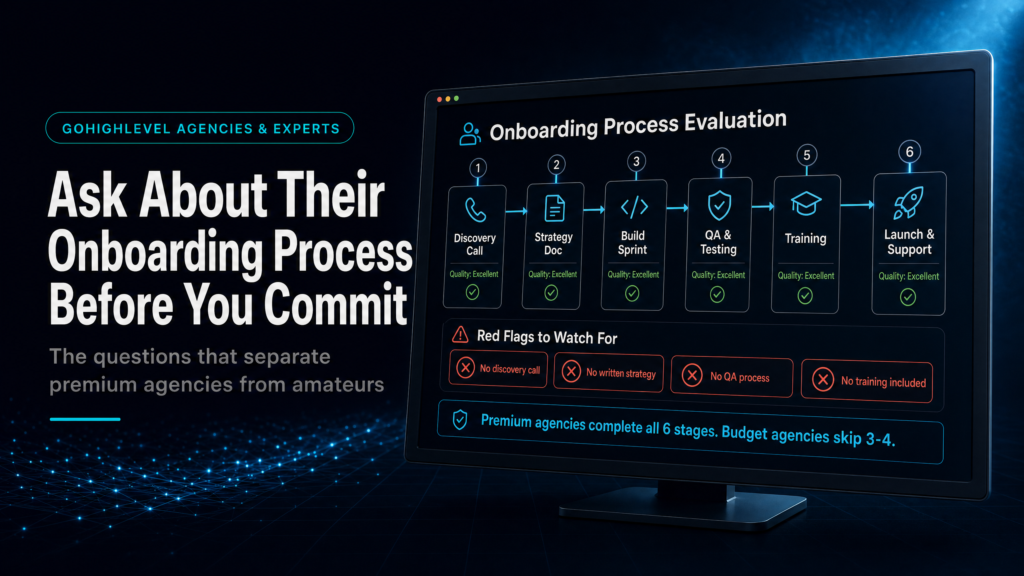
In This Guide, We Will Cover:
A practical buying guide for checking whether a GoHighLevel onboarding setup is a real revenue-system handover or just a tidy account build.
What The Agency Must Define First
Lead sources, pipeline stages, calendars, owner rules and acceptance criteria before anyone starts building.
How CRM, Funnels And Follow-Up Connect
The setup should connect forms, routes, assignments, SLA timers, automations and booking logic into one operating path.
What Good QA Looks Like Before Launch
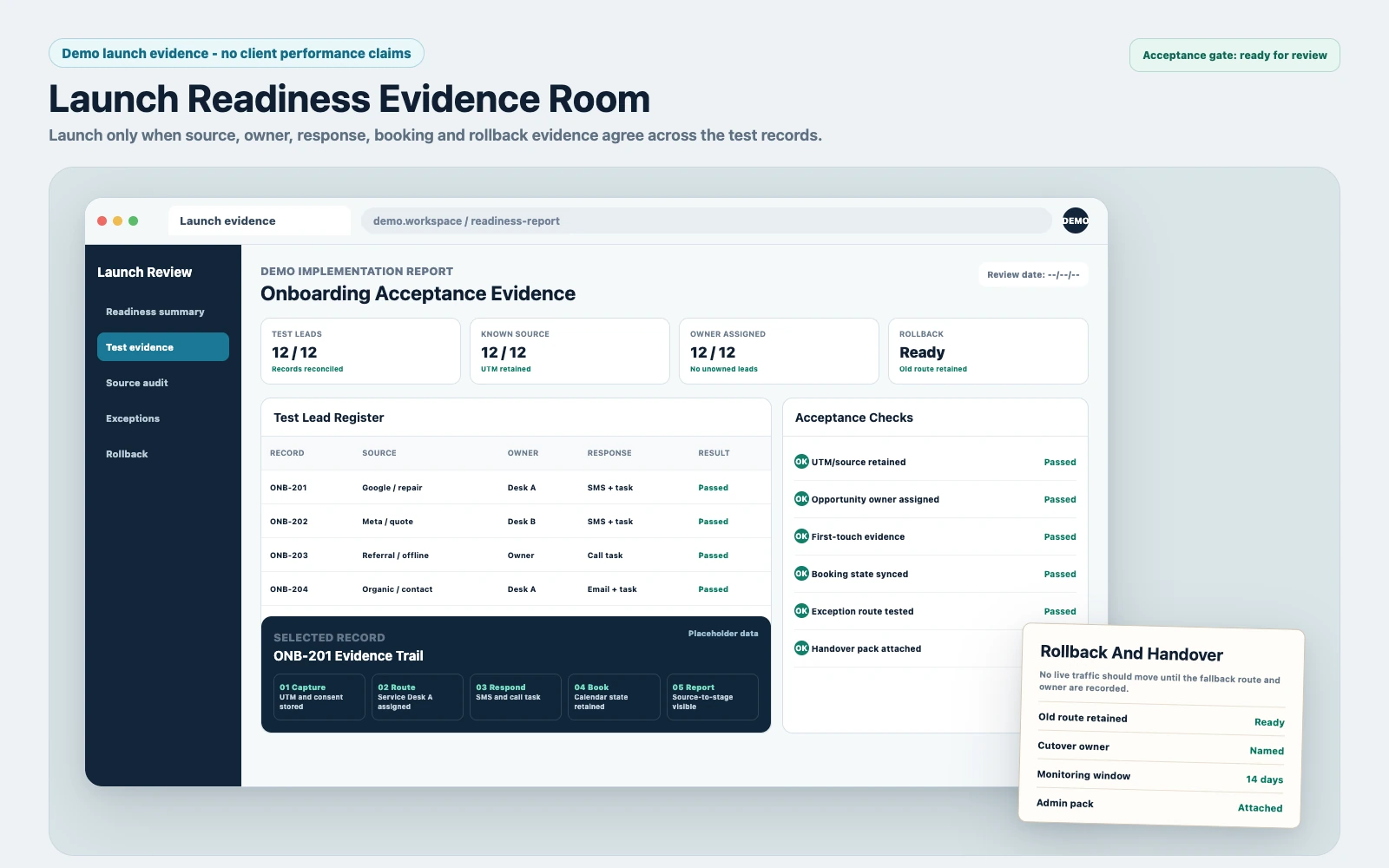
Test leads, retained source data, assigned owners, notifications, calendar events and reporting all need visible evidence.
Which Setup Route Fits Your Risk
Use the buying filter below to choose between internal setup, a cheap template build or a specialist systems implementation.
Quick Answer
A good gohighlevel onboarding setup is not “import contacts and turn on automations.” It’s a documented process that maps your lead sources, pipeline stages, calendars, forms, routing, speed-to-lead, and attribution—then proves it works with test leads and reporting. Before you commit, ask for their build plan, QA checklist, and handover assets in writing.
TL;DR
- If the agency can’t show a written onboarding plan (phases, deliverables, timelines), expect scope creep and missed revenue leaks.
- If they don’t ask about lead sources, UTMs, and “what counts as a conversion,” your reporting will be wrong from day one.
- If they can’t explain pipeline stage definitions and ownership rules, your team will stop trusting the CRM.
- If they “build automations” without SLA timers, missed-call text-back, and exception handling, follow-up will fail silently.
- If QA is “we tested it,” but there’s no test script with screenshots and sample leads, you’re the QA team.
- If handover is a Loom video only (no SOPs, diagrams, change log), you’ll be locked in and afraid to edit anything.
Which GoHighLevel Onboarding Setup Fits Your Business?
Use this as a buying filter. The right route depends less on who can click around GoHighLevel and more on who can own the process, risk and reporting after launch.
DIY / Internal Build
This can work when the business is simple, the team has a technical owner, and the funnel does not yet depend on paid traffic volume. The trade-off is speed and risk: every edge case, reporting gap and follow-up failure becomes your team’s problem to find and fix.
- Best fit: operators with time, strong process thinking and low complexity.
- Main risk: missed edge cases, inconsistent data and broken attribution.
- Choose it when: you have a simple funnel, low lead volume and enough time to iterate before scaling spend.
Cheap Freelancer / Template Implementer
This is the fastest route to something that looks finished. It is also the easiest route to a system that fails under real sales pressure because templates rarely solve source retention, owner accountability, SLA escalation and reporting discipline.
- Best fit: very small teams that only need basic CRM setup and reminders.
- Main risk: the account can look tidy while tracking, QA and reporting stay shallow.
- Choose it when: you are comfortable rebuilding later and are not spending meaningful ad budget yet.
Specialist GoHighLevel Expert / Systems Build
This is the route for businesses where missed leads, slow response, poor attribution or weak handover already costs money. A specialist build should be slower than a template install at the start because it forces the right decisions before launch.
- Best fit: businesses running ads, multiple lead sources, sales teams or high-ticket consultative sales.
- Main risk: lower when the build is process-led, documented and QA’d before traffic is switched on.
- Choose it when: you want speed-to-lead, predictable follow-up and decision-grade reporting.
The simplest way to choose is this: if a broken setup would only waste your time, a lighter build may be enough. If a broken setup would waste ad spend, lose booked calls or hide revenue attribution, treat onboarding as systems architecture, not admin help.
Who This Helps
- Local service businesses running Meta Ads or Google Ads and missing leads due to slow follow-up.
- Agency owners moving clients into GoHighLevel and needing a repeatable onboarding standard.
- Coaches/consultants with booked-call funnels who need clean calendar routing and show-up workflows.
- High-ticket service providers who need pipeline accuracy for forecasting and sales management.
- Operators replacing HubSpot, Pipedrive, or a patchwork of tools and worried about migration risk.
- Teams that already “have GHL” but don’t trust the numbers or the automations.
What GoHighLevel Onboarding Should Actually Include
Most agencies sell GoHighLevel onboarding setup as a checklist: create sub-account, connect email, import contacts, build a pipeline, add a calendar, turn on a few automations.
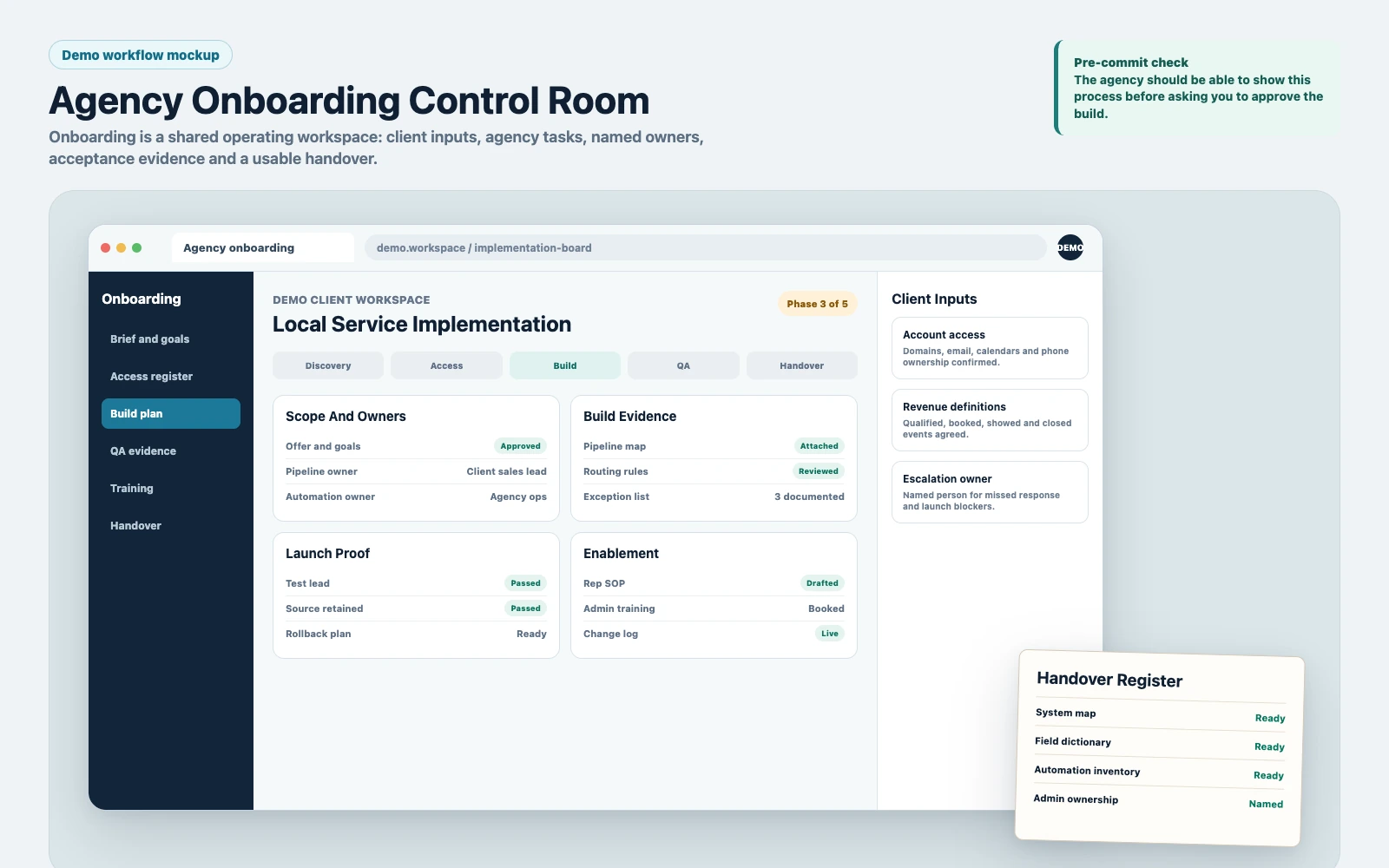
That’s not onboarding. That’s installing software.
Real onboarding is aligning your revenue process to GoHighLevel so leads move from source to booked to closed with:
- Consistent data (fields, tags, custom values, source tracking)
- Clear ownership (who follows up, when, and what happens if they don’t)
- Reliable routing (forms, calendars, round robin, territories, service lines)
- Measurable outcomes (booked calls, show rate, close rate, cost per booked call)
If an agency can’t explain onboarding in those terms, you’re buying a UI, not a system.
The Non-Negotiable Questions To Ask Any Agency About GoHighLevel Onboarding Setup
1) “What Are Your Phases, Deliverables, And Acceptance Criteria?”
You want a process with gates. Not “we’ll set it up and you can request changes.” Ask for:
- Phase breakdown (discovery, build, QA, launch, stabilization)
- Deliverables per phase (pipeline map, automation list, tracking plan, reporting dashboard)
- Acceptance criteria (what must be true for sign-off)
HighLevel’s official Agency Launchpad overview reinforces the value of a phased onboarding path. Use it as a platform reference, then require the agency to document the deliverables, owner and acceptance gate for your account.
Weak answer: “We usually knock it out in a week, depends.”
Strong answer: “We don’t launch until test leads flow from each source into the correct pipeline stage, assigned owner, correct calendar, and reporting shows source and conversion events.”
2) “How Do You Define And Build The Pipeline Stages?”
Pipelines fail when stages are vague. “New Lead” and “Contacted” are not operational definitions.
Ask how they decide:
- Stage names and definitions (what event moves a deal)
- Entry rules (what creates an opportunity and when)
- Exit rules (what closes it, what disqualifies it)
- Ownership rules (who is responsible at each stage)
Commercial reason: if stages aren’t defined, your team will “work the CRM” differently, and your close rate and forecast become fiction.
3) “What’s Your Speed-To-Lead Design?”
Speed-to-lead is where onboarding either makes you money or quietly burns it.
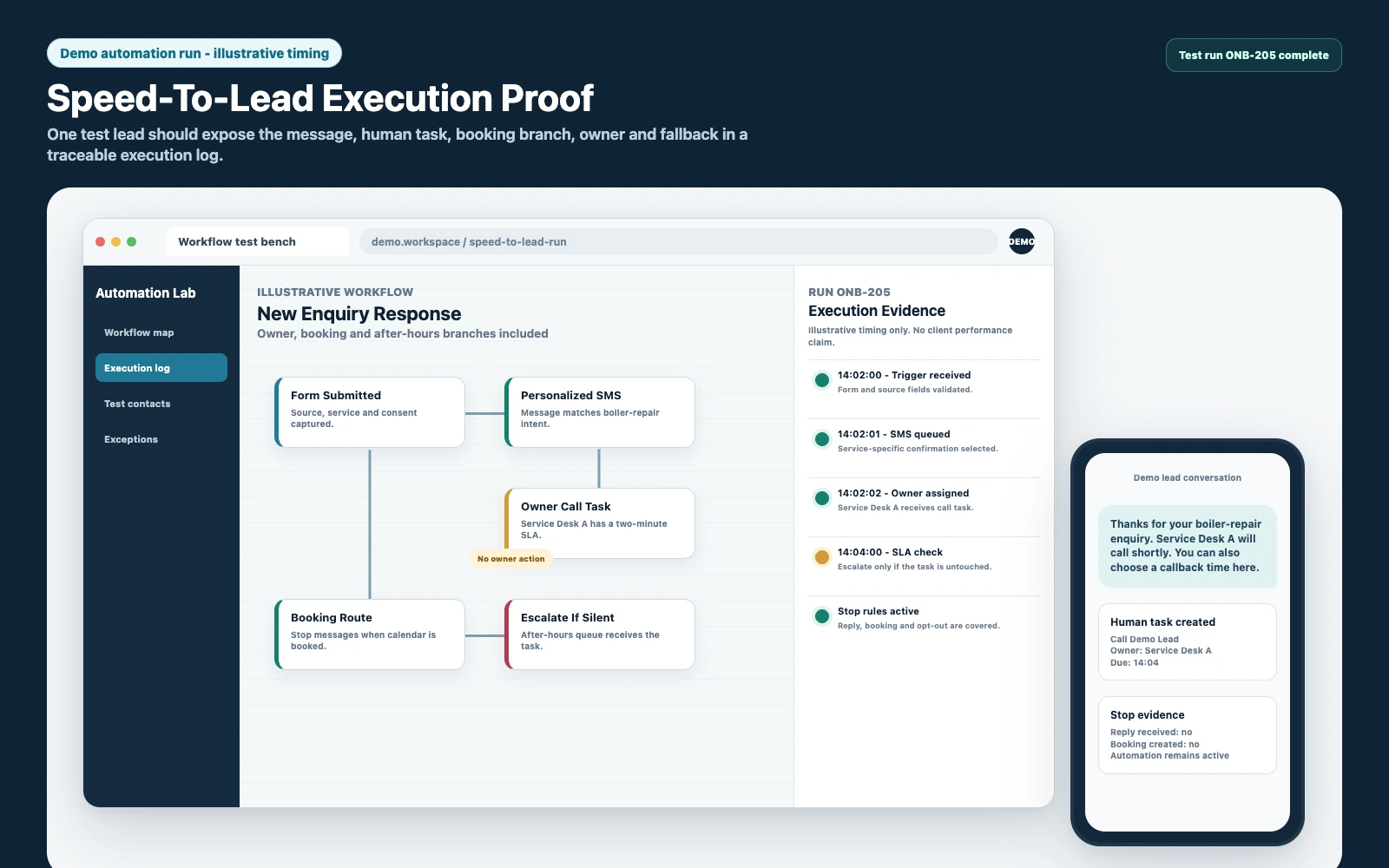
Ask for their standard:
- Immediate SMS/email confirmation to the lead
- Missed-call text-back (if calls are part of your flow)
- Rep notification logic (push + email + task creation)
- SLA timers (e.g., if no reply in X minutes, escalate)
- After-hours logic (different messaging and next-day tasks)
Weak setup looks like: one generic “thanks, we’ll reach out” email and a single task.
Strong setup looks like: multi-step follow-up with escalation and exception handling when the rep doesn’t act.
4) “How Will You Handle Lead Source Tracking And Attribution?”
If they don’t ask about UTMs, offline conversions, and what you consider a “lead,” your reporting will be wrong.
Ask specifically:
- How they capture UTMs (utm_source, utm_campaign, utm_content, utm_term)
- Where the source is stored (custom fields vs tags vs opportunity source)
- How they handle multiple touchpoints (first touch vs last touch)
- How they prevent “Unknown” sources (default values, hidden fields, form logic)
Commercial reason: if you can’t trust source data, you can’t scale Meta Ads, you can’t cut losers, and you can’t defend budget decisions.
5) “What’s Included In QA, And Can I See The Test Script?”
QA is not optional. GoHighLevel is flexible, which means it’s easy to build something that works in your head and fails in production.
Ask for a QA checklist that includes:
- Test leads from every source (forms, calendars, inbound calls, chat, ads)
- Correct pipeline creation and stage movement
- Correct assignment and notifications
- Correct follow-up timing (including after-hours)
- Correct opt-out compliance behavior
- Correct reporting (source, conversion events, appointment status)
Weak answer: “We’ll test it.”
Strong answer: “Here’s the test script we run and the acceptance criteria you sign off on.”
6) “What Does Handover Look Like So My Team Can Operate This Without You?”
If the agency’s handover is a single Loom video, you’re buying dependency.
Ask for:
- A system map (pipelines, calendars, forms, automations, integrations)
- An automation inventory (trigger, conditions, actions, owner, purpose)
- Field dictionary (what each custom field means and where it’s used)
- Change log (what was built, what was deferred, what’s risky to edit)
- Basic SOPs for reps (how to work leads, how to update stages)
A useful way to test whether the agency understands account ownership is to compare its handover answer with HighLevel’s own Agency Company Settings walkthrough. The branding, domain, security and experience controls shown here should be named in scope, assigned an owner and documented before handover.
Then compare those account-level controls with the full implementation process below.
What A Strong Agency Onboarding Call Should Sound Like
Before anyone touches your sub-account, a competent GoHighLevel expert will force clarity on a few uncomfortable points. That’s a good sign.
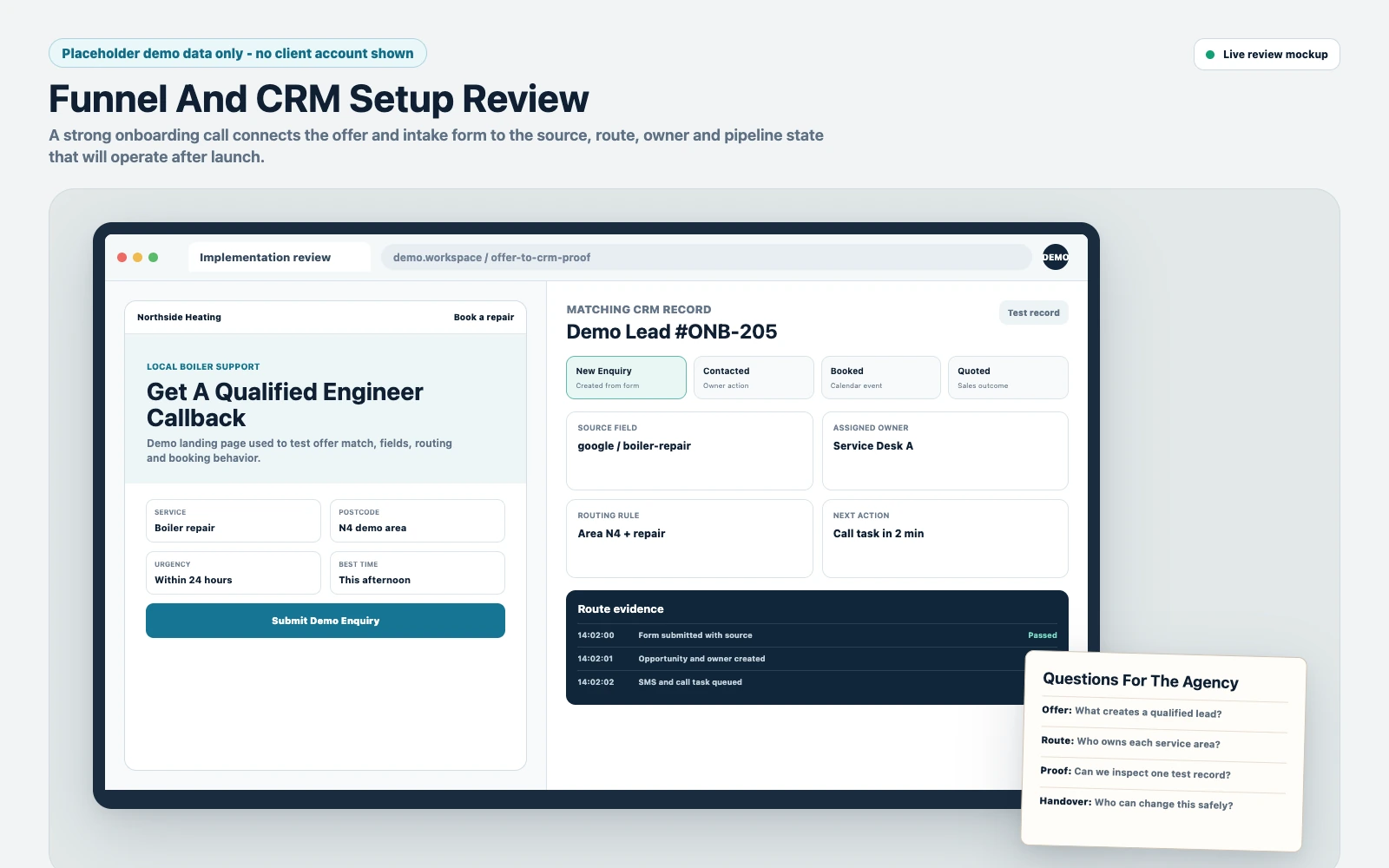
They Will Map Your Revenue Path, Not Your Features
Expect questions like:
- “What are your lead sources today, and which ones do you want to scale?”
- “What is the first human touchpoint: call, SMS, email, or booked calendar?”
- “What is the definition of a qualified lead for your sales team?”
- “What are the top 3 reasons leads don’t book or don’t show?”
They Will Force Operational Decisions You’ve Been Avoiding
Examples:
- Do you want opportunities created on form submit, on call answered, or on appointment booked?
- Do you want round robin assignment, territory-based routing, or service-line routing?
- What happens when a rep doesn’t respond within 5 minutes?
- What happens after-hours and on weekends?
If an agency avoids these decisions and “just builds,” you’ll pay later in rebuilds and missed leads.
The GoHighLevel Onboarding Setup Checklist You Should Use On The Sales Call
Use this as a diagnostic checklist. You’re not trying to be difficult; you’re trying to avoid paying for a system that can’t be operated.
CRM Data Model
- What custom fields are required for routing, qualification, and reporting?
- What’s the naming convention for fields, tags, and workflows?
- How will duplicates be handled (import rules, merge rules, phone/email priority)?
- What is the “source of truth” for lead source?
Pipelines And Stages
- How many pipelines do we need (by offer, location, service line)?
- What triggers stage movement (manual, automation, appointment status)?
- What are the required fields per stage (to prevent garbage data)?
Calendars And Booking Logic
- Do we need multiple calendars (sales vs fulfillment, different reps, different offers)?
- What are the booking states that matter (booked, confirmed, rescheduled, no-show)?
- What’s the confirmation and reminder sequence (SMS/email timing)?
- How do we handle reschedules and cancellations?
Forms, Surveys, And Routing
- Which forms exist (lead form, application, quote request, contact us)?
- What fields are required vs optional (and why)?
- How do we route leads based on answers (service type, budget, location)?
Automations And Exceptions
- What happens immediately after lead capture (first 60 seconds)?
- What happens if the lead doesn’t respond after X touches?
- What happens if the rep doesn’t respond (escalation path)?
- What happens when a lead opts out or is marked as spam?
Tracking, Attribution, And Reporting
- How will UTMs be captured and stored?
- What are the conversion events (lead, booked, showed, closed)?
- What dashboards will exist for owner vs sales manager vs rep?
- How will you validate reporting accuracy before launch?
The Implementation Process
- Discovery And Revenue Mapping: Document lead sources, offers, qualification rules, sales steps, and what “success” means (booked calls, quotes sent, deposits, closed-won). Confirm who owns each step.
- Data Model And Governance: Define custom fields, tags, and naming conventions. Decide how lead source is captured and how duplicates are handled. Set required fields where it prevents bad data.
- Pipeline Architecture: Build pipelines and stages with operational definitions. Decide when opportunities are created and what moves them. Add stage-based tasks and guardrails.
- Calendars And Routing: Configure calendars, availability, buffers, and assignment logic. Build booking flows for different offers or teams. Define appointment statuses and how they sync to pipeline stages.
- Forms, Surveys, And Intake: Build forms with hidden UTM fields where needed. Add conditional logic for routing and qualification. Ensure form submissions create the right contact/opportunity records.
- Follow-Up Automations (With Exceptions): Build speed-to-lead sequences (SMS/email), rep notifications, task creation, and escalation if no action occurs. Add after-hours logic, no-show sequences, and reactivation where appropriate.
- Integrations And Deliverability Basics: Connect phone, email, domains, and any required integrations (ads lead forms, webhooks, payment links). Confirm sending domains and basic deliverability settings are in place.
- Attribution And Reporting Setup: Confirm UTMs are captured, source is visible on contact/opportunity, and dashboards reflect your funnel stages (lead to booked to showed to closed). Define what gets reviewed weekly.
- QA With Test Leads: Run a test script using sample leads from every source. Validate routing, notifications, pipeline movement, appointment statuses, and reporting. Fix edge cases before launch.
- Launch And Stabilization: Go live with monitoring for the first 7–14 days. Track speed-to-lead, contact rate, booking rate, and “unknown source” rate. Patch issues quickly and document changes.
- Handover And Enablement: Deliver system map, automation inventory, field dictionary, and SOPs. Train the team on how to work leads and how to keep data clean.
Common Problems And How To Fix Them
| Problem | What It Usually Means | Commercial Risk | Fix | Metric To Watch |
|---|---|---|---|---|
| Leads Show Up But No One Follows Up | No assignment rules, weak notifications, no SLA escalation | Paid leads expire; cost per booked call spikes | Add owner assignment, multi-channel notifications, tasks, and escalation timers | Median time-to-first-response |
| Pipeline Is Full Of Junk Or Duplicates | Opportunity creation rules are wrong; duplicate handling is missing | Sales team stops trusting CRM; forecasting becomes useless | Define when opportunities are created; enforce dedupe rules; require key fields | Duplicate rate; opportunities per lead |
| “Unknown” Lead Source In Reports | UTMs not captured; hidden fields missing; inconsistent source storage | You can’t scale ads confidently; budget decisions are guesses | Standardize UTM capture; store source in a single field; set defaults | % leads with known source |
| Appointments Book But Reps Aren’t Notified | Calendar triggers incomplete; notifications not tied to assignment | No-shows increase; show rate drops | Bind booking events to owner; add SMS/email/push + tasks | Show rate; rep acknowledgment time |
| Automations Spam Or Double-Message Leads | Overlapping workflows; no suppression logic; missing stop conditions | Brand damage; opt-outs; deliverability issues | Workflow inventory; add suppression tags; stop on reply/booking/opt-out | Opt-out rate; reply rate |
| Sales Can’t Tell What To Do Next | No stage-based tasks; unclear definitions; missing notes requirements | Lower contact rate; inconsistent follow-up; lost deals | Add stage exit criteria, tasks, and required fields; train reps | Contact rate; stage aging |
What This Means For Revenue
GoHighLevel doesn’t create revenue by existing. Revenue shows up when your system reduces friction and increases throughput in the exact places most businesses leak money:
- Lead quality: If your forms and intake don’t capture the right qualifiers (and route accordingly), your sales team wastes time and your close rate drops.
- Speed-to-lead: If your first response is slow or inconsistent, you pay for leads that book with someone else. This is especially brutal with Meta Ads where intent can be soft and timing matters.
- Booked calls and show rate: Calendar logic, reminders, reschedule flows, and rep confirmation steps directly affect how many appointments actually happen.
- Pipeline visibility: If stages aren’t defined and enforced, you can’t forecast, you can’t coach reps, and you can’t see where deals stall.
- Attribution: If source tracking is messy, you’ll keep funding the wrong campaigns and cutting the ones that actually drive closed-won.
The most expensive GoHighLevel onboarding setup is the one that “works” but produces unreliable data. You’ll make confident decisions on bad numbers.
What Strong Onboarding Governance Looks Like
Most onboarding failures aren’t technical. They’re governance failures: unclear definitions, inconsistent data, and automations built without exception handling.
SCALE builds GoHighLevel CRM, funnel and automation systems for businesses that need better lead quality, faster follow-up and clearer attribution. Practically, that means we care less about how many workflows exist and more about whether:
- Every lead source is captured cleanly and shows up in reporting without manual patching.
- Every lead is owned, with SLA timers and escalation so follow-up doesn’t depend on “good reps.”
- Pipelines reflect reality (operational definitions), not vibes.
- Calendars and forms route correctly across offers, teams, and after-hours scenarios.
- QA is a real test script with sample leads and acceptance criteria, not a promise.
If you’re still early in your GoHighLevel journey, start by validating your prerequisites and migration risk using our GoHighLevel implementation checklist. Then use this page to evaluate whether an agency’s onboarding process will actually protect revenue.
Conclusion
A GoHighLevel onboarding setup is worth approving only when the agency can show its scope, owners, acceptance evidence and handover in writing. The build should protect lead capture, response, booking, source data and reporting before traffic is switched on. If the process, QA or ownership stays vague, pause the commitment: a tidy account without operational proof is still an expensive rebuild waiting to happen.
FAQs
How Long Should A Proper GoHighLevel Onboarding Setup Take?
For a simple single-offer business, a basic build can be fast, but a proper onboarding that includes pipeline definitions, routing, attribution, QA, and handover typically takes long enough to test every lead source and edge case. If the timeline doesn’t include QA and stabilization, assume you’ll be debugging while spending on ads.
What Deliverables Should I Expect From A GoHighLevel Expert Services Provider?
At minimum: pipeline map with stage definitions, calendar/routing logic, form field list (including UTMs), automation inventory (triggers, stop conditions, exceptions), reporting/dashboard setup, QA test script results, and handover documentation (system map + SOPs). If they can’t list deliverables, you’re buying time, not outcomes.
What’s The Biggest Red Flag When Hiring An Agency For GoHighLevel Onboarding?
The biggest red flag is when they don’t ask about your lead sources and conversion definitions. If they treat all leads the same and don’t design attribution, you’ll end up with “unknown source” reporting and a pipeline that can’t be trusted.
Should Opportunities Be Created On Form Submit Or Appointment Booked?
It depends on your sales process. If reps must contact and qualify before booking, create opportunities on form submit so nothing gets lost. If your funnel is strictly “booked call = qualified,” you can create opportunities on booking. The key is consistency and stage definitions so reporting matches reality.
How Do I Know If Automations Are Built Correctly?
Ask for a workflow inventory and a QA test script. Correct automations have stop conditions (reply, booked, closed-won, opt-out), suppression logic to prevent double-messaging, and exception handling (rep didn’t respond, after-hours, no-show). If they can’t explain those, expect spammy or silent failures.
Can I Switch Agencies Later If The Setup Is Bad?
You can, but it’s usually more expensive than doing it right initially because you’ll be untangling overlapping workflows, inconsistent fields/tags, and unclear pipeline logic. That’s why documentation and governance matter: they reduce lock-in and make the system maintainable.
What Should I Track In The First 14 Days After Launch?
Track median time-to-first-response, contact rate, booking rate, show rate, % leads with known source, and stage aging in the pipeline. Those metrics tell you whether routing, follow-up, and attribution are working under real conditions.
