
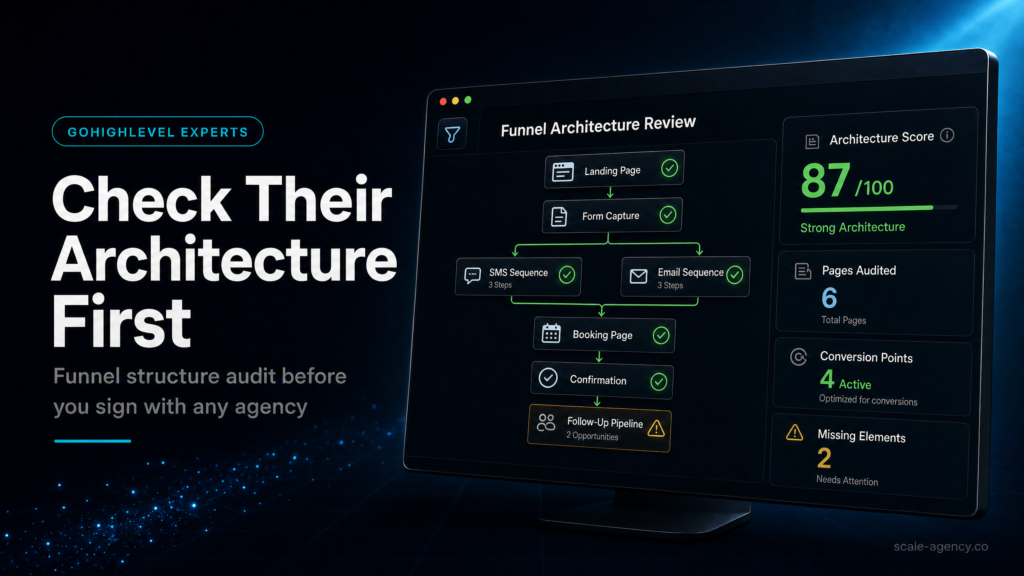
If you are deciding whether your local-business build needs specialist ownership, use the GoHighLevel expert guide as the parent hiring checklist before you choose an agency model.
For the broader commercial model, keep this support page connected to the GoHighLevel agency model hub; this article stays narrow on local-business funnel architecture quality.
In this guide, we’ll cover:
A local-business lens for checking whether a GoHighLevel agency can connect funnel architecture, routing, calendars, follow-up and reporting before leads start leaking.
For context, SCALE builds GoHighLevel CRM, funnel, and automation systems for businesses that need better lead quality, faster follow-up, and clearer attribution.
Local Lead Paths Need To Be Mapped First
First, calls, forms, ads, landing pages and missed calls need one clear route into the CRM.
Every Enquiry Needs A Known Owner
Often, local businesses leak revenue when enquiries arrive from different sources, but nobody owns the next action fast enough.
Bookings Should Update Pipeline Truth
Then, the system should handle booked calls, no-shows, cancellations and rebooking paths without confusing sales.
Automations Must Match Service Urgency
What strong builds protect: first touch, reminders, escalation, reply handling and stop conditions by service type.
Source Data Has To Survive To Revenue
Finally, owners need to see source, campaign, booked calls, show rate, close movement and revenue by local service.
“A strong GoHighLevel agency does not just build pages. It protects the route from local enquiry to booked job, sale and repeatable reporting.”
Quick Answer
A gohighlevel agency for local business should be judged on funnel architecture before anything else: how leads are captured, routed, followed up, tracked, and reported inside GoHighLevel. If the agency can’t show a clear pipeline, speed-to-lead logic, attribution, and conversion reporting, you’ll likely buy “pages and automations” but lose revenue in missed leads and unclear ROI.
TL;DR
- Ask for a funnel map: ad/source → landing page → form → pipeline stage → automation → booking → sales handoff.
- Verify speed-to-lead: first SMS/call within 60 seconds, with retries and owner alerts if no response.
- Demand attribution you can use: UTM capture, source fields, and reporting tied to pipeline outcomes (not just “leads”).
- Check pipeline design: stages must match your real sales process and include “no-show,” “unqualified,” and “won/lost” reasons.
- Look for operational safeguards: duplicate handling, spam filtering, consent language, and calendar conflict rules.
- Insist on a handover: SOPs, naming conventions, and a dashboard your team can run without the agency.
- If they only talk about templates, snapshots, or “AI,” assume you’ll pay later in leakage and rework.
Decision Table: Which Build Option Fits Your Local Business?
| Option | Best fit | Risk | Speed | Revenue visibility | When to choose it |
|---|---|---|---|---|---|
| DIY / internal build | Owner/operator has time, enjoys systems, low lead volume, simple offer | High: missed edge cases, weak tracking, inconsistent follow-up | Slow to medium | Low to medium (often “leads” only, not outcomes) | You can commit weekly time, you’re okay iterating, and you don’t rely on paid ads yet |
| Cheap freelancer / template implementer | Basic landing page + basic automations, very tight budget | Very high: template mismatch, broken routing, shallow reporting, no handover | Fast | Low (usually no true attribution or pipeline hygiene) | You need a temporary stopgap and you’re prepared to rebuild when you scale |
| Specialist GoHighLevel expert / SCALE-style growth systems build | Local business running ads or referrals, needs speed-to-lead, consistent booking, and clear ROI | Low to medium: depends on discovery quality and operational adoption | Medium (built right, tested, documented) | High: source → pipeline → revenue reporting, with diagnostics | You want fewer missed leads, better lead quality, and reporting you can make decisions from |
Who Is This For?
- Local service businesses (home services, med spa, dental, legal, clinics) relying on calls, forms, and booked appointments
- Owners running Meta Ads or Google Ads who can’t tell which campaigns produce revenue
- Teams with slow follow-up, missed calls, or inconsistent lead handling across staff
- Operators migrating from HubSpot, Pipedrive, Calendly, Mailchimp, or spreadsheets into GoHighLevel
- Agencies building GoHighLevel for clients who want a checklist to evaluate funnel architecture
- Businesses with multiple locations or multiple offers that require clean routing and reporting
- Founders who suspect their “automation” is just noise and not improving booked calls
Why funnel architecture is the real test (not pages, not “AI”)
Most local businesses don’t lose money because their landing page headline is imperfect. They lose money because the system between “new lead” and “booked/closed” is fragile: leads go to the wrong person, follow-up is delayed, attribution is missing, and reporting can’t answer basic questions like “Which source produces jobs?”
When you hire a gohighlevel agency for local business, you’re not buying a funnel. You’re buying a revenue operating system: capture, routing, speed-to-lead, sales pipeline visibility, and feedback loops that improve conversion over time.
If you want the broader view of how agencies structure GoHighLevel engagements and pricing models, use this hub as your reference point: GoHighLevel agency models built to attract high-value clients. This article stays narrow on the one thing that predicts success fastest: funnel architecture quality.
What “funnel architecture” means in GoHighLevel (practically)
- Entry points: landing pages, chat widgets, inbound calls, Google Business Profile, Facebook lead forms, website forms
- Data capture: fields, consent, UTM/source, service area, job type, budget/urgency
- Routing: pipeline assignment, round robin, location-based assignment, tags, custom fields
- Speed-to-lead: immediate SMS + call attempts + voicemail drops + owner alerts
- Conversion path: calendar booking, call connect, estimate scheduled, deposit/payment, close
- Measurement: source → stage conversion, show rate, close rate, time-to-first-response, cost per booked call
- Handover: SOPs, dashboards, naming conventions, and admin access control
What to check first: the funnel map and routing logic
Before you look at design, ask the agency to show you a single-page funnel map. If they can’t draw it clearly, they can’t build it reliably.
The minimum funnel map you should see
In practice, a strong agency can describe your system in one breath:
“Meta ad → local landing page → short form with service + ZIP → creates opportunity in ‘New Lead’ stage → triggers 60-second speed-to-lead workflow → if booked, moves to ‘Appointment Set’ → reminders reduce no-shows → if no response, escalates to owner → reporting shows source-to-revenue.”
How to diagnose routing quality (fast)
- Ask: “If a lead submits at 7:43pm on a Saturday, what happens in the first 5 minutes?”
- Ask: “If they submit twice, do we merge, dedupe, or create two opportunities?”
- Ask: “If they call instead of filling the form, do we still capture source and create an opportunity?”
- Ask: “If we have two locations, how do you route by ZIP/service area?”
What a weak setup looks like
- One generic pipeline stage called “New Lead” and everything stays there
- No clear owner assignment (everyone gets notifications, so nobody owns it)
- Forms create contacts but not opportunities (pipeline stays empty)
- Calendar booking exists, but it’s not connected to pipeline stages or reminders
- No handling for missed calls, after-hours, or no-shows
What a strong setup looks like
- Pipeline stages mirror your real process (not the agency’s template)
- Every lead creates an opportunity with an owner and a next action
- Routing rules are explicit (location, service line, urgency, language, VIP/referral)
- Missed call text-back and after-hours logic are built in
- Clear “exit states” exist: unqualified, lost, won, no-show, reschedule
What SCALE would look for or fix
- Opportunity creation rules (forms, calls, chat, FB lead forms) so the pipeline is the source of truth
- Owner assignment logic that matches staffing reality (including backups and escalation)
- Field strategy: only capture what you’ll use for routing, qualification, and reporting
- Edge-case handling: duplicates, spam, wrong numbers, after-hours, missed calls
Pipeline architecture: stages that drive action (not just reporting)
Your pipeline is not a “CRM decoration.” It’s a control panel for follow-up, forecasting, and accountability. If the pipeline is wrong, automations fire at the wrong time, sales reps work the wrong list, and reporting becomes meaningless.
A practical local business pipeline (example structure)
For example, this is a common baseline that can be adapted to your model:
- New Lead (Uncontacted)
- Attempting Contact
- Contacted (Needs Booking)
- Appointment Set
- No-Show / Reschedule Needed
- Estimate/Consult Completed
- Proposal Sent / Pending Decision
- Won
- Lost (with loss reason)
- Unqualified (with reason)
Commercial reason this matters
- Speed: stages trigger the right follow-up at the right time
- Capacity: you can see bottlenecks (too many “Contacted” but few “Booked”)
- Forecasting: you can estimate near-term revenue based on stage conversion
- Accountability: every opportunity has an owner and a next step
Diagnostic checklist: pipeline quality
- Does every lead source create an opportunity (not just a contact)?
- Are stages mutually exclusive and action-oriented (not vague labels)?
- Do you have “no-show” and “reschedule” as explicit states?
- Do you capture lost reason and unqualified reason consistently?
- Can you filter by owner, stage age, and next action?
- Do automations move stages based on real events (booking, call outcome, form completion)?
What SCALE would look for or fix
- Stage definitions tied to SOPs (what your team must do in each stage)
- Stage aging rules and escalation (e.g., “Attempting Contact” older than 15 minutes triggers manager alert)
- Loss reason taxonomy that improves marketing (e.g., “price,” “out of area,” “timing,” “competitor,” “not decision maker”)
Speed-to-lead and follow-up logic: where local businesses leak the most
Local leads decay fast. If you’re running ads, the first business to respond often wins the conversation. Your agency should be able to show exactly how GoHighLevel handles the first 60 seconds, the first hour, and the first 72 hours.
What to check: the first-response chain
- Immediate SMS confirming the request and offering the next step (book/call)
- Immediate call attempt (or within 1–2 minutes) to connect while intent is high
- Voicemail drop if no answer (where appropriate)
- Fallback routing if the assigned rep doesn’t respond (escalate to owner/manager)
- Multi-touch sequence over 3–7 days (SMS + email + call attempts) with stop rules
How to diagnose speed-to-lead inside GoHighLevel
- Look at conversation timestamps: lead created time vs first outbound message time
- Check call reporting: attempted calls, connected calls, missed calls, call outcomes
- Review the workflow: does it branch based on “booked,” “replied,” “called,” “no response”?
Weak setup signals
- One generic workflow that blasts SMS/email regardless of stage
- No stop conditions (people keep getting reminders after booking or after opting out)
- No escalation if staff ignores the lead
- No missed-call text-back (a major leak for local services)
Strong setup signals
- Separate workflows for new lead, appointment reminders, no-show recovery, and reactivation
- Stop rules based on tags, stage changes, booking events, and replies
- After-hours logic that sets expectations and schedules next-day follow-up
- Owner alerts for high-intent leads (e.g., “emergency,” “same-day,” “high ticket”)
What SCALE would look for or fix
- Speed-to-lead SLA design (who responds, how fast, and what happens if they don’t)
- Workflow branching that matches your sales motion (call-first vs book-first)
- Message quality: short, specific, and aligned to the offer (not “Hey {{name}}” spam)
- Compliance basics: opt-out handling and consent language where required
Attribution and lead source tracking: if it’s not captured, it can’t be optimised
Most “GoHighLevel builds” fail commercially because attribution is an afterthought. You end up with a CRM full of contacts and no reliable way to answer: “Which channel produced booked calls and revenue?”
What to check: source capture at the point of entry
- UTM parameters captured into hidden fields (utm_source, utm_medium, utm_campaign, utm_content)
- Landing page URL and referrer captured (where possible)
- Lead source field normalized (not 37 variations of “Facebook”)
- Call tracking plan if calls are a primary conversion event
Commercial reason this matters
- You stop scaling the wrong campaigns (cheap leads that never book)
- You can reallocate budget to sources that create won opportunities
- You can identify offer mismatch (high clicks, low qualified appointments)
How to diagnose attribution quality
- Pick 20 recent opportunities and ask: can you see the source and campaign for each?
- Compare “lead count” vs “appointment set” vs “won” by source.
- Check for “unknown” or blank sources; if it’s above ~10–20%, tracking is likely broken or incomplete.
Weak setup signals
- Everything is “Website” or “Facebook” with no campaign detail
- UTMs exist in ads but are not stored in GoHighLevel custom fields
- Reporting is based on form submissions only, not pipeline outcomes
Strong setup signals
- Standardized source taxonomy (e.g., Meta Ads, Google Ads, GBP, Referral, Organic)
- Campaign-level visibility for paid traffic
- Dashboards show conversion by stage and by source
What SCALE would look for or fix
- UTM + source field strategy aligned to your ad accounts and naming conventions
- Opportunity-level reporting so you can see source-to-revenue, not just source-to-lead
- Attribution guardrails: consistent fields, required fields where appropriate, and cleanup rules
Landing page and form architecture: qualify without killing conversion
Local funnels often fail in one of two ways: they ask for too little (junk leads flood the CRM), or they ask for too much (conversion rate collapses). A good agency designs the page and form around your sales capacity and your qualification needs.
What to check on the landing page (local business edition)
- Single primary CTA (call or book or request quote) based on your sales motion
- Service area clarity (so out-of-area leads self-select out)
- Proof that reduces friction (reviews, before/after, credentials)
- Expectation setting (pricing ranges, availability, what happens next)
- Mobile speed and above-the-fold clarity
Form design: the “minimum viable qualification” approach
For many local services, a strong starting point is:
- Name
- Phone
- Email (optional depending on your follow-up style)
- Service needed (dropdown)
- ZIP code (routing + service area filter)
- Timing/urgency (today/this week/this month)
Weak setup signals
- Long forms with 12–20 fields for cold traffic
- No ZIP/service area capture (routing becomes manual)
- No spam protection or validation (fake numbers, junk submissions)
- Form submits but doesn’t trigger the right workflow or pipeline stage
Strong setup signals
- Short form for cold traffic; deeper qualification happens after first contact
- Conditional logic (if available) or branching workflows based on service type
- Clear confirmation page and next step (book now, call now, or “we’ll call in X minutes”)
What SCALE would look for or fix
- Offer-message fit: aligning the page promise to what sales can deliver
- Field strategy that supports routing and reporting without crushing conversion
- Form-to-pipeline mapping and workflow triggers tested end-to-end
The implementation process
- Define the revenue path (one page): traffic sources, primary offer, conversion event (call vs booking), qualification rules, and sales handoff.
- Design the pipeline to match reality: stages, stage definitions, owner assignment rules, lost/unqualified reasons, and stage aging expectations.
- Build contact data architecture: required fields, custom fields (service, ZIP, urgency), tags, and naming conventions so reporting stays clean.
- Implement capture points: landing page(s), embedded forms, chat widget (if used), inbound call handling, and any third-party lead sources (e.g., FB lead forms) mapped into GoHighLevel.
- Connect calendars correctly: service-specific calendars, round robin (if needed), buffers, working hours, location rules, and confirmation pages.
- Build speed-to-lead workflows: immediate SMS, call attempts, voicemail logic, escalation to owner/manager, and stop rules when the lead books or replies.
- Add appointment and no-show workflows: reminders, reschedule links, and no-show recovery sequences tied to pipeline stage changes.
- Set up lead source tracking: UTM capture, normalized source fields, and opportunity-level reporting fields so you can see source-to-stage conversion.
- Configure reporting dashboards: leads by source, appointments set, show rate, close rate, time-to-first-response, and pipeline value by stage.
- QA the full journey: test each source (ad click, organic, call), confirm data lands in the right fields, confirm workflows fire, confirm stage movement, and confirm reporting accuracy.
- Team handover: SOPs for lead handling, stage movement rules, “what to do when” playbooks, and admin training so the system survives staff changes.
- 30-day optimisation loop: review bottlenecks weekly (speed-to-lead, booking rate, no-show rate, close rate), adjust messaging, routing, and qualification.
Common problems and how to fix them
Where Local Business Funnel Builds Usually Break
| Problem | What it usually means | Commercial risk | Fix | Metric to watch |
|---|---|---|---|---|
| Leads show up as contacts but not in the pipeline | Forms/integrations aren’t creating opportunities | Sales team works blind; follow-up becomes inconsistent | Map every lead source to “create opportunity” + assign owner + set stage | % of new leads with an opportunity created |
| Slow response times | No speed-to-lead workflow, or staff notifications aren’t actionable | Lower connect rate; wasted ad spend | Implement 60-second SMS + call attempt + escalation if no action | Time to first response; connect rate |
| Too many junk leads | Offer mismatch, weak form qualification, no spam controls | Team burnout; missed good leads; inflated CPL looks “good” but revenue drops | Add ZIP/service filters, validation, clearer offer framing, and qualification steps | Qualified lead rate; unqualified reason counts |
Pipeline And Follow-Up Issues To Fix Next
| Problem | What it usually means | Commercial risk | Fix | Metric to watch |
|---|---|---|---|---|
| Booked calls but low show rate | Weak reminders, unclear expectations, wrong calendar settings | Lost capacity; higher cost per attended appointment | Reminder sequence + reschedule link + confirmation page expectations | Show rate; reschedule rate |
| “Unknown source” dominates reporting | UTMs not captured; sources not normalized; call sources missing | You can’t scale winners or cut losers confidently | Implement UTM hidden fields + standardized source taxonomy + call tracking plan | % opportunities with known source |
| Automations keep firing after booking | No stop rules; workflows not tied to stage/booking events | Bad customer experience; opt-outs; reputation risk | Add stop conditions (booking, reply, stage change) and suppression tags | Opt-out rate; complaint rate; duplicate messages |
| Pipeline stages don’t match how sales actually works | Template pipeline installed without discovery | False reporting; poor handoffs; missed follow-up | Redesign stages around SOPs and decision points; train team | Stage conversion rates; stage aging |
What this means for revenue
Funnel architecture is revenue architecture. In local business, small operational gaps compound quickly because lead volume is spiky, response expectations are high, and many conversions happen by phone.
Lead quality
If your landing page and form don’t filter by service area, service type, or urgency, you’ll pay for leads you can’t serve. The fix isn’t “more leads.” It’s better qualification and routing so your team spends time on winnable opportunities.
Booked calls and appointments
Because booking rate is driven by speed-to-lead, clarity of next step and friction in scheduling, the build has to remove those problems before more leads arrive. A strong GoHighLevel build reduces friction with the right calendar rules, immediate confirmation, and reminders that prevent no-shows.
Speed-to-lead and connect rate
When response time stretches from minutes to hours, connect rates drop and competitors win the first conversation. A proper workflow with escalation protects revenue even when staff is busy.
Pipeline visibility and close rate
If opportunities aren’t staged correctly, you can’t see where deals stall. That prevents coaching, staffing decisions, and offer adjustments. Clean stages and loss reasons turn your CRM into a decision tool, not a database.
Attribution and wasted ad spend
Without source-to-outcome reporting, you’ll optimise for the wrong KPI (cheap leads) instead of the right KPI (qualified appointments and won revenue). Attribution doesn’t need to be perfect to be useful, but it must be consistent and tied to pipeline outcomes.
If you’re hiring a gohighlevel agency for local business, treat funnel architecture as the pass/fail test: GoHighLevel CRM structure, pipeline stages, funnels, automation, lead follow-up, attribution, and reporting must work as one system. Done right, you get faster response, higher booked calls, cleaner visibility, and fewer wasted leads; done wrong, you get pretty pages and silent revenue leakage—SCALE’s job is to find and fix those leaks before they compound.
Conclusion
Ultimately, local businesses don’t need “more automations.” They need fewer, better workflows connected to a pipeline that reflects reality, with attribution that tells the truth.
Here’s what we see go wrong most often when a gohighlevel agency for local business is chosen based on price or templates:
- Templates replace discovery: the pipeline looks nice but doesn’t match how your team sells.
- Follow-up is noisy: sequences fire without stop rules, creating opt-outs and confusion.
- Routing is vague: leads go to “the team,” so response becomes inconsistent.
- Reporting is cosmetic: dashboards show lead counts, not stage conversion or revenue outcomes.
- No operational handover: the system works only while the agency is around.
SCALE builds GoHighLevel CRM, funnel and automation systems for businesses that need better lead quality, faster follow-up and clearer attribution. Practically, that means we start with funnel architecture (capture → routing → speed-to-lead → pipeline → reporting), then build pages and automations to serve that architecture, not the other way around.
We also bias toward “owner-operable” systems: naming conventions, SOPs, dashboards, and guardrails so your team can run the machine without constant agency dependency.
FAQs
How do I evaluate a GoHighLevel agency for a local business quickly?
Ask for a funnel map and a live walkthrough of: (1) a test lead entering from each source, (2) the opportunity created in the pipeline, (3) the exact speed-to-lead workflow, and (4) a dashboard showing source-to-stage conversion. If they can’t demonstrate that end-to-end, you’re buying surface-level implementation.
What pipeline stages should a local service business use in GoHighLevel?
Specifically, use stages that match your real process and drive action: New Lead, Attempting Contact, Contacted/Needs Booking, Appointment Set, No-Show/Reschedule, Completed, Proposal Sent, Won, Lost, Unqualified. The exact names matter less than having clear definitions, owners, and automation triggers tied to each stage.
What’s the most important automation for local lead gen?
Speed-to-lead. You want an immediate SMS plus a call attempt, then structured retries and escalation if no one responds. The workflow must stop when the lead books or replies, and it must handle after-hours leads without spamming them.
How do I know if attribution is set up correctly in GoHighLevel?
Spot-check recent opportunities and confirm you can see a consistent lead source (and ideally UTMs for paid traffic). Then compare sources by pipeline outcomes (appointments set, show rate, won), not just lead volume. If “unknown” is common or sources are inconsistent, attribution isn’t decision-grade.
Should my funnel push calls or calendar bookings?
Choose based on your sales motion and capacity. Calls work well for urgent services and when you can answer quickly. Bookings work well when you need structured scheduling and reminders. Many local businesses use both: “Call now” for high intent plus a booking option for after-hours or low urgency.
What should I demand in a handover from a GoHighLevel agency?
You should receive: a pipeline/stage SOP, workflow list with what triggers each one, field and tag definitions, reporting dashboard explanation, admin access and permissions, and a simple “how we handle leads” playbook for staff. If you can’t operate it without the agency, it’s not a real system.
Can a bad GoHighLevel setup hurt my business?
Yes. The most common damage is silent: missed leads, slow response, duplicate follow-up, poor customer experience, and ad spend that can’t be tied to revenue. The fix is usually not “more tools,” but correcting funnel architecture so capture, routing, follow-up, and reporting work together.
