
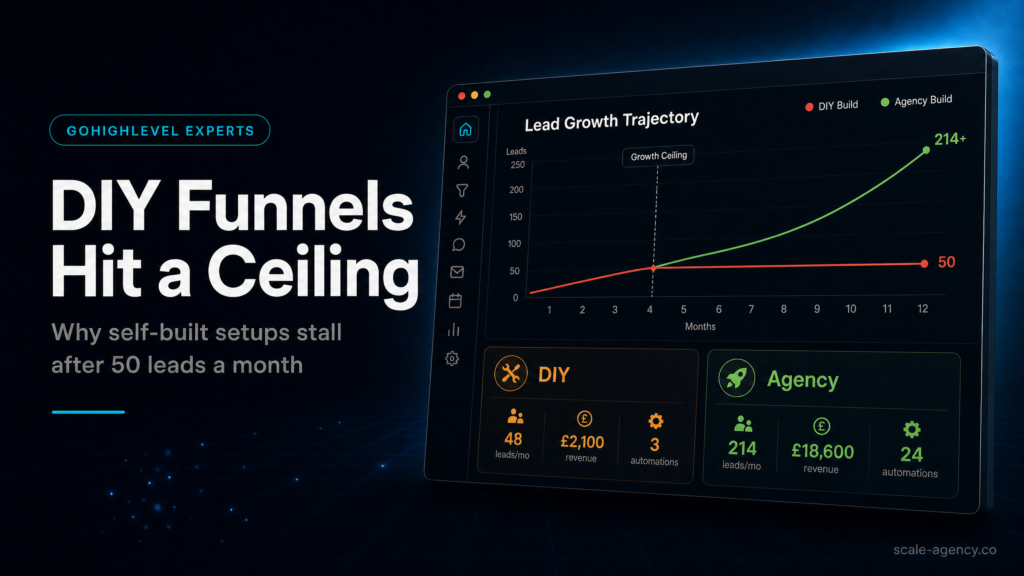
Once DIY funnels start missing handoffs, compare the build against an expert GoHighLevel setup so the CRM, funnel and follow-up path are judged as one revenue system.
Before scaling spend, use the GoHighLevel implementation pre-migration checklist to check whether fields, owner rules, calendar routing and reporting are ready for real lead volume.
In this guide, we’ll cover:
A revenue-first view of where DIY GoHighLevel funnels usually hit a ceiling once lead volume, follow-up, attribution and sales ownership become real.
SCALE builds GoHighLevel CRM, funnel, and automation systems for businesses that need better lead quality, faster follow-up, and clearer attribution.
Simple Funnels Can Hide Operational Weakness
Why early leads can arrive even when routing, source tracking and sales follow-up are not ready for scale.
More Volume Exposes Ownership Gaps
Where DIY builds usually break: leads enter the system, but the next owner and response path are unclear.
Automation Needs Stop Rules And QA
How workflows should respond quickly, then stop cleanly after replies, bookings, no-shows or disqualification.
Attribution Decides What Can Scale
What to check before increasing spend: source fields, opportunity stages, booked calls and close movement by campaign.
The Build Needs A Revenue Operating Model
Why a GoHighLevel agency setup should connect CRM, funnels, automation and reporting before more traffic is purchased.
“DIY funnels can prove demand, but a GoHighLevel agency setup has to protect the system when demand starts to scale.”
Quick Answer
A gohighlevel agency setup stops performing after ~50 leads when the “funnel” is just pages and forms without a real CRM structure, speed-to-lead automation, source tracking, and reporting. DIY builds often can’t diagnose where leads drop, can’t route follow-up correctly, and can’t prove ROI—so booked calls and revenue plateau.
TL;DR
- If your first 50 leads came from hustle, referrals, or “fresh ad account momentum,” DIY can look fine—until you need repeatable attribution and follow-up.
- The ceiling usually isn’t the landing page; it’s pipeline design, lead routing, speed-to-lead, and reporting.
- When you can’t answer “which source produced closed-won revenue last week?” you’re flying blind and scaling spend becomes risky.
- Templates work for layout, not for your offer logic, qualification, and sales process—so lead quality and show rate drift down.
- The fastest win is often fixing contact lifecycle + automations (not rebuilding the whole funnel).
- If you’re buying leads (Meta/Google), you need tracking + stage conversion rates before you increase budget.
- Choose a specialist build when you want revenue visibility, not just “a funnel that collects leads.”
| Option | Best fit | Risk | Speed | Revenue visibility | When to choose it |
|---|---|---|---|---|---|
| DIY / internal build | Founder-led business with time to learn, low lead volume, simple offer, minimal paid spend | High: misconfigured automations, messy CRM, no attribution, inconsistent follow-up | Medium (fast to launch, slow to stabilise) | Low unless you build reporting discipline | When you’re validating an offer and can tolerate missed leads while you learn |
| Cheap freelancer / template implementer | Need something “live” quickly; basic landing pages + calendar; low complexity | Medium-high: cookie-cutter pipeline, brittle automations, poor handover, limited QA | Fast | Low-medium (usually vanity metrics, not closed-won tracking) | When you need a temporary bridge and you already have an operator who can manage it |
| Specialist GoHighLevel expert (SCALE-style growth systems build) | Paid acquisition, sales team, multiple lead sources, high-ticket or high LTV, need clarity | Lower: designed around lifecycle, routing, compliance, reporting, and iteration | Medium (structured rollout) | High: pipeline + attribution + conversion reporting | When you want predictable booked calls, faster follow-up, and confidence to scale spend |
Who Is This For?
- Local service businesses running Meta or Google Ads and wondering why lead quality dropped after the first burst
- Coaches/consultants selling high-ticket offers who need better qualification and show rate
- Agency owners building client funnels in GoHighLevel and hitting operational chaos after onboarding a few accounts
- Founders who have “a funnel” but no reliable CRM pipeline or reporting
- Operators who need speed-to-lead and lead routing across multiple reps or locations
- Businesses migrating from HubSpot/ActiveCampaign/ClickFunnels and worried about losing tracking and pipeline history
- Teams that can’t confidently answer: “Which channel produced revenue this month?”
Why DIY funnels hit a ceiling after 50 leads (and why it’s rarely the page)
Most DIY builds start with the visible parts: a landing page, a form, a thank-you page, and a calendar. That’s enough to capture leads. It’s not enough to convert leads consistently once volume increases and variability shows up (different sources, different intent levels, different follow-up needs).
After ~50 leads, patterns emerge: missed calls, slow responses, duplicate contacts, untagged sources, reps working the same lead twice, or nobody working it at all. The funnel “works,” but revenue doesn’t scale.
What to check
- Do you have a defined contact lifecycle (new lead → attempted contact → booked → showed → closed-won/lost)?
- Is there a single source of truth for lead source and campaign?
- Do you have speed-to-lead automation (call + SMS + email) within 60 seconds?
- Can you see stage conversion rates (lead → booked, booked → showed, showed → closed)?
Why it matters commercially
When you can’t measure stage conversion rates, you can’t tell whether you have a traffic problem, an offer problem, a qualification problem, or a sales follow-up problem. That uncertainty is what creates the ceiling: you stop scaling because you can’t trust what will happen if you double lead volume.
How to diagnose the ceiling
- Pull the last 30 days of leads and calculate: % contacted within 5 minutes, % booked, % showed, % closed.
- Compare by source (Meta vs Google vs organic vs referral). If you can’t, you have a tracking problem before you have a funnel problem.
- Audit the pipeline: are stages meaningful, or is everything sitting in “New Lead” and “Won/Lost”?
What a weak setup looks like
- One pipeline stage called “New Lead” and another called “Booked,” with no attempt/contact logic
- Calendar bookings that don’t update opportunity stages or assign owners
- Leads coming in without UTM/source fields, so you can’t attribute revenue
- Automations that fire once and then stop, leaving long-tail follow-up to chance
What a strong setup looks like
- Lifecycle stages that match your sales process and create clear next actions
- Lead routing rules (by location, service line, rep, or availability)
- Speed-to-lead sequence that escalates (SMS → call → voicemail drop → email) and then nurtures
- Reporting that ties lead source to pipeline outcomes and closed-won revenue
What SCALE would look for or fix
SCALE will typically start by mapping your lead lifecycle and building the minimum viable pipeline + automation that makes every lead measurable and actionable. Pages matter, but the first priority is usually: capture → route → contact fast → track outcomes.
For a broader view of how agencies structure systems to attract and retain higher-value clients, read the main GoHighLevel agency guide: GoHighLevel agency models built to attract high-value clients.
GoHighLevel agency setup fundamentals that DIY builds usually skip
DIY builders often recreate what they had in a page builder: a form and a calendar. GoHighLevel is different: it’s a CRM + automation engine. If you don’t design the CRM and automation layer, you’re using 20% of the platform and expecting 80% of the outcome.
1) CRM data model: custom fields, tags, and source-of-truth rules
Before you touch automations, decide what data you need to make decisions. At minimum:
- Lead source (high-level channel: Meta, Google, Organic, Referral)
- Campaign/ad set/ad (or at least UTM campaign)
- Service line (what they want)
- Location (if multi-location)
- Lead status (new, working, booked, etc. via pipeline stages)
Then define rules: where does lead source come from (UTMs, form hidden fields, call tracking), and what happens when it’s missing?
2) Pipeline stages that reflect reality (not hope)
Most pipelines are too simple. A commercially useful pipeline answers: “What is the next action, and who owns it?” A practical baseline:
- New lead (uncontacted)
- Attempted contact (in progress)
- Contacted (two-way conversation)
- Qualified / unqualified
- Booked
- Showed
- No-show
- Closed-won
- Closed-lost
If you sell high-ticket, add “Proposal sent” or “Decision pending.” If you sell local services, add “Estimate scheduled” or “Job booked.”
3) Ownership and routing: who works the lead, and when?
After 50 leads, “we’ll just check notifications” breaks. You need routing rules:
- Round robin for multiple reps
- Territory-based routing by postcode/city
- Service-based routing (e.g., roofing vs solar vs HVAC)
- Availability-based routing (calendar capacity)
Routing must update: opportunity owner, task assignment, and notification paths. Otherwise, leads get contacted late or not at all.
4) Speed-to-lead automation that escalates
DIY automations often send one SMS and call it “follow-up.” Strong follow-up has escalation and fallbacks:
- Instant SMS confirmation + expectation setting
- Instant call attempt (to rep or to business line) with voicemail drop if unanswered
- Email with context and a clear CTA (book, reply, or call)
- Short-term sequence (first 24–72 hours) + long-term nurture (14–30 days)
Commercially, this protects your ad spend: you already paid for the click/lead. The cheapest conversion lift is often faster and more consistent contact.
5) Reporting that ties activity to outcomes
After 50 leads, you need to know:
- How many leads came in by source?
- How many were contacted within 5 minutes?
- How many booked?
- How many showed?
- How many closed-won, and what revenue?
If your reporting stops at “form submissions,” you’ll hit a ceiling because you can’t optimise the bottleneck.
The real ceiling: you can’t optimise what you can’t see
DIY funnels plateau because the feedback loop is broken. You can’t tell whether to change the ad, the landing page, the offer, the qualification, or the sales script—so you change everything randomly and performance becomes unstable.
Buyer checks: the minimum visibility stack
- UTM capture into contact fields (source/medium/campaign)
- Opportunity creation on every lead (not just bookings)
- Stage movement rules (what moves a lead to “Contacted,” “Booked,” etc.)
- Outcome logging (lost reasons, revenue amount, close date)
How to diagnose visibility gaps in 20 minutes
- Pick 10 recent leads from different sources.
- For each lead, check: do you see source/campaign? do they have an opportunity? who owns it? what stage is it in?
- Open the conversation history: was there a response within 5 minutes? within 1 hour?
- Check if the lead booked: did the pipeline stage update automatically?
- Check if they closed: is revenue recorded anywhere you can report on?
If you can’t answer those questions quickly, you don’t have a funnel problem—you have an operating system problem.
Weak vs strong: what it looks like in GoHighLevel
| Area | Weak setup | Strong setup |
|---|---|---|
| Lead capture | Form submits, sends email notification | Form submits, creates/updates contact, creates opportunity, assigns owner, stamps source/UTMs |
| Follow-up | One SMS, no escalation | Multi-step speed-to-lead + short-term pursuit + long-term nurture with stop conditions |
| Routing | Everyone gets notified; nobody owns it | Clear owner assignment + tasks + SLA reminders |
| Pipeline | Two stages; no definitions | Lifecycle stages with definitions and triggers |
| Reporting | Counts leads only | Stage conversion + source-to-revenue visibility |
The implementation process
- Define the revenue path (before building anything). Document: offer, qualification rules, sales steps, booking rules, and what “closed-won” means (deposit paid, contract signed, first invoice paid).
- Design the CRM structure. Create required custom fields (source, campaign, service line, location), standardise tags, and define data ownership rules (what overwrites what, and when).
- Build the pipeline stages and stage definitions. Write a one-line definition for each stage and the event that moves a lead into it (e.g., “Booked = calendar appointment created”).
- Set up lead capture with correct mapping. Forms/surveys should map fields cleanly, create opportunities, and stamp UTMs/hidden fields. If you use multiple funnels, standardise field names and mapping.
- Configure calendars for conversion (not convenience). Use the right appointment types, buffers, availability, and required fields. Ensure bookings update opportunity stage, assign owner, and trigger confirmations/reminders.
Build The Automation And Reporting Layer
- Implement speed-to-lead automation. Build an immediate response workflow: SMS + call attempt + email, with logic for business hours vs after-hours, and clear stop conditions when a rep connects.
- Implement pursuit + nurture sequences. Add a 7–14 day pursuit sequence for unbooked leads and a separate nurture for long-cycle buyers. Include “reply handling” so responses route to the right rep.
- Set up lead routing and SLAs. Round robin or territory rules, plus tasks and escalation if no contact attempt is logged within X minutes.
- Install tracking and attribution hygiene. Ensure UTMs are captured, sources are consistent, and reporting can segment by channel/campaign. If you run ads, align naming conventions with your ad account.
- Build reporting dashboards that match decisions. Create views for: daily lead intake, speed-to-lead, stage conversion, booked/show rate, close rate, and source-to-revenue.
- QA with real scenarios. Test: new lead during business hours, after-hours lead, duplicate lead, lead replies “stop,” lead books then reschedules, lead no-shows, lead closes-won. Fix edge cases.
- Handover and operating rhythm. Document: how reps work leads, how stages move, how to log outcomes, and a weekly review cadence (what to check, what to change).
Common problems and how to fix them
What Breaks Once Lead Volume Increases
| Problem | What it usually means | Commercial risk | Fix | Metric to watch |
|---|---|---|---|---|
| Leads come in but nobody contacts them fast | No owner assignment, no SLA, weak notifications | Lower booked rate; wasted ad spend | Assign owner on create; add speed-to-lead workflow; add escalation if no action in 5–10 minutes | % contacted within 5 minutes |
| Booked calls are low despite “good traffic” | Offer/message mismatch or friction in booking flow | High CPL with low conversion to appointments | Clarify promise + proof; reduce form friction; add “call now” option; add follow-up to non-bookers | Lead → booked % |
| High no-show rate | Weak confirmations, poor expectation setting, no reminders | Calendar waste; rep utilisation drops | Add SMS/email reminders; include pre-frame; add reschedule links; confirm intent | Booked → showed % |
| Duplicate contacts and messy histories | Inconsistent field mapping; multiple forms; no dedupe rules | Reps annoy leads; reporting becomes unreliable | Standardise fields; enforce email/phone formatting; merge duplicates; review form embed settings | Duplicate rate; reply sentiment |
| Can’t tell which ads produce revenue | No UTM capture; no opportunity revenue logging; inconsistent naming | Scaling spend becomes guesswork | Capture UTMs; require source fields; log revenue on closed-won; align naming conventions | Source-to-revenue report completeness |
| Automations keep texting people who already booked | No stop conditions; stages not updating | Brand damage; opt-outs increase | Add triggers to stop on booking/contact; ensure stage updates on appointment creation | Opt-out rate; complaint rate |
| Sales team “does their own thing” outside the CRM | CRM not aligned to workflow; too much manual work | Lost visibility; inconsistent follow-up | Simplify stages; automate tasks; train reps; enforce minimum logging standards | % opportunities with recent activity |
What this means for revenue
The “50 lead ceiling” shows up as a revenue problem, but it’s usually an operations and measurement problem. Here’s how it hits your P&L in real terms:
1) Lead quality appears to drop (even when it didn’t)
If you don’t segment by source and track outcomes, you’ll label leads as “bad” when the real issue is slow follow-up, poor routing, or reps cherry-picking. Without attribution, you can’t separate:
- Low-intent traffic (ad/targeting issue)
- High-intent leads not being contacted (ops issue)
- Qualified leads not booking (offer/booking flow issue)
- Booked leads not showing (confirmation/reminder issue)
- Showed leads not closing (sales process issue)
2) Booked calls plateau because speed-to-lead isn’t engineered
When volume increases, response time naturally slows unless you automate and assign ownership. A few missed or delayed responses per day compounds into fewer booked calls per week, which compounds into unstable revenue.
3) Close rate becomes noisy because the pipeline isn’t real
If opportunities aren’t created for every lead, or stages aren’t updated consistently, your close rate is fiction. That leads to bad decisions:
- You pause ads that are actually producing revenue
- You scale ads that are producing low-quality leads
- You hire sales help without knowing whether the bottleneck is marketing or follow-up
4) Wasted ad spend increases quietly
Paid acquisition punishes sloppy systems. If 20–40% of leads aren’t contacted quickly, you’re effectively paying a “leak tax” on every campaign. Fixing follow-up and routing is often cheaper than trying to “outspend” the problem.
5) Revenue visibility becomes the growth constraint
At small volume, you can “feel” what’s working. At higher volume, you need instrumentation. The businesses that scale are the ones that can answer, weekly:
- Which channel produced the most closed-won revenue?
- Where did leads drop (contact, booking, show, close)?
- What change will most likely increase revenue next week?
Conclusion
Most businesses don’t fail at GoHighLevel because they picked the wrong tool. They fail because they treat GoHighLevel like a page builder instead of a revenue operating system.
The common mistakes we see in a gohighlevel agency setup (especially DIY) are predictable:
- Building pages before lifecycle. The funnel looks good, but the CRM can’t run the business.
- No definitions. Stages exist, but nobody agrees what they mean or how leads move.
- Automation without stop conditions. Leads get spammed, opt-outs rise, and reps lose trust in the system.
- Attribution as an afterthought. UTMs aren’t captured, sources are inconsistent, and revenue can’t be tied back to spend.
- No operating rhythm. Even a great build decays without weekly review and iteration.
SCALE builds GoHighLevel CRM, funnel and automation systems for businesses that need better lead quality, faster follow-up and clearer attribution. Practically, that means we design from the revenue path backwards: lifecycle, routing, speed-to-lead, and reporting first—then we optimise pages and ads with real feedback loops.
What we do differently (the non-obvious parts)
- We design for edge cases. After-hours leads, duplicates, reschedules, no-shows, “call me later,” and multi-service routing are where DIY setups break.
- We build measurement into the workflow. If reps won’t update fields, we automate what we can and minimise what we can’t.
- We prioritise decision-grade reporting. Not dashboards for vanity metrics—dashboards that tell you what to do next.
- We treat follow-up as a product. Messaging, timing, escalation, and handoff are engineered, not improvised.
Want to learn more?
Watch the video below:
FAQs
Why do my GoHighLevel funnels work at first, then stop converting?
Early leads often convert because they’re warmer (referrals, organic, early ad learning). Once volume increases, conversion depends on speed-to-lead, routing, and consistent follow-up. If your pipeline stages, owner assignment, and stop conditions aren’t engineered, you’ll see more missed contacts, lower booking rates, and noisier results.
What’s the fastest fix when leads are coming in but booked calls are flat?
Audit speed-to-lead and ownership first. Ensure every lead creates an opportunity, gets assigned to a rep, and triggers an immediate SMS + call attempt during business hours (with after-hours logic). Then add a 7–14 day pursuit sequence for non-bookers. This usually lifts bookings faster than redesigning the landing page.
Do I need a separate pipeline for each service or location?
Not always. If your sales process is the same, one pipeline with fields for service line and location can be cleaner. Use separate pipelines when stages differ materially (e.g., “Estimate scheduled” vs “Strategy call booked”) or when reporting needs to be isolated by business unit. The goal is clarity, not complexity.
How should I track lead source in GoHighLevel properly?
Use UTMs and/or hidden fields to capture source/medium/campaign into dedicated custom fields at the moment of form submission. Standardise naming conventions so “facebook,” “fb,” and “Meta” don’t become three different sources. Then require source fields for opportunities so you can report source-to-revenue, not just source-to-lead.
What automations are “must-have” in a gohighlevel agency setup?
At minimum: (1) lead intake workflow that creates/updates contact and opportunity, assigns owner, and stamps source; (2) speed-to-lead workflow with escalation; (3) booking confirmations and reminders; (4) no-show recovery; (5) long-tail nurture for unbooked leads; and (6) internal alerts/SLA escalation when leads aren’t worked.
When should I stop DIY and hire a GoHighLevel expert?
When you’re spending meaningful money on ads, when multiple people touch leads, or when you can’t confidently attribute revenue to channels. If you’re asking “Are the leads bad, or are we slow?” you’re already at the point where expert setup pays for itself by restoring visibility and tightening follow-up.
Can I keep my existing funnel pages and still fix the ceiling?
Often, yes. Many plateaus are caused by CRM structure, routing, and automation—not the page design. A specialist can usually keep your existing pages, standardise field mapping, rebuild the pipeline and workflows, and add reporting so you can optimise with evidence instead of guesswork.
DIY can get you to your first leads, but a scalable gohighlevel agency setup requires a real gohighlevel agency operating system: GoHighLevel CRM structure, measurable funnels, reliable automation, fast lead follow-up, and decision-grade attribution. SCALE focuses on the parts that stop the 50-lead ceiling from becoming a revenue ceiling—so you can scale spend and sales activity with confidence.
