
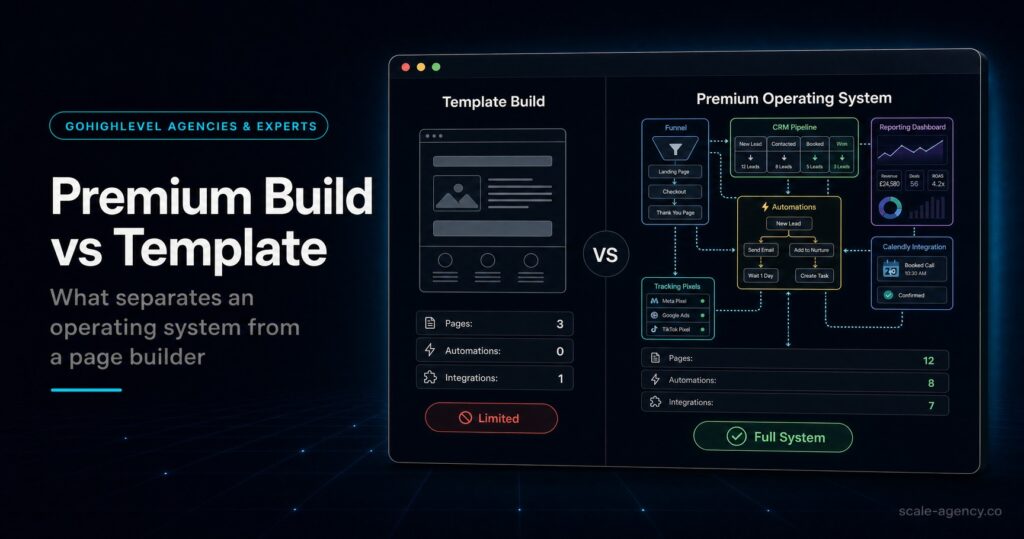
In this guide, we’ll cover:
A practical hiring filter for business owners who need a premium GoHighLevel build, not a template that looks finished while leaking leads.
The CRM Model Comes First
Why premium builds define fields, tags, lifecycle stages and ownership rules before anyone starts adding workflows.
Stages Must Enforce Action
How strong GoHighLevel experts design stages around contact, booking, show rate, proposal movement and next action.
Routing Protects The First Five Minutes
Where revenue leaks: no owner, weak notifications, no escalation, duplicate messages and slow first attempts.
Attribution Has To Survive The Build
What to check before hiring: UTM capture, source fields, dashboard definitions and closed revenue visibility.
Your Team Needs A System It Can Run
How QA, documentation and change control stop a premium build becoming messy again after launch.
“The right GoHighLevel expert is not hired to add more automation. They are hired to protect the commercial path from lead capture to revenue.”
Quick Answer
When you hire a GoHighLevel expert for a premium build, the non-negotiables are CRM structure, pipeline logic, routing, speed-to-lead, attribution, maintainable automation, reporting and handover. A good expert does not just install workflows. They design a revenue system your sales team can trust. Use the pre-migration implementation checklist to test whether those non-negotiables are defined before the build starts.
Before the sales call, use the GoHighLevel expert questions before hiring checklist to test whether the person can explain those choices clearly.TL;DR
- DIY is acceptable for a small test, but it becomes risky when paid traffic, sales reps or high-ticket offers depend on the setup.
- A template can make pages look finished while leaving routing, attribution, workflow QA and reporting weak.
- Before you hire, ask how the expert will define lifecycle stages, source tracking, owner rules and stop conditions.
- A premium build should improve lead quality, speed-to-lead, booked calls, show rate, close rate and revenue visibility.
- Use the GoHighLevel expert checklist as the parent guide, then use this page to pressure-test the build standards.
Decision Table: DIY Vs Freelancer Vs Premium GoHighLevel Expert Build
If the build only supports a small test, simplicity matters. However, if the account handles paid leads, booked calls, sales reps or attribution, the better question is not “Can someone build this?” It is “Can the system keep working when volume increases?”
| Route | Best Fit | Main Risk | Better Next Step |
|---|---|---|---|
| DIY setup | Low lead volume, one owner, simple offer | Slow QA, missed edge cases and unclear reporting | Use a narrow checklist and avoid complex automations. |
| Template or cheap freelancer | Basic landing pages, one calendar, simple nurture | Looks finished but misses sales logic, ownership and attribution | Ask for proof of workflow QA, data model and handover support. |
| SCALE GoHighLevel expert build | Paid traffic, sales team, multiple sources, high-ticket offer | Higher upfront cost, but lower operating risk | Book a Growth Systems Audit. |
Who Is This For?
- Local service businesses using Google or Meta leads and needing faster follow-up.
- Founders moving from spreadsheets, HubSpot, Pipedrive or ActiveCampaign into GoHighLevel.
- Coaches, consultants and high-ticket providers that sell through booked calls.
- Agencies standardising client pipelines, calendars, workflows and reporting.
- Operators who cannot explain which channel produced booked calls and revenue.
If the build is for a local-service sales motion, use the local business GoHighLevel expert guide to check the edge cases that generic templates usually miss.
Non-Negotiable 1: A Real CRM Data Model
Most weak builds fail because GoHighLevel is treated like a message tool, not the operating system for the customer journey. A premium build defines what a lead is, how it becomes an opportunity, what changes when a call is booked, and how the contact record should support sales decisions.
First, check the difference between custom fields and tags. For example, stable attributes such as service type, location, campaign, budget range and source should not be scattered across random tags. Meanwhile, tags can support segmentation and temporary states, but they should not replace a data model.
To diagnose this, open 20 recent opportunities. If source, owner, offer, stage, close date and value are missing or inconsistent, the CRM is not ready to support scale. A strong expert will simplify the model before adding more automations.
Non-Negotiable 2: Pipeline Stages That Match Sales Motion
Pipeline stages are not decoration. Instead, they should show the next commercial action. If the stages are vague, your team will work from inboxes and memory. As a result, reporting becomes a story rather than a management tool.
A premium setup usually includes stages such as New Lead, Attempting Contact, Contacted Not Booked, Booked, Showed, Proposal Sent, Won, Lost, Unqualified and Nurture. The exact labels depend on the business, but every stage needs an owner, a reason to exist and a next action.
Before hiring, ask the expert how they would measure contact rate, booking rate, show rate, close rate and stage aging. If they cannot answer without hiding behind a snapshot, they are probably not thinking commercially enough.
Non-Negotiable 3: Speed-To-Lead And Routing Logic
The first few minutes after enquiry are where many GoHighLevel builds leak revenue. The issue is rarely the form itself. More often, nobody owns the lead, the notification is weak, the calendar flow is unclear or the automation keeps messaging after a booking.
Therefore, strong routing should answer the practical questions in one clear rule set: who gets the lead, what happens after hours, what happens if the assigned rep does nothing, which message fires first and which workflow stops after a reply, booking, no-show or won deal.
For a deeper support guide on this exact issue, read the hire a GoHighLevel expert speed-to-lead checklist. That page is a useful sibling guide for judging whether the build protects response time.
Non-Negotiable 4: Attribution You Can Trust
If the system cannot show which source created a booked call, it cannot help you scale spend confidently. GoHighLevel can support source tracking, but only when forms, funnels, calendars and calls pass source data into the right fields.
At minimum, the build should define UTM standards, hidden fields, landing page capture, call tracking approach, opportunity source inheritance and reporting definitions. Otherwise, dashboards may look clean while still hiding the truth.
Before committing, ask the expert to explain how first-touch source, latest source, booked call source and closed revenue source will be handled. In practice, the answer should be specific. In other words, attribution is not a plugin. It is a system of rules.
Non-Negotiable 5: Maintainable Automation Architecture
Automation should reduce operational drag, not create a fragile maze. However, a weak account often has several workflows firing from the same trigger, no naming conventions and no suppression logic. As a result, prospects receive duplicate messages or continue getting booking reminders after they have already booked.
A premium expert separates workflows into modules: intake, assignment, speed-to-lead, booking reminders, no-show recovery, post-call follow-up, long-term nurture and customer onboarding. In practice, each module needs entry rules, exit rules and QA notes.
Before hiring, ask how the expert tests workflows. For example, they should use test contacts, real form submissions, message logs and stage movement checks. If testing is just “we looked at it,” the build is not premium.
Non-Negotiable 6: Reporting That Matches Decisions
A premium build does not stop at “leads.” It should help the owner decide what to fix next. That means reporting needs to show contact rate, booking rate, show rate, close rate, revenue by source, campaign quality and pipeline movement.
Therefore, the dashboard should not be built before the data model. First, define fields and stage rules. Next, verify that records populate correctly. Finally, build reporting around the decisions the business makes every week.
SCALE builds GoHighLevel CRM, funnel, and automation systems for businesses that need better lead quality, faster follow-up, and clearer attribution.
Premium Build Checklist
- Documented lifecycle definitions and pipeline stages.
- Clean custom field, tag and naming convention rules.
- Lead source tracking from form, funnel, call and calendar routes.
- Owner assignment, tasks, alerts and escalation rules.
- Separate workflow modules with stop conditions and suppression logic.
- QA test plan covering every intake path and booking outcome.
- Reporting definitions for leads, booked calls, shows, won deals and revenue.
- Handover notes, admin rules and change-control process.
Common Problems And How To Fix Them
| Problem | What It Usually Means | Fix | Metric To Watch |
|---|---|---|---|
| Leads Are Slow To Respond | No owner, weak notification, missing escalation | Add assignment, task creation and manager alert rules | Time to first attempt |
| Duplicate Messages Fire | Overlapping triggers and no stop conditions | Split workflows into modules and add suppression logic | Opt-out and complaint rate |
| Source Is Blank | UTMs and landing page data are not captured consistently | Add hidden fields and map source into opportunity records | Opportunities with known source |
| Pipeline Looks Busy But Sales Are Flat | Stages do not match real action or deal values are unreliable | Redesign stages around contact, booking, show and close movement | Stage aging and close rate |
| Team Ignores The CRM | The system adds admin work instead of making sales easier | Simplify fields, clarify ownership and train around the next action | Weekly opportunity update rate |
How To Interview A GoHighLevel Expert
Most importantly, good interview questions reveal whether the expert thinks in features or systems. Ask these before you sign:
- How will you define lifecycle stages and required fields?
- How will you prevent duplicate messages when multiple triggers apply?
- Which source data rules keep forms, funnels, calendars and calls connected?
- If a hot lead is not contacted quickly, what happens next?
- Which dashboards will tell us whether the build improved revenue?
- Which QA evidence and handover documentation will we receive?
If the answers are vague, slow down. A premium build should be easy to explain before it is built. That is the difference between buying tasks and installing an operating system.
What This Means For Revenue
The commercial upside is not theoretical. In practice, cleaner intake improves lead quality. Then faster follow-up improves contact rate. Moreover, reminders improve show rate. Stage discipline improves forecasting. Finally, source tracking shows which campaigns deserve more budget.
That is why hiring decisions matter. A cheap build can look economical on day one and expensive by month three if it causes missed leads, confusing automations, bad data and weak reporting.
For high-ticket and local-service businesses, one extra booked call can cover a meaningful part of the build. One repeated routing failure can waste weeks of ad spend and sales time. The first few minutes after enquiry deserve senior-level design.
Want to learn more?
Watch the video below:
Conclusion
Hiring a GoHighLevel expert for a premium build is a risk-control decision, not just a software decision. Before you approve the build, confirm the CRM model, routing, attribution, QA and handover are clear enough for paid traffic and sales-team follow-up.
FAQs
What Are The Non-Negotiables When Hiring A GoHighLevel Expert?
The non-negotiables are CRM data structure, pipeline logic, speed-to-lead routing, attribution, maintainable automations, reporting, QA and handover documentation. If those pieces are unclear, the build may look finished but still leak revenue.
When Should I Hire A GoHighLevel Expert Instead Of Doing It Myself?
Hire an expert when paid traffic, sales reps, multiple lead sources, high-ticket offers or revenue reporting depend on the system working correctly. DIY is fine for a narrow test, but it becomes risky when missed leads affect profit.
Can I Use A GoHighLevel Snapshot First And Upgrade Later?
You can use a snapshot for a small test. However, scaling usually needs custom routing, fields, attribution and workflow QA. In many cases, “upgrade later” becomes a rebuild because the original structure was not designed for the real sales motion.
What Should A Premium GoHighLevel Handover Include?
It should include pipeline definitions, field and tag taxonomy, workflow list, QA results, source tracking rules, dashboard notes, SOPs, admin permissions and training. A premium handover makes the system easier to manage after launch.
Should A GoHighLevel Expert Understand Funnels And Ads?
They do not need to manage every ad campaign, but they must understand how funnels and ads affect CRM data, lead quality, follow-up and attribution. Otherwise, the system cannot explain which sources create booked calls and revenue.
