
In this guide, we’ll cover:
A revenue-first pre-migration checklist for business owners moving CRM, funnels, follow-up, calendars and reporting into GoHighLevel without breaking the sales operation.
When the implementation plan reaches customer data, pair the pre-migration checklist with the GoHighLevel CRM migration data transfer checklist so fields, tags, pipelines and automations are mapped before import.
SCALE builds GoHighLevel CRM, funnel, and automation systems for businesses that need better lead quality, faster follow-up, and clearer attribution.
Every Revenue-Critical Path Gets Mapped First
Why implementation starts before migration: forms, calls, ads, calendars and sales handoffs need to be documented before anything is imported.
Fields And Stages Define How The System Thinks
Where migrations fail: contacts are moved before lead source, lifecycle stage, owner, service type and sales outcome rules are defined.
Capture, Routing And Calendar Logic Must Survive Cutover
How to protect pipeline: every entry point needs a clean destination, owner, response path, appointment rule and fallback process.
Workflows Need Trigger And Stop Rules Before Launch
What strong builds prevent: duplicate messages, dead leads, missed appointments and automations that keep firing after a prospect replies or books.
Attribution Has To Explain Revenue, Not Just Activity
What owners need to see: source, campaign, booked call, show, win and revenue data that survives from first click to closed-won.
“A GoHighLevel implementation is only successful when CRM structure, automation, lead follow-up, attribution and team ownership protect the revenue path during migration.”
Quick Answer
A successful GoHighLevel implementation starts before migration. Business owners should map lead sources, pipeline stages, data fields, routing rules, calendars, automations, reporting and cutover risk before importing contacts or switching forms. However, if this checklist is skipped, GoHighLevel can look finished while lead follow-up, attribution and sales visibility quietly break.
TL;DR
- Do not migrate everything first. Migrate the flows that protect revenue: capture, routing, speed-to-lead, booking, pipeline and reporting.
- Define the CRM data model before imports: fields, tags, stages, owners, lead source, lifecycle status and loss reasons.
- Audit every form, call source, calendar and automation trigger. Usually, most implementation failures are missed edge cases, not missing features.
- Set attribution rules before paid traffic keeps running. First-touch, UTMs, campaign names and opportunity source should be consistent.
- Run a controlled cutover with QA, test leads and a fallback plan. A big bang switch is rarely worth the operating risk.
- SCALE builds GoHighLevel CRM, funnel and automation systems for businesses that need better lead quality, faster follow-up and clearer attribution.
Decision Table: Which Implementation Path Fits?
| Path | Best Fit | Main Risk | What To Check |
|---|---|---|---|
| DIY implementation | One offer, one owner, low lead volume and time to test every workflow. | Slow QA, unclear reporting and automations that break when edge cases appear. | Can one person own specs, imports, testing, reporting and post-launch fixes? |
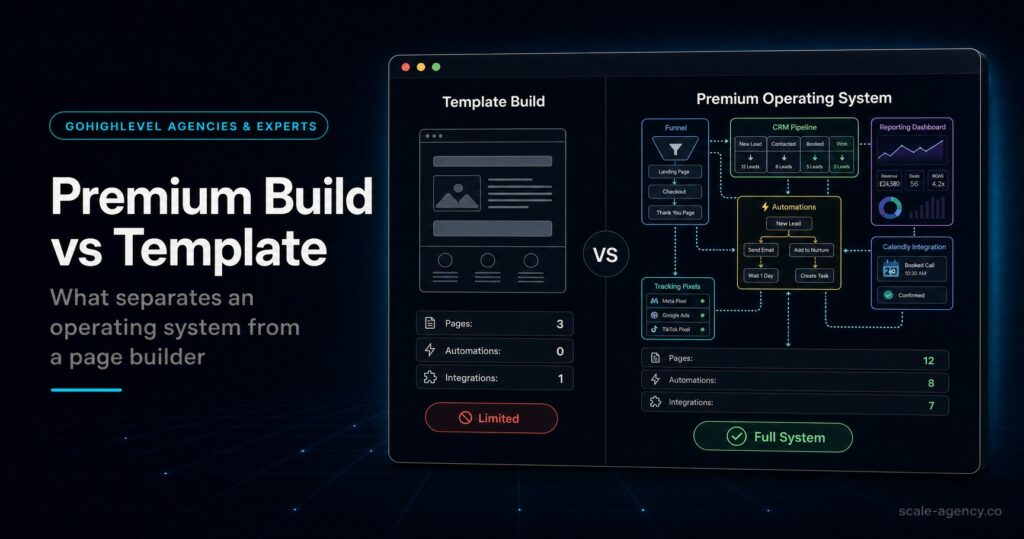
| Template or snapshot build | Simple nurture, one pipeline, low ad spend and a very basic sales process. | Looks finished but misses routing, source tracking, stop conditions and sales handoff logic. | Does the template match your actual lead flow without heavy rework? |
| Specialist GoHighLevel implementation | Paid traffic, booked calls, multiple lead sources, sales reps, local teams or high-ticket services. | Higher upfront cost, but lower operating risk when revenue depends on follow-up and visibility. | Will the expert map data, pipeline, routing, automations, QA, attribution and cutover? |
Who Is This For?
- Business owners moving from HubSpot, Pipedrive, spreadsheets, Calendly, Mailchimp, Zapier or disconnected tools into GoHighLevel.
- Local service businesses that rely on speed-to-lead, missed-call recovery, booked calls, sales reps and clean source reporting.
- Agencies building GoHighLevel for clients who need repeatable account structure, snapshots, QA and handover discipline.
- High-ticket providers where one missed lead, wrong calendar route or broken follow-up sequence can cost more than the implementation.
- Operators who want an expert GoHighLevel setup that turns the CRM into a revenue operating system, not just installed software.
Pre-Migration Means Designing The Revenue System First
Usually, weak GoHighLevel implementations start with the wrong question: “How do we move everything across?” The stronger question is: “Which parts of the current system create or protect revenue, and what cannot break during cutover?” That changes the entire build. Contacts matter, but the paths those contacts travel through matter more.
Before importing data, you need a written implementation map. Also, it should cover lead sources, forms, calls, calendars, pipelines, automations, fields, owner rules, handoff points, reporting outputs and launch dependencies. Therefore, without that map, GoHighLevel becomes another place where messy data lives.
Because of that, SCALE’s approach is different from a basic setup. As a SCALE GoHighLevel agency and implementation partner, the priority is not a tidy dashboard. Instead, the priority is a system that makes lead quality, first response, appointment flow, pipeline movement and attribution easier to manage.
If the implementation choice is really about the delivery model, use the GoHighLevel agency model guide to decide whether DIY, guided setup or done-for-you ownership fits the revenue risk.
What A Strong Implementation Map Includes
- Next, lead sources: website forms, landing pages, Meta Ads, Google Ads, calls, chat, referrals, email and manual entry.
- Destinations: contact record, opportunity, pipeline, stage, owner, tag, custom field and notification.
- Follow-up rules: first response, second attempt, appointment reminders, no-show recovery and long-term nurture.
- Stop conditions: reply, booking, reschedule, no-show, won, lost, unsubscribe, complaint and manual intervention.
- In addition, reporting requirements: lead source, campaign, contact rate, booking rate, show rate, win rate, revenue and cost per acquisition.
The GoHighLevel Pre-Migration Checklist
Before the build starts, use this checklist. As a result, it protects the work that affects bookings, follow-up and reporting. In other words, the goal is not to over-document everything. Instead, the goal is to make sure the implementation cannot accidentally break the parts of the business that create revenue.
| Area | Questions To Answer | Why It Matters | Required Output |
|---|---|---|---|
| Lead sources | Where do leads enter now? Which source creates the most valuable enquiries? | Missing sources create orphan leads and broken attribution. | Lead source inventory with URLs, forms, numbers and campaigns. |
| CRM data | Which fields are required for sales, routing, reporting and compliance? | Bad imports create duplicate contacts and unusable dashboards. | Field map, tag rules, lifecycle stages and dedupe rules. |
| Pipeline | What stages match the real sales process from enquiry to closed-won? | Vague stages make forecasting and rep accountability weak. | Stage definitions, entry rules, exit rules and loss reasons. |
| Routing | Who owns each lead by service, location, source, urgency or calendar? | Unassigned leads are the fastest way to waste ad spend. | Owner rules, task rules, notification rules and escalation logic. |
| Automation | What starts each workflow, what stops it and what happens after a reply? | Duplicate or stale automations damage trust and deliverability. | Trigger map, stop conditions, test scenarios and QA checklist. |
| Reporting | Which metrics will the owner review daily, weekly and monthly? | Without reporting standards, attribution becomes opinion. | Dashboard spec and conversion event definitions. |
Data Model: Fields, Tags And Stages Before Import
However, a clean import is not just a CSV upload. Instead, it is a decision about how the business will understand its pipeline after migration. However, if fields, tags and lifecycle stages are not defined first, you can import thousands of contacts and still have no useful operating view.
First, start with the minimum data that sales and marketing need to make decisions. For most businesses, that means name, email, phone, source, campaign, service interest, location, lifecycle stage, owner, appointment status, deal value and outcome. Extra fields can come later. Required fields should be governed from day one.
Next, for duplicates, decide the match logic before import. Meanwhile, email alone is not always enough. Meanwhile, phone formats vary. Also, names are messy. A clean migration usually needs sample testing, normalization and batch validation before the full import goes live.
Data Model Checks
- Can you filter new leads from the last seven days that have no contact attempt?
- Can you report booked, showed, quoted, won and lost by source?
- Reps should understand what each stage means without asking an admin.
- First-touch source should be separate from latest campaign touch.
- Opt-in status and unsubscribe handling need to survive the migration.
Lead Flow: Forms, Calls, Calendars And Ownership
For example, the most expensive GoHighLevel implementation mistakes usually happen around lead flow. For example, a form can appear to work while sending the lead to the wrong pipeline. Meanwhile, a calendar can accept bookings while skipping reminders. In another common failure, a missed-call workflow sends a text while no human owner is assigned. These are operational failures, not cosmetic issues.
Then, run real test leads through every entry point before cutover. First, submit a website form, a landing page form, a Meta lead form, a missed call, an inbound call, a chat enquiry, a direct calendar booking and a manually created lead. Then check whether each path creates the right contact, source, owner, opportunity, stage, task, notification and follow-up sequence.
After that, the speed-to-lead logic should also match urgency. For example, some leads need an immediate call task. Meanwhile, others need a qualification step. Finally, after-hours enquiries need a different handling rule again. However, if every path receives the same automation, the system is treating business context as noise.
Automation: Trigger Rules, Stop Conditions And QA
Meanwhile, GoHighLevel automation is powerful because it can join CRM, calendars, SMS, email, pipelines and tasks. Because of that, the same power creates risk. However, if workflows are not modular and testable, you can create duplicate messages, broken reminders, stale nurture, ignored replies and weak handoffs.
Because of that, every workflow needs a written rule: what starts it, what must be true before it runs, what stops it, what creates a human task and what changes pipeline stage. As a result, this is especially important around replies and bookings. Once a lead replies or books, automations should adjust. They should not keep acting like the lead is cold.
| Workflow Type | Trigger | Stop Condition | QA Test |
|---|---|---|---|
| New lead speed-to-lead | Form, call, chat or ad lead creates opportunity. | Reply, booking, manual disqualification or owner override. | Submit leads from every source and time the first response. |
| Appointment reminders | Appointment booked or rescheduled. | Appointment cancelled, completed, no-showed or moved. | Book, reschedule and cancel test appointments in multiple time zones. |
| No-show recovery | Appointment marked no-show. | Rebooked, replied, lost or manually stopped. | Mark a test booking no-show and verify the recovery path. |
| Long-term nurture | Qualified but not ready or proposal not accepted. | Reply, booking, won, lost or unsubscribe. | Check messages, timing, personalization and unsubscribe handling. |
Tracking And Reporting: Decide Your Truth Before Cutover
Finally, attribution has to be designed before the new system goes live. However, if lead source is inconsistent, every later dashboard becomes a negotiation. As a result, marketing will say one thing, sales will say another, and the owner will not know which campaign deserves budget.
To prevent that, set the standard for UTMs, lead source, campaign names, first-touch, latest touch and opportunity source. Next, decide what the sales team must update manually and what the system should update automatically. Then build dashboards that answer operational questions: are leads being contacted, are appointments being booked, are people showing, are deals moving, and which sources create revenue?
For paid traffic, reporting should connect CRM outcomes to acquisition decisions. For example, a campaign with cheap leads but poor booked-call quality should not look like a winner. By contrast, a channel with fewer leads but higher show rate and higher close rate may deserve more budget.
Migration And Cutover Process
- Define commercial success: response-time targets, booking targets, reporting needs and must-not-break flows.
- Inventory the current system: forms, pages, phone numbers, calendars, domains, automations, integrations and spreadsheets.
- Design the account structure: users, permissions, pipelines, fields, tags, custom values and naming conventions.
- Build the CRM foundation: required fields, lifecycle stages, opportunity stages, loss reasons and owner rules.
- Connect lead capture: website forms, landing pages, calls, chat, calendar booking and manual lead entry.
- Build workflows modularly: speed-to-lead, reminders, no-show recovery, nurture, reactivation and internal alerts.
- Set tracking standards: UTMs, lead source, campaign names, opportunity source and dashboard definitions.
- Test in batches: import a small sample, validate records, run test leads and fix errors before the full migration.
- Run cutover deliberately: switch critical forms and calendars with a rollback plan, then monitor live leads closely.
- Train the team: make pipeline ownership, task use and stage rules part of the sales process, not optional admin.
Common Problems And How To Fix Them
| Problem | What It Usually Means | Fix | Metric To Watch |
|---|---|---|---|
| Leads arrive but nobody follows up | No owner rule, no task, weak notification logic or after-hours gap. | Add assignment, task creation, escalation and SLA reminders. | Time to first response and contact rate. |
| Pipeline stages mean nothing | Stages are software defaults instead of sales milestones. | Define entry and exit criteria for each stage and require next action. | Stage aging and opportunities without next step. |
| Automations double-message prospects | Duplicate triggers or missing stop conditions. | Separate workflows and stop them on reply, booking, stage change or opt-out. | Reply rate, opt-out rate and complaints. |
| Booked calls fall after migration | Calendar, reminder, routing or time-zone logic changed during cutover. | Re-test every booking path, reminder and owner notification. | Booking rate and show rate. |
| Source reporting is unreliable | UTMs are not captured, source is overwritten or names are inconsistent. | Store first-touch, preserve latest touch and standardize campaign naming. | Percent of opportunities with known source. |
What This Means For Revenue
Ultimately, a GoHighLevel implementation should reduce leakage between lead generation and booked revenue. As a result, faster response increases the chance of a real conversation. Also, better routing reduces dropped leads. Cleaner calendars improve show rate. Stronger stage discipline gives the owner a view of what is stuck. Finally, better attribution shows which sources deserve more budget.
Therefore, the upside is especially clear for businesses with paid traffic or high-ticket services. For example, one additional qualified booking can cover a meaningful part of the build. However, one broken routing rule can waste weeks of ad spend and sales time. Because of that, is why implementation quality should be judged by operational clarity, not by how quickly a template appears in the account.
If this article is your starting point, also read the SCALE guide on hiring a GoHighLevel expert for speed-to-lead. Because of that, speed-to-lead is one of the first places a migration either creates revenue lift or exposes a broken build.
Conclusion
In practice, SCALE treats GoHighLevel implementation as revenue infrastructure. Therefore, the system needs to connect CRM, funnels, automations, lead follow-up, calendars and attribution so business owners can see what is happening from first enquiry to closed-won.
That is why a SCALE GoHighLevel expert will usually ask more commercial questions before touching the build. For example, what happens when a lead calls? For example, if a lead books and then no-shows, which recovery path starts? Also, the same conversation should define which source gets credit, who owns the lead, what sales should do next and which dashboard decides whether spend scales or stops.
Therefore, if those answers are unclear, the implementation is not ready. The work begins with the operating model, then GoHighLevel is configured to enforce it.
FAQs
What should I migrate first into GoHighLevel?
Migrate revenue-critical flows first: lead capture, routing, speed-to-lead follow-up, calendars, appointment reminders, pipeline stages and reporting. Meanwhile, contact imports should come after the CRM structure and workflow logic are tested.
How long does a GoHighLevel implementation take?
Usually, a simple one-location business can be implemented in weeks if the spec is clear. Multi-location, multiple pipelines, heavy automation or complex reporting needs take longer because QA and cutover planning matter more than page-building speed.
Will I lose attribution data during migration?
Yes, you can lose attribution if fields are not mapped and source rules are not defined. Before migration, decide how UTMs, first-touch source, latest touch and opportunity source are stored before importing data or switching forms.
Should I use a template or hire a GoHighLevel expert?
Usually, use a template only when the sales process is very simple and someone internal can QA it. However, hire a GoHighLevel expert when paid traffic, booked calls, sales reps, attribution or missed-lead risk directly affects revenue.
What makes a GoHighLevel implementation fail?
Most common failure points are unclear data structure, vague pipeline stages, missing owner rules, duplicate automation triggers, weak stop conditions, broken calendar logic and reporting that cannot connect source to revenue.
What should a business owner ask before implementation starts?
Before hiring, ask how the implementation will map lead sources, data fields, owner rules, pipeline stages, automation stop conditions, QA test cases, attribution and the cutover plan. However, if those answers are vague, the build is not ready.
