
What You Will Learn
A system-first guide to deciding what the Go High Level funnel builder should replace, wiring every response into the CRM and validating the migration before traffic moves.
What Does Replacing The Stack Actually Include?
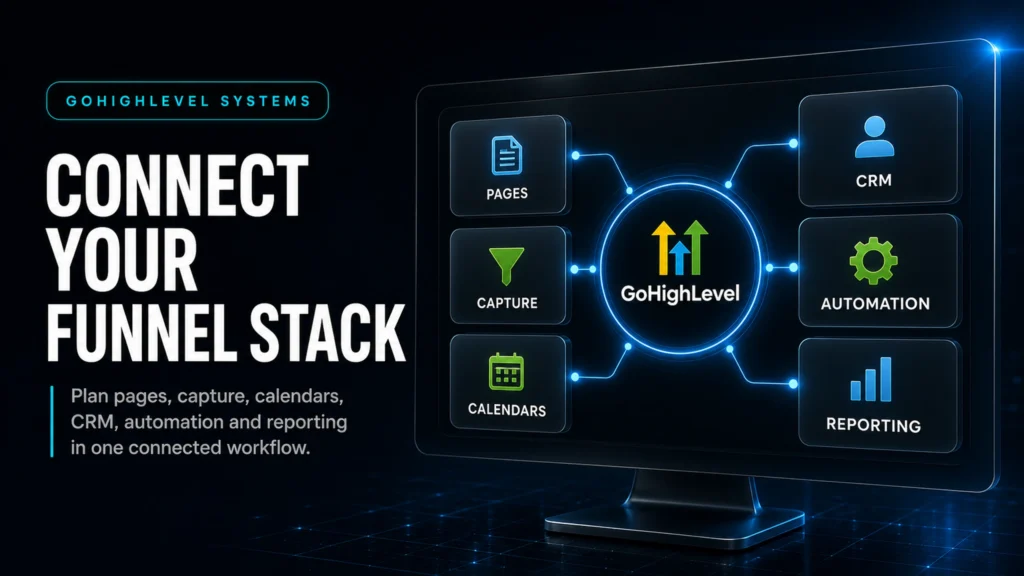
Define how pages, capture, calendars, CRM, automation and reporting share one lead record before deciding which tools can move.
Which Migration Route Fits The Operational Risk?
Choose DIY, template-led or specialist implementation according to routing depth, team capacity, tracking needs and revenue dependence.
How Does Every Response Reach The Sales Process?
Connect the form or calendar to the contact, opportunity, owner, SLA and follow-up while retaining the original source.
What Must Pass Before Traffic Moves?
Test capture, routing, booking, follow-up and attribution end to end, then document cutover ownership and the rollback path.
Quick Answer
Go High Level funnel builder pages can consolidate forms, calendars, CRM capture, follow-up automation and basic analytics in one system. The practical value is a shorter lead path, fewer integration handoffs and clearer attribution. The setup works best when the funnel and CRM are designed together rather than as separate projects.
TL;DR
- If your current stack relies on several tools stitched together, a key risk is a silent failure across forms, webhooks, calendar sync or tracking.
- GoHighLevel’s funnel builder is most valuable when it’s paired with pipelines, automations, and lead routing—not when it’s used like a standalone page builder.
- Migrations are more likely to create gaps when pages move before the CRM is defined. Build the pipeline, fields and follow-up rules before you switch traffic.
- For local services and high-ticket lead generation, useful KPIs include speed-to-lead and contact rate alongside page conversion rate.
- If you can’t answer “Which source produced this booked call?” you don’t have attribution—you have vibes.
- Use a staged rollout: mirror funnel, validate tracking, run parallel, then cut over.
- If revenue depends on the funnel, don’t template your operations. Template pages are fine; templating routing and follow-up is where money gets lost.
Three Ways To Replace Your Funnel + CRM Stack
| Option | Best Fit | Risk | Speed | Revenue Visibility | When To Choose It |
|---|---|---|---|---|---|
| DIY Build In GoHighLevel | Operators with time, process discipline, and a simple offer | Medium to high (missed edge cases, weak routing, inconsistent tracking) | Medium | Low to medium unless you’re strong on tracking + pipelines | When you have one offer, one calendar, one sales motion, and you can test carefully before scaling spend |
| Template-Led Implementation | Businesses that only need basic pages and a simple form-to-email flow | Depends on routing depth, QA and handover quality | Usually quicker for a narrow scope | Limited unless source tracking and reporting are included | When you’re validating an offer and can accept a simpler operating setup before a later systems phase |
| Specialist GoHighLevel Systems Build | Businesses using paid traffic or depending on consistent lead handling | Depends on scope, implementation quality and handover | Structured rollout with defined QA gates | Designed around pipeline stages, source tracking and conversion points | When routing, follow-up and reporting need to be designed as one operating system |
Who This Is For
- Local service businesses (home services, medical, legal, dental) needing faster lead response and cleaner booking flow
- Coaches, consultants, and high-ticket service providers running calls-based funnels
- Agencies that want one platform to deploy funnels + CRM + automations for multiple clients
- Founders tired of paying for overlapping tools (page builder + forms + scheduler + CRM + email + SMS)
- Teams losing leads between “form submit” and “sales actually contacted them”
- Operators who want attribution clarity across Meta Ads, Google Ads, and organic
- Businesses planning to scale ad spend and needing a stable revenue system first
What “Replacing Your Entire Stack” Actually Means
Most businesses say they want “one tool” but what they really want is one source of truth. Replacing your stack with the Go High Level funnel builder is not just swapping ClickFunnels for a different page editor. It’s consolidating the entire lead-to-revenue path so fewer things can break.
A Typical Fragmented Funnel Stack
- Landing pages: ClickFunnels / Leadpages / WordPress builder
- Forms: Typeform / Jotform / native form plugin
- Scheduling: Calendly / Acuity
- CRM: HubSpot / Pipedrive / spreadsheets
- Automation: ActiveCampaign / Mailchimp + Zapier
- SMS: Twilio add-on or separate tool
- Tracking: GA4 + pixels + a call tracking tool + “hope”
As a result, each handoff creates another point to monitor. A webhook can change, an automation can hit a task limit, a calendar can stop syncing, a field name can change, or a duplicated page can lose its UTM capture.
What GoHighLevel Consolidates (When Built Properly)
- Funnel pages and landing pages
- Forms and surveys (lead capture)
- Calendars and booking flows
- CRM contact record as the system of record
- Pipelines and opportunity stages (sales workflow)
- Automations (email, SMS, tasks, internal notifications)
- Basic funnel and site analytics inside HighLevel
GoHighLevel has official documentation for launching funnels and reviewing analytics, but a live page is only one part of a reliable lead system. The operational wiring determines how capture, routing, follow-up and reporting work together. For reference: Getting started: launch a funnel and how to use site and funnel analytics in HighLevel.
What the Go High Level Funnel Builder Can Replace
As an operator, you don’t buy a funnel builder for “features.” You buy it to reduce lead leakage, shorten time-to-contact, and improve revenue visibility. That’s the real replacement value.
Where It Wins For Most Service Businesses
1) Fewer integration points. When the page, form, calendar, CRM, and automation live together, you remove entire categories of failure. That alone can justify the switch if you run paid traffic.
2) A defined speed-to-lead workflow. A configured GoHighLevel workflow can acknowledge the enquiry, assign ownership, create a task and update the opportunity stage after a form submission.
3) Cleaner handoff between marketing and sales. The funnel is not “done” until the pipeline stage changes and the sales team has a next action with an SLA.
4) One contact record with source context. If UTMs, landing page, and form data are captured into the contact record, you can actually answer: “What produced this booked call?”
Where Businesses Get Burned
1) Treating it like a page builder only. If you rebuild pages but keep your old CRM and follow-up, you keep the same leaks—just in a new UI.
2) Over-customizing the funnel before validating the workflow. Fancy pages don’t fix broken routing, weak qualification, or slow follow-up.
3) No tracking rules. If you don’t standardize UTM capture, source mapping, and stage definitions, your reporting becomes noise.
The Stack Replacement Map: What To Replace First (And Why)
If you want to replace your stack without downtime, sequence matters. The goal is to protect lead flow while you migrate the system of record.
Phase 1: Replace The System Of Record (CRM + Pipeline)
First, before you touch pages, define how a lead becomes revenue inside GoHighLevel:
- Custom fields: what you must capture (service type, budget band, location, urgency, etc.)
- Pipeline stages: what “progress” means (not what sounds nice)
- Ownership rules: who gets assigned and when
- SLAs: what “fast follow-up” means in minutes, not intentions
A weak setup is a single pipeline with vague stages like “New Lead” and “Contacted” and no definition of what moves a lead forward. A strong setup has stage entry/exit rules and automations tied to those rules.

Phase 2: Replace Capture (Forms + Calendars)
Most lead loss happens here. Your form and calendar are not “front-end.” They are the first step of your sales process.
- Form fields should map cleanly to contact fields (no duplicates, no mismatched naming)
- Calendar should reflect real capacity and qualification (don’t let unqualified leads self-book into prime slots)
- Confirmation and reminders should reduce no-shows (SMS + email + internal tasking)

Phase 3: Replace Pages (Funnels + Landing Pages)
Now you rebuild pages with the CRM logic already defined. This is where the Go High Level funnel builder becomes a revenue tool, not a design exercise.
Commercially, the page’s job is to create the right action: submit, book, or start a conversation. If your offer requires sales qualification, optimize for qualified conversations, not raw form volume.
Phase 4: Replace Automation (Follow-Up + Nurture)
Next, build automations around states and outcomes:
- New lead: immediate response + assignment + task
- No answer: timed retries + voicemail drop (if used) + reschedule prompts
- Booked: confirmations + reminders + pre-call intake
- No-show: recovery sequence + rebooking link
- Closed won/lost: post-sale onboarding or reactivation logic
Phase 5: Replace Reporting (Attribution + Pipeline Visibility)
If you can’t see lead source, stage conversion, and time-to-first-contact, you can’t manage performance. Therefore, you can only guess and argue.
What A Strong Go High Level Funnel Builder Setup Looks Like
Here’s the operator-level definition of “strong.” Not pretty. Not complex. Strong means it holds up under volume, staff turnover, and ad scaling.
Strong Funnel Architecture (Simple, Not Minimal)
- One primary conversion action per page (book, call, form, or checkout)
- Message match from ad to headline to CTA
- Proof placed near the first CTA (not buried)
- Objection handling aligned to your sales call reality (pricing, timing, eligibility)
- Thank-you page that continues the process (what happens next, what to prepare, how to reschedule)
Strong CRM Wiring (Where Most Builds Fail)
- Every lead creates/updates a contact record (no duplicates from email/phone mismatch)
- Every lead creates an opportunity in the correct pipeline
- Opportunity stage is set based on action (submitted vs booked vs qualified)
- Owner assignment is deterministic (round robin, territory, service line, or calendar owner)
- Internal notifications include context (source, page, form answers, last touch)

Strong Follow-Up Logic (Speed + Persistence Without Spam)
- Prompt automated acknowledgement for high-intent leads, using SMS or email where appropriate
- Call task created instantly with an SLA timer
- Retry logic based on outcomes (answered, no answer, wrong number)
- Stop conditions (when they book, reply, or are marked unqualified)
- Separate nurture for “not now” leads (not the same as new lead follow-up)
The Implementation Process
Build And Connect The Core System
- Define The Sales Outcome And Constraints
Decide what the funnel must produce (booked calls, quote requests, paid consults) and what constraints exist (service area, capacity, minimum deal size, eligibility). This prevents you from building a funnel that “converts” but wastes sales time.
- Design Your CRM Data Model
Create the custom fields you need, standardize naming, and decide what is required vs optional. If you don’t define fields up front, you’ll end up with duplicate fields and unusable reporting.
- Build The Pipeline With Stage Definitions
Create pipeline stages that reflect real sales steps (example: New Lead → Attempting Contact → Conversation Started → Booked → Showed → Proposal Sent → Closed Won/Lost). Define what triggers stage movement and who owns each stage.
- Set Up Lead Capture (Forms/Surveys) With Clean Mapping
Build forms that map to your fields and include hidden fields for UTMs and landing page URL where appropriate. Decide how you’ll handle partial submissions and duplicate contacts.
- Configure Calendars And Booking Rules
Set availability, buffers, minimum notice, and routing rules. If you have multiple reps, decide whether booking assigns the owner or whether assignment happens earlier based on territory/service type.
- Build The Funnel Pages In Go High Level Funnel Builder
Start with one core funnel: landing page → confirmation/thank-you page. Keep it tight. Ensure the CTA triggers the correct form or calendar and that the thank-you page sets expectations and reduces no-shows.
Validate, Launch And Hand Over The System
- Wire Automations Around States (Not “Send 7 Emails”)
Create workflows for: new lead response, missed call/no answer, booked confirmations, reminders, no-show recovery, and long-term nurture. Add stop conditions so leads don’t get hammered after they convert.
- Implement Lead Source Tracking Rules
Standardize UTM parameters, store them on the contact record, and map them to reporting fields. Decide what happens when UTMs are missing (fallback to referrer, landing page, or manual source).
- QA The Entire Journey End-To-End
Test like a buyer: submit forms, book calls, reschedule, reply to SMS, and check that the opportunity moves stages correctly. Confirm notifications, tasks, and ownership assignment.
- Run Parallel And Cut Over Traffic
Run the new funnel in parallel with the old one for a controlled period. Compare lead volume, contact rate, booking rate, and show rate. Cut over only when the new system is stable.
- Set Reporting Cadence And Handover
Document stage definitions, SLA expectations, and “what to do when” rules. Set a weekly review: lead source → stage conversion → speed-to-lead → booked/showed/closed.
Common Problems And How To Fix Them
| Problem | What It Usually Means | Commercial Risk | Fix | Metric To Watch |
|---|---|---|---|---|
| Leads Submit But No One Follows Up | No owner assignment, no task creation, or notifications not firing | High: you pay for leads you never contact | Create deterministic assignment rules + instant task + internal alert; add SLA timer | Time To First Attempt (minutes) |
| Calendar Bookings Don’t Create Opportunities | Booking event not mapped to pipeline/opportunity logic | High: booked calls disappear from sales workflow | Trigger opportunity creation on booking; move stage to Booked; assign owner | % Bookings With Opportunity Record |
| Duplicate Contacts Everywhere | Inconsistent identifiers (email vs phone), multiple forms, poor merge rules | Medium: messy reporting, double messaging, lost context | Standardize primary identifiers; enforce field formats; dedupe process | Duplicate Rate (weekly) |
| “Good” Conversion Rate But Bad Sales | Low-intent leads, weak qualification, wrong CTA, or misleading promise | High: sales time wasted, close rate drops | Add qualification step; tighten offer; adjust CTA to match sales motion | Qualified Lead Rate; Close Rate |
| UTMs Missing Or Unreliable | No hidden fields, inconsistent naming, redirects stripping parameters | High: you can’t scale spend confidently | Standardize UTM schema; capture on first touch; store on contact + opportunity | % Leads With Source/UTM Captured |
| No-Show Rate Is High | Weak confirmation flow, poor reminders, low commitment, wrong scheduling | Medium to high: calendar waste, CAC increases | Improve confirmation page; add SMS reminders; pre-call intake; reschedule link | Show Rate |
| Sales Team “Doesn’t Trust The CRM” | Stages don’t match reality; too many clicks; unclear next actions | High: pipeline becomes fiction, forecasting fails | Redesign stages; automate next steps; simplify views; train on definitions | % Opportunities Updated Weekly |
How To Decide If You Should Replace Your Stack Or Keep Parts Of It
“All-in-one” is not a religion. It’s a trade. The right decision depends on what’s currently costing you money: tool cost, integration risk, team adoption, or reporting blindness.
Keep Your Existing Stack If These Are True
- Your current CRM is deeply embedded (custom objects, complex reporting, heavy sales ops) and it’s working
- You have stable attribution and can reliably tie spend to booked calls and revenue
- Your speed-to-lead is already tight and enforced (SLA + accountability)
- You’re not experiencing integration failures or lead loss
In this scenario, GoHighLevel might still be useful, but you’d be using it selectively (for funnels or specific campaigns) rather than as the system of record.
Replace The Stack If These Are True
- You’ve had “mystery weeks” where leads dropped and nobody knows why
- Sales complains they didn’t get the lead, marketing insists it was sent
- You can’t answer which channel produced booked calls without manual work
- Your follow-up depends on humans remembering to do things
- You’re paying for multiple tools that overlap and still don’t give clarity
A Simple Diagnostic: Where Is The Leak?
Pick the first “yes” and start there:
- Leads arriving but not being contacted quickly point to a routing + SLA problem.
- Enquiries that receive contact but do not book point to an offer + qualification + calendar problem.
- Booked calls that do not show point to a confirmation + reminders + commitment problem.
- Closed deals with an unclear source point to a source tracking + pipeline hygiene problem.
Go High Level Funnel Builder: The Pages Matter Less Than The “Wiring”
For example, many funnel rebuilds fail because the team optimizes the visible layer (design) and ignores the invisible layer (operations). The Go High Level funnel builder is the visible layer. The wiring is what replaces your stack.
What A Weak Build Looks Like
- Form submits send an email to a shared inbox
- No pipeline stage is created or updated
- No owner is assigned, so “someone” is responsible
- UTMs are not stored, so reporting is guesswork
- Follow-up is a generic drip, not tied to outcomes
What A Strong Build Looks Like
- Form submit creates/updates contact, creates opportunity, assigns owner, triggers SLA task
- Instant SMS to lead plus internal notification with context
- Calendar booking moves stage and triggers confirmations/reminders
- UTMs captured and stored consistently for attribution
- Dashboards reflect the sales reality: new leads, attempts, conversations, booked, showed, closed
What This Means For Revenue
Replacing your stack with GoHighLevel is a revenue decision when it improves one (or more) of these levers:
- Lead quality: better qualification and routing reduces sales time wasted on bad-fit leads.
- Speed-to-lead: a defined first-response workflow helps the team act on enquiries consistently.
- Booked calls: a clear booking flow and relevant follow-up support the move from enquiry to scheduled conversation.
- Show rate: confirmations, reminders and pre-call intake help prospects understand and prepare for the appointment.
- Pipeline visibility: when stages reflect reality, you can forecast and manage sales performance instead of reacting late.
- Attribution: when source data is captured reliably, you can scale what works and cut what doesn’t without politics.
- Wasted ad spend: fewer lost leads and clearer measurement reduces “spend more and hope” behavior.
The hidden cost in most stacks isn’t the subscription fees. It’s the compounding effect of missed leads, slow follow-up, and reporting gaps that cause you to make the wrong decisions for months.
Conclusion
The Go High Level funnel builder can replace your stack when you treat it as a connected revenue system: pages, capture, calendars, CRM, routing, follow-up and tracking designed together. If your current setup has silent failures, slow response or unclear attribution, consolidation may reduce operational friction and improve visibility. Do not migrate pages first; migrate the operating system that moves leads through a defined sales process.
Define stage rules, ownership, SLA timers, stop conditions and source capture before traffic moves. These controls connect funnel design to sales follow-up and reporting, so the migration changes the operating system rather than only the visible pages.
FAQs
Can GoHighLevel Replace ClickFunnels And A CRM At The Same Time?
Yes, if you sequence it correctly. Build the CRM structure (fields, pipeline stages, ownership rules) and follow-up automations first, then rebuild the funnel pages and switch traffic. If you replace pages without the CRM wiring, you’ll keep the same lead leaks—just in a new tool.
Is The Go High Level Funnel Builder Good Enough For Paid Traffic Landing Pages?
For most service businesses, yes. The bigger determinant of paid traffic performance is message match, offer clarity, qualification, and speed-to-lead. If you need highly custom front-end experiences, you may keep a separate site builder, but still route capture and follow-up through GoHighLevel for reliability and attribution.
What Should I Build First In GoHighLevel: Funnel Or Automation?
Start with the pipeline and automation logic, then build the funnel. Your funnel’s CTA should trigger a known workflow: create opportunity, assign owner, notify, and follow up. When you build pages first, you usually end up retrofitting automations and missing edge cases like duplicates, no-shows, and unqualified leads.
How Do I Know If My Funnel Tracking Is Actually Working?
Pick 10 test leads and verify the full chain: UTMs captured on the contact record, opportunity created with the right source, stage changes when they book, and reporting shows the correct conversion points. If you can’t reliably answer “which source produced this booked call,” your tracking rules need tightening.
What Are The Most Important Pipeline Stages For A Calls-Based Funnel?
Use stages that reflect real outcomes: New Lead, Attempting Contact, Conversation Started, Booked, Showed, Proposal Sent, Closed Won, Closed Lost. The key is defining what moves a lead between stages and automating the next action (task, reminder, nurture) so the pipeline stays truthful.
Will Consolidating Tools Into GoHighLevel Reduce My Costs?
Often, yes—but cost savings are usually the secondary win. The primary win is fewer integration failures, faster follow-up, and better attribution. If consolidation saves you subscriptions but your sales workflow is still slow and inconsistent, you won’t feel the revenue impact.
Do I Need An Expert To Set Up GoHighLevel Funnels?
If your funnel is revenue-critical—because it uses paid traffic, multiple reps, multiple offers or complex routing—a specialist can define the dependencies, QA gates and handover. If you have one simple offer and can test carefully, DIY can work; do not skip QA, tracking rules or SLA-based follow-up.
