
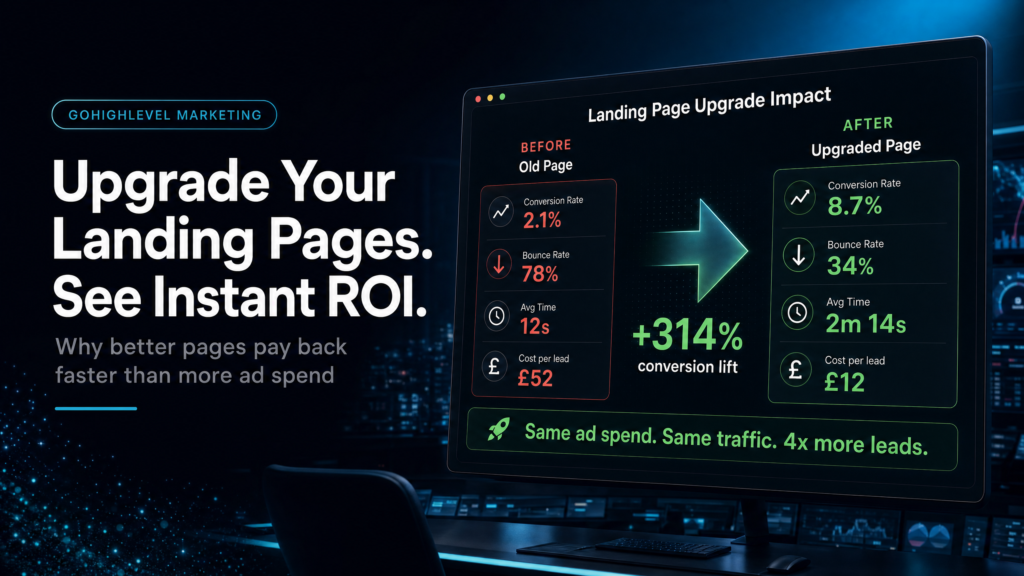
What You Will Learn
Use this Go High Level funnels landing pages review to follow one paid click from message match to form, booking, follow-up and a measurable pipeline outcome.
Does The First Screen Match The Ad Promise?
Compare the traffic source, offer, proof and next step so the page continues the same buying conversation instead of resetting it.
Do The Form And Calendar Remove Friction?
Keep only fields that change routing or qualification, then make the booked-call step explicit and easy to complete on mobile.
What Happens In The First 60 Seconds?
Confirm owner assignment, instant confirmation, call tasks and stop conditions so intent becomes a real conversation quickly.
Can You Trace The Page To Pipeline Revenue?
Retain source data and reconcile page views, submissions, bookings and opportunities before deciding which landing page deserves more spend.
Quick Answer
Upgrading go high level funnels landing pages pays back immediately when your current pages create friction (slow load, unclear offer, weak proof, too many fields) or break operations (bad routing, delayed follow-up, missing tracking). The fastest wins come from tightening the above-the-fold message, simplifying the form, improving booking flow, and connecting the page to pipeline stages, automations, and analytics.
TL;DR
- If you are paying for traffic, your landing page is either compounding or wasting ad spend every day; “good enough” is usually expensive.
- Don’t redesign first; diagnose whether the leak is offer-message fit, form friction, booking flow, speed-to-lead, or tracking.
- A strong GoHighLevel landing page is not just design: it is page + form + calendar + pipeline + automation + attribution working as one system.
- Most “low conversion” problems are actually “low intent” or “slow follow-up” problems that a page upgrade can expose and fix.
- If you can’t answer “where did this lead come from and what happened next?” your funnel is not a funnel; it’s a web form.
- Upgrade when you have consistent traffic, a sellable offer, and a clear next step (call, quote, checkout, or application).
- Choose the build approach based on risk tolerance and revenue visibility needs, not on who can make it look prettier.
Choose The Right Landing Page Upgrade Route
| Option | Best Fit | Risk | Speed | Revenue Visibility | When To Choose It |
|---|---|---|---|---|---|
| DIY Tweaks Inside GoHighLevel | Owner/operator with time, simple offer, low page count | Medium: easy to “improve” design while missing routing/tracking | Fast (1–3 days) | Low to Medium (depends on tracking discipline) | You already have a working funnel and just need clarity, fewer fields, better proof, and basic analytics. |
| Template Implementer / Cheap Freelancer | Need a quick facelift, minimal CRM changes | High: often ignores pipeline stages, automations, attribution, and speed-to-lead | Fast (3–10 days) | Low (usually page-level only) | You have internal ops handled elsewhere and you only need a page refresh with strict requirements you can enforce. |
| Specialist GoHighLevel Funnel + CRM Build | Paid traffic, sales team, multiple lead sources, high-ticket or high volume | Low to Medium: more moving parts, but built with QA and measurement | Medium (2–6 weeks) | High (source-to-close tracking, pipeline reporting, SLA follow-up) | You want the landing page upgrade to translate into booked calls, show rate, close rate, and attributable revenue. |
Who This Helps
- Local service businesses running Meta or Google Ads who need more qualified calls, not more “leads.”
- Agencies using GoHighLevel who want higher conversion and fewer client complaints about lead quality.
- Coaches/consultants selling high-ticket offers who need application + booking flows that filter and convert.
- Operators with a sales team who need routing, speed-to-lead, and pipeline hygiene tied to the landing page.
- Founders who suspect their funnel is leaking but can’t prove where (page, form, calendar, follow-up, or tracking).
- Businesses migrating from ClickFunnels/WordPress to GoHighLevel funnels and trying to avoid a conversion dip.
Why Go High Level Funnels Landing Pages Can Pay Back Faster Than Expected
Most businesses treat a landing page like a design asset. In GoHighLevel, a landing page is an operational trigger: it creates a contact record, sets a source, starts an automation, routes to a pipeline, and (if you build it properly) produces measurable outcomes like booked calls and closed revenue.
That’s why upgrading go high level funnels landing pages can pay back immediately: you are not just improving “conversion rate.” You are reducing friction and increasing speed-to-lead while making the downstream system behave predictably.
The Real Payback Mechanism: Fewer Leaks Between Click And Conversation
- Message clarity reduces junk leads and increases intent.
- Form friction control increases completion without lowering quality.
- Calendar flow increases booked calls and show rate.
- Routing + follow-up reduces time-to-first-touch (often the silent killer).
- Tracking turns “I think it’s working” into “I can scale this.”
What A Weak Setup Looks Like (Common In “Pretty” Funnels)
- One generic page for every traffic source and every offer angle.
- Long forms that ask for everything, then no one follows up quickly anyway.
- Calendar embedded with no guardrails (wrong time zones, no buffers, no qualification, no reminders).
- Leads land in the CRM with no pipeline stage, no owner, and no SLA timer.
- No consistent UTMs, no source fields, and no way to reconcile ad spend with outcomes.
What Strong Go High Level Funnels Landing Pages Need
- One page per offer + per intent level (cold traffic vs warm retargeting) with clear next step.
- Forms designed around routing and follow-up, not curiosity.
- Calendars connected to the correct pipeline stage and automation sequence.
- Speed-to-lead handled automatically (instant SMS/email, missed-call text-back, task creation, round-robin assignment).
- Analytics and attribution configured so you can see page performance and lead outcomes in one view.
Go High Level Funnels Landing Pages Upgrade Checklist
Before you touch design, run this checklist. It tells you whether you need a copy/structure upgrade, an ops upgrade, or both. Most “landing page problems” are really “system problems” that show up on the landing page first.
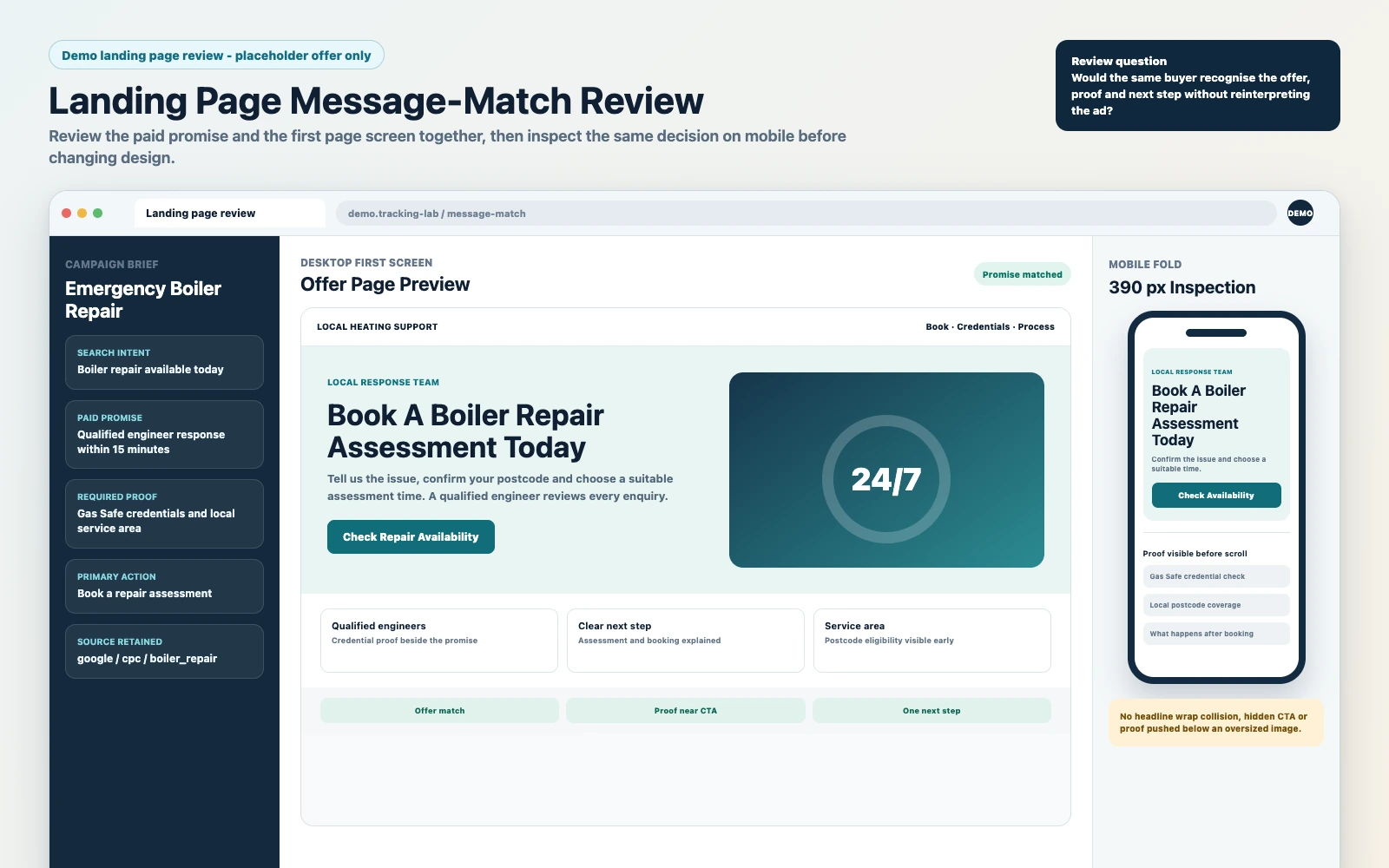
1) Above-The-Fold: Can A Stranger Explain The Offer In 5 Seconds?
If your headline could fit any competitor, it’s not doing its job. For cold traffic, the page must answer three questions immediately: what is this, who is it for, and what happens next.
- Weak: “Get Started Today” + stock image + vague promise.
- Strong: Specific outcome + timeframe/constraint (if true) + clear next step (book, apply, get quote).
2) Proof: Are You Using The Right Kind Of Trust For The Buying Stage?
Cold traffic needs proof that reduces perceived risk. That can be reviews, before/after (where compliant), credentials, process transparency, or “what happens after you submit.”
- Weak: A logo bar with brands you “worked with” but no context.
- Strong: 3–6 tight proof blocks tied to the promise, plus a short “how it works” section that sets expectations.
3) Form Design: Are You Collecting Data You Will Actually Use?
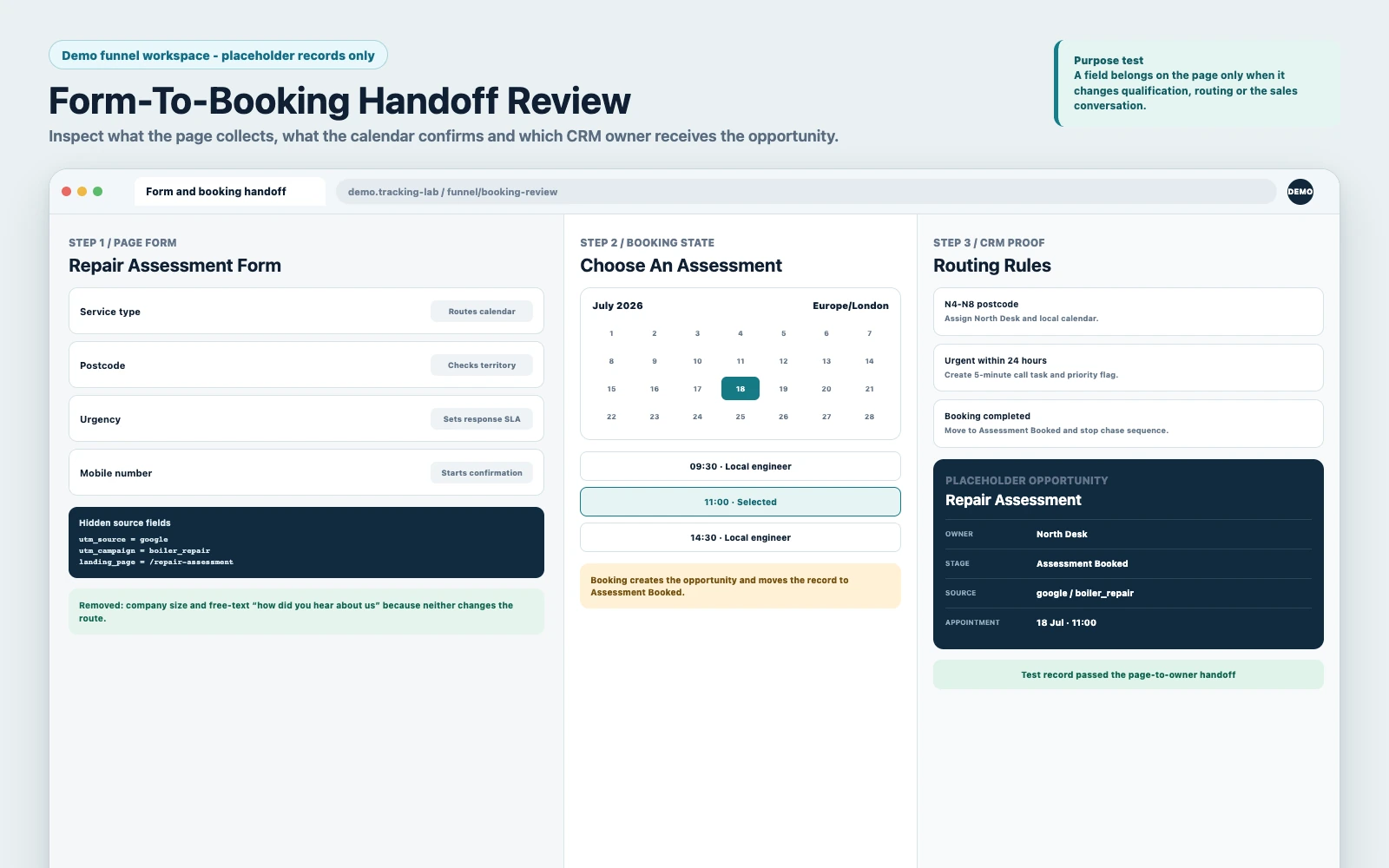
Every extra field is a tax. Sometimes it’s worth it (qualification). Often it’s not (curiosity). The right question is: will this field change routing, follow-up, or the sales conversation?
- Keep fields that drive segmentation (service type, location, budget range, timeline) if you will route based on them.
- Remove fields that don’t change anything (company size, “how did you hear about us” if you already have UTMs).
- Add hidden fields for UTMs and page context so attribution doesn’t rely on the lead telling you.
4) Booking Flow: Is The Page Optimized For “Booked” Or Just “Submitted”?
If your business model depends on calls, the landing page should push the user to a booked slot, not just a thank-you page. In GoHighLevel, that means your form submission should either:
- Send them directly to a calendar step, or
- Show an embedded calendar on the same page with a clear “Step 2: Pick A Time” flow.
Then you back it with reminders, reschedule links, and no-show prevention.
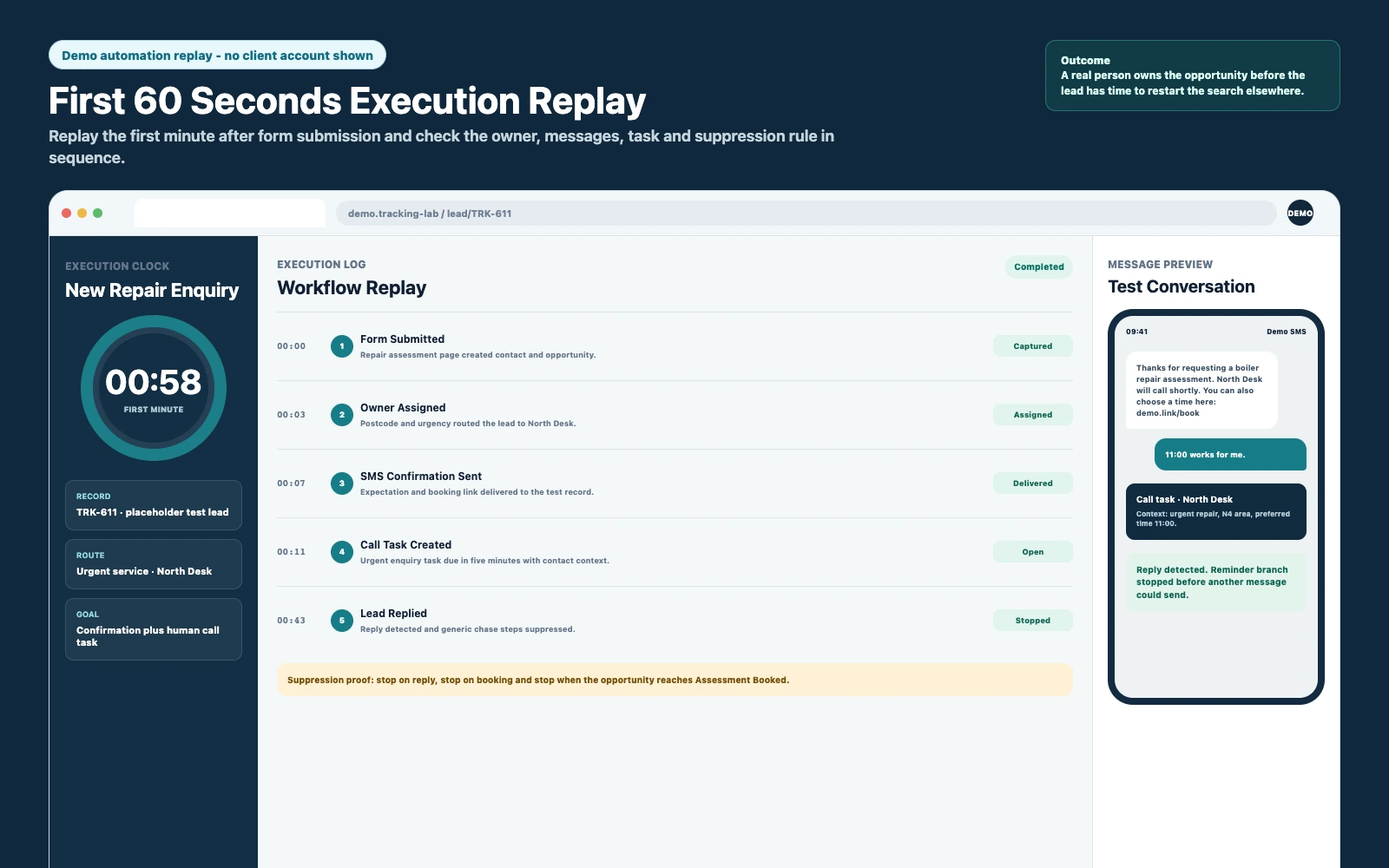
5) Speed-To-Lead: What Happens In The First 60 Seconds?
Landing page upgrades pay back when they reduce the time between intent and contact. If a lead submits and hears nothing for 10 minutes, you are effectively bidding against faster competitors.
Minimum viable speed-to-lead inside GoHighLevel:
- Instant SMS confirmation with a clear expectation (“We’ll call you in X minutes”).
- Instant email with the same expectation and a calendar link (if relevant).
- Internal notification to the right person (or round-robin assignment).
- Missed-call text-back if you call and they don’t answer.
6) Tracking: Can You Tie The Landing Page To Pipeline Outcomes?
If you can’t answer “which page produced the last 10 closed deals,” you’re flying blind. GoHighLevel can help here, but only if you set it up intentionally. At minimum, you need consistent UTMs, source fields, and pipeline stage definitions that match your sales process.
For GoHighLevel-specific setup references, see the platform docs on launching a funnel and using site and funnel analytics.
Where Go High Level Funnels Landing Pages Usually Break
When a landing page is not converting, the next step is to determine which of these conditions is true:
- The page is not matching the ad promise (message mismatch).
- The page is converting, but the leads are low intent (quality mismatch).
- The page is converting, but the business is slow to respond (ops mismatch).
- The page is converting and follow-up is happening, but reporting is broken (visibility mismatch).
Message Mismatch: The Ad And The Page Are Selling Different Things
Symptoms:
- High click-through rate, low form completion.
- High form completion, low booking rate.
- Sales calls filled with “I thought this was…” confusion.
Fix: Align the first screen of the landing page with the ad’s exact promise and audience. If you have multiple ad angles, you probably need multiple landing pages (or at least dynamic sections) rather than one generic page.
Quality Mismatch: You “Improved Conversion” And Now Sales Hates The Leads
Symptoms:
- More leads, fewer qualified conversations.
- Higher no-show rate.
- Sales team stops trusting the funnel.
Fix: Add qualification where it matters. That can be one or two fields, an application step, or a “micro-commitment” (choose service type, choose location, choose timeline) that filters without killing volume.
Ops Mismatch: The Funnel Works, But The Business Doesn’t Respond Fast Enough
Symptoms:
- Leads say “I already went with someone else.”
- Calls happen days later, not minutes later.
- Pipeline is full of “New Lead” with no next action.
Fix: Treat the landing page as the start of an SLA. The moment the form submits, GoHighLevel should assign, notify, and start a follow-up sequence that escalates if no human touches the lead.
Visibility Mismatch: You Can’t Prove What Changed
Symptoms:
- Arguments about whether the new page is “better.”
- Ad spend increases without confidence.
- Leads exist, but you can’t tie them to source, page, or campaign.
Fix: Implement tracking rules before you scale. If you want the full tracking discipline, use these Go High Level funnel tracking rules as your baseline so page upgrades translate into measurable pipeline outcomes.
What To Upgrade First (If You Want Immediate Payback)
If you want the upgrade to pay back quickly, prioritize changes that reduce friction and increase speed-to-lead. Design polish is last, not first.
Priority 1: The Offer And The Next Step
Make the CTA match the buying stage:
- High intent: “Get A Quote,” “Book An Inspection,” “Schedule A Call.”
- Medium intent: “Check Availability,” “See Pricing Options,” “Apply For A Call.”
- Low intent: “Get The Guide,” “See The Plan,” “Watch The Breakdown” (then nurture).
Immediate payback comes when the CTA reduces indecision and moves the right people forward.
Priority 2: Form Friction And Routing Logic
In GoHighLevel, forms are not just capture tools; they are routing triggers. If you ask a question, use it:
- Route by service type to the right pipeline or the right calendar.
- Route by location to the right team member or territory.
- Route by budget/timeline to the right follow-up intensity.
If you are not routing, keep the form short and move qualification into the call or a second step.
Priority 3: Calendar Experience (If Calls Are The Product)
Calendar upgrades that pay back fast:
- Buffers and minimum notice to protect delivery and reduce reschedules.
- Confirmation page that restates the value of showing up.
- SMS/email reminders with reschedule links (reduce no-shows without manual chasing).
- Optional pre-call questions that improve close rate (not 20-field interrogations).
Priority 4: Speed-To-Lead Automation
Most businesses underestimate how much revenue is lost in the first hour. Your landing page upgrade should include:
- Instant contact confirmation.
- Instant internal alert.
- Escalation if no one responds (task + manager notification, or round-robin fallback).
- A short, human follow-up sequence that stops when the lead replies or books.
Priority 5: Analytics That Tie To Outcomes
Page analytics without pipeline outcomes is vanity. Your upgrade should make it easier to answer:
- Which page produced the most booked calls?
- Which source produced the highest show rate?
- Which campaign produced the highest close rate?
- Where do leads stall in the pipeline?
If you need a broader cold-traffic baseline for what to measure and how to structure the funnel, use the canonical hub: Go High Level Funnels Cold Traffic Checklist.
How To Upgrade Go High Level Funnels Landing Pages
- Define The Conversion Event That Matters: pick one primary outcome per page (booked call, application completed, checkout, quote request). “Form submitted” is not a business outcome unless your sales process is built around it.
- Map The Funnel To Your CRM Reality: confirm pipeline stages that match your sales process (New Lead, Contacted, Booked, Showed, No-Show, Qualified, Proposal Sent, Won, Lost). If stages are vague, reporting will be vague.
- Design The Landing Page Structure Around Objections: above-the-fold promise, proof blocks, “how it works,” FAQs, and a CTA that repeats at logical points. Keep it tight; remove anything that doesn’t move the decision.
- Build The Form With Routing In Mind: choose fields that drive segmentation. Add hidden UTM fields. Ensure the form creates/updates the contact correctly and doesn’t overwrite good data with blanks.
- Connect The Calendar (If Applicable): embed or redirect to the correct calendar. Configure availability, buffers, time zone behavior, and confirmation messaging. Ensure bookings move the lead to the correct pipeline stage.
Connect Routing, Follow-Up And Measurement
- Set Ownership And SLA Rules: decide how leads are assigned (single owner, round-robin, territory). Create an SLA timer: if not contacted within X minutes, escalate.
- Build Follow-Up Automations That Stop When The Lead Engages: instant SMS/email, then a short sequence over 1–3 days. Add logic to stop on reply, stop on booking, and branch based on qualification fields.
- Implement Tracking And Naming Conventions: consistent UTMs, consistent funnel/page naming, consistent campaign naming. If you can’t keep it consistent, you can’t compare performance.
- QA The Full Journey End-To-End: test on mobile, test form submission, test booking, test pipeline movement, test notifications, test automation stop conditions, test attribution fields, and test reporting views.
- Launch With A Measurement Plan: define what you will review weekly (page views, form rate, booking rate, speed-to-lead, show rate, close rate, cost per booked call, cost per acquisition where possible).
Common Problems And How To Fix Them
| Problem | What It Usually Means | Commercial Risk | Fix | Metric To Watch |
|---|---|---|---|---|
| High Traffic, Low Form Submissions | Message mismatch, weak above-the-fold, too much friction | Wasted ad spend; you pay for clicks that never become opportunities | Tighten headline/CTA to match ad promise; reduce fields; improve proof near CTA | Form conversion rate; scroll depth |
| High Form Submissions, Low Booked Calls | Wrong CTA, weak calendar flow, low intent leads | Sales team time waste; low pipeline quality | Add “Step 2: Book” flow; qualify with 1–2 fields; improve confirmation messaging | Booking rate from submissions |
| Booked Calls, Low Show Rate | Weak reminders, low commitment, unclear expectations | No-shows kill capacity and morale; CAC rises | SMS/email reminders; reschedule link; confirmation page that reinforces value | Show rate; reschedule rate |
| Leads Complain “No One Contacted Me” | Broken notifications, no assignment, no SLA | Direct revenue loss; brand damage | Set owner assignment; internal alerts; escalation rules; missed-call text-back | Time to first response; contact rate |
| Sales Says “Leads Are Trash” After Upgrade | Conversion increased by lowering intent, not by improving clarity | Lower close rate; churn if you are an agency | Re-align offer; add qualification; segment follow-up; create separate pages per intent | Qualified rate; close rate |
| Can’t Tell Which Page/Campaign Works | UTMs inconsistent; source fields missing; pipeline not tied to source | You can’t scale confidently; budget decisions become guesswork | Implement tracking rules; hidden UTM fields; consistent naming; reporting views | % leads with source/UTM; cost per booked call |
What This Means For Revenue
A landing page upgrade is only “worth it” if it changes one of the revenue drivers below. The reason it can pay back immediately is that these drivers compound: a small lift at the top of the funnel increases the number of sales conversations, and operational fixes increase the percentage that turn into revenue.
Lead Quality: Fewer Junk Leads, More Sales-Ready Conversations
Clarity beats cleverness. When the page clearly states who it is for and what happens next, you reduce accidental leads. That improves:
- Contact rate (people answer because they expected the call).
- Qualification rate (less mismatch).
- Close rate (sales spends time with the right prospects).
Booked Calls: Turning “Interest” Into A Scheduled Commitment
If your funnel ends at “thanks, we’ll be in touch,” you are leaving money on the table. A booking-first flow increases:
- Booked call volume per 100 clicks.
- Sales team predictability (calendar capacity planning).
- Pipeline velocity (less waiting, fewer stale leads).
Speed-To-Lead: The Hidden Multiplier
Speed-to-lead is where landing page upgrades become operational upgrades. When the page triggers immediate follow-up and correct routing, you reduce the time window where prospects shop around or cool off.
Revenue Visibility: Knowing What To Scale
When tracking is connected, you can make budget decisions based on outcomes, not vibes. That means:
- You can cut campaigns that generate volume but not revenue.
- You can double down on pages that generate booked calls and closed deals.
- You can forecast based on pipeline stages, not just lead counts.
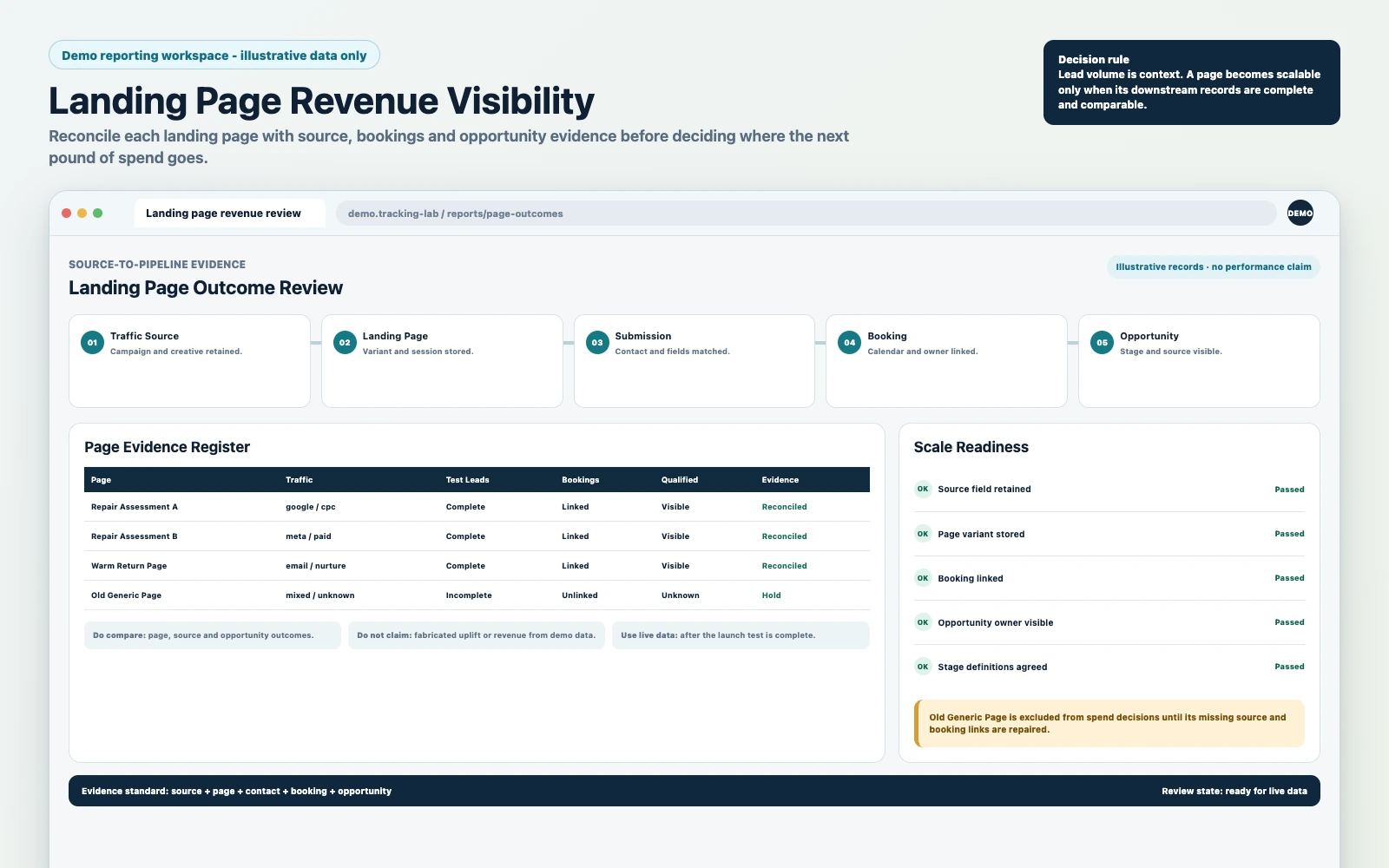
What A Revenue-Ready Landing Page System Looks Like
Most businesses upgrade landing pages like they’re updating a brochure: new design, new copy, maybe a new template. Then they wonder why nothing changes downstream.
A revenue-ready GoHighLevel setup treats the landing page as the front door to a measurable system for lead quality, follow-up and attribution:
- Start with the pipeline: if stages and ownership are not defined, the page cannot be successful in a way your team can prove.
- Build routing and SLA rules into capture: design the form around who needs to respond and how fast.
- Optimise for booked and attended: not just submitted. Connect the page to calendars, reminders and stop conditions.
- Enforce tracking discipline: use UTMs, hidden fields, naming conventions and reporting views so your team can scale with confidence.
- QA the whole journey: verify the mobile experience, form behaviour, pipeline movement, notifications, automations and analytics.
If you want to keep the stack lean while improving performance, the mindset is simple: don’t add tools to compensate for unclear offers, weak routing, or broken follow-up. Fix the system you already have. This is the same logic behind scaling GoHighLevel funnels without more tools.
Conclusion
Upgrading Go High Level funnels landing pages can pay back when you improve the whole system, not just the page: clarify the offer, reduce friction, strengthen the booking flow, speed up follow-up and connect clicks to pipeline outcomes. If you are already buying traffic or relying on inbound leads, a mostly working page can hide expensive leakage.
FAQs
Do GoHighLevel Funnels Convert As Well As ClickFunnels?
They can, but conversion is rarely about the builder alone. GoHighLevel funnels convert well when the page is fast, the message matches the traffic source, and the form/calendar is connected to routing and follow-up. If you migrate and only copy the design without rebuilding tracking, pipeline stages, and automations, you can lose performance even if the page “looks the same.”
What Should I Upgrade First On Go High Level Funnels Landing Pages?
Start with the above-the-fold promise and CTA (message match), then reduce form friction, then fix the booking flow (if calls are the goal), then implement speed-to-lead automation. Design polish comes after those because it rarely fixes operational leaks.
How Many Form Fields Should A High-Converting Page Have?
As few as possible while still enabling routing and qualification. If a field does not change who follows up, how they follow up, or what the sales conversation should be, remove it. Use hidden fields for UTMs and page context so you don’t rely on the lead to self-report attribution.
How Do I Track Which GoHighLevel Funnel Page Generated A Customer?
Use consistent UTMs, capture them via hidden fields on the form, and ensure those values persist on the contact record. Then tie contacts to opportunities in a pipeline with defined stages so you can report from source to outcome. GoHighLevel’s funnel analytics help at the page level, but revenue visibility requires CRM discipline and tracking rules.
Why Are My Leads Submitting But Not Booking Calls?
Usually one of three issues: the CTA is unclear (they thought they were “requesting info,” not booking), the calendar step is buried or confusing, or the leads are low intent because the page is too generic. Fix by making booking the explicit next step, improving the confirmation flow, and adding light qualification that filters without killing volume.
What Automations Should Trigger After A Landing Page Form Submission?
At minimum: instant SMS and email confirmation, internal notification to the assigned owner, pipeline stage update, and an escalation rule if the lead isn’t contacted within your SLA. If you use a calendar, add reminders and stop conditions so the sequence stops when the lead replies or books.
When Should I Hire A Specialist Instead Of Tweaking The Page Myself?
When you have paid traffic, multiple lead sources, a sales team, or you need attribution you can trust. If the landing page upgrade must improve booked calls, show rate, and close rate (not just “conversion”), you want someone who can rebuild the page, CRM stages, routing, automations, and tracking as one system.
