
In This Guide, We Will Cover:
Use this Go High Level funnel builder templates vs custom comparison to choose a starting structure from offer clarity, qualification, routing, measurement and the evidence already available.
Diagnose
Identify What Your Funnel Must Prove
Define the primary conversion event and inspect offer, form, routing, follow-up and tracking before treating visual design as the cause.
Decide
Choose Templates Or Custom Based On Risk And Speed
Choose a template baseline or custom structure from launch scope, message clarity, form friction, routing and attribution requirements.
Implement
Build The Page + CRM + Follow-Up As One System
Map the page, form fields, pipeline stages, ownership rules, automations and source data as one testable workflow.
Verify
Validate Conversion With Analytics And Sales Feedback
Submit test leads, confirm source and outcome records, and compare one controlled change at a time.
Quick Answer
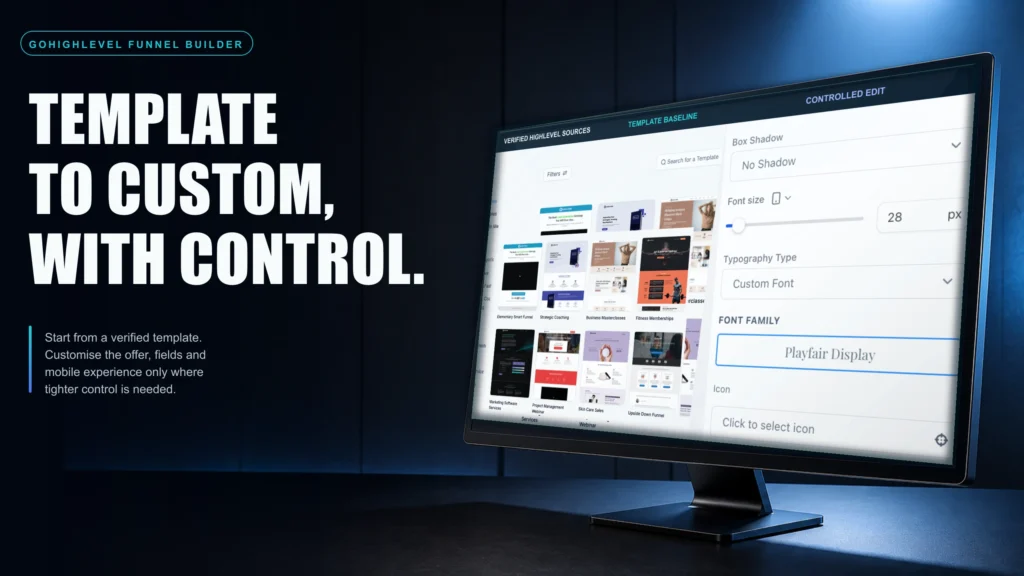
The Go High Level funnel builder templates vs custom choice should follow the evidence available about the offer and sales process. Start with a template when the offer is straightforward, the primary conversion event is clear and the team needs a measurable baseline without inventing a unique page structure. Use custom design when confirmed buyer objections, qualification criteria, routing rules or proof requirements cannot be expressed clearly in the template. Neither approach can be called the better converter before the complete workflow is tested. Define the primary event, capture source data, map form answers to the contact record, route the lead, update appointment and pipeline states, and review outcomes by source. Then compare variants using qualified leads, booked appointments, attendance and sales outcomes rather than page opt-ins alone. A hybrid path is practical: launch from a template, preserve its working structure and replace only the sections that evidence shows need more specificity.
TL;DR
- For a new offer or traffic source, a template can provide a measurable baseline before custom sections are justified by evidence.
- Custom sections become relevant when qualification, verified proof or recurring buyer objections require a more specific flow.
- A template is incomplete when colour changes are made without testing form fields, calendar routing and response workflows.
- A custom build becomes difficult to assess when extra steps and copy are added without a UTM, source and pipeline-outcome measurement plan.
- Assess opt-ins alongside qualified leads, booked appointments, attendance, sales outcomes and response timing in the CRM.
- A practical hybrid is to retain a working template structure and customise only the sections supported by buyer and pipeline evidence.
Go High Level Funnel Builder Templates Vs Custom: Decision Table
| Option | Best Fit | Key Dependency | Implementation Scope | Measurement Scope | When To Choose It |
|---|---|---|---|---|---|
| DIY Template Build (Owner/Team) | Simple offer, limited pages, you can write clear copy and follow a checklist | The owner must configure and test tracking, routing, booking and follow-up. | Page, form, calendar, CRM and QA owned by the internal team. | Depends on consistent UTMs, pipeline stages and reporting definitions. | You need a controlled baseline and can own configuration, testing and iteration. |
| Template + Light Customization (Freelancer/VA) | You have a working offer and want a cleaner page without rebuilding your CRM | Scope must cover the page plus the form, booking, source-data and ownership handoffs. | Template adaptation plus the agreed CRM, calendar and analytics configuration. | Depends on whether forms, calendars, source fields and outcome reporting are included and tested. | You want speed but need someone to implement correctly inside GoHighLevel |
| Custom Funnel System Build | High-ticket, multi-step qualification, multiple lead sources, sales team follow-up | Requires confirmed requirements, a baseline, controlled tests and a documented handover. | Custom information architecture, page components, CRM logic, integrations and QA. | Can include source tracking, pipeline outcomes, response timing and attribution when configured and tested. | You’re spending meaningful budget on ads or your sales process needs better lead quality and visibility |
Who This Is For
- Local service businesses using Meta Ads that need to connect forms, booking, routing and sales outcomes
- Agencies building funnels in GoHighLevel and deciding whether to standardize on templates
- Coaches/consultants selling high-ticket offers where trust and qualification matter
- Operators comparing a template baseline or custom rebuild while moving from ClickFunnels or WordPress
- Founders who have leads coming in but slow follow-up and unclear attribution
- Teams with multiple calendars, multiple closers, or multiple locations needing routing rules
- Businesses that want to measure funnel performance beyond “page views”
Start With The Real Question: What Does “Converts Better” Mean In Your Business?
The templates-versus-custom question includes design, but the decision also depends on operations and measurement.
In GoHighLevel, a funnel page is only the front door. Conversion quality is determined by what happens next: form data captured, lead source recorded, pipeline stage set, speed-to-lead automation fired, appointment booked, reminders sent, and outcomes tracked.
Define Your Conversion Event Before You Touch Design
Pick one primary conversion event and one secondary event. Examples:
- Primary: booked call (calendar appointment created)
- Secondary: qualified lead (form includes budget/service area/timeline and passes a rule)
Opt-ins alone do not show whether the lead was qualified or progressed. Booked appointments alone can also hide changes in lead volume and attendance, so compare the same downstream outcomes for each variant.
What A Weak Setup Looks Like
- One generic form field (name/email) for a high-ticket offer, then sales has to chase context
- No UTMs captured, so you can’t tell which ad set or campaign produced revenue
- Leads go to a single inbox with no SLA timer and no owner assignment
- Calendar bookings don’t update pipeline stages, so reporting is guesswork
What A Strong Setup Looks Like
- Form fields map to CRM custom fields (service type, location, timeline, budget range)
- Lead source captured via UTMs and stored on the contact record
- Pipeline stages reflect your real sales process (New Lead → Contacted → Booked → Showed → Closed/Won/Lost)
- Automations acknowledge the enquiry, notify the owner, create the intended task and stop when the defined outcome occurs
When To Use A GoHighLevel Funnel Builder Template
Templates are a suitable baseline when the immediate constraint is implementation scope rather than a unique page structure. They reduce initial layout decisions so the team can test the offer, headline, verified proof, form friction and follow-up workflow.
Use Templates When You Need A “Version 1” That You Can Measure
Consider a template baseline when:
- You’re launching a new offer and don’t yet know the top objections
- You’re testing a new traffic source (Meta, Google, referral partners) and need baseline data
- Your funnel is one page + one thank-you page + one calendar step
- Your brand doesn’t require strict design governance to maintain trust
What A Template Baseline Makes Easier To Test
- They force a familiar structure: headline, subhead, proof, CTA, FAQ, and a single next step
- They can reduce initial layout work, leaving more of the project scope available for measurement and iteration
- They can constrain the first version to a clear narrative and one primary next step
The Template Trap: “We Used A Template” But Nothing Improved
A template remains incomplete when the team treats only the page as the deliverable. The surrounding workflow also requires:
- Form submission must create/update the contact, tag the lead, and set the pipeline stage
- Calendar booking must change the stage and trigger reminders and pre-call nurture
- No-show and lost outcomes must be recorded so you can fix lead quality or sales process
If you’re not using GoHighLevel’s funnel analytics and attribution basics, you’re guessing. GoHighLevel provides guidance on launching funnels and getting started here: Getting Started: Launch A Funnel.

When Custom Funnel Design Becomes The Better Fit
In the Go High Level funnel builder templates vs custom choice, custom sections become relevant when the funnel must do more than collect a lead. Confirmed positioning, qualification, routing or multi-audience requirements can justify a structure that a template does not express clearly.
Custom Is A Conversion Tool When Your Offer Has Complexity
Consider custom sections when:
- You sell multiple services with different price points and different qualification criteria
- You have multiple locations or territories and need routing rules
- You need to pre-handle objections (price anchoring, timelines, eligibility, outcomes)
- You require trust elements that templates don’t support well (process visuals, comparison blocks, proof libraries, compliance language)
Custom Done Right Is Not “More Design”
Custom that converts is typically:
- Clearer, not longer
- More specific, not more clever
- Built around one action, not multiple CTAs competing
- Integrated with CRM logic (fields, tags, stages, assignment, and follow-up)
Where Custom Sections Add Specific Control In HighLevel
- Qualification flows: multi-step forms that collect only the information needed for consent, routing and the next step
- Dynamic routing: different calendars or pipelines based on service type or location
- Proof sequencing: showing the right proof at the right moment (before the ask, not after)
- Offer packaging: presenting options without creating decision paralysis
Use recurring, documented sales-call objections as one input to custom design. Address a verified objection before booking only when the page can do so accurately and without adding unnecessary friction.

Template Vs Custom Funnel Diagnostic Checklist
Use this checklist to identify the implementation requirements that favour a template baseline or custom structure. Treat the result as a scope signal, not a conversion forecast, and verify the choice with the same downstream outcome definitions.
| Question | Template Lean | Custom Lean |
|---|---|---|
| Is a narrow baseline more important than a unique first-version structure? | Yes | No |
| Is your offer simple and easy to explain in one headline? | Yes | No |
| Do you have multiple buyer types (different pains, budgets, or use cases)? | No | Yes |
| Do you need qualification to protect sales time? | No | Yes |
| Do you have multiple calendars, closers, locations, or territories? | No | Yes |
| Do you know your top objections from real calls? | Not yet | Yes |
| Can you currently track lead source to pipeline outcome? | Not yet | Yes (or must) |
| Are you willing to run weekly tests (headline, CTA, form friction)? | Yes | Yes |
What To Measure In GoHighLevel So You Don’t “Pick Wrong”
A templates-versus-custom test is difficult to interpret when the selected metrics stop at the page. Connect page behaviour to agreed lead, appointment and sales outcomes.
Minimum Measurement Stack For A Fair Comparison
- UTM capture into contact fields (source, medium, campaign, content)
- Pipeline stages that match your sales process (not generic defaults)
- Appointment status tracking (booked, confirmed, showed, no-show)
- Speed-to-lead measurement (time from form submit to first outbound attempt)

Use GoHighLevel Analytics With Intent
HighLevel documents site and funnel analytics for reviewing page and step activity. Use those reports with contact, appointment and opportunity records to answer operational questions. Reference: How To Use Site And Funnel Analytics In HighLevel.
Operator Tip: Tie Funnel Steps To Pipeline Outcomes
If page submissions do not reconcile with pipeline outcomes, inspect the handoff before rebuilding the page. SCALE scopes GoHighLevel pages, forms, pipeline definitions, routing, automations and source tracking as one connected implementation so each handoff can be tested and documented.
How Templates And Custom Affect Lead Quality (Not Just Volume)
Lead quality is one downstream variable in the templates-versus-custom decision. Review whether the page sets accurate expectations and collects the information needed for routing and the next sales action.
How To Assess A Low-Friction Template
That’s not always bad. If you have:
- Low cost per lead
- Strong speed-to-lead follow-up
- A sales process that can qualify quickly
…then a low-friction template may be operationally manageable. For a longer sales cycle or premium offer, compare lead intent and sales workload before reducing form friction further.
How Custom Sections Can Clarify Intent And Routing
Custom does not have to mean harder. It can make specific routing and expectation requirements explicit through elements such as:
- Service selection that routes to the correct calendar and pipeline
- Location/service area gating (especially for local service businesses)
- Timeline questions that separate urgent buyers from “someday” leads
- Expectation setting (price ranges, minimum engagement, eligibility)
What To Watch If You’re Optimizing For Quality
- Booked call rate per lead source (not overall)
- Show rate by funnel variant
- Close rate by service type
- Sales cycle length and follow-up touches required

The Implementation Process
- Define The Funnel’s Job And The One Next Step. Decide whether the page’s primary action is form submit, calendar booking, deposit, or application. Remove competing CTAs.
- Choose Your Starting Point: Template Baseline Or Custom Wireframe. If you don’t have clear objections and proof, start with a template baseline. If you do, start with a custom wireframe that maps objections to sections.
- Build The Funnel Page Structure In GoHighLevel. Keep above-the-fold tight: outcome, who it’s for, proof, CTA. Add objection handling and FAQs below. Avoid “everything to everyone” copy.
- Design The Form For Routing And Sales Context. Add fields that reduce back-and-forth: service type, location, timeline, budget range, preferred contact method. Map fields to GoHighLevel custom fields.
- Set Up The CRM Pipeline And Stages. Create stages that match reality (New Lead, Attempted Contact, Contacted, Booked, Showed, Closed Won, Closed Lost). If you can’t define stages, you can’t manage conversion.
- Connect Calendars And Booking Logic. Route to the right calendar based on form answers. Ensure booking updates pipeline stage and triggers confirmations and reminders.
- Build Response And Ownership Automations. Send an accurate acknowledgement, notify the owner, create the intended task, define the fallback sequence and record the response SLA.
- Implement Lead Source Tracking. Capture UTMs and store them on the contact record. Use consistent naming so reporting is usable (not 40 variations of “facebook”).
- Set Up Reporting That Matches The Business Question. Define leads by source, booked appointments by source, attendance, sales outcomes and response timing. Reconcile the definitions before changing spend.
- Launch With A Test Plan, Not A Hope. Decide what you’ll test first (headline, CTA, form friction, proof order). Change one variable at a time and track outcomes in the pipeline.
Common Problems And How To Fix Them
| Problem | What To Check | Commercial Risk | Fix | Metric To Watch |
|---|---|---|---|---|
| High opt-ins, low booked calls | Weak CTA path, wrong next step, or no calendar integration | Page activity is not reconciled with a recorded next step | Move to a clearer single CTA, add calendar step, tighten offer promise, add proof above the fold | Lead-to-booked rate |
| Booked calls, low show rate | Low intent leads or poor confirmation/reminder flow | Booking volume can be misread when attendance is not reviewed separately | Add SMS/email reminders, pre-call value, reschedule links, and expectation setting on the page | Show rate |
| Sales says “leads are bad” but you can’t prove it | No lead source tracking or pipeline outcome discipline | Campaign and page decisions rely on incomplete source and outcome data | Capture UTMs, enforce stage updates, require lost reasons, review outcomes weekly | Close rate by source |
| Slow follow-up after form submit | No automation, no assignment rules, no SLA | The first-response owner and timing cannot be verified | Owner notifications, assignment rules, tasks, escalation and response-SLA checks | Time-to-first-contact |
| Template looks “generic” and trust is low | Mismatch between brand promise and page experience | The page may not explain the offer with enough specificity or evidence | Custom sections with verified evidence, process visuals, accurate offer terms and clearer positioning | Scroll depth + conversion rate |
| Custom funnel expands in scope without a useful baseline | Overbuilt without a baseline or test plan | The team cannot isolate which change affected the measured outcome | Ship a baseline version, then iterate; remove steps; simplify copy; test one variable at a time | Iteration velocity + booked rate |
What This Means For Revenue
The template-versus-custom decision can affect lead context, response ownership and attribution clarity, which should be reviewed alongside sales outcomes.
Lead context: If the funnel does not collect the information needed for routing and the next action, reported lead volume can become difficult to compare with later sales outcomes.
Response ownership: Define how an enquiry is acknowledged, assigned and escalated, then test whether the chosen page structure preserves that workflow. Neither a template nor custom design compensates for an unowned handoff.
Attribution and visibility: Store consistent UTM and source fields, then reconcile them with appointment and pipeline outcomes before changing acquisition spend.
For Meta Ads, define a qualified lead and review booking, attendance and sales outcomes by source rather than evaluating the page from total form submissions alone.
Conclusion
Choose a template for a controlled baseline when the offer and next step are straightforward. Choose custom sections when confirmed qualification, routing, proof or buyer-context requirements cannot be expressed clearly in that baseline. In either case, test the page, contact record, booking, pipeline, source data and follow-up as one workflow before attributing an outcome to design.
FAQs
Do GoHighLevel Funnel Templates Convert Well?
They can provide a useful baseline for a straightforward offer with one clear next step. Keep the structure simple, use verified evidence and test how the form, calendar, ownership and pipeline stages work together.
When Should I Stop Using Templates And Go Custom?
Consider custom sections when consistent evidence identifies a specific limitation, such as repeated objections, missing qualification, multiple routing paths or a trust requirement the template cannot express clearly.
Is Custom Design Worth It If I’m Not Spending On Ads Yet?
A template baseline is often easier to assess when traffic and buyer evidence are limited. Confirm tracking and follow-up first, then add custom sections when a specific requirement or repeated sales insight justifies them.
What’s The Biggest Mistake People Make In GoHighLevel Funnels?
A practical mistake is reviewing only the page while CRM fields, UTMs, pipeline stages, ownership and follow-up remain untested. That prevents the team from reconciling submissions with later outcomes.
How Do I Track Funnel Performance Inside GoHighLevel?
Use funnel analytics for page and step activity, then reconcile it with contact sources, pipeline movement, appointment statuses and recorded sales outcomes. Define the same outcome for every variant before comparing them.
Should My Funnel Go Straight To A Calendar Or Use A Form First?
Use a short form before the calendar when its answers genuinely change qualification, ownership or routing. Direct-to-calendar can suit a straightforward offer when the booking, reminder and follow-up workflow is tested.
Can SCALE Build This Inside GoHighLevel End-To-End?
Yes. SCALE can scope and implement GoHighLevel pages, forms, calendars, pipeline definitions, routing, automations, source tracking and reporting, with acceptance tests for each handoff.