
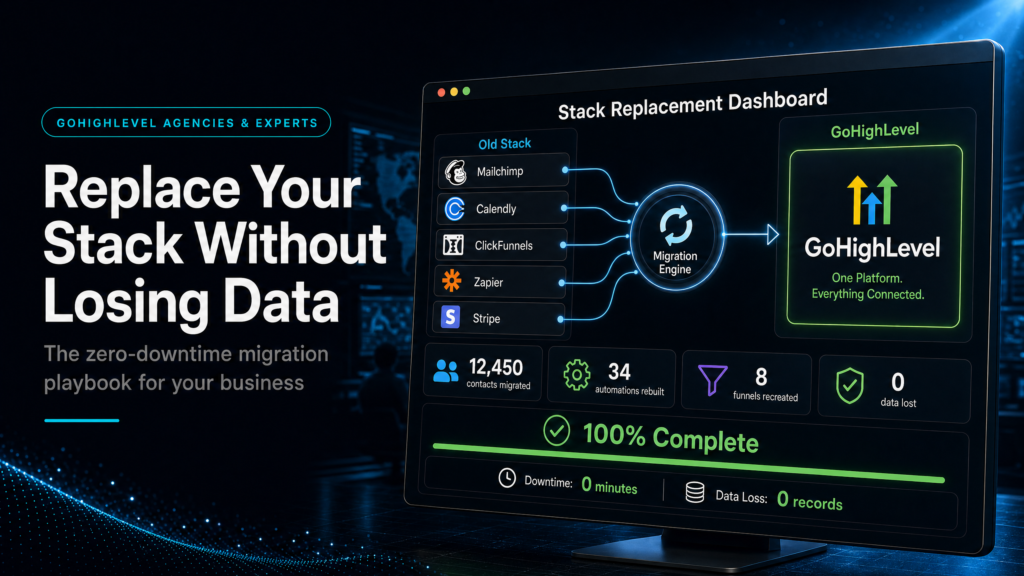
In This Guide, We Will Cover:
How to replace your CRM, forms, calendars, automations and tracking with GoHighLevel without losing lead history, follow-up, attribution or booked-call visibility.
What Should Move?
Separate useful CRM records, pipeline stages and source fields from stale contacts, dead tags and clutter.
How Does The Stack Reconnect?
Map fields, forms, calendars, pipelines and workflow triggers before anything is imported into GoHighLevel.
When Is It Safe To Switch?
Run test leads and a short parallel window before moving live traffic away from the old stack.
What Must Still Be Visible?
Confirm source, booked-call path, owner, SLA and pipeline reporting survive the migration.
Quick Answer
A safe gohighlevel implementation data migration starts with a full inventory of your current stack (CRM, forms, calendars, automations, tracking), then a field-and-stage mapping plan, a staged import (contacts first, then opportunities/activities), and a parallel-run cutover with test leads. The goal is zero downtime for lead capture and no loss of sales history or attribution.
TL;DR
- If you migrate “everything” without a map, you’ll import junk, break reporting, and slow down sales.
- Start with outcomes: what your team must see (pipeline, lead source, last touch, next task) to close deals.
- Do a staged migration: contacts + custom fields, then pipeline/opportunities, then conversations/notes where feasible.
- Run a parallel period: keep old forms/calls flowing while you validate GoHighLevel forms, calendars, and automations.
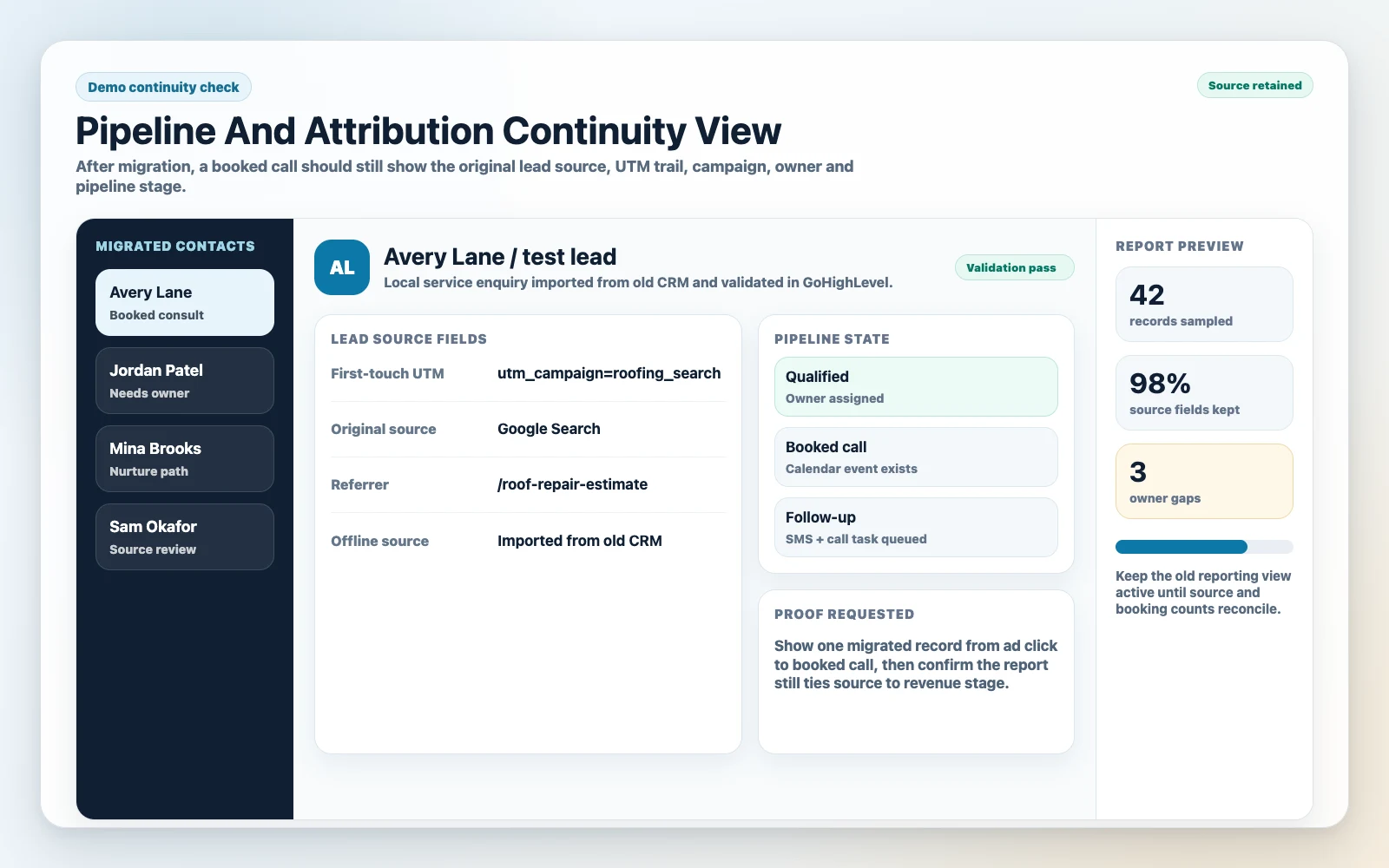
- Protect attribution: standardize UTM capture, source fields, and “first/last touch” rules before cutover.
- Have a rollback plan: if lead capture or routing fails, you need a fast switch back while you fix it.
- If revenue depends on speed-to-lead, don’t DIY the cutover week—get an expert to run the migration and QA.
Decision Table: DIY Vs Freelancer Vs Specialist Implementation
| Option | Best Fit | Risk | Speed | Revenue Visibility | When To Choose It |
|---|---|---|---|---|---|
| DIY / Internal Team | Simple stack, low lead volume, one pipeline, minimal automation | High: missed triggers, broken routing, messy fields, attribution loss | Medium to slow | Usually weak unless you already track UTMs and lifecycle stages | When you can tolerate a learning curve and have time for testing + documentation |
| Cheap Freelancer / Template Implementer | Basic setup, “good enough” CRM, minimal customization | Medium to high: imports done “as-is,” automations copied without logic, no QA plan | Fast | Often superficial (dashboards without clean data) | When budget is tight and you can personally QA every form, calendar, and workflow |
| Specialist GoHighLevel Expert (SCALE-Style Build) | Revenue-critical funnels, multiple lead sources, sales team, paid ads, need clean reporting | Low: mapped migration, staged cutover, test plans, rollback, adoption support | Fast with structure | Strong: lifecycle stages, source tracking, pipeline hygiene, attribution-ready | When downtime, lost leads, or unclear attribution costs more than the implementation |
Who This Is For
- Agency owners moving clients from HubSpot, Pipedrive, ActiveCampaign, or a patchwork stack into GoHighLevel
- Local service businesses that rely on speed-to-lead (calls, SMS, booking) and can’t afford routing failures
- Coaches/consultants with multiple funnels, calendars, and nurture sequences that need clean segmentation
- High-ticket sales teams that need pipeline stages, tasks, and handoffs to be consistent
- Operators running Meta Ads who need UTM capture and lead source reporting to stop wasting spend
- Businesses with messy CRM data that want to migrate without importing years of duplicates and dead leads
What “Replacing Your Stack” Actually Means (And Where Migrations Go Wrong)
Most businesses don’t have “a CRM.” They have a revenue system stitched together from tools:
- Lead capture: landing pages, forms, chat widgets, Typeform, ClickFunnels, Webflow, WordPress
- Scheduling: Calendly, Acuity, Google Calendar routing
- Messaging: email platform, SMS provider, call tracking, inbox tools
- Automation: Zapier/Make, ActiveCampaign, HubSpot workflows, tags, sequences
- Sales ops: pipeline stages, tasks, reminders, handover rules
- Attribution: UTMs, offline conversions, spreadsheets, “ask the lead” fields
A GoHighLevel implementation data migration fails when you treat it like “export contacts, import contacts.” However, that’s not the hard part. The hard part is preserving the operational truth your team relies on: who the lead is, where they came from, what they did, what they’re waiting on, and what happens next.
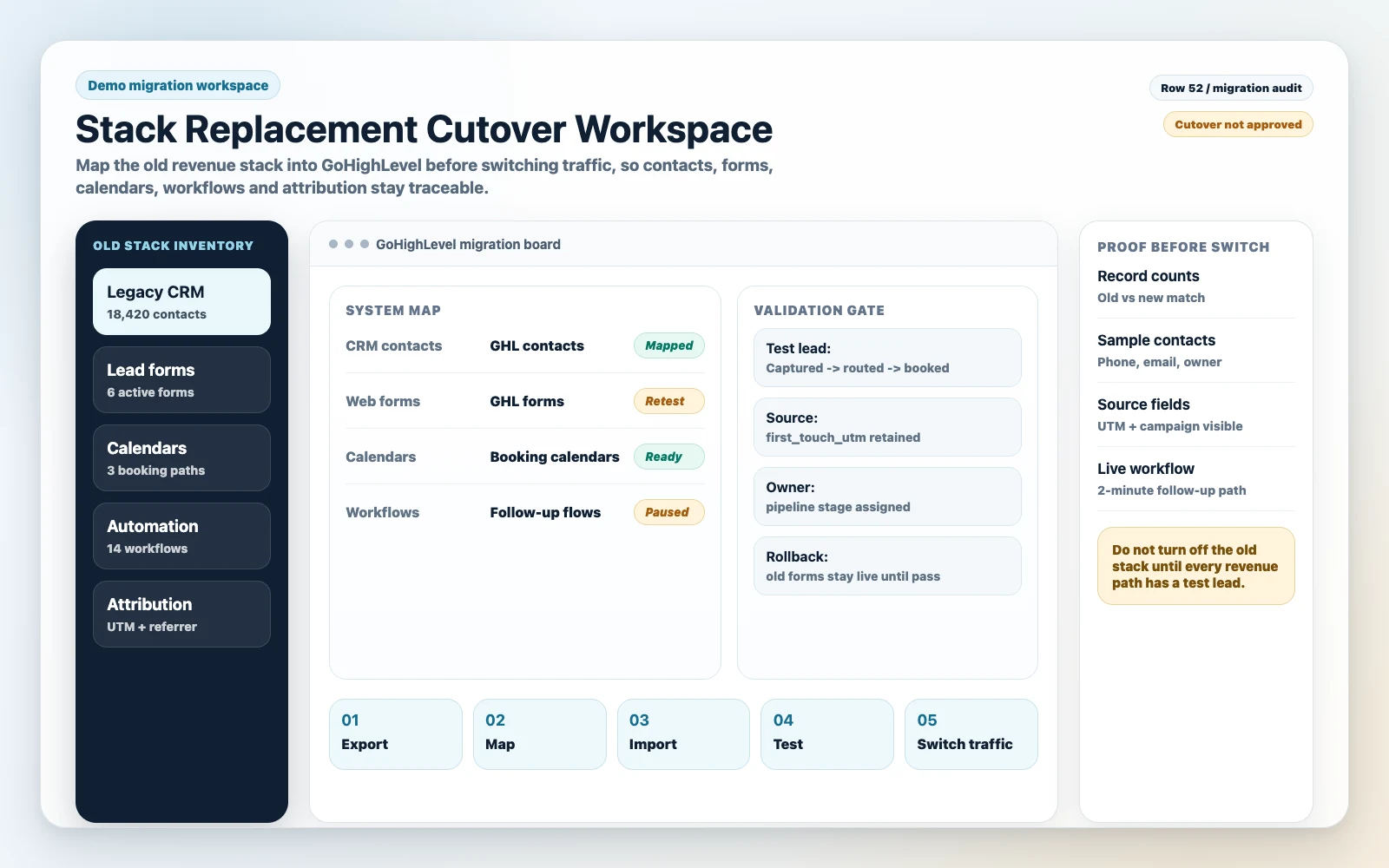
Commercial Reality Check: The Migration Risk Is Not Data Loss—It’s Silent Revenue Loss
True data loss is obvious (missing contacts). Silent revenue loss is worse:
- Forms submit but don’t create an opportunity, so sales never sees the lead.
- Calendars book but don’t trigger confirmations, reminders, or pre-call qualification.
- UTMs stop being captured, so you can’t tell which campaigns are working.
- Pipeline stages don’t match your sales process, so forecasting becomes fiction.
The goal is a cutover where lead capture, routing, follow-up, and reporting work on day one.
Pre-Migration Inventory: The Only Way To Avoid “Unknown Unknowns”
Before you touch GoHighLevel imports, you need a stack inventory. This is where most DIY migrations skip steps and pay for it later.
Inventory The Revenue Path (Not Just The Tools)
List every path a lead can take from “first touch” to “closed won.” For each path, capture:
- Entry point: page, form, ad, chat, inbound call, referral
- Data captured: name, email, phone, service, location, budget, notes, consent
- Routing rule: who gets it, when, based on what conditions
- Follow-up: SMS/email/call tasks, timing, stop conditions
- Conversion event: booked call, quote sent, deposit paid, contract signed
- Reporting requirement: lead source, campaign, pipeline stage timestamps
Export What You Have, But Audit What You Should Keep
Exports are easy. Decisions are not. In practice, you want to migrate:
- Contacts (with clean identifiers: email/phone)
- Custom fields that drive routing, qualification, or reporting
- Opportunities (pipeline stage + value + owner) if you need continuity
- Notes/tasks if sales relies on them (often selectively)
You usually do not want to migrate:
- Old, unengaged lists that will inflate your database and hurt deliverability
- Redundant tags that nobody can explain
- Broken lifecycle stages that don’t match how you sell today
Define Your “Minimum Viable Continuity”
Ask one blunt question: What must be true on day one for revenue not to dip?
For most businesses, the minimum viable continuity is:
- Every lead is captured
- Every lead is routed to the right person
- Every lead gets follow-up within your SLA (often 1–5 minutes for inbound)
- Every lead has a source (UTM or at least channel)
- Sales can see pipeline stages and next actions
Field Mapping And Data Hygiene: Where Most GoHighLevel Migrations Get Messy
GoHighLevel is flexible, which is great until you import chaos. Instead, use the migration to standardize how your business names, stores, and uses data.
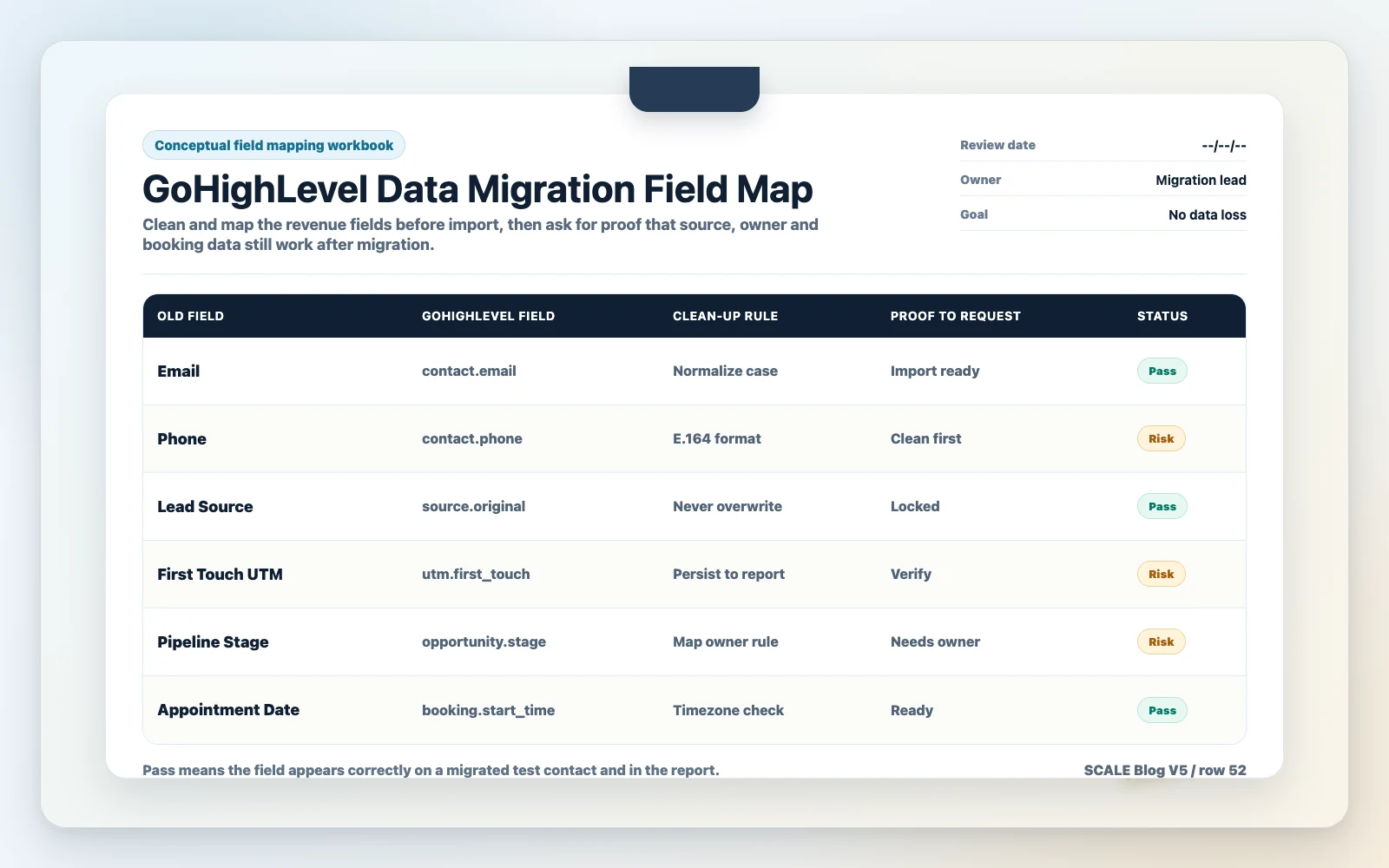
Build A Field Map Before You Import Anything
Create a simple mapping document with:
- Source field name (from old CRM/form tool)
- Destination in GoHighLevel (standard field vs custom field)
- Data type (text, number, date, dropdown)
- Allowed values (especially for dropdowns)
- Whether it’s required for routing/reporting
Strong setup: dropdown fields for “Service Type,” “Location,” “Lead Type,” “Budget Range” with controlled values.
In contrast, free-text fields create 40 variations of the same answer, making automation and reporting unreliable.
Deduplication Strategy: Decide Your Primary Identifier
Most duplicates happen because one system treats email as primary and another treats phone as primary. Decide what “same contact” means for your business:
- If you’re SMS-first: phone is usually the primary identifier.
- If you’re email-first: email may be primary, but phone still needs normalization.
Operational tip: normalize phone numbers (country code, formatting) before import. If you don’t, you’ll create duplicates that look different but are the same person.
Tag And List Cleanup: Keep What Drives Action
Tags should exist to trigger automation, segment messaging, or report lifecycle. If a tag doesn’t do one of those jobs, it’s a liability.
A practical rule: if you can’t explain what a tag does in one sentence, don’t migrate it.
If you want to see what the platform import flow actually looks like, HighLevel’s own CSV walkthrough is useful at this point. Watch it after the field map is clean, then come back to the validation checks below before you switch traffic.
Once the platform steps are clear, use the cutover validation section below to test lead capture, source fields, opportunity ownership and rollback before the old stack is switched off: Check the cutover validation steps.
Pipelines, Stages, And Ownership: Migrating The Sales Process (Not Just Records)
Pipeline design is where GoHighLevel becomes a revenue tool instead of a contact database.
Stage Names Must Match Sales Actions
Stages should reflect what sales is doing, not vague statuses. Example of strong stages:
- New Lead (Uncontacted)
- Contacted
- Booked Call
- Showed
- Proposal Sent
- Closed Won
- Closed Lost
- No Show / Reschedule Needed
Weak stages are things like “Warm,” “Hot,” “Maybe,” because they don’t tell you the next action or where leads are stuck.
Ownership Rules: Who Gets The Lead, And When?
During migration, define ownership logic explicitly:
- Round-robin vs territory vs service line
- What happens when the owner is unavailable
- How reassignments are tracked (so reporting stays honest)
If you don’t define this, you’ll see “unassigned” opportunities and missed follow-up—usually right after cutover when you can least afford it.
Stage Timestamping: The Hidden Requirement For Revenue Visibility
If you want to measure speed-to-lead, time-in-stage, and conversion rates, you need consistent stage movement rules. That means:
- Automations move stages only when a real event happens (form submit, call booked, payment received).
- Similarly, sales moves stages with clear definitions, and you train them.
Attribution And Lead Source: Don’t Lose The Only Data That Protects Your Ad Budget
Most migrations accidentally reset attribution. The business keeps spending, but can’t prove what’s working.
Decide What “Source” Means In Your Business
At minimum, capture:
- UTM source, medium, campaign (and optionally content/term)
- Landing page URL
- Referrer (when available)
- Lead channel (Meta, Google, organic, referral, outbound)
Then decide your rule:
- First-touch source: best for understanding acquisition.
- In contrast, last-touch source is best for understanding what closed.
Strong setup stores both (or stores first-touch and updates last-touch separately). Weak setup overwrites source every time the lead fills a new form.
Diagnose Attribution Risk Before Cutover
If you run paid traffic, do this test before you migrate:
- Submit a test lead from each funnel with UTMs present.
- Then confirm UTMs land in the correct GoHighLevel fields.
- Confirm the opportunity is created with the correct pipeline and owner.
- Confirm the follow-up sequence triggers and stops correctly after booking.
If any of those fail, you’re not ready to cut over.
The Implementation Process
-
Define The Cutover Goal And Non-Negotiables
Write down what must work on day one: lead capture, routing, speed-to-lead, booking confirmations, pipeline visibility, and attribution fields. As a result, this becomes your acceptance criteria.
-
Inventory Your Current Stack And Revenue Paths
List every form, funnel, calendar, automation, and integration that creates or updates a lead. In particular, include edge cases: missed call texts, reschedule links, quote follow-ups, and reactivation campaigns.
-
Design The GoHighLevel CRM Structure
Set up pipelines, stages, opportunity fields, custom fields, tags (only those that drive action), and user roles. Define ownership rules and SLA expectations.
-
Build Field Mapping And Data Hygiene Rules
Map old fields to GoHighLevel fields, normalize phone/email formats, define dropdown values, and decide what data you will not migrate. Therefore, plan deduplication logic before import.
-
Rebuild Lead Capture And Booking Assets
Implement forms, surveys, calendars, and routing rules inside GoHighLevel (or connect existing pages). Ensure required fields for segmentation and attribution are captured consistently.
-
Recreate Automations As “Event-Driven” Workflows
Build workflows around real events: form submitted, call booked, call missed, stage changed, payment received. Add stop conditions so leads don’t get spammed after they convert.
Tracking, Import, And Cutover
-
Set Up Tracking And Reporting
Ensure UTMs are captured, lead source fields are populated, and pipeline reporting reflects reality. If you run Meta Ads, confirm your lead events and offline conversion logic won’t break during cutover.
-
Run A Staged Import
Import contacts first (with custom fields), then opportunities/pipeline records, then notes/tasks if needed. Afterward, validate counts, spot-check records, and confirm owners and stages are correct.
-
Parallel Run With Test Leads
Keep the old system live while you send test leads through every funnel and booking path. Confirm: capture, routing, notifications, follow-up, calendar sync, and attribution.
-
Cutover With A Rollback Plan
Switch forms/calendars/integrations in a controlled window. Meanwhile, monitor the live lead path in real time. If lead capture or routing fails, revert immediately and fix before trying again.
-
Handover, Training, And Pipeline Hygiene
Document stage definitions, required fields, and “how we work leads.” Then train the team on inbox, tasks, and stage movement. Set weekly hygiene checks so reporting stays clean.
| Cutover Acceptance Test | Pass Condition | How To Verify |
|---|---|---|
| Lead Capture | Every form submission creates/updates the correct contact | Submit test leads from each page and confirm contact record + fields |
| Opportunity Creation | New leads create an opportunity in the right pipeline/stage | Check pipeline view and opportunity owner assignment |
| Routing | Correct user gets notified and assigned within SLA | Time-stamp notifications and assignment logs |
| Booking | Calendar booking triggers confirmations/reminders and updates stage | Book a test call; confirm emails/SMS + stage movement |
| Attribution | UTMs and source fields populate consistently | Use UTM-tagged test URL; confirm fields on contact/opportunity |
Common Problems And How To Fix Them
| Problem | What It Usually Means | Commercial Risk | Fix | Metric To Watch |
|---|---|---|---|---|
| Duplicates Explode After Import | Email/phone formats inconsistent; no dedupe rules; multiple sources creating contacts | Sales confusion, double follow-up, poor deliverability | Normalize identifiers pre-import; standardize phone format; audit integrations creating new contacts | Duplicate rate; complaint/unsubscribe rate |
| Leads Submit But Don’t Hit The Pipeline | Form triggers not creating opportunities; workflow misconfigured | Missed leads, delayed response, lost bookings | Add opportunity creation step; verify pipeline/stage IDs; test each form | Leads-to-opportunities ratio |
| Booked Calls Don’t Stop Follow-Up | No stop conditions; booking event not linked to workflow | Bad customer experience; lower show rate | Add “appointment booked” stop logic; segment by appointment status; suppress promos | Show rate; reply sentiment |
| UTM Data Missing Or Overwritten | Forms not capturing UTMs; source fields overwritten on repeat submissions | Wasted ad spend; can’t scale winners | Capture UTMs on first touch; store last touch separately; lock first-touch fields | % leads with UTMs; CAC by campaign |
| Sales Can’t Trust The Pipeline | Stages unclear; no definitions; automations moving stages incorrectly | Bad forecasting; missed follow-up; longer sales cycles | Define stage entry/exit; train team; restrict automation to event-driven moves | Time-in-stage; stage conversion rate |
| Email Deliverability Drops After Migration | Old lists imported; no warming; poor segmentation | Lower response; damaged domain reputation | Import only engaged contacts; segment; warm sending; clean bounces | Open rate trends; bounce rate |
How To Validate A GoHighLevel Implementation Data Migration Before You Turn Off The Old Stack
If you want a migration that doesn’t create a “mystery dip” in revenue, validation is the job. Here’s the operator-grade approach.
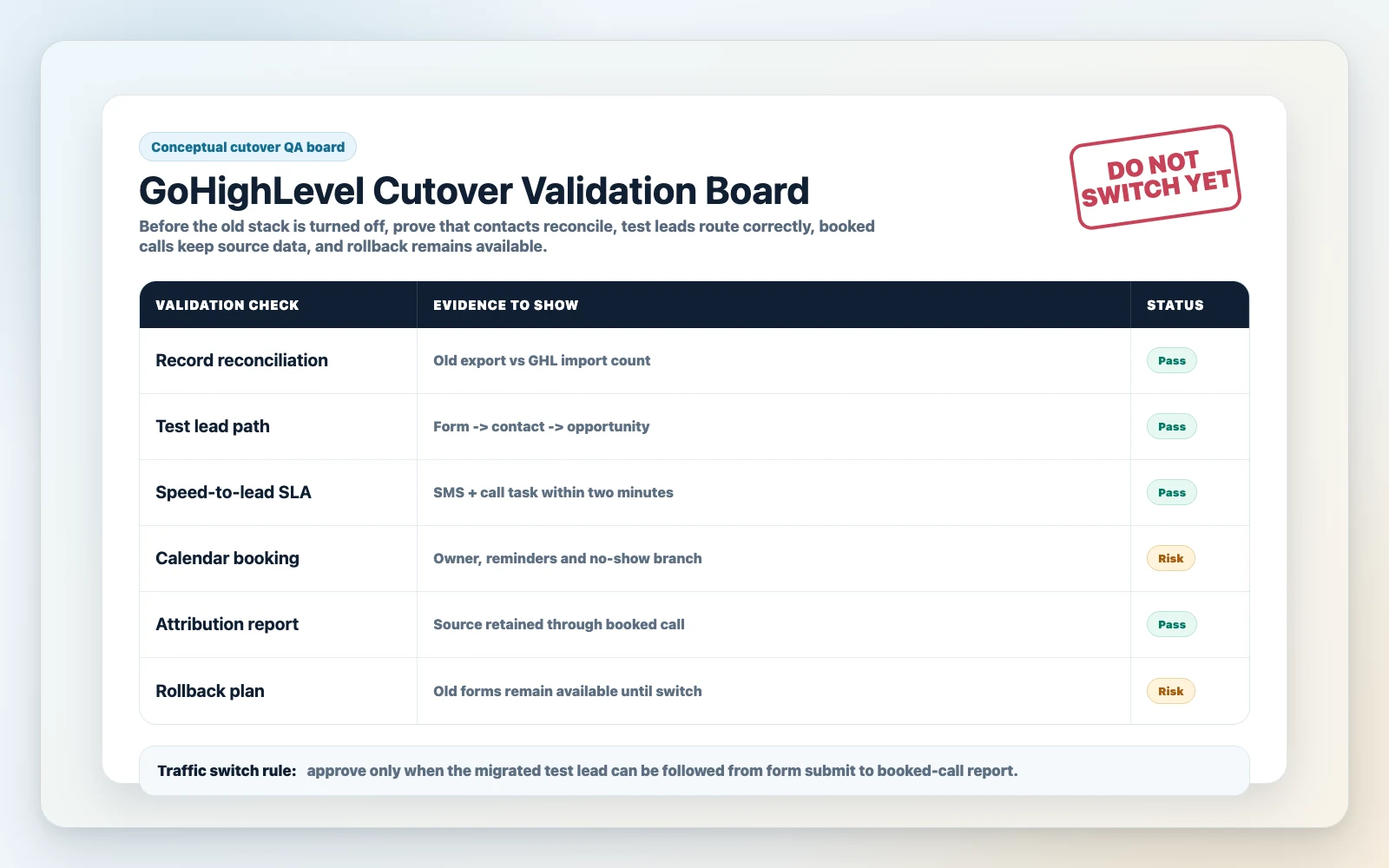
1) Reconciliation: Prove The Numbers Match
Pick a date range (e.g., last 90 days) and reconcile:
- Total contacts created
- Total opportunities created
- Booked calls (calendar events)
- Closed won count and value (if you track it)
You’re not looking for perfection across every historical edge case. You’re looking for confidence that the system is capturing and progressing leads correctly going forward.
2) Test Leads: Simulate Real Behavior
Run test leads that mimic reality:
- Lead submits form, doesn’t book
- Lead submits form, books immediately
- Lead books without form (direct calendar link)
- Lead replies “STOP” or asks a question
- Lead no-shows and reschedules
Strong setup: each path updates the pipeline, triggers the right follow-up, and stops the wrong follow-up.
Weak setup: everything triggers everything, and your team starts ignoring notifications.
3) SLA Monitoring: Speed-To-Lead Must Be Measurable
If you can’t measure time-to-first-response, you can’t manage it. During cutover week, track:
- Time from form submit to first outbound SMS/email
- Time from form submit to first human touch (call/SMS reply)
- Missed call handling (if phone is a primary channel)
4) Rollback Plan: The Safety Net You Hope You Don’t Need
A rollback plan is simple: if a critical path fails (lead capture, routing, booking), you can revert traffic to the old form/calendar quickly. That means you keep access and don’t “clean up” the old stack until the new one is stable.
Cost, Timing, And Resourcing: What Owners Underestimate
Migration cost is not just implementation hours. It is the operational cost of missed follow-up, disputed reporting, duplicate records and confused ownership while two systems overlap. Treat budget as a risk-control plan: decide what must be migrated, what can be archived, who signs off each object type, and how long the old stack stays available for reconciliation.
Time Windows That Reduce Risk
- Cut over during a lower-volume period (if your business has one).
- Avoid launching new offers and migrating at the same time.
- Plan for at least a few days of parallel run and QA.
Resourcing Reality: Who Owns What
A clean GoHighLevel implementation data migration usually needs clear ownership across:
- CRM architecture (pipelines, fields, permissions)
- Funnel/forms/calendars (capture + routing)
- Automation logic (workflows + stop conditions)
- Tracking/attribution (UTMs + reporting)
- Sales enablement (stage definitions + training)
If one person is “kind of doing all of it,” expect gaps.
If you’re deciding whether to outsource, this guide helps frame the tradeoffs: GoHighLevel implementation cost and outsourcing.
What This Means For Revenue
A migration is not an IT project. It’s a revenue continuity project.
Here’s what typically moves when the migration is done well (or poorly):
- Lead quality: better qualification fields and routing reduce time wasted on bad-fit leads. Poor mapping creates garbage data and weak segmentation.
- Booked calls: clean calendar logic + reminders + pre-call workflows increase show rates. Broken triggers reduce bookings and create no-shows.
- Speed-to-lead: GoHighLevel can automate instant SMS/email and task creation. If routing fails, your response time spikes and conversion drops.
- Pipeline visibility: consistent stages and ownership make forecasting real. Messy stages make the pipeline look “fine” while deals silently stall.
- Attribution: UTM capture and source rules protect your ad budget. Losing UTMs forces you to make scaling decisions based on vibes.
- Wasted ad spend: if leads aren’t captured or followed up, you’re paying for traffic that never gets worked.
The commercial win is not “we moved tools.” The win is: every lead is captured, worked fast, tracked correctly, and visible in one place.
Migration View
Most migrations fail for one reason: people migrate data without migrating the operating system of the business (routing, follow-up, attribution, and sales hygiene).
SCALE builds GoHighLevel CRM, funnel and automation systems for businesses that need better lead quality, faster follow-up and clearer attribution. In practice, that means we focus on:
- Acceptance criteria before build: what must work on day one, and how we’ll prove it.
- Event-driven automation: workflows tied to real buyer actions, with stop conditions to prevent spam and confusion.
- Pipeline truth: stages that match sales actions, ownership rules that prevent “unassigned,” and hygiene that keeps reporting accurate.
- Attribution that survives reality: UTM capture, first/last touch logic, and fields that don’t get overwritten every time a lead re-enters.
- Cutover discipline: parallel run, test leads, reconciliation, and rollback planning so revenue doesn’t dip.
If you want a more granular checklist for the actual transfer work, use this alongside your plan: GoHighLevel CRM migration and data transfer checklist.
Conclusion
Our view: a safe GoHighLevel implementation data migration is a controlled revenue cutover, not a bulk import. Move only the data that sales and marketing need to act on, protect source fields, prove forms and routing with test leads, and keep the old stack available until capture, follow-up, booking and reporting have all passed QA.
FAQs
Can GoHighLevel import my contacts and pipeline deals from another CRM?
Yes, but the import is only half the job. Contacts can be imported via CSV, and opportunities can be recreated if you have clean exports. The real risk is mismatched fields, inconsistent stage names, and missing ownership rules. Plan your field map and pipeline definitions before you import, then validate with reconciliation and test leads.
What data should I not migrate into GoHighLevel?
Don’t migrate data that doesn’t drive action: ancient unengaged lists, duplicate-heavy segments, and tags nobody uses. Importing “everything” usually creates a bloated CRM, hurts email deliverability, and makes reporting noisy. Migrate what sales needs to close deals and what marketing needs to segment and attribute.
How do I avoid losing attribution (UTMs) during a migration?
Standardize UTM capture at the form level and store first-touch UTMs in fields that don’t get overwritten. If you also want last-touch, store it separately. Before cutover, submit UTM-tagged test leads through every funnel and confirm the fields populate correctly on the contact and/or opportunity.
Should I run the old stack and GoHighLevel in parallel?
For most revenue-driving businesses, yes. A short parallel run lets you validate lead capture, routing, booking, and follow-up without risking downtime. The goal is not to operate two systems forever; it’s to prove the new system works before you switch off the old one.
What’s the biggest “silent failure” after a GoHighLevel migration?
Leads being captured but not being worked. Common causes: opportunities not being created, owners not being assigned, notifications going to the wrong person, or workflows not triggering. If you don’t have a clear SLA and a way to measure time-to-first-response, you won’t notice until revenue drops.
How long does a GoHighLevel implementation data migration take?
It depends on stack complexity: number of funnels/forms, calendars, pipelines, and automations. The timeline is usually driven by inventory, field mapping, rebuild of capture/booking, and QA—not the CSV import. If you need zero downtime, plan for staged migration and a parallel-run validation window.
When should I hire a GoHighLevel expert service instead of DIY?
Hire help when speed-to-lead and attribution are revenue-critical, when you have multiple lead sources and a sales team, or when your current data is messy. The cost of missed leads during cutover often exceeds the cost of a specialist implementation—especially if you’re running paid traffic.
