
In this guide, we’ll cover:
A buyer-led comparison of GoHighLevel CRM vs HubSpot for agencies that want cleaner delivery, faster follow-up and lower tool drag.
If the HubSpot-to-GoHighLevel decision is close, run the data transfer checklist before switching so contact history, deal stages, tags and follow-up workflows are not lost during migration.
For the wider build plan behind that switch, use the GoHighLevel implementation pre-migration checklist to map CRM structure, pipeline stages, automations and reporting before migration starts.
Is HubSpot Too Heavy For How Your Agency Actually Sells?
The comparison changes when the agency needs client funnels, bookings, follow-up and pipeline visibility more than enterprise CRM depth.
Where Does Client Work Slow Down?
A switch is usually about delivery speed: pages, forms, calendars, messages and opportunities need to be easier to launch and manage.
Can The New CRM Keep Source Truth Intact?
Migration only works if contact records, fields, lifecycle stages and opportunity source data survive the move cleanly.
When Does GoHighLevel Become The Better Operating System?
GoHighLevel wins when the agency needs one system for CRM, follow-up, bookings, client delivery and growth reporting.
“The best CRM for an agency is the one the team can use daily without breaking lead capture, client delivery or revenue reporting.”
GoHighLevel CRM vs HubSpot is not just a software comparison. For agencies, it is a delivery model decision: how leads are captured, how clients are managed, how follow-up runs and how revenue movement is reported.
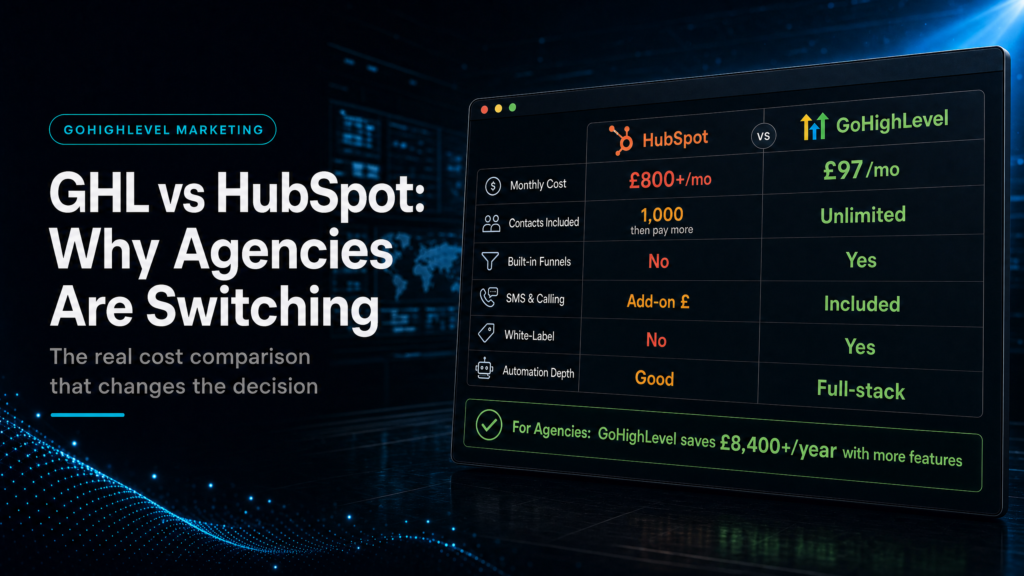
HubSpot can be powerful for larger sales teams. GoHighLevel can be more practical when the agency needs funnels, calendars, SMS, email, pipeline stages and client sub-accounts in one working system.
SCALE builds GoHighLevel CRM, funnel and automation systems for businesses that need better lead quality, faster follow-up and clearer attribution. This guide focuses on when agencies should consider switching and what they must protect during the move.
If the comparison is really about implementation ownership, the SCALE GoHighLevel expert build guide explains what separates a configured CRM from a revenue system.
Quick Answer
GoHighLevel CRM can be a better fit than HubSpot for agencies that need lead capture, funnels, calendars, SMS/email follow-up, pipeline tracking and client delivery inside one operating system. HubSpot can still be better for larger sales organizations that need advanced enterprise CRM features, deep custom reporting and mature internal sales operations.
TL;DR
- GoHighLevel is usually stronger for agency fulfilment, funnels, bookings and client sub-accounts.
- HubSpot is usually stronger for larger sales teams, complex CRM governance and enterprise reporting.
- Agencies switch when the cost of tool sprawl is higher than the cost of migration.
- The migration must protect fields, lifecycle stages, source data, calendars and follow-up rules.
- Use the CRM stack replacement hub before moving any revenue-critical client process.
Switching Decision Table
Use this table to decide whether GoHighLevel or HubSpot fits the way the agency actually sells and delivers.
| Decision Area | GoHighLevel CRM Fits When | HubSpot Fits When | Migration Check |
|---|---|---|---|
| Agency delivery | You need funnels, bookings, follow-up and client sub-accounts close together. | You need mature enterprise CRM processes and larger internal teams. | Map client access, permissions and account structure before switching. |
| Lead generation | Most revenue depends on forms, calls, landing pages, calendars and rapid follow-up. | Most revenue depends on longer sales cycles and deep CRM governance. | Test every lead source through contact, opportunity and booking stages. |
| Reporting | You need simple source-to-pipeline visibility for campaigns and client outcomes. | You need advanced dashboards, custom objects and multi-team reporting. | Define lifecycle stages and source fields before importing contacts. |
Who Is This For?
- Agencies comparing GoHighLevel CRM vs HubSpot before moving client delivery.
- Consultants who need funnels, booking, SMS and email close to the CRM.
- Local business agencies tired of stitching together landing page, calendar and follow-up tools.
- Teams that want faster campaign launch without losing pipeline accountability.
- Operators who need clearer source reporting across client campaigns.
Why Agencies Compare GoHighLevel CRM Vs HubSpot
The comparison usually starts when the agency feels software drag. HubSpot may hold contacts and deals, while landing pages, calendars, SMS, email and client reporting live elsewhere. Each extra tool adds a handoff that can break.
GoHighLevel appeals because the agency can manage more of the growth system in one place. Funnels, forms, calendars, opportunities, SMS, email and client sub-accounts are closer together. That can reduce friction if the agency sells through booked calls and local lead generation.
Where HubSpot Still Makes Sense
HubSpot can still be the stronger choice for larger teams with complex internal sales processes. If the business needs advanced governance, custom reporting, deep CRM administration or enterprise integrations, switching purely to reduce tool cost can be shortsighted.
The right question is whether HubSpot’s extra depth is actually being used. If the agency only needs basic pipeline management plus connected lead generation, GoHighLevel may be simpler. If the agency depends on advanced CRM operations, HubSpot may remain the safer system.
Where GoHighLevel Wins For Agencies
GoHighLevel tends to win when delivery speed matters. Agencies can build landing pages, connect forms, trigger SMS, send email, book calendars, update opportunities and manage client sub-accounts without spreading the same process across multiple tools.
That matters for client campaigns. A lead should not bounce between a page builder, calendar tool, email platform, spreadsheet and CRM before a sales conversation starts. The fewer the handoffs, the easier it is to protect response speed and attribution.
Migration Risks Agencies Should Not Ignore
The biggest switching risk is not the software account. It is the operating data. Contacts, lifecycle stages, lead sources, custom fields, forms, calendars, owner rules and reporting definitions must be mapped before the migration starts.
If the agency imports contacts without a clean stage model, the new CRM starts messy. If the agency moves forms without source rules, attribution breaks. If calendars move without owner logic, booked calls can be assigned to the wrong person.
How To Switch Without Breaking Follow-Up
Start with one representative client or campaign path. Map how a new lead enters, which fields are captured, who owns the conversation, what follow-up fires and which report shows the outcome. Then rebuild that path in GoHighLevel before migrating the rest.
Test with real scenarios. Submit forms, book calls, cancel appointments, reply to messages, opt out and change pipeline stages. The switch is only ready when the new system handles normal sales behavior without manual rescue.
Conclusion
GoHighLevel CRM can be a better fit than HubSpot for agencies that need faster funnel deployment, native follow-up, client sub-accounts and simpler source-to-pipeline visibility. HubSpot can still win for larger teams with deeper CRM governance needs.
The decision should come from the agency’s operating model. If growth depends on lead generation, booking, SMS, email and client delivery working together, GoHighLevel is worth serious consideration. If complex enterprise CRM depth is the real value, keep HubSpot until the switching case is clear.
FAQs
Is GoHighLevel CRM Better Than HubSpot For Agencies?
It can be better for agencies that need funnels, calendars, SMS, email, pipeline management and client sub-accounts in one system. HubSpot can still fit teams that need deeper enterprise CRM features.
Why Do Agencies Switch From HubSpot To GoHighLevel?
Agencies switch when they want fewer disconnected tools, faster funnel deployment, simpler client delivery, native follow-up and a CRM closer to booked-call revenue.
What Should Agencies Check Before Switching?
Check contacts, lifecycle stages, pipelines, fields, forms, calendars, automation rules, reporting needs, client access and source tracking before migrating.
Does Switching Reduce Software Cost?
It can reduce software cost when GoHighLevel replaces separate landing page, booking, CRM, email, SMS and reporting tools. The saving only matters if the new setup protects sales follow-up.
