
In this guide, we’ll cover:
A practical way to decide when Go High Level automation can replace Zapier, ActiveCampaign and disconnected follow-up without breaking lead routing.
Which Automations Are Quietly Doing The Same Job?
Before replacing Zapier or ActiveCampaign, map the duplicate jobs across forms, tags, calendars, email, SMS and CRM updates.
Where Does A Lead Lose Its Owner?
The expensive failure is rarely the missing app. It is the point where a lead is captured but not assigned, alerted or moved correctly.
What Has To Move Before You Cut The Old Tool?
Revenue-critical automation should migrate in stages so booking, opt-out, source and pipeline rules can be tested before anything is switched off.
Can The New Stack Prove Which Source Created Revenue?
The replacement only works if GoHighLevel shows which campaign, form, call or calendar event created pipeline and closed revenue.
“Automation consolidation only saves money when the new system protects the lead journey better than the tools it replaces.”
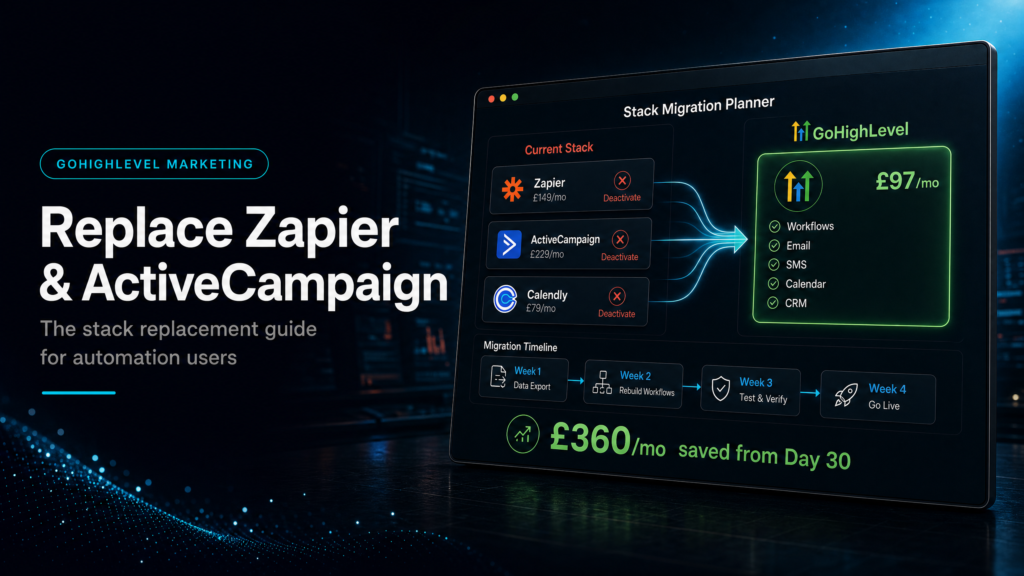
Go High Level automation can replace parts of Zapier, ActiveCampaign and a scattered follow-up stack when the same lead journey is being stitched together across too many tools.
The goal is not fewer subscriptions for its own sake. The goal is a cleaner revenue path where the CRM, calendar, pipeline, email, SMS, attribution and sales tasks agree with each other.
SCALE builds GoHighLevel CRM, funnel and automation systems for businesses that need better lead quality, faster follow-up and clearer attribution. That means every replacement decision starts with the handoff from enquiry to revenue.
Before replacing Zapier with native workflows, compare the plan against an expert GoHighLevel setup so ownership, QA and fallback rules are clear.
Quick Answer
Go High Level automation can replace Zapier and ActiveCampaign when your main workflows are lead capture, routing, calendar booking, SMS/email follow-up, pipeline updates and source reporting. Keep external tools only where they handle specialist integrations, deep email segmentation or non-sales operations that GoHighLevel cannot support cleanly.
TL;DR
- Start with the revenue path, not the app list.
- GoHighLevel is strongest when CRM, funnels, calendars and follow-up need to act together.
- Zapier may still be needed for specialist external app handoffs.
- ActiveCampaign may still be useful for complex email-only segmentation.
- Do not switch tools off until forms, booking, opt-outs, attribution and pipeline updates are tested.
Replacement Decision Table
Use this table to decide what should move into GoHighLevel and what should stay outside the account for now.
| Current Tool | Move Into GoHighLevel When | Keep Separate When | Test Before Switching Off |
|---|---|---|---|
| Zapier | The zap only moves leads between forms, calendars, pipelines and notifications. | The workflow depends on finance, fulfilment, inventory or specialist third-party apps. | Field mapping, owner assignment, failed-task handling and duplicate prevention. |
| ActiveCampaign | Follow-up is tied to booked calls, missed calls, pipeline stages and sales outcomes. | Email segmentation is deep, ecommerce-led or independent from the sales CRM. | Unsubscribes, tags, suppression, reply handling and sequence stop rules. |
| Spreadsheets | The sheet tracks lead status because the CRM is not trusted. | The sheet is used for finance or operational reporting beyond sales workflow. | Pipeline stages, source fields, dashboard definitions and export needs. |
Who Is This For?
- Businesses paying for Zapier just to move leads between simple sales tools.
- Teams using ActiveCampaign for follow-up while the CRM lives somewhere else.
- Agencies managing multiple sub-accounts that need cleaner client delivery.
- Local service businesses that need missed-call, form, booking and SMS logic in one place.
- Operators who want source reporting tied to pipeline movement instead of disconnected dashboards.
Why Stack Replacement Starts With The Lead Journey
Most tool consolidation fails because it starts with software cost. The better starting point is the lead journey. A new enquiry enters through a form, ad, call, chat or landing page. Then it needs a source, an owner, a first-touch action, a pipeline stage and a clear next step.
If Zapier currently moves that data, replacing it without a field map creates risk. If ActiveCampaign currently handles follow-up, replacing it without suppression and reply rules creates noise. Therefore, the stack replacement should be designed around the sales handoff first.
Where GoHighLevel Automation Works Best
GoHighLevel is strongest when the automation is close to the sales process. That includes form capture, missed-call text back, calendar reminders, pipeline stage changes, task creation, owner assignment, no-show recovery and nurture after a prospect books or replies.
These workflows benefit from being inside the same account because the CRM record, opportunity, messages and calendar can share context. The system can see whether someone booked, replied, cancelled, opted out or moved stage.
Where You Should Keep Zapier Or ActiveCampaign
Some workflows should stay outside GoHighLevel. If a zap updates finance software, fulfilment tools, inventory, reporting warehouses or non-sales operations, it may still be the cleanest option. Removing it just to simplify the stack can create a hidden operations problem.
ActiveCampaign may also stay useful when the business relies on complex email-only segmentation that is not tied to sales conversations. The decision depends on what the workflow is protecting, not whether the logo is convenient.
The Migration Sequence That Reduces Risk
Start by listing every active trigger. Include forms, calls, calendars, appointment outcomes, manual stage changes, tag changes and missed conversations. Then group them by job: intake, assignment, first-touch follow-up, booking, no-show recovery, nurture, reporting and internal alerts.
Next, rebuild only the revenue-critical path in GoHighLevel. Submit test leads from each source. Book and cancel test appointments. Reply to messages. Trigger opt-outs. Then check whether fields, opportunities, tasks and source data update correctly.
What To Measure After Replacement
The replacement should make the system easier to measure. Watch time to first response, booked-call rate, show rate, opportunity source coverage, stage movement and failed automation events. If those metrics get weaker, the stack is not actually simpler.
For businesses running paid traffic, attribution is the guardrail. Every form, call and calendar path should preserve the source before follow-up starts. Otherwise, the business may reduce software spend while making ad decisions harder.
Conclusion
GoHighLevel can replace a large amount of sales automation when the workflow is tied to lead capture, follow-up, booking, pipeline movement and reporting. It should not replace every external tool without a clear test plan.
The safest route is to map the revenue path first, migrate the handoffs in stages, verify source and owner rules, then retire the old tools only when the new system proves it can protect the lead journey.
FAQs
Can Go High Level Automation Replace Zapier?
Yes, when Zapier is only moving sales leads between forms, calendars, notifications and CRM fields. Keep Zapier when the workflow connects specialist external apps that GoHighLevel does not handle cleanly.
Can Go High Level Replace ActiveCampaign?
Often, yes. GoHighLevel is a good fit when email and SMS follow-up should react to CRM stages, bookings, missed calls and pipeline outcomes. ActiveCampaign may still fit deep email-only segmentation.
What Should Be Migrated First?
Migrate lead capture, owner assignment, first-touch follow-up, calendar booking, stop conditions and source reporting before cosmetic nurture sequences.
What Is The Biggest Stack Replacement Risk?
The biggest risk is losing source data, ownership rules or booking outcomes during migration. A cleaner tool list is not a win if sales visibility gets worse.
