In this guide, we’ll cover:
Which Tools Are Quietly Doing The Same Job?
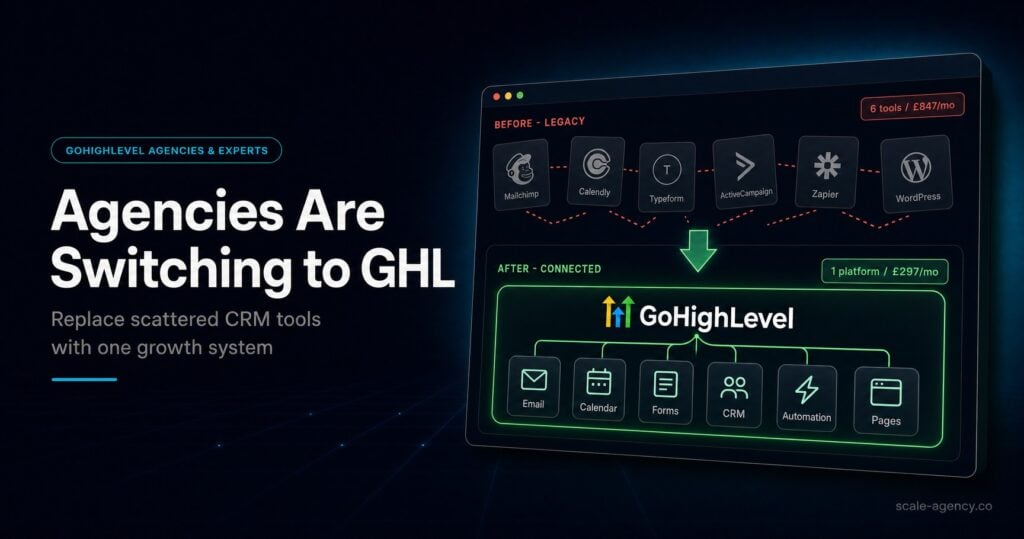
Most businesses do not realise how many tools overlap until forms, calendars, email follow-up, pipelines and reports are mapped against one customer journey.
Before replacing a CRM stack, use the GoHighLevel CRM migration checklist to decide which contacts, deals, tags, fields and automations must move cleanly into the new system.
Can One System Own The Buyer Record?
A useful CRM replacement gives each contact one source of truth for source, stage, owner, booking status, follow-up and outcome.
Will Cutting Software Break Revenue Visibility?
The saving only matters if the business keeps clean lead capture, routing, attribution and sales reporting after old tools are removed.
What Needs To Move Before You Cancel Anything?
Fields, forms, calendars, automations, tags and pipeline stages should be checked before subscriptions are cut, otherwise the cheap move becomes a rebuild.
GoHighLevel CRM only cuts costs safely when it replaces duplicated tools without weakening the lead journey, follow-up system or revenue reporting.
Quick Answer
GoHighLevel CRM can replace a fragmented stack when your forms, landing pages, calendars, pipeline, follow-up and reporting can live around one contact record. The cost saving is useful only if source capture, owner assignment, automations and sales reporting still work after old tools are removed.
This post is the canonical CRM hub for the Q2 cluster. For website-specific software consolidation, compare it with the GoHighLevel website software costs guide.
TL;DR
- GoHighLevel CRM can reduce stack cost by consolidating pages, forms, calendars, follow-up, pipeline and reporting.
- The risk is cutting tools before lead capture, source tracking and sales ownership are rebuilt properly.
- A CRM replacement should start with one clean contact record and one clear pipeline process.
- Do not cancel old software until fields, forms, automations and reports have been tested.
- SCALE treats CRM consolidation as a revenue visibility project, not a subscription-cutting exercise.
Stack This Post With These Related Guides
If software cost is tied to your website stack, read the GoHighLevel website software costs guide. If the replacement starts with funnels, compare this with the GoHighLevel funnel builder setup guide.
CRM Stack Replacement Table
| Current Tool Area | Common Overlap | GoHighLevel CRM Role | Check Before Cutting |
|---|---|---|---|
| Forms And Landing Pages | Separate page builder, form tool and CRM capture. | Pages, forms and contact creation can sit in one system. | Test every form, hidden field, notification and source value. |
| Calendars And Bookings | Standalone scheduler that does not update the pipeline cleanly. | Booking, reminder and opportunity movement can connect to the contact record. | Confirm show, cancel, reschedule and no-show outcomes. |
| Email And SMS Follow-Up | Disconnected tools send messages without sales context. | Workflows can react to stage, reply, booking and source data. | Add stop rules for replies, opt-outs and sales conversations. |
| Reporting | Dashboards count leads but miss revenue movement. | Pipeline and source reports can show booked calls and closed outcomes. | Check source, owner, stage and close data before relying on reports. |
Why Stack Replacement Starts With The Contact Record
The contact record is the centre of a CRM replacement. If every lead has one source, one owner, one pipeline status and one follow-up history, the business can reduce tools without losing visibility.
If the contact record is messy, the stack may get cheaper while the sales process becomes harder to manage. That is why the CRM layer should be designed before subscriptions are cancelled.
What GoHighLevel CRM Can Consolidate
GoHighLevel can often bring together forms, landing pages, calendars, pipelines, automations, email, SMS and reporting. The practical value is not having more features in one login. It is having fewer gaps between each step of the lead journey.
For older CRM-stack comparisons, the GoHighLevel sales funnel versus CRM stack guide gives a useful supporting view.
Where Businesses Break The Move
The most common mistake is cancelling software before every live path has been tested. A form might submit, but the owner is wrong. A calendar might book, but the pipeline does not move. A workflow might send, but it keeps running after a reply.
If consolidation exposes missed handoffs, use the Go High Level automation lead recovery playbook to rebuild routing, reminders and stop conditions around the new CRM.
- Map the current stack before replacing it.
- Rebuild the contact fields and source rules first.
- Test form, calendar, pipeline and follow-up paths end to end.
- Keep old tools live until reporting proves the replacement works.
How To Decide Whether The Saving Is Real
The real saving is not just the cancelled subscription total. It is the difference between a cheaper stack and a more controllable revenue system. If the new CRM improves response time, attribution and sales follow-up, the saving is operational as well as financial.
If the website is part of the consolidation, use the GoHighLevel website vs WordPress guide before moving public pages.
Conclusion
GoHighLevel CRM can replace a disconnected stack and reduce monthly software costs, but only when the lead journey is rebuilt with care.
SCALE’s view is that CRM consolidation should protect revenue visibility first. Cost savings are valuable, but they should not come at the expense of source tracking, owner assignment or follow-up control.
- Start with the contact record, not the subscription list.
- Test every lead path before cancelling old tools.
- Use reporting to prove the new CRM is cleaner, not just cheaper.
FAQs
Can GoHighLevel CRM replace multiple business tools?
Yes, when forms, calendars, landing pages, follow-up, pipeline and reporting can be rebuilt around one contact record. The replacement must be tested before old tools are cancelled.
What should I check before cutting CRM software costs?
Check source capture, form routing, calendar outcomes, pipeline stages, owner notifications, stop rules and reporting. Those controls protect revenue visibility after consolidation.
Is GoHighLevel CRM better than a separate CRM and funnel stack?
It can be better when the business needs fewer handoffs between lead capture, follow-up and sales reporting. A separate stack may still work if integrations are stable and reporting is trusted.
Should this CRM post be the canonical hub?
Yes. This is the Q2 canonical page for the GoHighLevel CRM cluster, so future CRM migration and CRM comparison support posts should link back to this URL.
