
Why Cheap Leads Can Still Be Expensive
However, cost per lead only matters once you know whether leads book, show, qualify and close.
Where Lead Quality Breaks First
Message mismatch, slow first touch, routing gaps and attribution holes distort the funnel before sales sees it.
How To Make KPIs Revenue-Grade
Then, track stage conversion and source-to-revenue movement so you know which fixes actually change outcomes.
When To Upgrade The Build
As a result, high-ticket teams need a funnel that enforces qualification, follow-up and handoff rules without relying on memory.
In this guide, we’ll cover:
For context, SCALE builds GoHighLevel CRM, funnel, and automation systems for teams that need lead quality to be measured by pipeline movement, not guessed from cost per lead.
Lead quality improves when your funnel stops measuring volume and starts measuring intent, handoff quality, and revenue movement.
Quick Answer
The fastest way to improve lead quality is to track GoHighLevel sales funnel kpis that expose friction: (1) offer-to-form mismatch, (2) slow speed-to-lead, (3) broken routing and pipeline hygiene, and (4) weak attribution. As a result, fixing these in GoHighLevel tightens qualification, increases booked calls, and stops ad spend from feeding the wrong conversations.
TL;DR
- If your CPL looks “fine” but show rate and close rate are falling, your funnel is producing volume, not qualified intent.
- Track KPIs by stage conversion (view → opt-in → booked → showed → closed), not just leads and cost per lead.
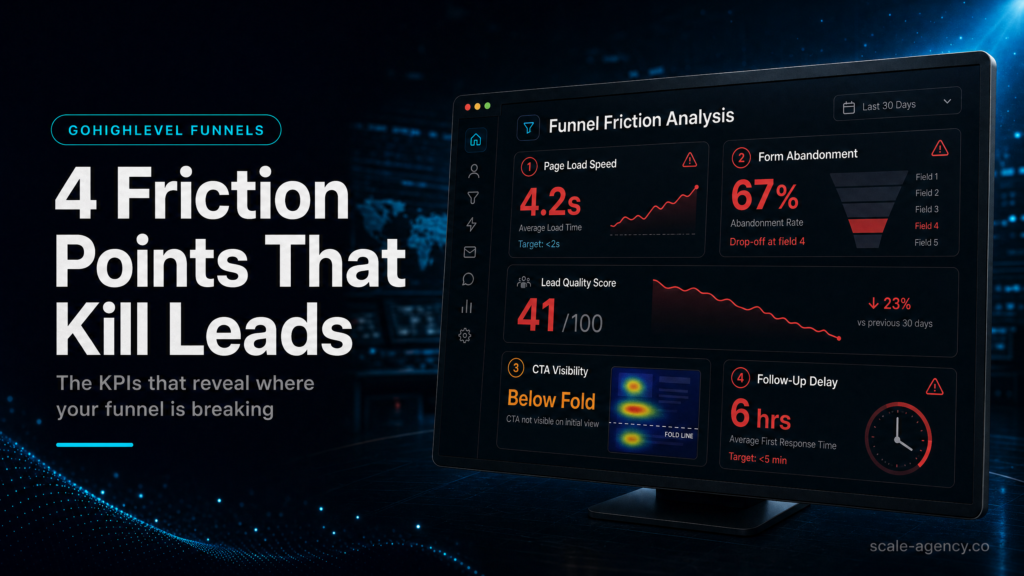
- Most lead quality issues come from four friction points: message mismatch, slow follow-up, routing/pipeline chaos, and missing attribution.
- In GoHighLevel, the highest leverage fixes are: form field strategy, instant SMS + call connect, pipeline stage definitions, and source tracking.
- If you can’t answer “Which ad set produced the last 10 closed-won deals?” your reporting is not revenue-grade.
- Use a weekly KPI review cadence: speed-to-lead, booking rate, show rate, SQL rate, close rate, time-to-first-touch.
- When stakes are high (high-ticket, limited capacity, sales team involved), a specialist build beats templates because it prevents silent leakage.
Build Approach Decision Table
| Approach | Best fit | Risk | Speed | Revenue visibility | When to choose it |
|---|---|---|---|---|---|
| DIY / internal build | Operators with time, strong CRM discipline, and low complexity offers | High: hidden routing errors, inconsistent pipeline usage, weak attribution | Medium to slow | Low to medium (often lead-level, not deal-level) | Choose if you can commit to weekly QA, documentation, and sales team enforcement |
| Cheap freelancer / template implementer | Simple funnels, low ad spend, minimal sales process | Very high: “it works” but doesn’t measure quality; brittle automations | Fast | Low (usually vanity metrics) | Choose only if you accept rework later and you have internal ops to validate everything |
| Specialist GoHighLevel expert (SCALE-style growth systems build) | High-ticket services, agencies, local service teams, paid traffic, multi-step follow-up | Lower: designed for edge cases, reporting, and handoffs | Fast to stable (because fewer rebuilds) | High (pipeline + attribution + stage KPIs) | Choose when lead quality, speed-to-lead, and revenue attribution matter more than “getting it live” |
Who Is This For?
- Local service businesses running Meta/Google ads who get leads but not booked jobs
- Agencies using GoHighLevel who need cleaner pipeline reporting and client-proof KPIs
- Coaches/consultants selling high-ticket offers where one bad funnel week is expensive
- Founders/operators who suspect follow-up is slow or inconsistent across the team
- Sales teams dealing with “ghost leads” and low show rates
- Businesses migrating into GoHighLevel and trying to avoid importing bad habits
- Anyone who can’t confidently tie ad spend to closed-won revenue
If lead quality or booked calls depend on clean routing and follow-up, pressure-test the build with the GoHighLevel expert checklist before you scale spend.
First: don’t track “lead quality” as a feeling
Most teams say “lead quality is down” when what they really mean is: the funnel is creating friction that changes who opts in, how fast you respond, and whether the right person gets the lead. That’s measurable.
In GoHighLevel, you want KPIs that answer three commercial questions:
- Intent: Are we attracting the right buyer and filtering out the wrong one?
- Conversion: Are we turning that intent into booked calls and attended appointments?
- Revenue: Can we prove which sources and follow-up paths create closed-won deals?
If you’re building or auditing a GoHighLevel sales funnel, start with the hub checklist first, then come back here to diagnose lead quality killers: GoHighLevel sales funnel pre-launch checklist.
The KPI map: the only funnel numbers that matter for lead quality
Lead quality improves when you stop optimizing for the cheapest lead and start optimizing for the cheapest closed-won (or at least the cheapest showed-up and qualified).
Core GoHighLevel sales funnel KPIs (stage-based)
| Stage | KPI | What it reveals | Healthy direction | Where to measure in GoHighLevel |
|---|---|---|---|---|
| Landing page | View → opt-in rate | Offer/message fit and page friction | Up (without lowering downstream quality) | Funnel/website stats + external analytics |
| Form | Form start → submit rate | Field friction, trust, device issues | Up | Form analytics (plus page events if configured) |
| Booking | Opt-in → booked rate | Calendar friction, qualification clarity | Up | Opportunities + calendar reports |
| Follow-up | Speed-to-lead (time to first touch) | Automation + team responsiveness | Down (faster) | Conversation timestamps + workflow logs |
| Appointment | Show rate | Confirmation quality, reminders, pre-frame | Up | Calendar outcomes + pipeline stage movement |
| Sales | Showed → qualified (SQL) rate | Lead quality and sales qualification consistency | Up | Pipeline stages + custom fields |
| Revenue | Close rate + time-to-close | Offer fit, sales process, follow-up persistence | Up / down | Opportunities reporting |
| Attribution | Closed-won by source | Which traffic actually pays | Clear and stable | UTM fields + opportunity source mapping |
The rule that prevents KPI theatre
If a KPI can’t be tied to a stage change in your pipeline, it will turn into a dashboard that looks impressive and changes nothing. Your pipeline stages are the spine of your reporting.
Friction Point 1: Offer-to-form mismatch (you’re attracting the wrong “yes”)
For example, this is the most common reason “lead quality” drops while CPL stays stable: the ad and landing page promise one thing, but the form, calendar, or next step signals something else. You end up with people who are curious, price-shopping, or not ready.
What to check (buyer checklist)
- Does the landing page headline match the ad promise in plain language?
- Does the form ask questions that reflect your buying criteria (not your curiosity)?
- Does the calendar page clearly state who it’s for, what happens next, and what to prepare?
- Are you using a “free quote” CTA for a high-ticket consultative sale (often a mismatch)?
- Are you forcing too many fields too early (causing fake data), or too few (causing unqualified bookings)?
Why it matters commercially
Mismatch creates two expensive outcomes: (1) your sales team spends time on the wrong conversations, and (2) your follow-up system gets trained on low-intent behavior (more ghosts, lower reply rates). That drags down show rate and close rate, which increases your true cost per acquisition even if CPL looks “good.”
How to diagnose in GoHighLevel
- Segment by source/campaign (UTM) and compare opt-in → booked and booked → showed.
- Review the last 20 “no-show” and “not qualified” opportunities: what did they think they were getting? If the booked-to-show stage is the leak, compare the KPI review against this automated booking funnel no-show workflow before changing the ad or offer.
- Listen to call recordings or read conversation threads for repeated confusion (pricing, eligibility, location, timeline).
What a weak setup looks like
- One generic form for every traffic source
- No qualification fields; sales team “figures it out on the call”
- Calendar lets anyone book without pre-frame or eligibility
- Thank-you page has no next step beyond “we’ll reach out”
What a strong setup looks like
- Message-matched landing pages by offer angle (even if the backend is the same)
- Form fields designed to filter: location, budget band, timeline, service type, decision-maker status
- Conditional logic or routing (where appropriate) to the right pipeline and calendar
- Thank-you page that sets expectations: response time, what happens next, and a “confirm your details” step
What SCALE would look for or fix
- Rewrite the first screen to align promise, proof, and next step (reduce curiosity clicks)
- Design a minimum viable qualification form: enough to filter, not enough to cause fake entries
- Implement “soft gates” (eligibility copy + required fields) before calendar access
- Map each offer angle to a pipeline stage path so reporting shows where quality drops
Friction Point 2: Speed-to-lead and first-touch quality (you’re losing the best leads first)
Because high-intent leads decay fast. If your first touch is slow, inconsistent, or generic, you don’t just lose volume—you lose the best leads (the ones who were ready to buy and contacted multiple providers).
What to check (buyer checklist)
- What is your median time to first SMS?
- What is your median time to first call attempt?
- Do leads get an immediate confirmation that feels human and specific?
- Is there a clear owner assigned within minutes (not hours)?
- Do you have different follow-up paths for “booked” vs “not booked”?
Why it matters commercially
Because speed-to-lead is a compounding advantage, faster response increases contact rate, which increases booking rate, which increases show rate, which increases close opportunities. Slow response does the opposite and forces you to buy more leads to hit the same revenue target.
How to diagnose in GoHighLevel
- Pull a sample of new leads and compare form submission timestamps to first outbound message timestamps.
- Check workflow execution logs for delays, errors, or “stopped because contact is missing phone/email.”
- Audit round-robin or assignment rules: are leads sitting unassigned?
- Compare reply rate and booking rate by time-of-day and day-of-week to spot coverage gaps.
What a weak setup looks like
- One email autoresponder and “we’ll call you soon”
- No call attempt within the first 5–15 minutes during business hours
- Sales reps manually texting from personal phones (no tracking, no consistency)
- Workflows that fail silently when a field is blank
What a strong setup looks like
- Instant SMS that references the exact request and offers two next steps (book now or reply with a quick detail)
- Immediate call connect or rapid call attempt with voicemail drop
- Clear ownership: assigned user + task + SLA (e.g., “call within 10 minutes”)
- Fallback paths: if phone missing, email path; if no reply, multi-touch sequence
What SCALE would look for or fix
- Build a speed-to-lead workflow with guardrails: required fields, fallback routing, and error alerts
- Implement separate sequences for: new lead not booked, booked appointment, no-show, and post-call nurture
- Set up internal notifications that actually get acted on (Slack/email/SMS to the right person)
- Define and enforce an SLA using tasks and pipeline stage rules
Friction Point 3: Routing, pipeline hygiene, and stage definitions (your KPIs are lying)
If your pipeline stages are vague or inconsistently used, your GoHighLevel reporting becomes fiction. You can’t manage lead quality if you can’t trust where leads are in the process.
What to check (buyer checklist)
- Are pipeline stages defined by observable events (booked, showed, qualified), not feelings (“hot lead”)?
- Does every lead enter the pipeline the same way (form, chat, inbound call, manual add)?
- Is there a single “source of truth” pipeline, or multiple overlapping pipelines?
- Do you have a clear definition for “qualified” and “unqualified”?
- Are there automations that move stages based on real triggers (appointment booked, appointment status changed)?
Why it matters commercially
Poor pipeline hygiene creates two costs: wasted labor (reps chasing the wrong leads) and wrong decisions (you scale spend based on misleading KPIs). If you can’t trust stage conversion rates, you can’t fix the right friction point.
How to diagnose in GoHighLevel
- Look for “dead zones”: stages where leads pile up with no next action.
- Check stage aging: how long do leads sit in each stage?
- Audit duplicates: are leads being created multiple times from different sources?
- Review opportunity creation rules: are opportunities created for every lead, or only some?
What a weak setup looks like
- Stages like “New,” “Contacted,” “Follow up,” “Won” with no definitions
- Reps moving stages differently (or not at all)
- No “lost reason” tracking, so you can’t see patterns
- Opportunities created inconsistently, breaking conversion math
What a strong setup looks like
- Stages tied to events: New Lead → Attempting Contact → Booked → Showed → Qualified → Proposal Sent → Closed Won/Closed Lost
- Mandatory fields or prompts for key transitions (e.g., lost reason)
- Automations that create opportunities and move stages based on appointment outcomes
- Weekly pipeline QA: duplicates, stuck leads, missing source fields
What SCALE would look for or fix
- Rebuild pipeline stages around your actual sales process and reporting needs
- Implement “stage entry criteria” and “stage exit actions” (tasks, reminders, sequences)
- Standardize opportunity creation across all lead sources
- Add lost reason taxonomy that’s useful for marketing decisions (price, timing, location, competitor, not decision-maker)
Friction Point 4: Attribution gaps (you can’t tell good leads from bad sources)
When attribution is missing or messy, teams blame “lead quality” when the real issue is source mix. One campaign might be producing high-intent buyers while another produces bargain hunters, but if both land in the same bucket, you’ll optimize the wrong thing.
What to check (buyer checklist)
- Are UTMs captured into contact fields every time?
- Do you store first-touch source and last-touch source separately?
- Can you report closed-won by source without manual spreadsheets?
- Do inbound calls and chat leads get a source value too?
- Do you have a consistent naming convention for campaigns/ad sets?
Why it matters commercially
Finally, attribution is how you protect budget. Without it, you’ll keep spending on sources that look good at the top (cheap leads) but fail at the bottom (no shows, low close rate). That’s how ad accounts quietly become unprofitable.
How to diagnose in GoHighLevel
- Check a sample of contacts: do UTM fields exist and are they populated?
- Compare “lead source” values to actual UTMs (often they’re inconsistent or overwritten).
- Look at closed-won opportunities: do they have a source field you trust?
- Audit your forms and funnels: are hidden fields set up correctly?
What a weak setup looks like
- Everything is “Facebook” or “Website” with no campaign detail
- Source overwritten on every visit, losing first-touch context
- Offline leads (calls, referrals) have blank source fields
- Sales team manually guesses source, contaminating reporting
What a strong setup looks like
- UTM parameters captured into dedicated custom fields (source/medium/campaign/content/term)
- First-touch stored and protected; last-touch stored separately
- Opportunities inherit source fields at creation
- Closed-won reporting by source is possible without manual cleanup
What SCALE would look for or fix
- Implement a clean attribution model that matches your buying cycle (first-touch + last-touch minimum)
- Standardize UTM naming conventions and enforce them across ads
- Ensure every lead entry point writes source data (forms, chat widgets, call tracking where applicable)
- Build a weekly “source integrity” check so reporting doesn’t decay over time
The implementation process
- Define the revenue goal and the “qualified lead” definition. First, write down what qualifies someone (budget band, location, timeline, service type, decision-maker). If you can’t define it, you can’t measure it.
- Next, map your funnel stages to a single pipeline. Then, create stages based on observable events (booked, showed, qualified, proposal sent, won/lost). Also, add lost reasons that marketing can act on.
- Standardize lead capture. Ensure every entry point creates a contact and (if appropriate) an opportunity: landing page form, chat, inbound call, manual add, referral.
- For example, build forms for qualification, not curiosity. Then, use 3–7 fields that filter without encouraging fake data. Finally, add hidden UTM fields. Decide what is required vs optional.
Phase 2: Wire the routing and measurement
- Configure calendars with friction in the right place. If you sell high-ticket, add eligibility copy and pre-frame questions. If you sell local services, make booking fast but confirm service area and job type.
- Set up routing and ownership rules. Round-robin or territory-based assignment, plus a backup owner. Create tasks automatically on new lead and on missed SLA.
- Build speed-to-lead workflows. Immediate SMS + email confirmation, then call attempt logic. Separate paths for booked vs not booked. Add no-show recovery and post-call nurture.
- Implement lead source tracking and attribution fields. Capture UTMs into custom fields, store first-touch and last-touch, and ensure opportunities inherit the values.
- Set reporting around stage conversion and aging. Weekly review: opt-in → booked, booked → showed, showed → qualified, qualified → won; plus speed-to-lead and stage aging.
- QA the system with real test leads. Submit test leads from different devices and sources. Confirm: fields populate, ownership assigns, workflows fire, pipeline stages update, and reporting reflects reality.
- Handover and enforcement. Document stage definitions and required actions. Train the team. If reps don’t use the pipeline consistently, your KPIs will drift within weeks.
Common problems and how to fix them
| Problem | What it usually means | Commercial risk | Fix | Metric to watch |
|---|---|---|---|---|
| Lots of leads, low booked rate | Offer-to-form mismatch or calendar friction | Wasted ad spend; sales team time sink | Message-match page to ad; add qualification fields; simplify booking step | Opt-in → booked rate |
| Booked calls, low show rate | Weak confirmation, poor pre-frame, wrong buyer booking | Empty calendars; rep morale drops | Improve reminders; add pre-call questions; tighten eligibility copy | Show rate |
| Slow response times | Missing automation, no owner, coverage gaps | High-intent leads go to competitors | Instant SMS + call attempt; assignment rules; SLA tasks | Median speed-to-lead |
| “Contacted” stage is meaningless | Pipeline stages not event-based | KPIs become unreliable; wrong scaling decisions | Redesign stages; automate stage movement from appointment outcomes | Stage conversion + stage aging |
| Closed-won has no source | UTMs not captured or overwritten; manual entry | You can’t scale what works; you keep funding what doesn’t | Dedicated UTM fields; first/last touch logic; opportunity inheritance | Closed-won by source coverage % |
| Duplicate contacts/opportunities | Multiple forms, imports, or call tracking creating new records | Double follow-up; bad reporting; poor customer experience | Deduping rules; standardize entry points; merge process | Duplicate rate; reply rate |
| Leads “stuck” in early stages | No next action defined; workflows not firing | Silent leakage; missed revenue | Stage exit actions; workflow QA; internal alerts | Stage aging; task completion rate |
What this means for revenue
Lead quality problems are rarely “marketing problems” or “sales problems” in isolation. They’re usually system problems—the handoffs, the timing, the routing, and the measurement.
Specifically, here’s how the four friction points translate into revenue outcomes:
- Offer-to-form mismatch increases low-intent opt-ins. That inflates CPL efficiency while reducing booked rate, show rate, and close rate. Net effect: you pay for volume that can’t convert.
- Slow speed-to-lead reduces contact rate and increases ghosting. Net effect: you need more leads to fill the calendar, which increases ad spend and sales labor per closed deal.
- Routing/pipeline hygiene issues create “invisible loss.” Leads don’t get followed up properly, reps cherry-pick, and management can’t see where the funnel breaks. Net effect: you can’t forecast, and you can’t fix.
- Attribution gaps cause misallocation. You scale the wrong campaigns, pause the right ones, and argue about “lead quality” instead of isolating which sources produce revenue. Net effect: unstable growth and unpredictable CAC.
If you’re running Meta Ads, the compounding risk is bigger: the algorithm optimizes for the conversion event you feed it. If your funnel event is “lead” but your system can’t separate qualified from unqualified, you train the ad platform to find more of the wrong people.
Conclusion
Often, GoHighLevel builds fail in one of two ways: they’re either “pretty” (pages and automations exist) but not measurable, or they’re “tracked” (dashboards everywhere) but not operational (no one follows the process consistently).
Ultimately, SCALE builds GoHighLevel CRM, funnel and automation systems for businesses that need better lead quality, faster follow-up and clearer attribution. The difference in approach is simple:
- We design KPIs from the pipeline backwards. If a stage can’t be defined and enforced, it can’t be reported.
- We treat speed-to-lead as a product feature. It’s engineered with ownership rules, fallbacks, and QA—not left to “someone will call them.”
- We separate intent from volume. Forms and calendars are built to filter and route, not just capture.
- We build attribution that survives reality. UTMs, offline sources, duplicates, and repeat visits are handled so reporting doesn’t decay.
- We operationalize the system. Stage definitions, tasks, and handover rules are documented so the team can run it without heroics.
If your current setup “works” but you still can’t predict revenue from pipeline movement, you don’t need more leads—you need less friction and better measurement.
FAQs
What are the most important GoHighLevel sales funnel KPIs to track for lead quality?
Then, track stage conversion and speed metrics: opt-in → booked rate, booked → showed rate, showed → qualified rate, qualified → won rate, median speed-to-lead, and closed-won by source. These expose whether you have an intent problem, a follow-up problem, or an attribution problem.
How do I measure speed-to-lead inside GoHighLevel?
Use timestamps from the contact’s form submission (or opportunity creation) and compare them to the first outbound SMS/call logged in Conversations. For reliability, ensure all outbound activity is sent through GoHighLevel (not personal devices) and that workflows log execution times.
Why do I get lots of leads but few booked calls in my GoHighLevel funnel?
Usually it’s offer-to-form mismatch or calendar friction. Your ad may attract curiosity, while your form doesn’t qualify, or your calendar step feels like a commitment without enough clarity. Diagnose by segmenting opt-in → booked rate by source/UTM and reviewing “not booked” conversations for repeated objections or confusion.
How should I structure pipeline stages in GoHighLevel for accurate KPI reporting?
Use event-based stages: New Lead, Attempting Contact, Booked, Showed, Qualified, Proposal Sent, Closed Won, Closed Lost. Add lost reasons. Automate stage movement where possible (appointment booked/status changed) and require reps to update stages after key events so reporting reflects reality.
How do I track lead source and attribution correctly in GoHighLevel?
Capture UTMs into dedicated custom fields (source/medium/campaign/content/term) via hidden fields on forms and preserve first-touch values. Store last-touch separately if you want optimization insight. Ensure opportunities inherit these fields at creation so closed-won reporting can be filtered by source.
What’s the fastest way to improve lead quality without changing my ads?
Improve qualification and follow-up: add 2–4 high-signal form fields (service type, location, timeline, budget band), tighten calendar eligibility copy, and implement instant SMS + call attempt workflows with clear ownership. Then monitor opt-in → booked, show rate, and qualified rate for improvement.
When should I hire a GoHighLevel specialist instead of using a template?
Hire a specialist when you have paid traffic, a sales team, high-ticket offers, multiple lead sources, or you need revenue attribution. Templates can launch quickly, but they often fail on routing, pipeline hygiene, and source integrity—exactly the areas that determine lead quality and profitability.
