
In this guide, we will cover:
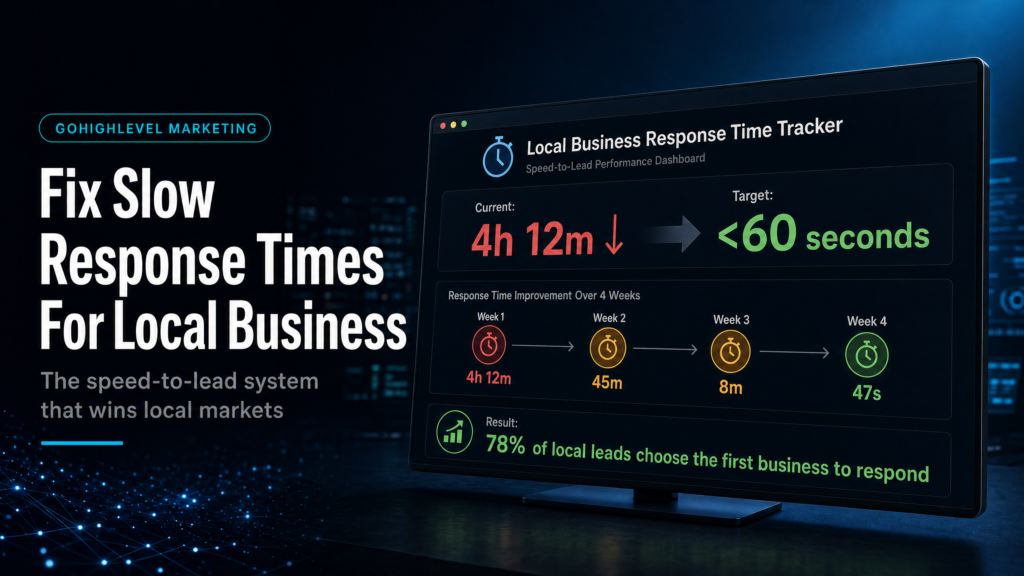
How local businesses can stop slow replies turning new enquiries into missed appointments, colder leads and invisible revenue leaks.
Where Local Leads Go Cold
See why missed calls, delayed replies and inbox handoffs make interested local leads harder to convert.
Who Owns The Next Step?
Map each enquiry to one contact record, owner task and booking route so follow-up is not left to memory.
Which Follow-Up Runs First?
Use short SMS, email and task nudges to keep response personal without relying on manual chasing.
What Should Be Measured?
Track source, contact rate, booked calls and show rate so local follow-up improvements show up in revenue.
Quick Answer
GoHighLevel lead follow up for local business fixes slow response times by routing every form, call and chat lead into one pipeline, assigning a clear owner, and triggering SMS, call and email follow-up within minutes. This support page feeds the broader GoHighLevel lead follow up system so the local-business workflow does not compete with the parent hub.
TL;DR
- If you’re taking longer than 5 minutes to respond, you’re donating leads to faster competitors. Fix speed-to-lead before you buy more ads.
- Most “slow follow-up” is actually broken routing: forms not connected, wrong pipeline stage triggers, or notifications going to the wrong person.
- Use one primary pipeline and enforce stage definitions; don’t run follow-up from “tags” and hope it stays consistent.
- Build a single inbound lead intake automation that normalizes every source (Meta lead forms, website forms, calls, chat) into the same workflow.
- Install missed-call text-back + call connect logic so inbound calls become conversations, not voicemails.
- Track time-to-first-touch, contact rate, show rate, and booked rate by source; if you can’t see it, you can’t fix it.
- If you need this live in 7–14 days with clean reporting and handover, a specialist build beats DIY and template installs.
Compare Your Follow-Up Options
| Option | Best fit | Risk | Speed | Revenue visibility | When to choose it |
|---|---|---|---|---|---|
| DIY / internal build | Operators with time, process discipline, and someone who can test automations end-to-end | High: missed triggers, duplicate conversations, inconsistent stages, no reporting baseline | Slow to medium | Low to medium unless you build dashboards and enforce data hygiene | When you have low lead volume, simple offers, and can afford a few weeks of iteration |
| Cheap freelancer / template implementer | Businesses that want “something running” quickly and accept compromises | Very high: template mismatch, brittle workflows, poor routing, no attribution, hard to maintain | Fast | Low: usually no source normalization or KPI reporting | When budget is the only constraint and you can tolerate rework later |
| Specialist GoHighLevel expert / SCALE-style growth systems build | Local businesses spending on ads or relying on inbound leads where speed-to-lead impacts bookings | Low: built around your offer, team capacity, and lead sources with testing + documentation | Fast to very fast (with a defined rollout) | High: clear pipeline, source tracking, time-to-first-touch, booked rate, and handover | When you want predictable follow-up, fewer lost leads, and reporting you can run the business on |
Who this is for
- Local service businesses (HVAC, plumbing, roofing, electricians) losing leads after hours or on weekends
- Med spas, clinics, dentists, chiropractors, and wellness practices with missed calls and slow text replies
- Home services and trades running Meta/Google ads and unsure which leads are actually being contacted
- Multi-location operators who need consistent intake and routing across teams
- Agencies managing GoHighLevel for clients who complain “leads aren’t being followed up”
- Owner-operators who are the salesperson and need automation that supports (not overwhelms) them
- Teams with appointment setters who need clear tasks, SLAs, and accountability
Why slow response times happen in GoHighLevel (and why it’s usually not “your team”)
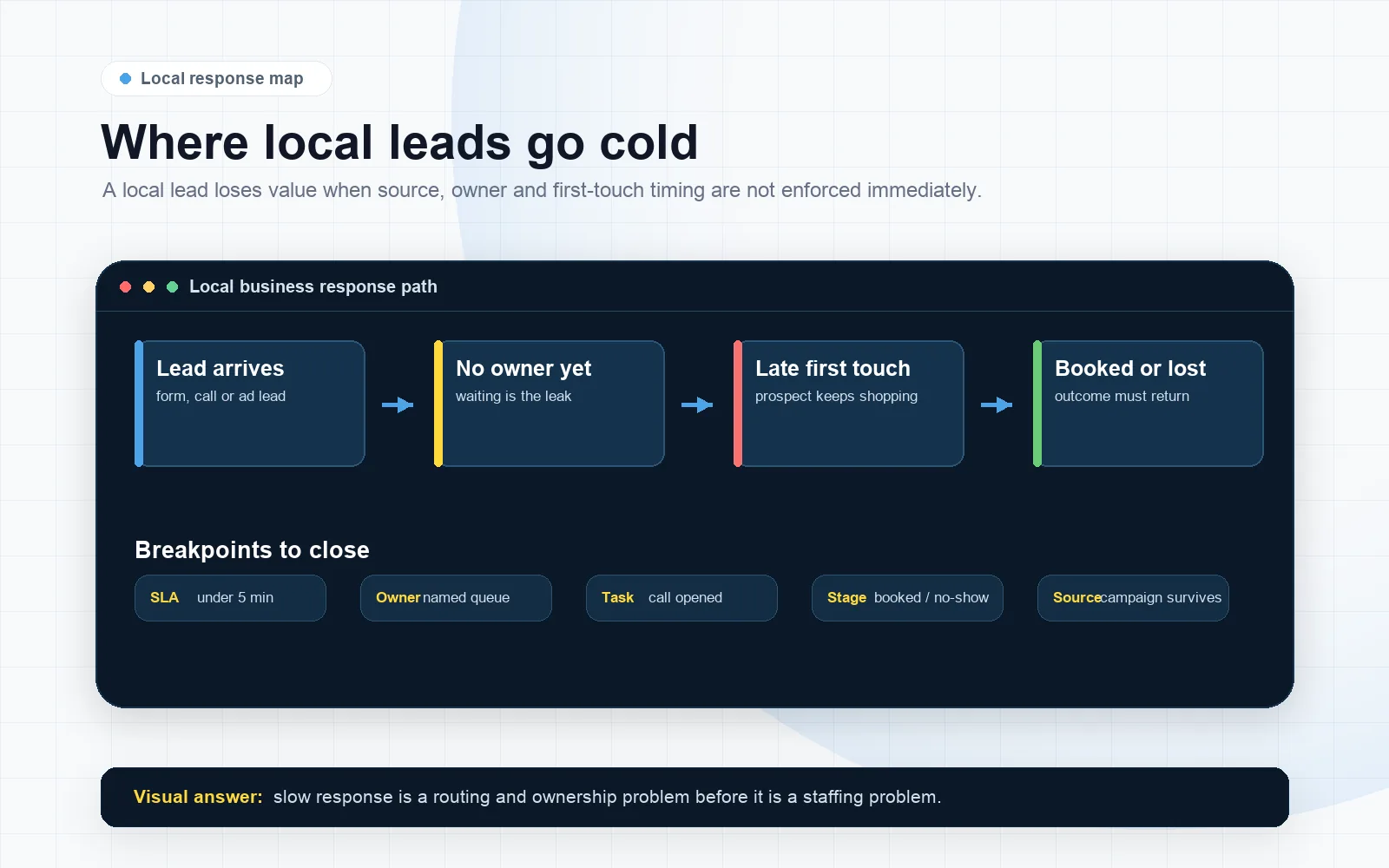
When a local business says “we’re slow to respond,” the root cause is often a systems problem, not a motivation problem. GoHighLevel can respond instantly, but only if your intake, routing, and triggers are designed around how leads actually arrive.
Most slow response times come from one of these failures:
- Lead intake is fragmented: website form goes to one workflow, Meta lead form goes to another, calls go nowhere, and chat is handled manually.
- Triggers are stage-dependent: the automation only fires when a lead hits a specific pipeline stage, but the lead never gets moved there.
- Notifications are noisy: everyone gets pinged, so no one owns the lead.
- After-hours logic is missing: leads arrive at 7:30pm and sit until morning, when they’ve already booked elsewhere.
- Data is messy: duplicates, missing phone numbers, wrong country codes, and “unknown source” break your follow-up logic.
Commercial reality: speed-to-lead is a conversion lever
Local intent leads are impatient. They’re often contacting 3–5 providers in a short window. If your first touch is delayed, your close rate drops even if your service is better.
Support-page note (and the canonical hub)
This article is a focused support guide on fixing slow response times for local businesses. For the broader parent guide on building automated sequences and the full cluster strategy, use the canonical hub: GoHighLevel lead follow up automated sequences.
Define “fast” for a local business: the only SLAs that matter
Before you touch automations, define what “fast” means in your operation. Otherwise you’ll build a system that looks busy but doesn’t book.
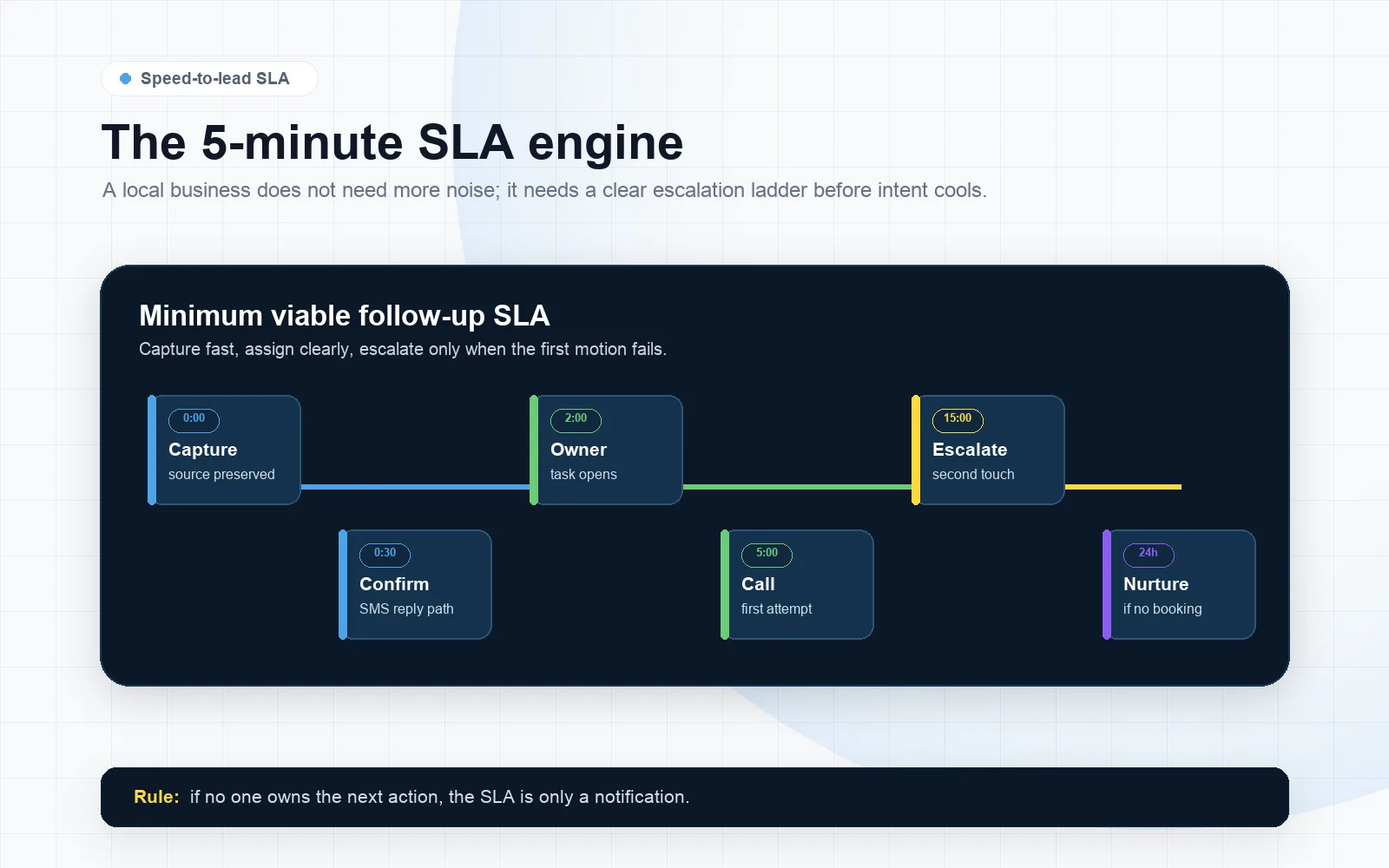
Minimum viable follow-up SLA (what we aim for)
- 0–60 seconds: lead is created, source captured, pipeline stage set, owner assigned, and first SMS sent (if compliant for your region).
- 0–2 minutes: internal notification to the right person (not everyone), plus a task created if no immediate call is possible.
- 0–5 minutes: first call attempt (or immediate call connect if you use round-robin/instant connect).
- First 60 minutes: at least 2 contact attempts across channels (SMS + call, or call + email) if no response.
- First 24 hours: 6–10 touches total depending on lead type and capacity, with stop rules when booked/unqualified.
What to measure (so you stop guessing)
If you only measure “new leads” and “appointments,” you’ll miss the operational leak. Use the GoHighLevel lead source tracking guide when you need cleaner attribution before judging follow-up performance. Track these four:
- Time-to-first-touch: how long until the first outbound SMS/call/email is sent.
- Contact rate: % of leads who reply or answer a call within 24 hours.
- Booked rate: % of leads who book an appointment (or get scheduled) within 7 days.
- Speed-to-book: time from lead created to appointment booked.
Diagnose your current GoHighLevel lead follow up (local business) in 15 minutes
This is the fastest way to find why you’re slow. You’re looking for broken handoffs and missing triggers, not “more messages.”
Diagnostic checklist (run it in order)
- Lead creation test: submit your website form, your Meta lead form, and a Google Business Profile click-to-call test (or call tracking number). Confirm each creates a contact in GoHighLevel.
- Source normalization: check whether each lead has a usable source field (UTM, form name, campaign, or at minimum a consistent tag/custom field).
- Pipeline placement: confirm each lead lands in the same pipeline and the correct first stage (e.g., New Lead).
- Assignment: confirm the lead is assigned to a specific user (owner, setter, location rep). “Unassigned” is where leads go to die.
- First-touch automation: confirm an SMS/email is sent immediately and logged in the conversation.
- Call attempt logic: confirm a call task is created or an auto-dial/instant connect is triggered.
- Stop rules: confirm the automation stops when the lead books, becomes a customer, or is marked not qualified.
- After-hours: confirm you have different behavior after hours (set expectations + capture intent + schedule).
- Duplicate handling: submit twice and see whether you get duplicate contacts or duplicate sequences.
What a weak setup looks like
- Different pipelines for different sources (“Meta pipeline,” “Website pipeline,” “Calls pipeline”).
- Automations triggered by tags that are inconsistently applied.
- Notifications to a shared inbox with no owner.
- Calendar links sent without context, so leads don’t book.
- No reporting on time-to-first-touch or contact rate.
What a strong setup looks like
- One primary pipeline with clear stage definitions and entry rules.
- Every lead source routes into the same intake workflow, then branches based on service/location/urgency.
- Immediate first-touch + a human call attempt, with after-hours handling.
- Owner assignment and accountability (tasks, SLAs, and escalation).
- Dashboards that show speed-to-lead and booked rate by source.
Build the “speed-to-lead” engine inside GoHighLevel (the parts that actually matter)
Fixing slow response times is not about writing clever SMS scripts. It’s about building a reliable intake and follow-up engine that works even when your team is busy.
1) CRM structure: one pipeline, clear stages, and stage-based accountability
For most local businesses, you want a single pipeline that represents the customer journey. Keep it boring and enforce it.
Recommended baseline stages:
- New Lead (just arrived; not contacted yet)
- Attempting Contact (first touches started)
- Contacted (two-way conversation started)
- Booked (appointment scheduled)
- Showed (optional, if you track attendance)
- Won (paid / job scheduled / treatment plan accepted)
- Lost / Not Qualified (with reason)
Commercial reason: if your pipeline doesn’t reflect reality, you can’t manage follow-up, forecast revenue, or hold anyone accountable.
2) Intake: every lead source must create the same “starting conditions”
Your automations should not care whether the lead came from Meta, your website, a call, or a referral. They should care about: who owns it, what they want, and how fast you can respond.
Starting conditions to enforce on every new lead:
- Contact created with phone + email (where possible)
- Lead source captured (UTM/form name/campaign)
- Pipeline = Primary
- Stage = New Lead
- Owner assigned (user or round-robin)
- Consent/compliance flags (where required)
3) Follow-up logic: multi-channel, short windows, and escalation
Local leads respond to clarity and speed. Your first message should confirm you received the request and offer the next step (call now vs schedule).
Baseline follow-up sequence (first 24 hours):
- Immediately: SMS: confirm request + one question to qualify + “reply YES” style prompt
- +2 minutes: internal notification to owner + task “Call within 5 minutes”
- +5 minutes: call attempt (manual or assisted) + voicemail drop if no answer
- +15 minutes: SMS follow-up with calendar link (only if appropriate)
- +2 hours: email with proof + what happens next
- Evening: SMS “still looking for help with X?”
Escalation rule: if no contact after X minutes/hours, reassign or notify a manager/owner. If you don’t escalate, you’re accepting lead loss as normal.
4) Missed-call text-back: the fastest win for local businesses
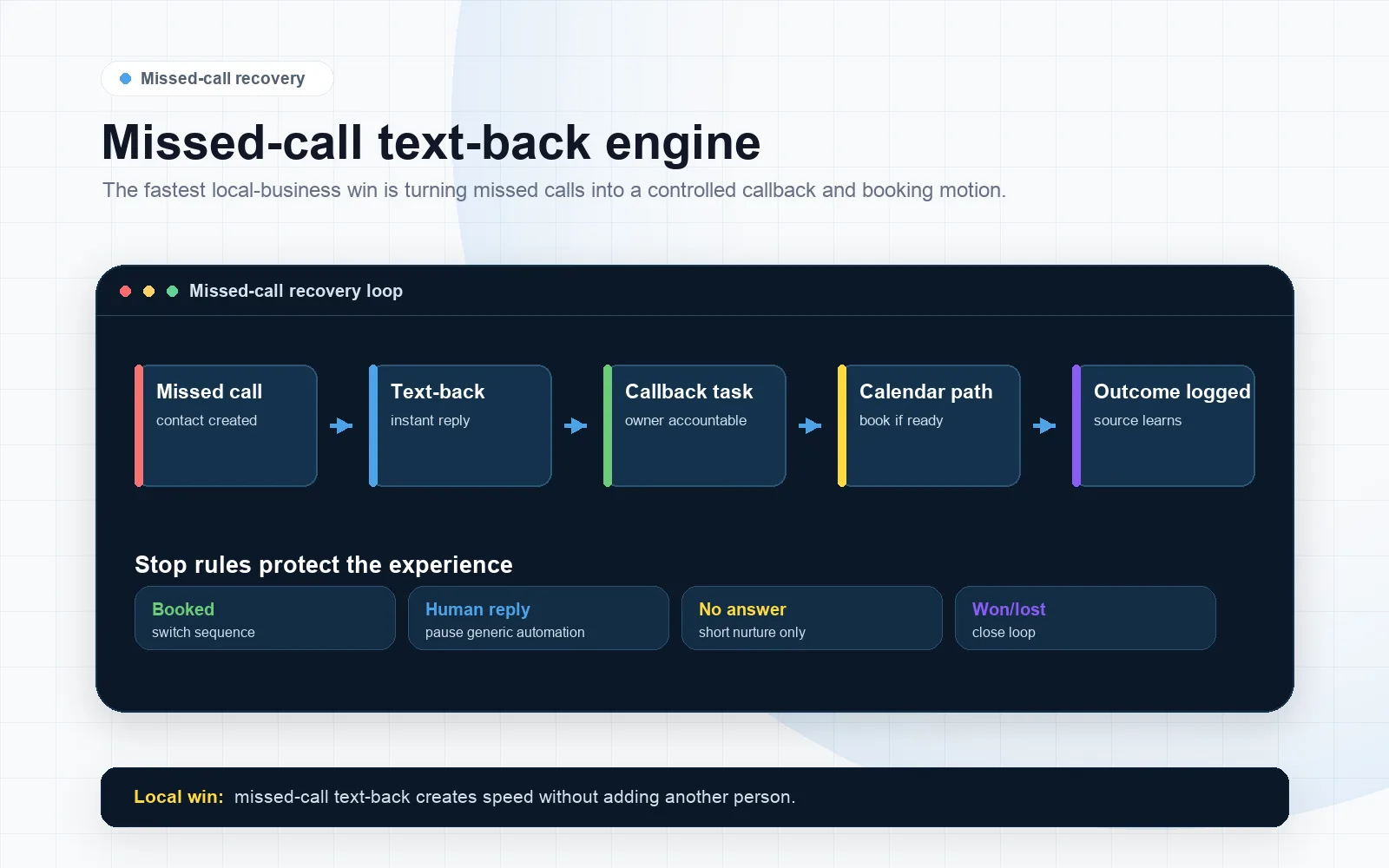
If your business relies on inbound calls, missed-call text-back is often the highest ROI automation you can install. It turns “we missed you” into a conversation while intent is hot.
What to implement:
- Trigger: inbound call missed (no answer, busy, after-hours)
- Immediate SMS: “Sorry we missed your call—what can we help with?” + option to book
- Owner notification + task to call back
- Stop rule if they call back or reply
What SCALE would check: correct phone number configuration, call status triggers, business hours, and that the SMS comes from the same number the lead called (to reduce confusion).
5) Calendars: reduce friction, don’t outsource the sale to a link
Calendars are useful, but they’re not a strategy. If you send a calendar link too early, many local leads won’t book because they still have questions (price range, availability, service area).
Stronger approach: ask one qualifying question first, then offer two paths:
- “Reply with your address and the issue” (for urgent home services)
- “Grab a time here” (for appointment-based services)
Commercial reason: you increase contact rate and reduce no-shows by matching the next step to intent.
The implementation process
- Map your lead sources and entry points. List every way a lead arrives: website forms, Meta lead forms, Google Ads, GBP calls, chat widgets, referral forms, manual entry. Identify which ones currently bypass GoHighLevel.
- Define your pipeline stages and SLA. Create one primary pipeline with stage definitions, owner rules, and what “done” means at each stage (e.g., “Contacted = two-way conversation”).
- Standardize your contact record. Decide which custom fields you need (service type, location, urgency, budget range, preferred time). Ensure every form populates them consistently.
- Build intake forms and routing. For each form/source, ensure it creates/updates a contact, sets lead source, assigns owner, and drops the opportunity into the correct pipeline stage.
- Configure calendars and availability. Set business hours, appointment types, buffers, round-robin rules, and confirmation/reminder sequences. Ensure the calendar is tied to the right user/location.
- Create the “Speed-to-Lead” workflow. One core automation triggered on new opportunity in “New Lead” (or equivalent). It should: send first-touch SMS/email, create call task, notify owner, and branch by business hours.
- Add missed-call text-back and call-back tasks. Configure triggers for missed calls, after-hours calls, and voicemail outcomes. Ensure stop rules prevent spam if they call back.
- Install stop rules and suppression logic. Stop sequences when booked/won/lost, when they reply, or when they request no contact. Add safeguards for duplicates and repeated form submissions.
- Implement lead source tracking. Capture UTMs where possible, store form names, and normalize sources into a reporting-friendly field. If you run Meta Ads, ensure each lead is labeled by campaign/ad set where feasible.
- Set up reporting dashboards. At minimum: new leads by source, time-to-first-touch, contact rate, booked rate, and pipeline value. Make it visible to the operator daily.
- QA test end-to-end. Run test leads through every source. Confirm: contact created, opportunity created, owner assigned, messages sent, tasks created, calendar booking works, and stop rules fire.
- Handover and operating rhythm. Document “how we work leads,” define daily follow-up blocks, and set a weekly review of the four KPIs. Train the team on stage movement and notes.
Escalation, reporting and handover
Escalation, reporting and handover
Common problems and how to fix them
| Problem | What it usually means | Commercial risk | Fix | Metric to watch |
|---|---|---|---|---|
| Leads show up, but no one contacts them | No owner assignment, notifications going to the wrong user, or tasks not created | Lost bookings; wasted ad spend | Enforce owner assignment on intake; create call task + escalation; notify only the owner | Time-to-first-touch; % unassigned leads |
| Automation fires for some sources but not others | Triggers tied to a specific form/tag/pipeline stage that not all sources use | Inconsistent follow-up; “random” performance | Normalize all sources into one intake workflow; trigger on opportunity created in New Lead | % leads entering workflow; booked rate by source |
| Leads get spammed with duplicate texts | Duplicate contacts, multiple workflows, or no suppression/stop rules | Brand damage; opt-outs; deliverability issues | Dedup rules; “if in workflow” checks; stop on reply/booking; consolidate workflows | Opt-out rate; duplicate contact count |
| After-hours leads never book | No after-hours branch; no expectation setting; no next-step capture | High-intent leads go to competitors overnight | After-hours SMS with clear promise + booking link; morning priority queue + first-call block | Booked rate for after-hours leads |
| Missed calls don’t convert | No missed-call text-back; slow call-back; no call tracking visibility | Lost “ready now” buyers | Missed-call text-back + immediate call-back task; ensure number consistency | Missed call to conversation rate |
| Calendar bookings are low | Link sent too early; wrong calendar; too many time options; no trust elements | Low appointment volume despite lead volume | Qualify first; use 2-step CTA; simplify availability; add confirmation/reminders | Click-to-book rate; show rate |
| Owner says “leads are bad” but can’t prove it | No attribution, no contact tracking, no stage discipline | Wrong decisions: cut ads, blame marketing, or hire more staff unnecessarily | Source tracking + pipeline hygiene + KPI dashboard; enforce stage movement | Contact rate and booked rate by source |
Operational playbook: how to get response time under 5 minutes without hiring
Most local businesses don’t need more staff to respond faster. They need a system that makes the next action obvious and unavoidable.
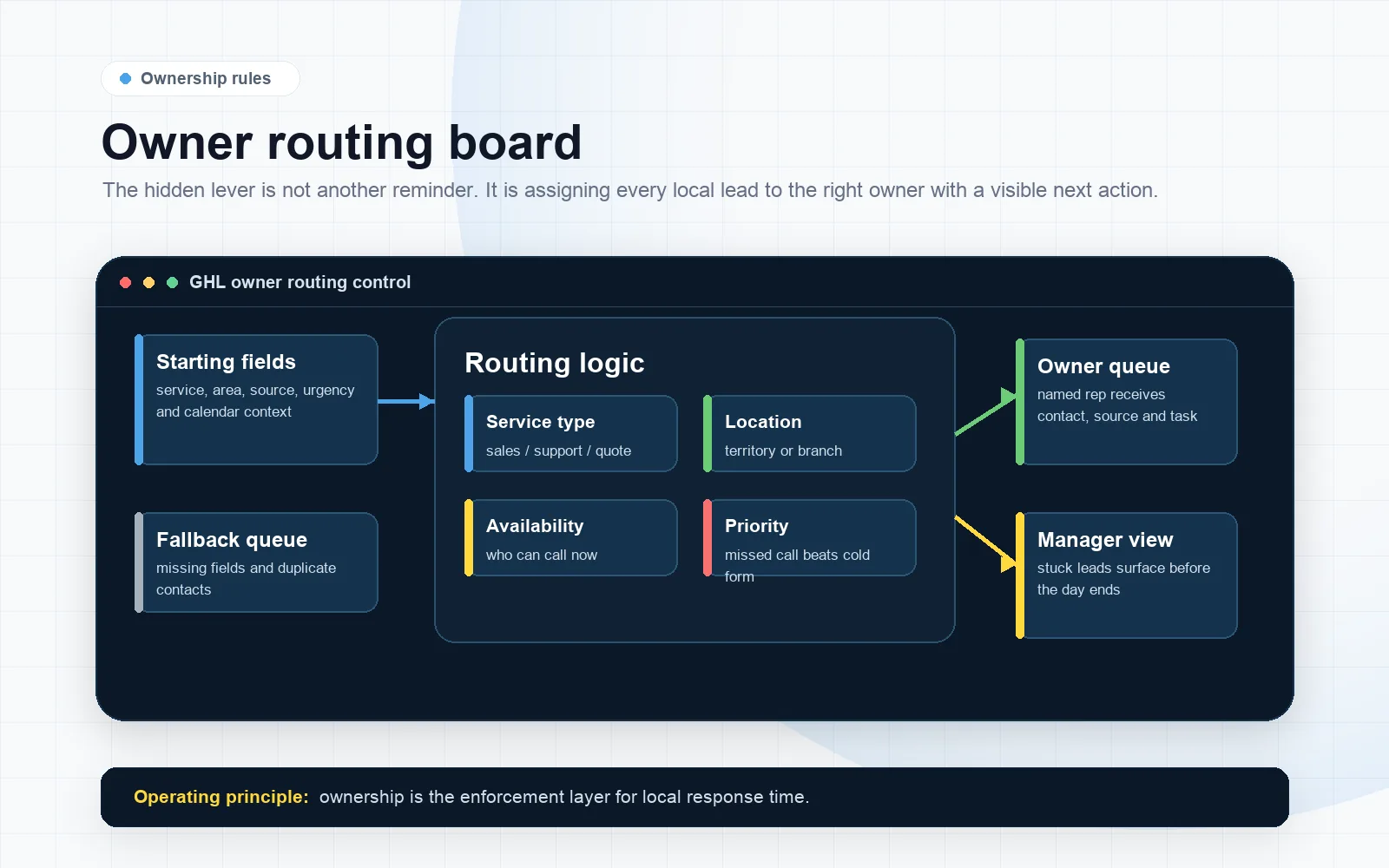
Set “ownership” rules (the hidden lever)
If a lead is not owned, it is not real. In GoHighLevel, make sure every new lead is assigned to:
- a specific salesperson/setter, or
- a round-robin pool with capacity rules, or
- the location rep for that service area.
Weak: shared inbox + “someone will get it.”
Strong: one owner + escalation if untouched.
Use tasks as the enforcement layer
Notifications are easy to ignore. Tasks create a queue and accountability.
- Create a task: “Call lead within 5 minutes” on intake.
- If task not completed in 10 minutes, escalate (notify manager/owner, or reassign).
- If lead replies by SMS, create a task: “Respond now” (yes, it sounds obvious; it works).
Build a “first-call block” into the day
Automation can start the conversation, but calls close local deals. If you can’t call instantly, schedule a daily block:
- Morning: 30–60 minutes to call all overnight leads first.
- Midday: 15 minutes to clear new leads.
- Late afternoon: 15 minutes to clear new leads.
Commercial reason: you reduce lead aging, increase contact rate, and stop paying for leads you never speak to.
Stop rules prevent wasted effort (and protect deliverability)
Every follow-up sequence needs stop conditions. Otherwise you’ll keep messaging people who already booked, already paid, or already said no.
- Stop when appointment is booked.
- Stop when stage moves to Won/Lost.
- Stop when they reply (then switch to a “human needed” workflow).
- Stop when they opt out.
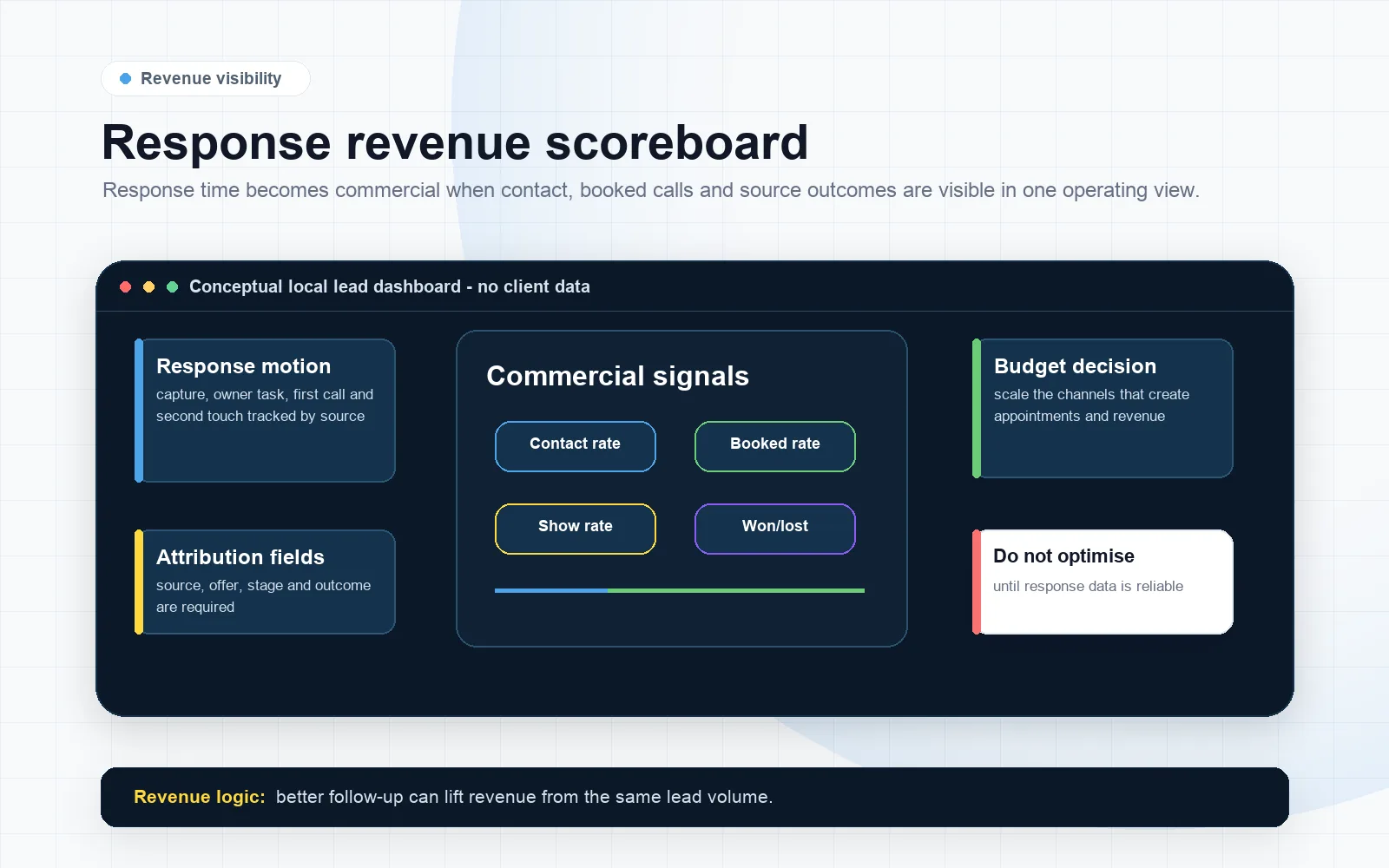
What this means for revenue
Slow response time is not a “soft” problem. It shows up as hard leakage across your funnel and CRM.
1) You pay for leads you never contact
If you run Meta Ads or Google Ads, every uncontacted lead is pure waste. Even worse: you may think the channel is “low quality” when the real issue is that your follow-up never reached the lead fast enough.
2) Your booked rate drops before your close rate drops
Most owners look at close rate and assume sales is the issue. In local business, the first failure is usually booked rate (or “scheduled rate”). Fixing speed-to-lead often increases bookings without changing your sales script.
3) Your team gets busier while revenue stays flat
Without clean routing and stop rules, your team chases old leads, duplicates, and no-shows. That creates the illusion of activity while new leads age out.
4) You lose attribution, so you make the wrong budget decisions
If your CRM can’t tell you which lead sources are being contacted quickly and which are not, you’ll cut the wrong campaigns, keep the wrong ones, or hire the wrong role.
Revenue logic you can use immediately
- If time-to-first-touch improves, contact rate should improve.
- If contact rate improves, booked rate should improve.
- If booked rate improves, you can often scale spend without “lead quality” collapsing.
That’s why speed-to-lead is a foundational lever in GoHighLevel lead follow up for local business operations: it stabilizes the front end so you can scale the back end.
Conclusion
Most businesses don’t actually have a “follow-up problem.” They have a systems integrity problem: intake isn’t normalized, ownership isn’t enforced, and reporting doesn’t show where the leak starts.
Here’s what we see repeatedly in GoHighLevel accounts that are underperforming:
- Too many workflows built over time, each partially responsible for follow-up. The result is gaps and duplicates.
- Stage chaos: the pipeline exists, but no one uses it consistently, so automations tied to stages don’t fire.
- Source blindness: “Lead Source = Unknown” for most contacts, so you can’t tie speed-to-lead and bookings back to spend.
- Calendar misuse: sending links as a substitute for qualification and conversation.
- No operating rhythm: even good automations fail if the team doesn’t have a daily process for calls, notes, and stage movement.
What SCALE does differently is treat follow-up as a revenue system, not a set of messages. “SCALE builds GoHighLevel CRM, funnel and automation systems for businesses that need better lead quality, faster follow-up and clearer attribution.” That means we design:
- a single intake layer that normalizes all lead sources,
- a pipeline that matches how you sell locally,
- speed-to-lead automations with escalation and stop rules, and
- reporting that ties response time to booked calls and revenue outcomes.
FAQs
What is a good response time for local business leads in GoHighLevel?
A practical target is: automated first-touch within 60 seconds, and a human call attempt within 5 minutes during business hours. If you can’t call that fast, use tasks + escalation and commit to a first-call block so no lead waits more than 30–60 minutes.
Why are my GoHighLevel automations not triggering for some leads?
Usually the trigger is tied to a condition not all leads meet (wrong pipeline, wrong stage, missing tag, or a form that isn’t connected). Fix it by normalizing intake: every source should create an opportunity in the same pipeline and stage, then trigger one core “Speed-to-Lead” workflow.
How do I stop GoHighLevel from sending duplicate follow-up texts?
Consolidate overlapping workflows, add suppression checks (e.g., “if contact is already in workflow”), and implement stop rules on reply, booking, and stage change. Also test duplicate submissions to ensure your forms update an existing contact instead of creating a new one.
Should I send a calendar link immediately after a lead opts in?
Not always. For many local services, sending a calendar link too early reduces bookings because the lead still has questions. A stronger pattern is: confirm request, ask one qualifying question, then offer either “reply with details” or “book a time” depending on urgency and service type.
How do I handle after-hours leads without losing them?
Create an after-hours branch in your workflow: acknowledge the request, set expectations (“We’ll call at 8am”), capture one key detail (address/service needed), and offer a booking link for those who prefer scheduling. Then queue those leads for the first-call block the next morning.
What reports should I look at to prove follow-up is the problem (not lead quality)?
Start with time-to-first-touch, contact rate within 24 hours, and booked rate by lead source. If a source has decent lead volume but low contact rate and slow first-touch, it’s a follow-up/routing issue. If contact rate is high but booked rate is low, it’s offer/qualification/sales process.
Can SCALE fix my GoHighLevel follow-up without rebuilding everything?
Often, yes. The fastest wins usually come from intake normalization, owner assignment, a single speed-to-lead workflow, missed-call text-back, and stop rules. If your account has heavy template debt (too many workflows/pipelines), a controlled consolidation may be the cleanest path.
Conclusion
If you want gohighlevel lead follow up local business performance to improve fast, book a free Growth Systems Audit and stop tweaking message copy. Start fixing the system: one GoHighLevel CRM pipeline, normalized funnels and lead intake, automation that enforces speed-to-lead with tasks and escalation, attribution that shows what’s working by source, and a simple operating rhythm your team can follow. The official GoHighLevel platform can support this, but the commercial result comes from the routing, ownership and reporting discipline around it.
