
In this guide, we will cover:
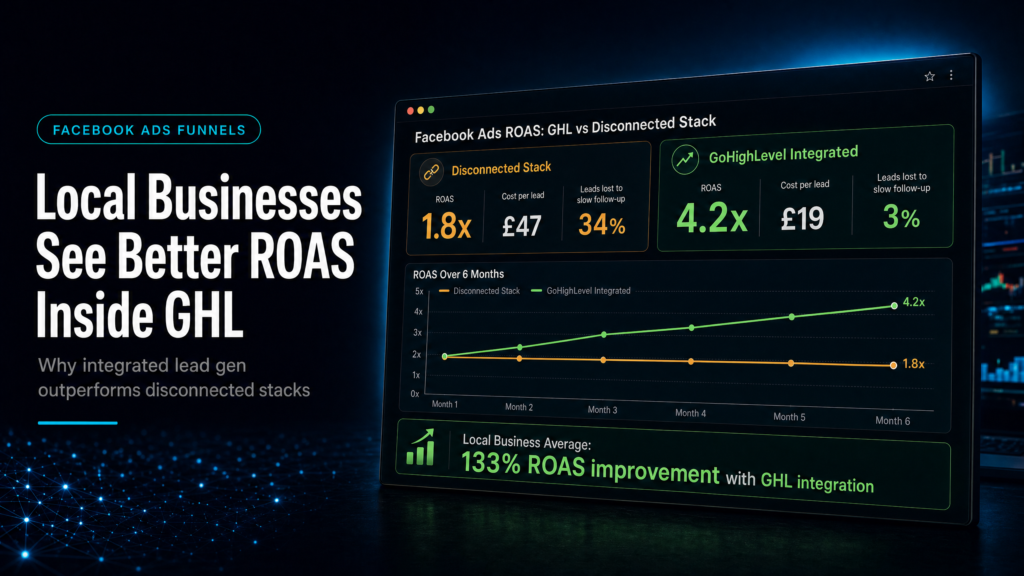
How to protect Facebook Ads ROAS by connecting lead capture, fast follow-up, pipeline ownership and revenue attribution inside GoHighLevel.
What Happens After The Click?
Check whether every Facebook lead lands in one clean contact record with source, campaign and offer context.
How Fast Is First Follow-Up?
Compare manual response with automated SMS, email and owner tasks so hot leads are not left waiting.
Can Sales See The Opportunity?
Move leads into clear stages so booked calls, no-shows and follow-up gaps are visible before spend scales.
Which Leads Become Revenue?
Tie campaign source to booked calls, show rate and outcomes so ROAS is measured beyond the first form fill.
Quick Answer
Local businesses often get better ROAS from gohighlevel facebook ads for lead generation because GoHighLevel connects the ad click to the CRM, pipeline, automation, and speed-to-lead follow-up in one system. That reduces missed leads, improves attribution, and increases booked appointments without needing more ad spend.
For ROAS, source data has to reach pipeline and booking reports. Use the GoHighLevel lead source tracking guide as the attribution layer behind this page.
TL;DR
- If your leads aren’t contacted in under 5 minutes, your Meta spend is being taxed by slow follow-up.
- GHL improves ROAS by turning “lead volume” into “contact rate, show rate, and close rate” with automation and pipeline discipline.
- Local ROAS usually improves when you track by lead source + stage (not just CPL) and fix the handoff to sales.
- Most “bad ads” are actually broken routing: wrong form fields, no dedupe, no SMS/email sequence, no call attempts, no appointment logic.
- If you can’t answer “Which campaign produced revenue last week?”, you have an attribution and reporting gap, not a creative gap.
- Choose DIY only if you can own CRM architecture, automation QA, and reporting; otherwise you’ll pay in wasted leads.
- For high-ticket local services, the fastest win is usually speed-to-lead + pipeline hygiene + missed-call text-back.
This is a support article in the gohighlevel facebook ads cluster. For the broader hub view on how follow-up turns clicks into clients, see: GoHighLevel Facebook Ads follow-up: from clicks to clients.
For the broader decision on whether Facebook Ads inside GoHighLevel should own the paid-lead journey, use the canonical guide: can Facebook Ads be managed inside GoHighLevel?
Decision table: DIY vs freelancer vs specialist build
| Option | Best fit | Risk | Speed | Revenue visibility | When to choose it |
|---|---|---|---|---|---|
| DIY / internal build | Owner-operator or in-house marketer who can design pipelines, automations, tracking, and QA | High: missed leads, broken triggers, messy data, “looks fine” but leaks revenue | Medium to slow (learning + iteration) | Medium if you implement source tracking + reporting correctly | When you have time to test, document, and maintain the system weekly |
| Cheap freelancer / template implementer | Simple lead capture with minimal routing; low complexity offers | Very high: templates rarely match your sales process; attribution and handoff usually fail | Fast initial setup, slow to fix | Low: often CPL-only reporting, no pipeline-to-revenue linkage | When budget is the only constraint and you accept rework later |
| Specialist GoHighLevel expert (SCALE-style growth systems build) | Local businesses where speed-to-lead, booking, and sales follow-up determine ROAS | Lower: architecture + QA + reporting built around your actual revenue process | Fast to deploy, faster to improve | High: campaign-to-pipeline-to-revenue visibility | When you want predictable lead handling, clearer attribution, and fewer wasted ad dollars |
Who this is for
- Local service businesses running Meta lead ads or landing page campaigns (home services, dental, med spa, legal, fitness, clinics).
- Owners who feel “ads work sometimes” but can’t explain why weeks swing up and down.
- Teams missing calls, replying late, or letting leads sit in inboxes with no next step.
- Agencies managing Meta Ads who need cleaner attribution and a repeatable follow-up system.
- Businesses with multiple locations or multiple offers that need routing rules and pipeline clarity.
- Operators who want to measure ROAS by booked appointments and closed revenue, not just CPL.
- Anyone migrating from disconnected tools (Lead Ads + Zapier + spreadsheets + random texting apps).
Why GoHighLevel Facebook Ads Lead Generation Can Improve Local ROAS
Most local businesses judge Meta performance using two numbers: cost per lead and lead volume. That’s incomplete. ROAS is created (or destroyed) after the lead is captured: contact rate, speed-to-lead, appointment set rate, show rate, and close rate.
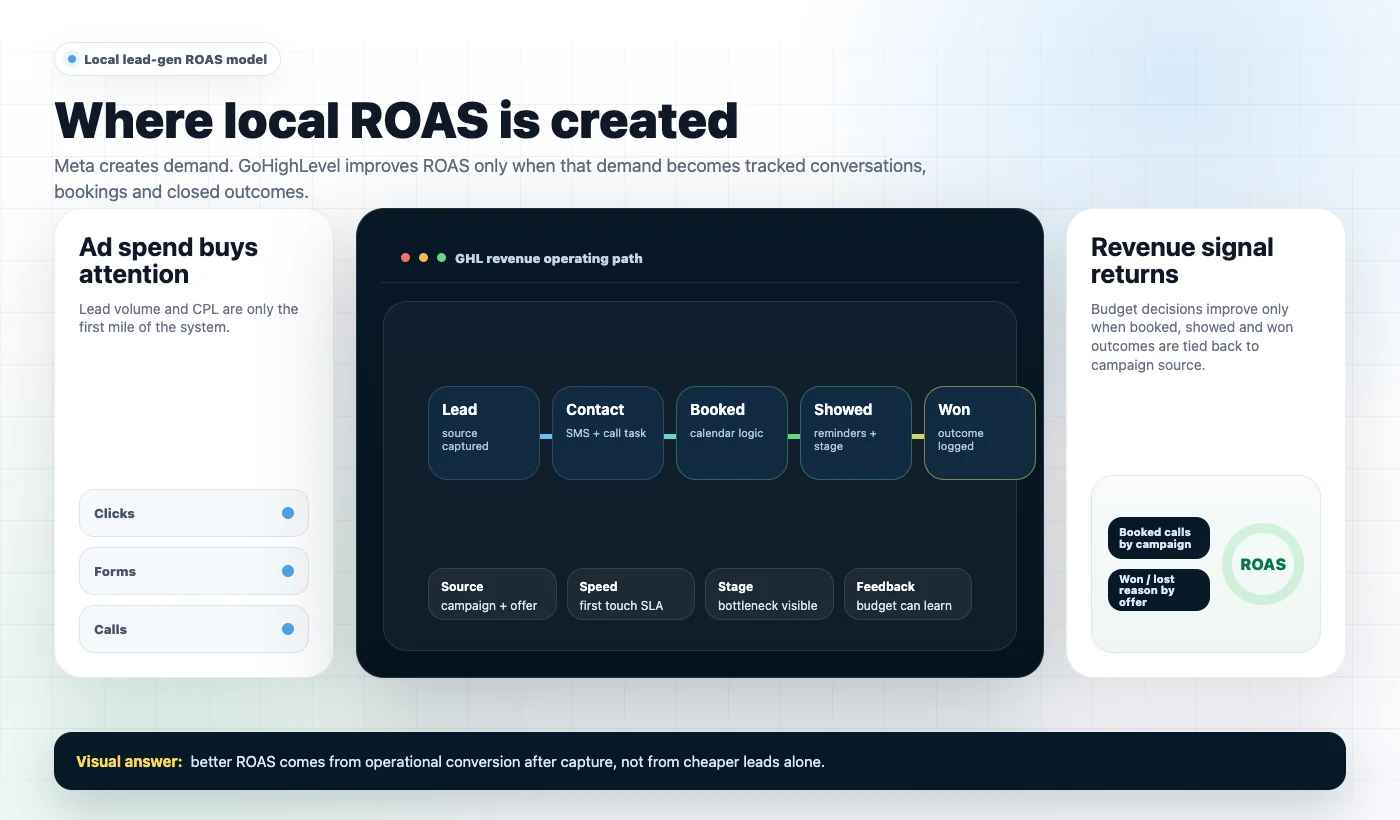
GoHighLevel improves ROAS when it becomes the system of record for:
- Lead capture (forms, surveys, chat widgets, inbound calls, FB Lead Ads)
- Routing (who owns the lead, which location, which offer, which calendar)
- Follow-up (SMS/email/voice drops/call attempts with stop conditions)
- Pipeline visibility (stages that match your sales process, not generic CRM stages)
- Attribution (lead source + campaign context + outcome)
What to check (buyer checklist)
- Can you see every lead’s source and first response time in one place?
- Do leads automatically enter a pipeline stage with a clear next action?
- Do you have a missed-call text-back and after-hours logic?
- Does your system stop automation when a lead books, replies, or is marked won/lost?
- Can you report weekly on leads → contacts → booked → showed → closed by campaign?
Weak setup vs strong setup
Weak setup looks like: FB leads go to email, someone checks later, half the leads never get called, no pipeline stage discipline, and “ROAS” is guessed from memory.
Strong setup looks like: FB lead hits GHL, deduped, tagged by source, assigned to the right rep/location, immediate SMS + call attempt, booking link sent, reminders run, pipeline stages update, and reporting shows which campaigns produce booked appointments and revenue.
What SCALE would look for or fix: source tracking consistency, routing rules, speed-to-lead automation, pipeline stage definitions, stop conditions, and reporting that ties outcomes to campaigns.
Where ROAS is actually won: speed-to-lead, contact rate, and appointment conversion
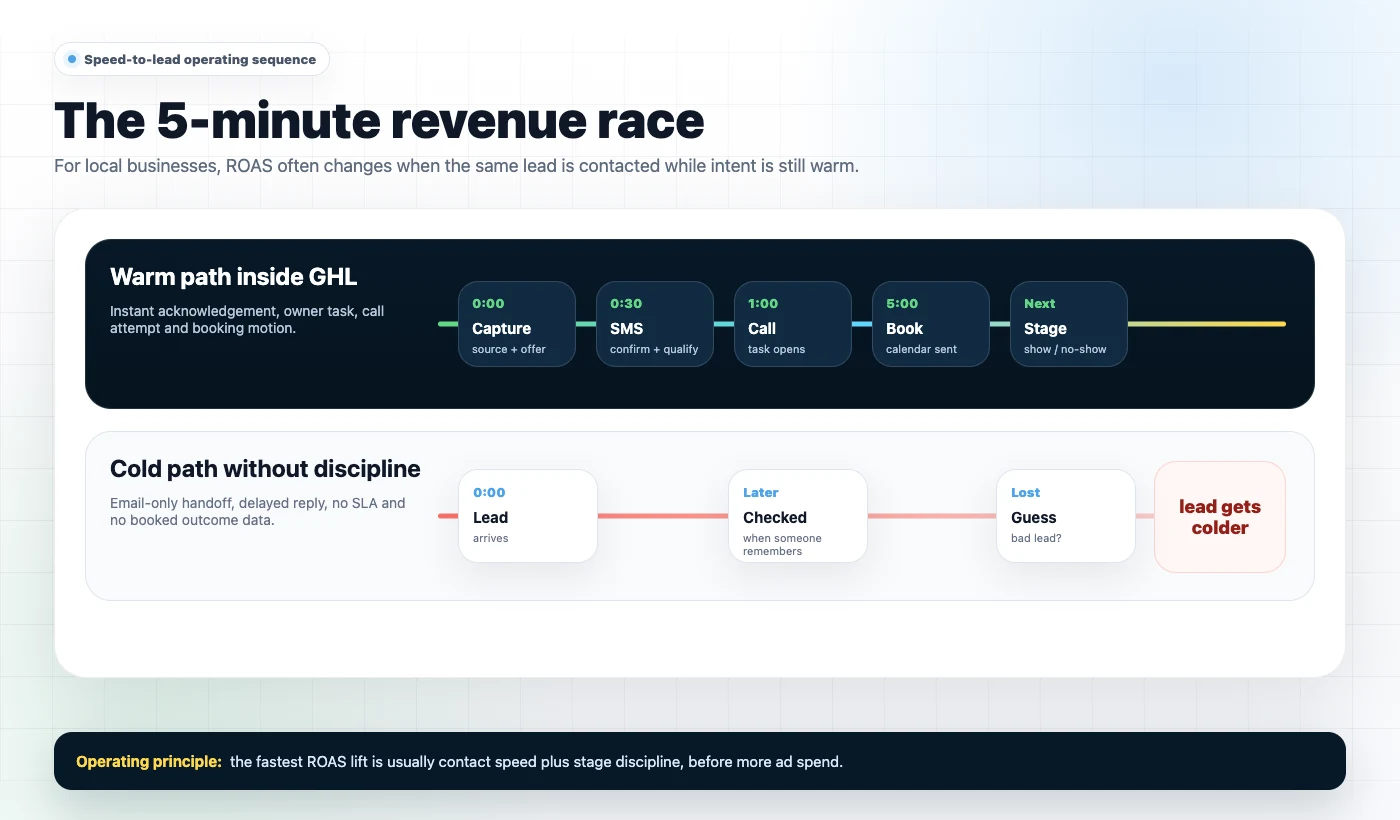
Local lead gen is a race. The first business to respond usually gets the conversation. If your follow-up is slow, you’re paying Meta for leads your competitors close.
How to diagnose your speed-to-lead problem
Pull a sample of 50 leads from the last 14–30 days and answer:
- Median time to first SMS
- Median time to first call attempt
- % of leads contacted within 5 minutes
- % contacted within 60 minutes
- % never contacted
Commercial why: what changes when you respond faster
- Higher contact rate (more conversations from the same spend)
- Higher appointment set rate (less “ghosting”)
- Lower effective CPL (because more leads become opportunities)
- Better ROAS (because your sales team works warmer leads)
What a strong GHL follow-up loop includes
- Instant SMS confirmation: “Got it—quick question so we can help you faster…”
- Immediate call attempt (or within 1–2 minutes) during business hours
- Voicemail drop if no answer + SMS “just left you a quick message”
- Booking link with a specific promise (what happens on the call, how long it takes)
- Stop conditions: if they book, reply, or are marked “Not a fit,” automation stops
- After-hours logic: acknowledge now, schedule call attempt for next morning
Attribution inside GHL: why “CPL” is a trap for local businesses
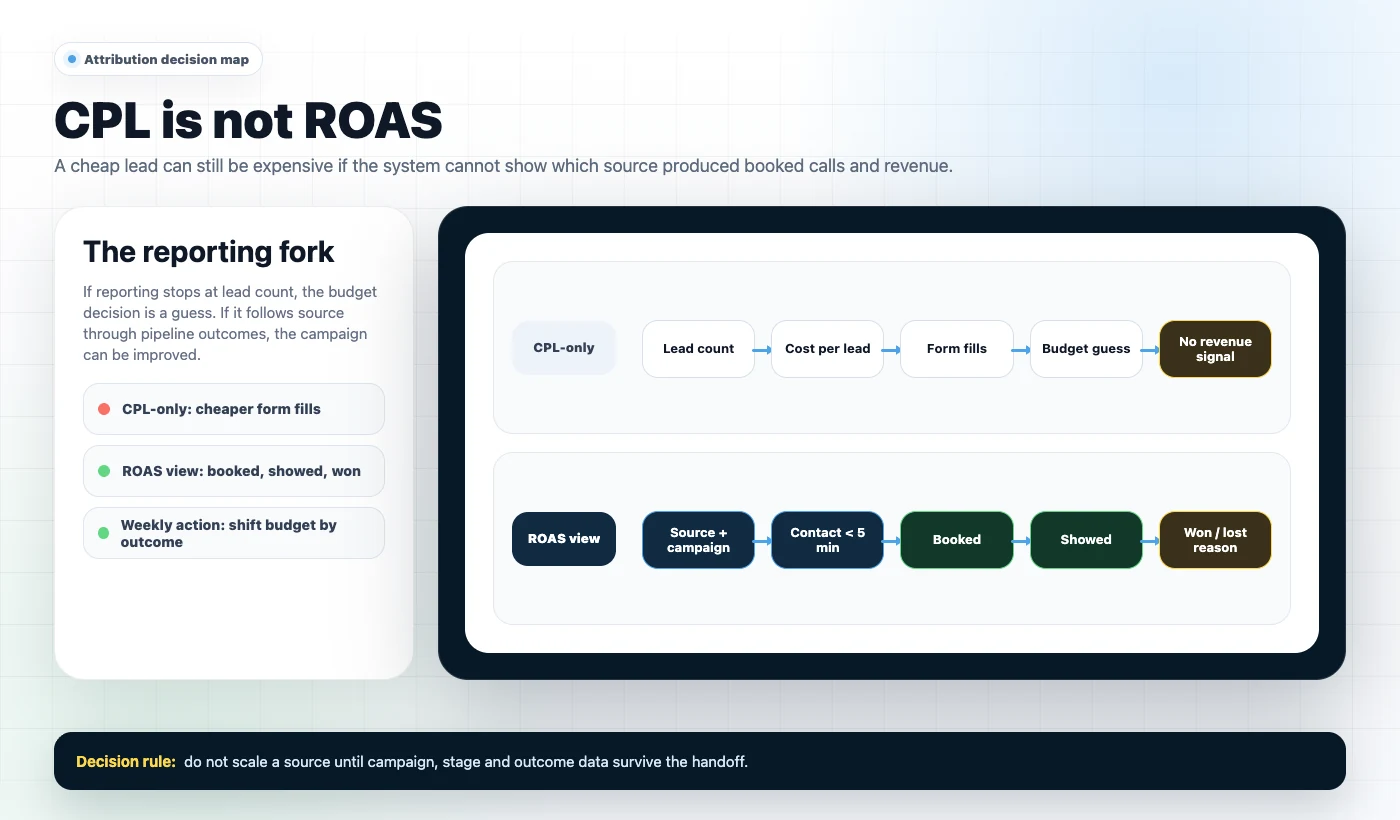
Most local advertisers optimize for cheap leads. Cheap leads are often low intent, hard to contact, or not qualified. The better approach is to optimize for cost per booked appointment and cost per closed deal (or at least cost per qualified opportunity).
GoHighLevel helps because it can store the lead source and track the lead through pipeline stages. But it only works if you implement attribution intentionally.
For campaign-side setup and policy guidance, use Meta’s official Business Help Center. This page focuses on the GoHighLevel routing, follow-up and attribution layer after a lead is captured.
What to check: attribution essentials
- Every lead record has a consistent Lead Source value (e.g., “Facebook Lead Ad,” “Facebook Landing Page,” “Google LSA”).
- Campaign-level context is captured (UTMs, form identifiers, or funnel step identifiers).
- Pipeline stages are used consistently (no “everything sits in New Lead forever”).
- Won revenue is recorded (even if it’s a simple “estimated value” for now).
How to diagnose attribution gaps
- Run a report: leads by source vs opportunities by source. If the ratio is wildly different, routing/follow-up is inconsistent.
- Check 20 random leads: do they have UTMs or a source tag? If not, you can’t optimize.
- Compare Meta reported leads vs GHL created contacts for the same period. If they don’t match, your capture is broken.
Weak vs strong attribution
Weak: “Facebook” is the only source, no campaign differentiation, and sales outcomes aren’t recorded.
Strong: Source + campaign + offer are captured, pipeline stages reflect reality, and you can answer: “Which campaign produced booked calls and revenue last week?”
Pipeline design for local lead gen: the hidden ROAS lever
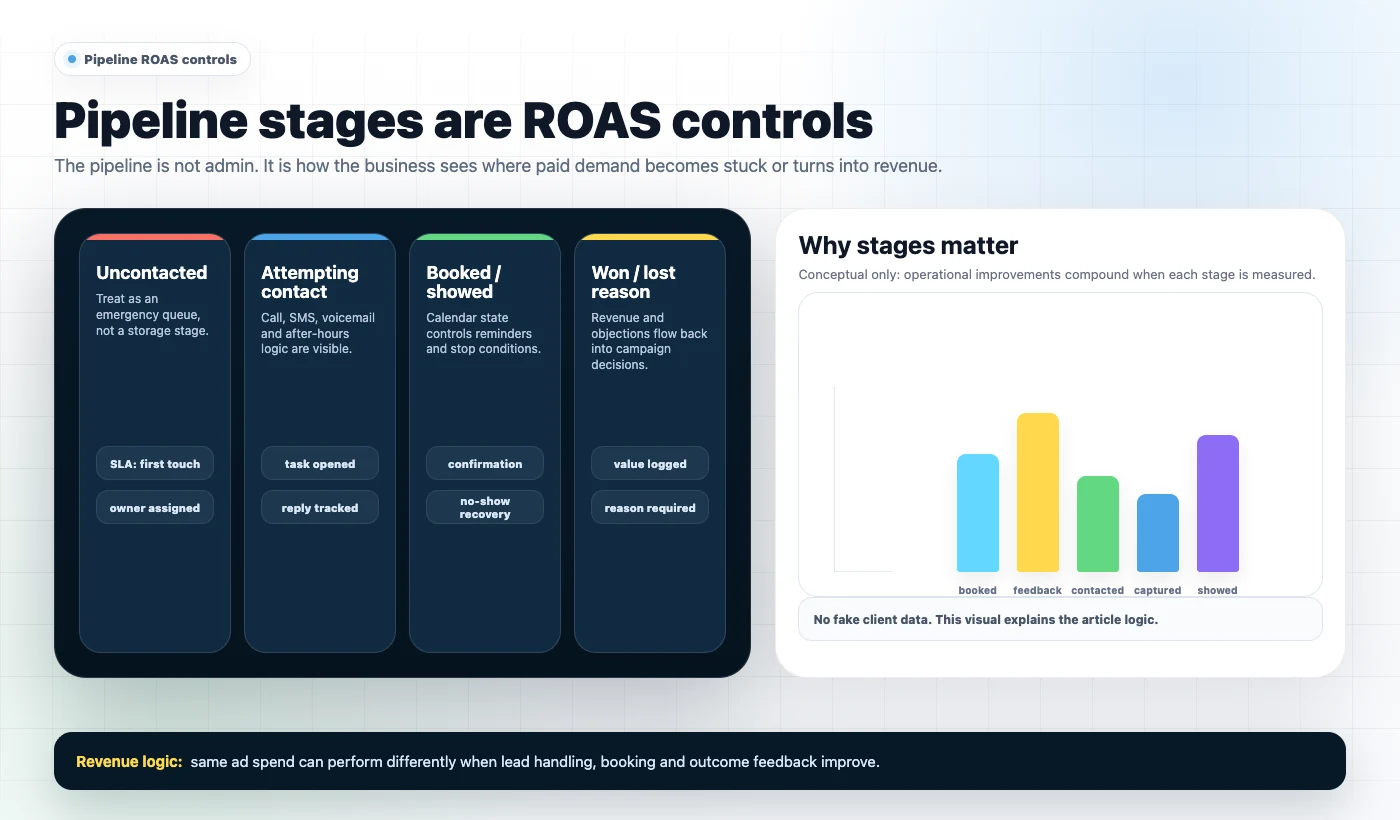
Most pipelines are built like generic CRMs. Local lead gen needs a pipeline that matches the actual journey from “new lead” to “paid.” If your pipeline is wrong, your team’s behavior is wrong, and your reporting becomes fiction.
A practical pipeline for Facebook lead generation
Use stages that force action and make bottlenecks obvious:
- New Lead (Uncontacted)
- Attempting Contact
- Contacted (Needs Booking)
- Booked
- Showed
- No Show / Reschedule Needed
- Won
- Lost (Reason)
What to check (buyer checklist)
- Does every stage have an owner action (call, text, book, confirm, close)?
- Do you have a “Uncontacted” stage that is treated like an emergency?
- Is “Lost” required to include a reason (price, timing, not qualified, competitor)?
- Are there SLAs (e.g., uncontacted leads must be touched within 5 minutes)?
Weak vs strong pipeline behavior
Weak: reps leave leads in “New” while they “get to it,” no one knows what’s stuck, and management can’t coach.
Strong: the pipeline is a daily operating system. Uncontacted leads are cleared fast, booked leads get reminders, no-shows get a recovery sequence, and lost reasons inform ad targeting and offer changes.
What SCALE would look for or fix
- Stage definitions and required fields (so data is usable)
- Automation triggers tied to stage movement (not just “on form submit”)
- Opportunity values and close dates for revenue reporting
- Location/rep assignment rules so leads don’t get orphaned
Offer-message fit and landing page structure: why GHL makes testing easier (if you set it up right)
GHL doesn’t make a weak offer work. But it makes it easier to test offers, route leads correctly, and measure outcomes beyond CPL.
What to check on the offer (local business reality check)
- Is the offer specific (problem, outcome, timeframe) or generic (“Free quote”)?
- Is there a clear next step (book, call, request availability) that matches buyer intent?
- Does the offer pre-qualify (service area, budget range, urgency, type of job)?
Landing page structure that converts without killing lead quality
- Headline that matches the ad promise (no bait-and-switch)
- Proof that matters locally (reviews, before/after, certifications)
- Short form with smart fields (enough to route/qualify, not enough to reduce completion)
- Clear expectation: “We’ll call/text within X minutes”
- One primary CTA (avoid multiple competing actions)
How to diagnose “bad lead quality” vs “bad follow-up”
Before you blame targeting, check:
- If contact rate is low, it’s often speed-to-lead or wrong phone/email capture.
- If contact rate is high but booking is low, it’s often offer clarity or sales script.
- If booking is high but show rate is low, it’s often reminders, calendar friction, or weak confirmation.
- If show rate is high but close rate is low, it’s often pricing/positioning or sales process.
The implementation process
- Define the revenue goal and conversion event. Decide what “success” is for this campaign: booked estimate, booked consult, walk-in, deposit paid, or qualified opportunity. Set a single primary conversion event to optimize around.
- Map your lead journey end-to-end. Write the exact steps from ad click to paid: capture → contact → qualify → book → show → close. If you can’t map it, you can’t automate it.
- Build the CRM foundation in GoHighLevel. Create custom fields (service type, location, urgency), tags (source/campaign), and a pipeline with stages that match your sales process.
- Set up lead source tracking. Use UTMs for landing pages and ensure FB Lead Ads integrations pass source identifiers into GHL. Standardize naming so reporting doesn’t fragment (e.g., “FB Lead Ad” vs “Facebook Lead Ads”).
- Create the funnel or form with routing in mind. If using a landing page, ensure the form captures the minimum viable qualifiers. If using FB Lead Ads, ensure required fields are correct and validated (phone formatting, email required where appropriate).
- Connect calendars properly. Use the right calendar per location/rep. Add buffers, working hours, and appointment types. Ensure booking triggers confirmation and reminders.
QA, reporting and handover
- Build speed-to-lead automations. On lead creation: instant SMS + task creation + call attempt workflow. Add after-hours logic and missed-call text-back. Include stop conditions when the lead replies or books.
- Implement pipeline stage automations. When moved to “Booked,” start reminders. When “No Show,” start recovery. When “Won/Lost,” stop sequences and log outcome reasons.
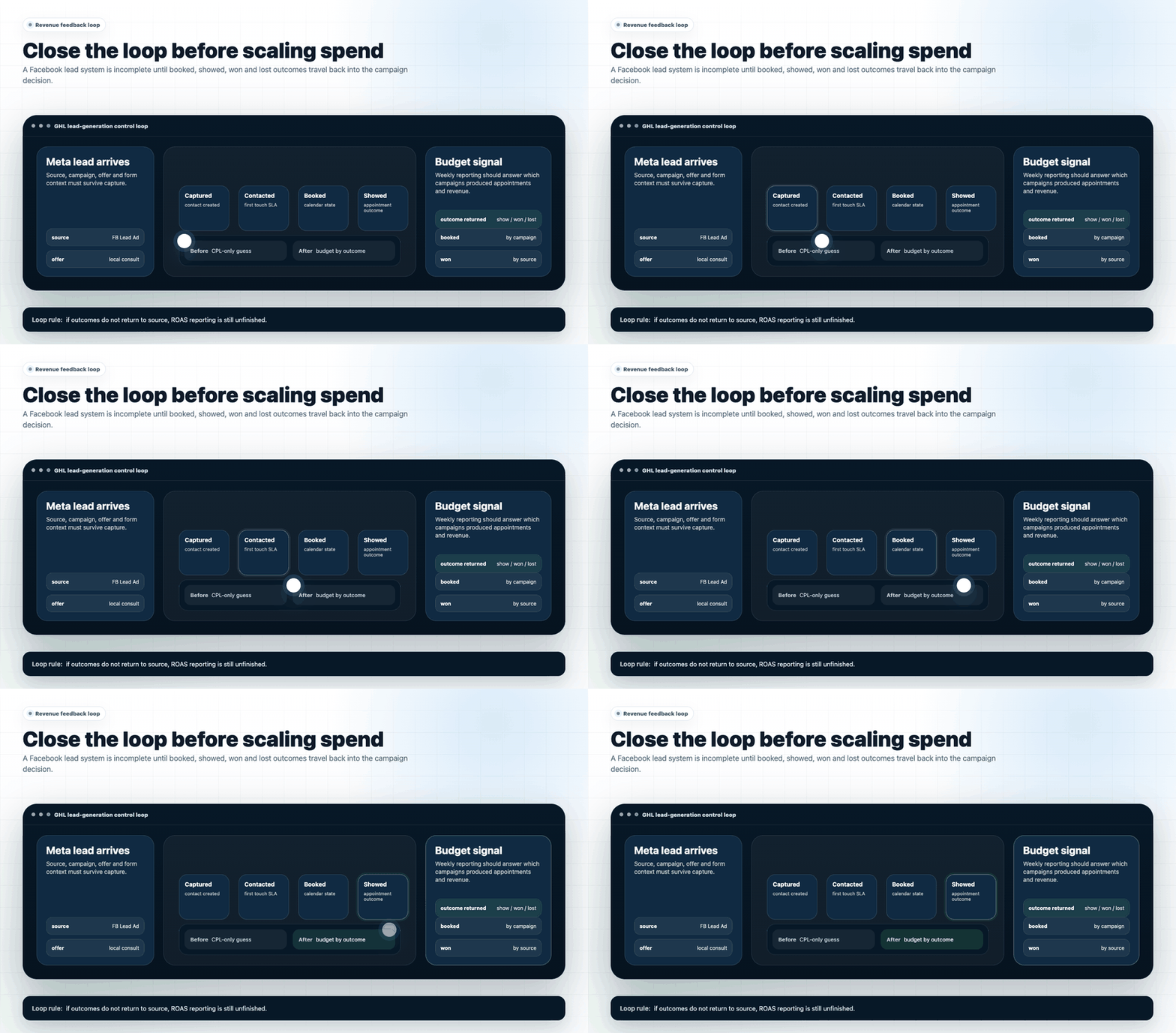
- Set up reporting that ties ads to outcomes. Track leads, contacts, booked, showed, won, and revenue by source/campaign. Decide who reviews it weekly and what actions follow (creative changes, offer tweaks, staffing changes).
- QA the system like a buyer. Submit test leads from each source, confirm contact creation, tags, pipeline stage, notifications, SMS delivery, calendar booking, and stop conditions. Fix edge cases (duplicates, missing phone, international numbers).
- Handover and operating rhythm. Document the pipeline rules, response SLA, and daily checklist for reps. Set a weekly review: bottlenecks, lead quality notes, and campaign adjustments.
Common problems and how to fix them
| Problem | What it usually means | Commercial risk | Fix | Metric to watch |
|---|---|---|---|---|
| Leads show in Meta but not in GHL | Integration failure, permissions issue, or wrong form connected | Paying for leads you never contact | Reconnect FB Lead Ads integration, verify page/form selection, run test lead, set alerts for failures | Meta leads vs GHL contacts match rate |
| Leads enter GHL but no one follows up | No workflow, no notifications, or no owner assignment | Wasted spend; competitors win the lead | Create assignment rules + tasks + notifications; enforce response SLA | % contacted within 5/60 minutes |
| “Bad lead quality” complaints | Offer mismatch, weak pre-qual, or slow follow-up causing cold leads | Team loses confidence; ads paused prematurely | Add 1–2 qualifier fields, tighten copy, improve speed-to-lead, track reasons for loss | Contact rate and booked rate |
| Too many duplicates | Multiple sources creating new contacts; no dedupe rules | Double texting/calling; brand damage | Enable dedupe logic, normalize phone/email, use update vs create where possible | Duplicate contact rate |
| Booked calls but low show rate | Weak confirmation, no reminders, or calendar friction | High CPL with low realized opportunities | Add SMS/email reminders, confirmation prompts, reschedule links, and pre-call instructions | Show rate |
| Can’t tell which campaign makes money | No UTMs/source standardization; pipeline not updated; revenue not logged | Budget allocated by guesswork | Standardize sources, enforce stage movement, log won value, review weekly | Cost per booked/show/won by source |
| Automation keeps texting after a lead books | Missing stop conditions or stage-based suppression | Annoyed prospects; cancellations | Add “stop on reply/booking/won/lost” logic; test edge cases | Reply sentiment + unsubscribe rate |
What this means for revenue
ROAS improves when you stop treating Facebook ads as a “lead generator” and start treating them as the top of a revenue system. GoHighLevel is valuable because it can connect the pieces that usually break:
- Lead quality: Better qualification fields, better routing, and better tracking of “lost reasons” lets you refine targeting and offers based on reality, not opinions.
- Booked calls: Instant response + clear booking logic increases the percentage of leads that become scheduled appointments.
- Speed-to-lead: Automated first-touch and call tasks reduce the time window where prospects keep shopping.
- Pipeline visibility: When stages are accurate, you can forecast workload, staffing, and revenue instead of reacting late.
- Attribution: You can shift budget toward campaigns that create booked/shown/won outcomes, not just cheap form fills.
- Wasted ad spend: The biggest waste is paying for leads you don’t contact or can’t track. Fixing capture + follow-up often “creates” revenue without increasing spend.
A practical way to think about it: if you improve contact rate and booking rate, you can often maintain the same CPL but generate more opportunities and revenue per dollar spent. That’s ROAS improvement driven by operations, not ad platform luck.
Conclusion
Most businesses don’t have a Facebook ads problem. They have a system integrity problem: leads arrive, but the CRM structure, routing, follow-up, and reporting aren’t built to convert those leads into booked appointments and closed deals.
Here’s what we see repeatedly:
- CRMs built like databases, not operating systems. If stages don’t drive action, your team won’t move leads correctly, and your reporting becomes noise.
- Automation without stop conditions. This creates awkward customer experiences and makes reps distrust the system.
- Attribution that stops at “Facebook.” Without campaign/offer/source clarity, you can’t scale what works.
- No speed-to-lead discipline. The business pays for demand, then responds like demand doesn’t matter.
SCALE builds GoHighLevel CRM, funnel and automation systems for businesses that need better lead quality, faster follow-up and clearer attribution. Practically, that means we design the pipeline around your sales process, implement routing and speed-to-lead logic, and set up reporting that ties Meta spend to booked, showed, and won outcomes so you can make budget decisions with confidence.
FAQs
Does GoHighLevel replace Meta Ads Manager?
No. You still run campaigns in Meta Ads Manager. GoHighLevel improves what happens after the click: capturing leads reliably, routing them to the right person, automating follow-up, and tracking outcomes through your pipeline so you can optimize based on booked and won results.
What’s the fastest way to improve ROAS from Facebook leads in GoHighLevel?
Fix speed-to-lead and missed-lead recovery first. Implement instant SMS, immediate call tasks, missed-call text-back, and after-hours logic. Then add stage-based reminders for booked appointments. These changes typically improve contact and booking rates without changing ad spend.
Should I use Facebook Lead Ads or a GoHighLevel landing page?
Use Lead Ads when frictionless volume matters and you can qualify later with follow-up. Use a landing page when you need stronger pre-qualification, clearer offer framing, and better control of tracking. Many local businesses run both: Lead Ads for volume and landing pages for higher-intent segments.
How do I track which Facebook campaign produced revenue in GoHighLevel?
At minimum, standardize lead source values and enforce pipeline stage movement through to Won/Lost. For landing pages, use UTMs and store them in custom fields. For Lead Ads, ensure the integration passes form identifiers and apply tags per form/campaign. Then report by source/campaign against booked, showed, and won outcomes.
Why are my Facebook leads not receiving texts from GoHighLevel?
Common causes include: no phone number captured, invalid formatting, SMS not configured correctly, compliance issues, or workflows not triggering due to missing conditions. Test with real devices, check workflow enrollment logs, and confirm the lead is entering the correct trigger path.
What pipeline stages should a local business use for Facebook lead generation?
Use stages that mirror the sales reality: New Lead (Uncontacted) → Attempting Contact → Contacted (Needs Booking) → Booked → Showed → Won/Lost, plus a No Show/Reschedule stage. The goal is to make bottlenecks visible and tie automations to stage movement.
When should I hire a specialist instead of building this myself?
If you’re spending enough on Meta that missed leads are materially expensive, or if you can’t confidently report leads-to-revenue by source, you’ll usually get a faster payback by hiring a specialist. The cost of a broken system is ongoing wasted spend and inconsistent sales performance.
Local businesses see better performance from gohighlevel facebook ads for lead generation when GoHighLevel is used as the operating system: CRM structure, funnels, automation, lead follow-up, and attribution working together to convert clicks into booked appointments and closed revenue. If you’re in the gohighlevel facebook ads cluster and want fewer missed leads, clearer pipeline visibility, and reporting you can trust, SCALE can audit and rebuild the system so Meta spend translates into measurable outcomes.
