
Scroll breakdown
In this guide, we’ll cover:
01 / Ad source tracking
Campaign source
Why each lead needs source, campaign and creative context before it reaches the CRM.
02 / Lead capture
Contact record
Where forms, landing pages and UTM values pass buyer intent into GoHighLevel.
03 / Follow-up system
Automated response
How tags, workflows, SMS and email stop new leads from waiting for manual follow-up.
04 / Attribution view
Pipeline clarity
What changes when booked calls, pipeline value and closed revenue can be tied back to the ad.
05 / Missed-lead protection
Fewer leaks
Why the system should flag duplicates, delays and stalled opportunities before sales are missed.
“GoHighLevel Facebook ads tracking works when the ad, funnel, CRM and follow-up system share the same data. That is what stops leads from disappearing after the click.”
For the wider source and attribution model behind paid-lead reporting, use the GoHighLevel lead source tracking guide before judging ad performance from form fills alone.
For the broader decision on whether Facebook Ads belong inside GoHighLevel at all, use the Facebook Ads inside GoHighLevel guide. This tracking page stays focused on attribution, lead routing and missed follow-up after ads are already running.
If your Facebook ads are creating leads but your team is still missing calls, chasing spreadsheets or guessing which campaign worked, the problem is not the ad account. It is the tracking layer behind it.
SCALE builds GoHighLevel CRM, funnel, and automation systems for businesses that need better lead quality, faster follow-up, and clearer attribution.
If the tracking problem is really a CRM ownership, routing or follow-up problem, use the GoHighLevel expert guide to decide whether the account needs a stronger expert build rather than another ad tweak.
If paid traffic is the source, use the GoHighLevel Marketing 101 guide to connect Facebook ad leads to CRM ownership, follow-up and revenue reporting instead of judging ads from platform metrics alone.
GoHighLevel Facebook ads tracking helps connect ad clicks, form fills, CRM records, follow-up workflows and booked calls so fewer leads disappear between the first click and the sales conversation.
Direct answer: GoHighLevel prevents lost Facebook ad leads by capturing source data, storing it inside the CRM, tagging each contact and triggering automated follow-up before the lead goes cold.
Quick verdict: If Facebook ads are generating enquiries but sales cannot see which campaigns create booked calls, GoHighLevel should act as the tracking and follow-up layer between the ad account and the pipeline.
For the wider funnel side of this, see our guides on marketing funnel Facebook ads and GoHighLevel Facebook Ads automations.
Why GoHighLevel Facebook Ads Tracking Matters
Most businesses run Facebook ads and dump leads into a spreadsheet or a basic CRM. The problem is that there is no connection between the ad that generated the lead and what happens after they opt in. You cannot tell which campaign, ad set or creative is bringing in qualified buyers versus low-fit enquiries.
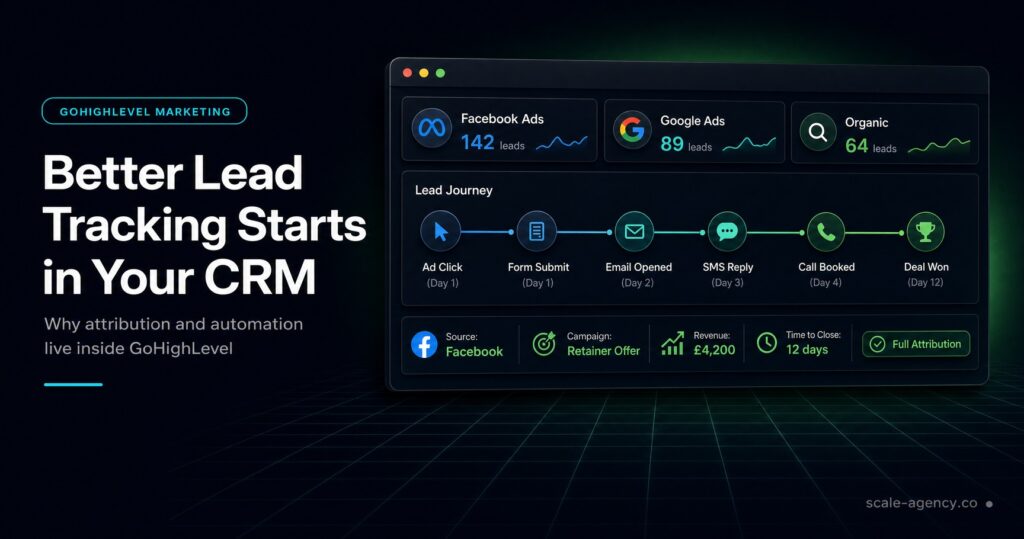
GoHighLevel solves this by helping you track the customer journey from ad click to booked call. When integrated properly, every Facebook lead is tagged with campaign data, assigned to the right pipeline and entered into a nurture sequence without manual data entry.
This prevents two critical failures: leads who never get contacted, and ad spend being pushed into campaigns that generate attention but not revenue.
How GoHighLevel Captures Facebook Ad Data
GoHighLevel uses form submissions, landing pages, webhook connections and UTM data to capture lead information from Facebook ads. When someone fills out a form or lands on a tracked page, the contact record can carry the source, campaign and context that created the enquiry.
The useful data usually includes:
- Lead name, email, phone number and any custom form fields
- Facebook campaign name, ad set and ad ID
- UTM source, medium, campaign, content and term
- Submission timestamp and funnel entry point
- Pipeline stage, opportunity value and booked-call outcome
This data flows into GoHighLevel’s contact record, where it can trigger automations, update custom fields and show your sales team exactly where the lead came from.
Setting Up GoHighLevel Facebook Ads Integration
There are two primary ways to connect Facebook ads to GoHighLevel: direct Facebook Lead Ads integration and landing page tracking with UTM parameters.
Method 1: Facebook Lead Ads Integration
GoHighLevel can connect with Facebook Lead Ads so form submissions are pushed into your account. You connect the Facebook account, select the page and lead form, then map the form fields to GoHighLevel contact fields.
The advantage is speed. Leads can be captured without sending the user to an external landing page. The tradeoff is less control over the page experience, tracking scripts and funnel context.
Method 2: Landing Page Tracking with UTM Parameters
For businesses sending traffic to GoHighLevel landing pages or external pages with GoHighLevel forms, UTM tracking is essential. UTM values show which campaign, ad set and creative generated each lead.
Use this setup:
- Build the landing page or form path in GoHighLevel.
- Add UTM parameters such as
?utm_source=facebook&utm_medium=cpc&utm_campaign=your_campaign_name&utm_content=ad_creative_id. - Use Facebook dynamic parameters like
{{campaign.name}}and{{adset.name}}where appropriate. - Create custom fields in GoHighLevel to store UTM values.
- Create workflow rules that tag, segment or route leads based on the campaign data.
This method gives you more control and works across paid traffic sources, not only Facebook Lead Ads.
Automating Follow-Up Based on GoHighLevel Facebook Ads Data
Once tracking is in place, the real value comes from automation. GoHighLevel lets you build workflows that respond differently depending on the ad, funnel or campaign that produced the lead.
A lead from a high-intent service ad might trigger a speed-to-lead call task and a short SMS sequence. A lead from a lead magnet ad might enter a longer nurture sequence before being invited to book a call.
You can also use campaign data to assign leads to sales reps, update opportunity values and trigger SMS or email follow-up. The goal is simple: the lead gets the right response before they forget why they clicked.
Tracking ROI and Attribution with GoHighLevel
One of the biggest advantages of proper GoHighLevel Facebook ads tracking is closed-loop attribution. You can see not just which ads generated leads, but which ads generated booked calls, pipeline and revenue.
By connecting pipeline stages and deal values to the original ad source, you can calculate cost per booked call, cost per acquisition and return on ad spend by campaign. This gives the business a cleaner view than judging performance from Facebook’s reported leads alone.
GoHighLevel bridges the gap between ad-platform reporting and what actually happened after the lead entered your system.
Common Mistakes with GoHighLevel Facebook Ads Tracking
Even with the right tools, tracking can break when the setup is rushed. The most common issues are:
- Not using UTM parameters consistently: If URLs are not tagged properly, attribution data becomes unreliable.
- Failing to map custom fields: Campaign data needs to be stored where reporting and automations can use it.
- Not testing lead flow: A broken connection means leads can sit inside Facebook while sales assumes nothing came in.
- Not testing automations: Tracking is not useful if workflows fail to send the right follow-up.
- Overlooking duplicate leads: Without deduplication rules, the same person can trigger repeated workflows.
Each of these is fixable, but they need to be checked before ad spend scales.
Advanced Strategies for GoHighLevel Facebook Ads Tracking
Once the basics are working, you can layer in more advanced tracking. Use Facebook’s Conversions API alongside the pixel to improve event reliability, especially when browser-side tracking becomes less complete.
You can also send stage-based events back into the ad system, such as qualified lead, booked call or closed deal. This helps the campaign optimise toward real outcomes instead of only form fills.
For more mature accounts, multi-touch attribution can show which ads and content assisted the eventual conversion, not just the first or last click.
Conclusion
Proper GoHighLevel Facebook ads tracking is the difference between guessing and knowing. It helps every lead get captured, every follow-up happen faster and every pound of ad spend connect to a clearer business outcome.
Set up the integration correctly, use UTM parameters consistently and build automations that respond to campaign data. The result is a system that protects leads instead of letting them disappear after the click.
Want to learn more about this?
Watch the video below:
