
Scroll breakdown
In this guide, we’ll cover:
Website Reality
Why the website should become part of the revenue system, not just another hosted page.
Connected CRM
Where every form, booking and enquiry should land with useful context attached.
Follow-Up System
How centralisation pays off when follow-up starts immediately after the lead converts.
Cleaner Growth Stack
What improves when pages, CRM, bookings and reporting stop living in separate tools.
“Centralising the website inside GoHighLevel is strongest when it improves the full revenue journey, not just where pages are hosted.”
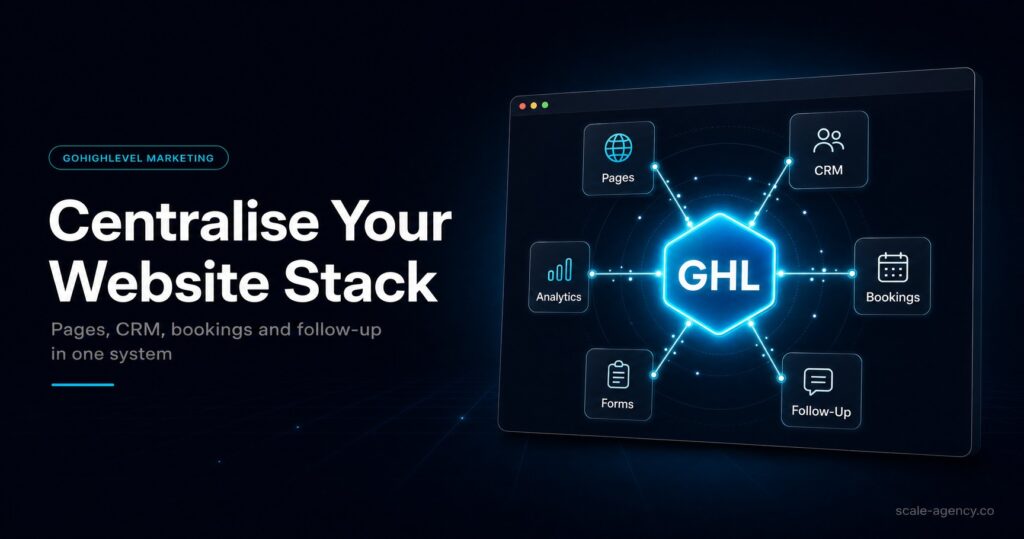
A GoHighLevel website becomes commercially more valuable when it stops acting like a brochure and starts acting like part of your revenue system. Centralising your site, CRM, booking flow and automation inside one platform reduces handoff friction and makes attribution much easier to trust.
SCALE builds GoHighLevel CRM, funnel, and automation systems for businesses that need better lead quality, faster follow-up, and clearer attribution.
If centralising the website also means rebuilding forms, calendars, pipelines and reporting, a SCALE GoHighLevel expert build gives the migration a cleaner commercial structure.
If you want SCALE to show you where that consolidation improves conversion, book a free Growth Systems Audit and we will map the revenue leaks between your site, lead capture and follow-up.
Disclosure: We may earn a commission if you sign up for GoHighLevel through the link below.
If your goal is to centralise your site, CRM and automation in one place, try GoHighLevel here.
If you are comparing tools before centralising the stack, this GoHighLevel website builder versus ClickFunnels comparison explains where GHL starts to replace a standalone funnel builder.
Why You Should Centralise Your Business Websites Inside GoHighLevel
Most businesses treat their website as a separate entity from their sales and marketing operations. You build a site in WordPress or Wix, then try to connect it to your CRM with Zapier or embed forms that don’t quite match your branding. Every integration becomes a potential point of failure, and tracking the customer journey from first click to closed deal requires stitching together data from multiple sources.
If you are still in pre-launch mode, use this GoHighLevel website checklist before you publish. It covers the launch checks that usually get missed when teams centralise too quickly.
What Makes a GoHighLevel Website Different
The core difference is that GoHighLevel wasn’t designed as a website builder that added CRM features later. It’s a client acquisition and management platform that includes website building as part of a complete system. This distinction matters because it changes how the website functions within your business.
When someone fills out a contact form on your GoHighLevel website, they don’t just send you an email. They’re instantly created as a contact in your CRM, tagged based on which page they came from, enrolled in the appropriate follow-up sequence, and assigned to a team member—all without a single integration or third-party tool. The website isn’t a separate marketing asset; it’s the front door to your entire client management system.
The builder itself uses a drag-and-drop interface similar to other modern website tools, but with native access to all your GoHighLevel data. You can display dynamic content based on contact information, show different versions of pages to different segments, and build multi-step forms that update contact records in real time.
Core Benefits of Hosting Your Website in GoHighLevel
The practical advantages become clear once you’ve actually run a business on the platform. These aren’t theoretical benefits—they’re daily operational improvements that compound over time.
Unified Tracking and Attribution
When your website and CRM are the same system, attribution becomes straightforward. You can see exactly which pages a contact visited before they booked a call, which emails they opened, and how long it took them to convert. This data lives in one place and updates in real time, giving you a complete view of the customer journey without needing to cross-reference Google Analytics with your CRM reports.
Simplified Technical Management
You’re not managing WordPress updates, plugin conflicts, or hosting renewals. You’re not troubleshooting why your form submissions aren’t reaching your CRM or why your booking calendar is double-booking clients. The technical overhead drops significantly because there are fewer moving parts and no integrations to maintain.
Faster Implementation and Iteration
Building a new landing page or updating your service offerings doesn’t require coordinating between your web developer, your CRM admin, and your automation specialist. One person can make changes across the entire system. This speed matters when you’re testing new offers, launching campaigns, or responding to market feedback.
When a GoHighLevel Website Makes Strategic Sense
Not every business needs to move their website into GoHighLevel, but certain business models and operational structures benefit disproportionately from this approach.
Service businesses that rely on lead generation and appointment booking see immediate value. If your website’s primary job is to capture leads, qualify them, and get them into your sales process, having that entire flow in one system eliminates the most common points of failure. Agencies, consultants, coaches, local service providers, and B2B companies with defined sales processes all fit this profile.
Businesses that run multiple brands or client campaigns also benefit significantly. GoHighLevel’s sub-account structure lets you build and manage multiple websites from one dashboard, each with its own domain, branding, and automation. This is particularly valuable for agencies managing client websites or businesses operating multiple service lines under different brands.
Conversely, if your website is primarily content-focused with thousands of blog posts, complex SEO requirements, or needs advanced e-commerce functionality, GoHighLevel may not be the optimal choice. The platform excels at conversion-focused websites and landing pages, not content publishing or large-scale e-commerce operations.
Building an Effective GoHighLevel Website
The technical capability to build a website in GoHighLevel is only useful if you approach it with the right structure. Here’s how to set up a website that actually drives business results.
- Start with your conversion goals before you start designing. Define exactly what action you want visitors to take and build the site architecture around those conversion points.
- Map your automation before building forms. Decide what should happen when someone submits each form, then configure those workflows before you publish the page.
- Use consistent tagging and pipeline stages across all your pages. This lets you segment and follow up appropriately based on which pages or offers someone engaged with.
- Build mobile-first. The GoHighLevel builder is responsive, but you need to actively check and optimise the mobile experience, not just assume it will work.
- Connect your domain properly and set up SSL certificates. GoHighLevel handles this, but you need to follow the DNS configuration steps correctly to avoid issues.
Common Implementation Considerations
Moving your website into GoHighLevel or building a new one from scratch requires thinking through several practical details that affect how the system performs for your business.
Domain management is straightforward but requires attention. You can connect custom domains to your GoHighLevel website, and the platform provides SSL certificates automatically. The DNS setup process is documented, but you’ll need access to your domain registrar to make the necessary changes.
SEO capabilities exist but are more basic than dedicated website platforms. You can set page titles, meta descriptions, and alt text. You can create custom URLs and set up 301 redirects. What you don’t get is the extensive SEO plugin ecosystem that WordPress offers. For most service businesses focused on local SEO and paid acquisition, this isn’t a limitation. For content-heavy sites trying to rank for hundreds of keywords, it might be.
Page speed is generally good because GoHighLevel hosts on solid infrastructure and the sites are relatively lightweight. You won’t have the bloat that comes from years of accumulated WordPress plugins. However, you also have less control over advanced performance optimisation if that’s a priority.
Integration with Your Broader Marketing System
The real power of a GoHighLevel website emerges when you connect it to the rest of your marketing and sales operations. This is where the unified platform approach delivers compound benefits.
Your website forms can trigger different automation workflows based on the information submitted. Someone requesting a quote can be routed to a different pipeline than someone downloading a free resource. Each pathway can have its own follow-up sequence, task assignments, and conversion tracking.
Booking widgets embedded on your website pull from your team’s actual calendars, with buffer times, meeting types, and availability rules all configured in one place. When someone books, they’re automatically added to your CRM with all relevant context, and reminder sequences begin immediately.
Retargeting and follow-up become more sophisticated because you have complete behavioural data. You can create audiences based on specific page visits, form submissions, or time spent on site, then trigger email sequences, SMS campaigns, or internal notifications based on those behaviours.
What You Give Up and What You Gain
Choosing to build your website in GoHighLevel involves trade-offs. Understanding these clearly helps you make an informed decision for your specific situation.
You give up some design flexibility compared to WordPress with a premium theme and page builder. You give up the massive plugin ecosystem and the ability to add almost any functionality you can imagine. You give up some advanced SEO features and content management capabilities.
What you gain is operational simplicity, unified data, reliable automation, and significantly reduced technical overhead. You gain the ability to move faster, test more easily, and maintain complete visibility into how your website contributes to revenue. For businesses where the website is primarily a lead generation and client acquisition tool, this trade-off is almost always worth it.
Technical Requirements and Limitations
Before committing to a GoHighLevel website, you should understand the technical boundaries of what the platform can and cannot do.
The website builder supports custom HTML, CSS, and JavaScript, so you can extend functionality beyond the standard drag-and-drop interface if you have development resources. You can embed third-party tools, add tracking pixels, and integrate with external services through code.
However, you cannot install plugins or themes the way you would in WordPress. You cannot directly access server configurations or database structures. The platform is designed to be managed through its interface, which provides significant power but within defined boundaries.
For most service businesses, these limitations are irrelevant. The standard functionality covers what you need: pages, forms, booking widgets, payment processing, and membership areas. The constraints only become meaningful if you’re trying to build something highly custom or unusual.
Making the Transition
If you’re considering moving an existing website into GoHighLevel, the process requires planning but isn’t technically complex.
- Audit your current website to identify which pages actually drive business results and which are legacy content that can be archived or simplified
- Export your contact data from your current CRM and prepare it for import into GoHighLevel with proper tagging and segmentation
- Rebuild your highest-priority pages first—typically your homepage, main service pages, and primary conversion pages
- Set up your automation workflows and test them thoroughly before switching your domain over
- Configure proper redirects from old URLs to new ones to preserve any SEO value and avoid broken links
- Update your domain DNS settings to point to GoHighLevel and verify everything works correctly
The transition doesn’t have to happen all at once. You can build and test your new GoHighLevel website on a subdomain or temporary domain, then switch over when you’re confident everything works correctly.
Before you centralise everything, it helps to compare the trade-offs clearly. Read whether a GoHighLevel website is the right choice for a local business and whether a GoHighLevel sales funnel can replace your wider CRM stack. Together they clarify when consolidation improves performance and when it just adds complexity.
Conclusion
A GoHighLevel website makes sense when you value operational efficiency and unified data over maximum design flexibility and advanced content management. For service businesses focused on lead generation, client acquisition, and systematic growth, having your website live inside the same platform that manages your entire client journey eliminates friction, improves tracking, and makes your marketing system more reliable. The question isn’t whether GoHighLevel can technically host your website—it can—but whether the trade-offs align with how your business actually operates and where you want to focus your resources.
If you are centralising the website layer first, also review GoHighLevel website examples used by local businesses and whether marketing on GoHighLevel reduces costs. Those two pages make the commercial upside easier to evaluate before you commit the move.
Want SCALE to build this for your business?
Book a free Growth Systems Audit and we will show you where your funnel, CRM and follow-up system are leaking revenue: https://scale-agency.co/
Learn more below:
