
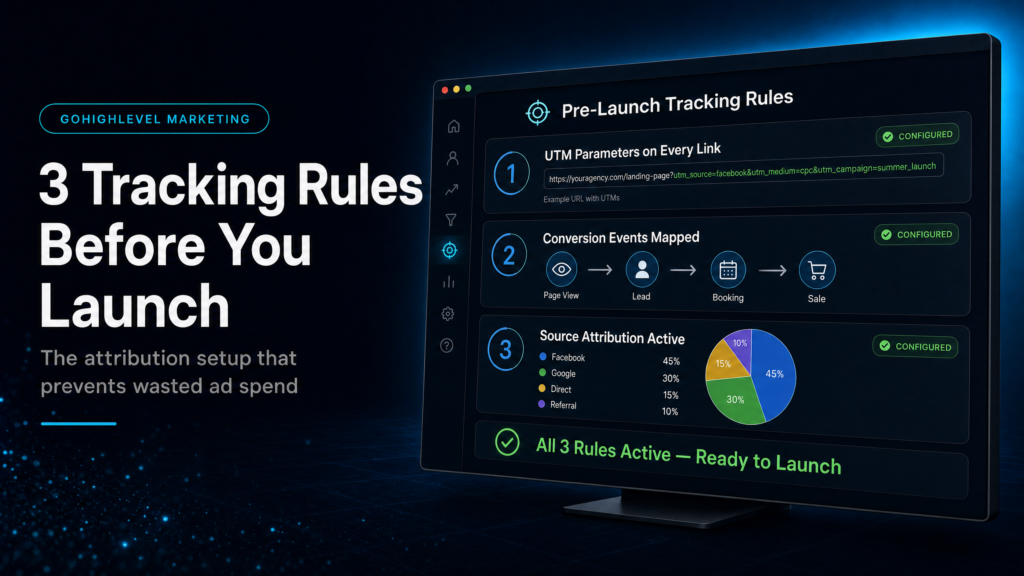
In This Guide, We Will Cover:
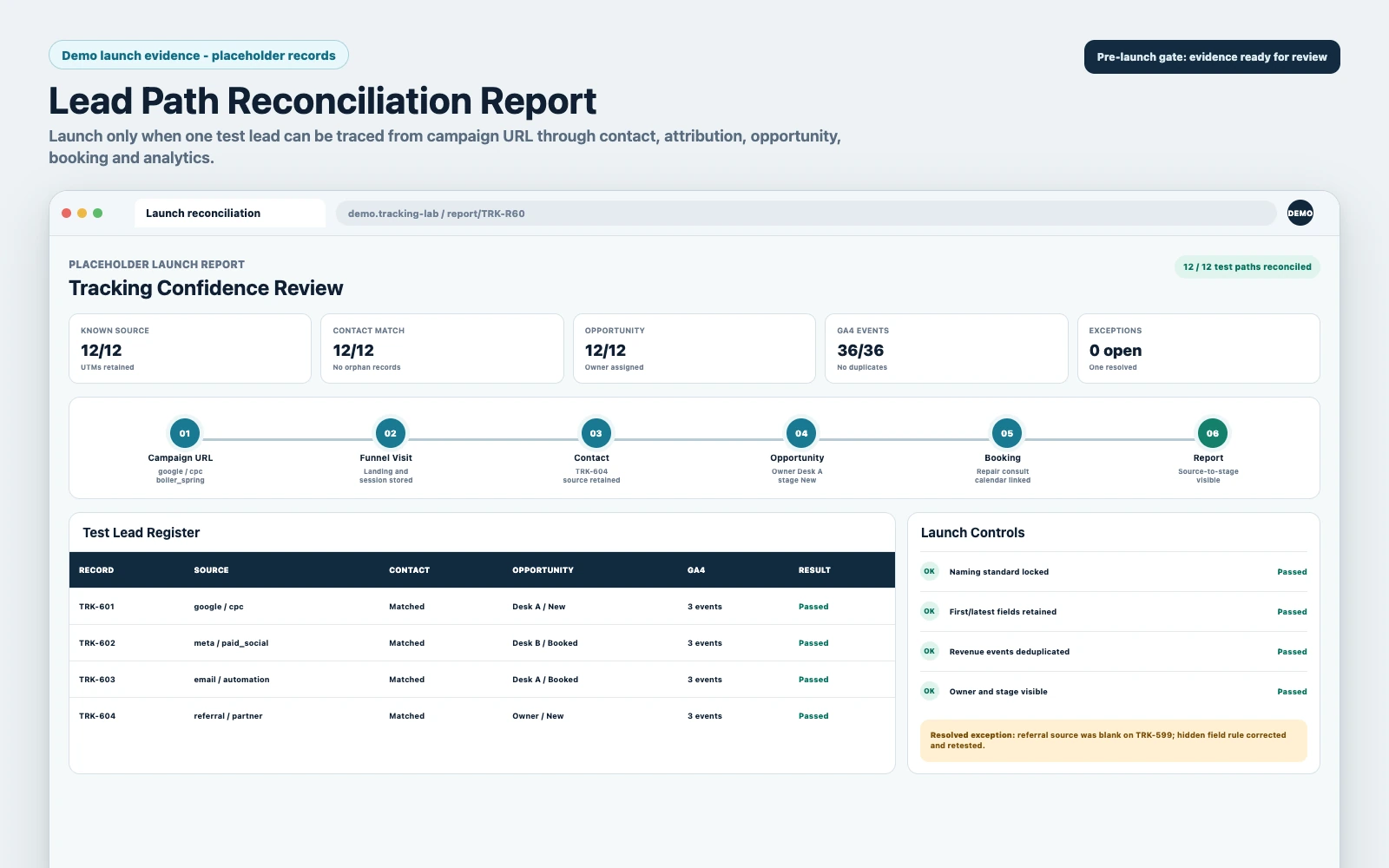
A pre-launch tracking review that follows one lead from campaign link to contact record, attribution, conversion event and pipeline outcome.
Do All Campaign Links Use One UTM Standard?
Lock source, medium, campaign and creative names before traffic starts so reports do not split the same channel into conflicting labels.
Does The Contact Record Preserve The Source?
Test that HighLevel forms store first-touch and latest attribution without losing the acquisition context when a lead returns.
Can You Prove The Lead And Revenue Actions?
Define opt-in, booking and qualified-opportunity events so page activity can be reconciled with pipeline movement.
Do CRM, Pipeline And GA4 Tell The Same Story?
Run test leads before launch and compare the URL, contact, opportunity and analytics record before increasing spend.
Quick Answer
For reliable go high level funnels tracking, set three rules before launch: (1) enforce a single UTM naming standard and capture it into the contact record, (2) define one source-of-truth for attribution (first-touch vs last-touch) and report from it consistently, and (3) track the two launch-critical events—opt-in and booked/qualified—so you can tie spend to pipeline, not just pageviews.
TL;DR
- If your UTMs are inconsistent, your reports will lie even if your funnel “works.” Fix naming first.
- Decide whether you optimize for first-touch (lead gen) or last-touch (conversion) attribution, then stick to one reporting view.
- Capture source data into the GoHighLevel contact record, not just GA4, so sales and ops can act on it.
- Track two events at minimum: lead_magnet_optin and affiliate_click (plus booked call if you sell via calendar).
- Make tracking resilient to real behavior: refreshes, multi-device, missed UTMs, and manual lead entry.
- If you can’t answer “Which campaign produced this booked call?” within 10 seconds, don’t scale spend yet.
Who Should Own Tracking Before Launch?
| Option | Best Fit | Risk | Speed | Revenue Visibility | When To Choose It |
|---|---|---|---|---|---|
| DIY Owner/Operator Setup | Simple offer, low spend, you can test slowly | High: inconsistent UTMs, broken fields, messy reporting | Medium | Low to Medium | You’re spending small, can tolerate learning costs, and you’ll document standards. |
| Cheap Freelancer / Template Implementer | You need pages live fast | Very High: “looks right” builds with no attribution integrity | Fast | Low | You only care about a basic funnel launch and will rebuild tracking later (expect rework). |
| Specialist GoHighLevel Systems Build (SCALE-Style) | You want clean attribution, speed-to-lead, and pipeline reporting | Low: standards + QA + edge-case handling | Fast to Medium | High | You’re running ads, selling high-ticket, or need confidence before scaling budget. |
Who This Helps
- Business owners running Meta Ads or Google Ads into GoHighLevel funnels and tired of “unknown source” leads.
- Agencies building client funnels in GoHighLevel who need consistent attribution across accounts.
- Coaches/consultants selling via booked calls who need to tie campaigns to pipeline stages.
- Local service businesses (HVAC, dental, legal, home services) where missed follow-up equals lost revenue.
- Operators migrating from ClickFunnels/HubSpot/ActiveCampaign who want tracking parity (or better) in GoHighLevel.
- Teams with multiple lead entry points (forms, chat, inbound calls, manual adds) who need one reporting truth.
Why Funnel Tracking Breaks And What It Costs
Most funnel tracking failures aren’t “technical.” They’re operational. A funnel gets launched with pages, forms, and automations working, but nobody defines what a “source” is, where it’s stored, and which reports the team will trust.
That creates three predictable outcomes:
- Marketing can’t prove what’s working, so budget decisions become emotional.
- Sales can’t prioritize leads properly (hot vs cold, campaign intent, offer context).
- Ops can’t diagnose leaks (form completion vs calendar booking vs show rate) because the data doesn’t connect.
GoHighLevel can track attribution and pass data into GA4, but you have to set rules. Otherwise, you’ll get a CRM full of contacts with missing or conflicting source fields, and a reporting layer that doesn’t match reality.
For GoHighLevel’s attribution concepts, it’s worth understanding how the platform defines and stores attribution data: Understanding Attribution Source (GoHighLevel Help).
Rule 1: Standardize UTMs And Capture Them Into The Contact Record
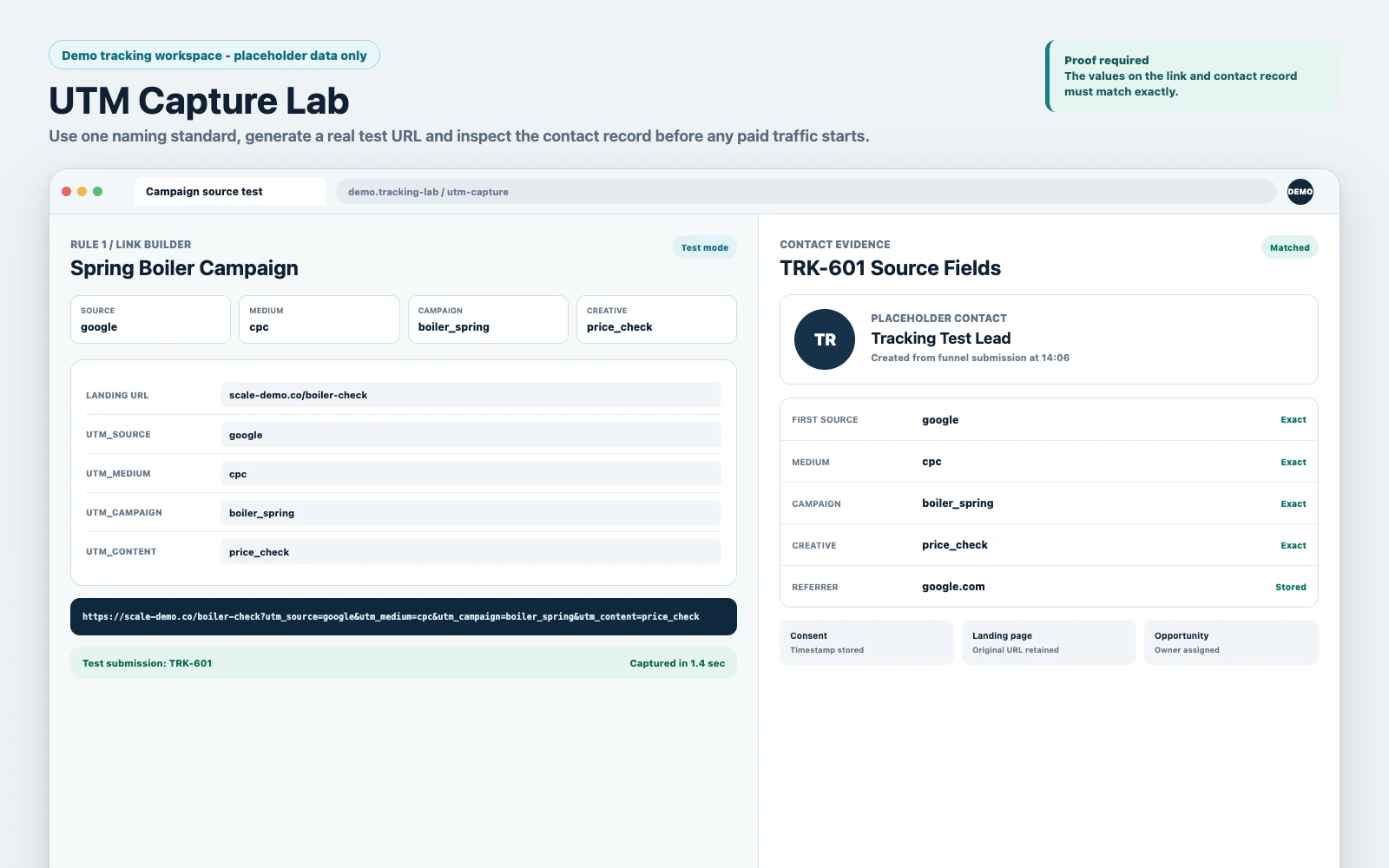
If you only do one thing for go high level funnels tracking, do this: enforce a UTM standard and make sure those UTMs land in the GoHighLevel contact record (custom fields and/or attribution fields), not just in Google Analytics.
What To Standardize (Minimum Viable UTM Spec)
Use a naming spec your future self can audit in 30 seconds. Keep it boring and consistent.
- utm_source: platform (meta, google, youtube, linkedin)
- utm_medium: traffic type (cpc, paid_social, email, sms)
- utm_campaign: campaign identifier (offer + audience + geo + date or quarter)
- utm_content: creative angle or ad name (hook1_video, testimonial_static)
- utm_term: optional for search intent or keyword group
Rule of thumb: if two people on your team would name the same campaign differently, you don’t have a standard yet.
Where UTMs Should Live In GoHighLevel
You want UTMs available where decisions happen: inside the contact record, inside the opportunity, and inside reporting exports.
- Contact custom fields for UTMs (source/medium/campaign/content/term).
- Attribution fields (GoHighLevel’s attribution source data) for platform-level reporting.
- Opportunity fields/notes (or workflow-applied tags) to preserve context when a lead becomes a deal.
Why this matters commercially: when a salesperson asks “Where did this lead come from?” you don’t want them guessing based on what the lead says on the phone. You want the answer in the record.
Weak Setup Vs Strong Setup
- Weak: UTMs exist in ad URLs, but forms don’t store them; GA4 has some data; CRM shows “Unknown” or inconsistent tags.
- Strong: Every opt-in writes UTMs into the contact record; missing UTMs fall back to a defined default; reporting uses one consistent field set.
How To Diagnose Rule 1 Is Broken
Pull 25 recent leads and check:
- Do at least 80% have utm_source and utm_campaign populated?
- Do values match your naming spec (no “Facebook,” “fb,” “meta ads” mixed together)?
- Do leads from the same ad set show the same campaign naming?
If you can’t answer those quickly, you’re not ready to scale traffic.
Rule 2: Decide Your Attribution Truth (First-Touch Vs Last-Touch) And Report From One
Attribution arguments kill momentum. The fix is not “more dashboards.” The fix is choosing what you’re optimizing for and reporting from that consistently.
Pick The Model Based On Your Sales Motion
- First-touch bias (lead gen focus): best when you’re measuring which campaigns create net-new leads at an acceptable cost.
- Last-touch bias (conversion focus): best when you’re measuring which campaigns close or book the most, especially with retargeting and multi-step nurturing.
Most businesses need both views eventually, but at launch you need one source-of-truth to prevent decision paralysis.
What To Configure In GoHighLevel So Attribution Sticks
Common failure: a lead clicks an ad, opts in, then later returns direct and books a call. Without rules, your “source” flips and you lose the original acquisition context.
Practical approach:
- Store first-touch UTMs in dedicated fields that never overwrite.
- Store last-touch UTMs in separate fields that can update on new sessions.
- Define which fields your reports and pipeline views use for decisions.
GoHighLevel’s attribution source handling is its own system; understand how it records and displays attribution so you don’t accidentally mix concepts in reporting: GoHighLevel Attribution Source Documentation.
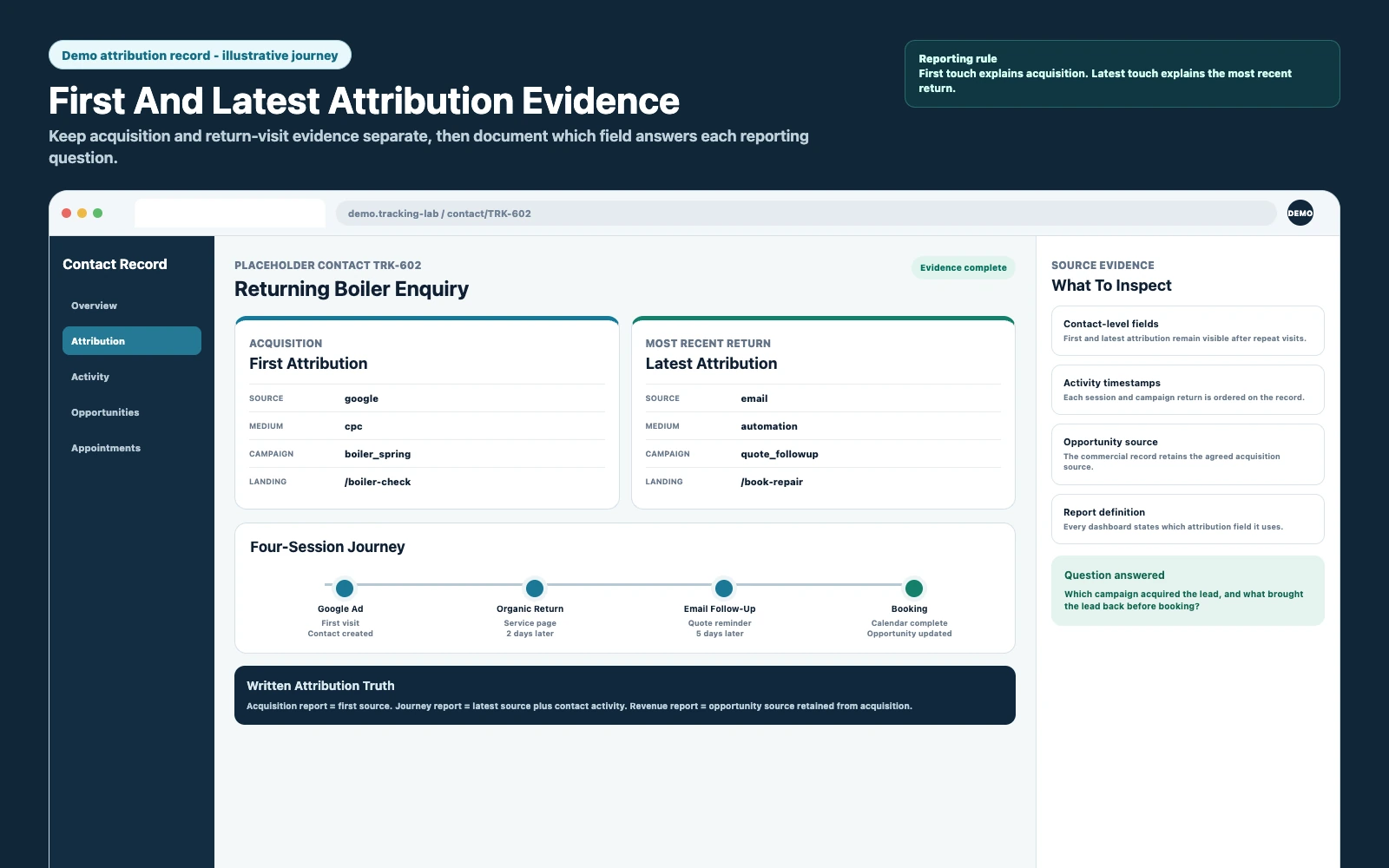
HighLevel’s official attribution guide includes this walkthrough of first and latest attribution, source categories and the contact-level evidence you should inspect before launch.
After the walkthrough, run the full implementation and reconciliation process below with live test URLs.
Weak Setup Vs Strong Setup
- Weak: One “Lead Source” field that gets overwritten by every new click, manual edit, or import.
- Strong: Separate first-touch and last-touch fields, plus a simple “Reporting Source” rule (for example: first-touch for CAC, last-touch for conversion optimization).
Rule 3: Track Launch-Critical Events (Not Vanity Metrics)
Pageviews don’t pay you. Events do. Before you launch, decide what you will count as success and make sure it’s trackable end-to-end.
The Two Events You Must Track Before Spending Real Money
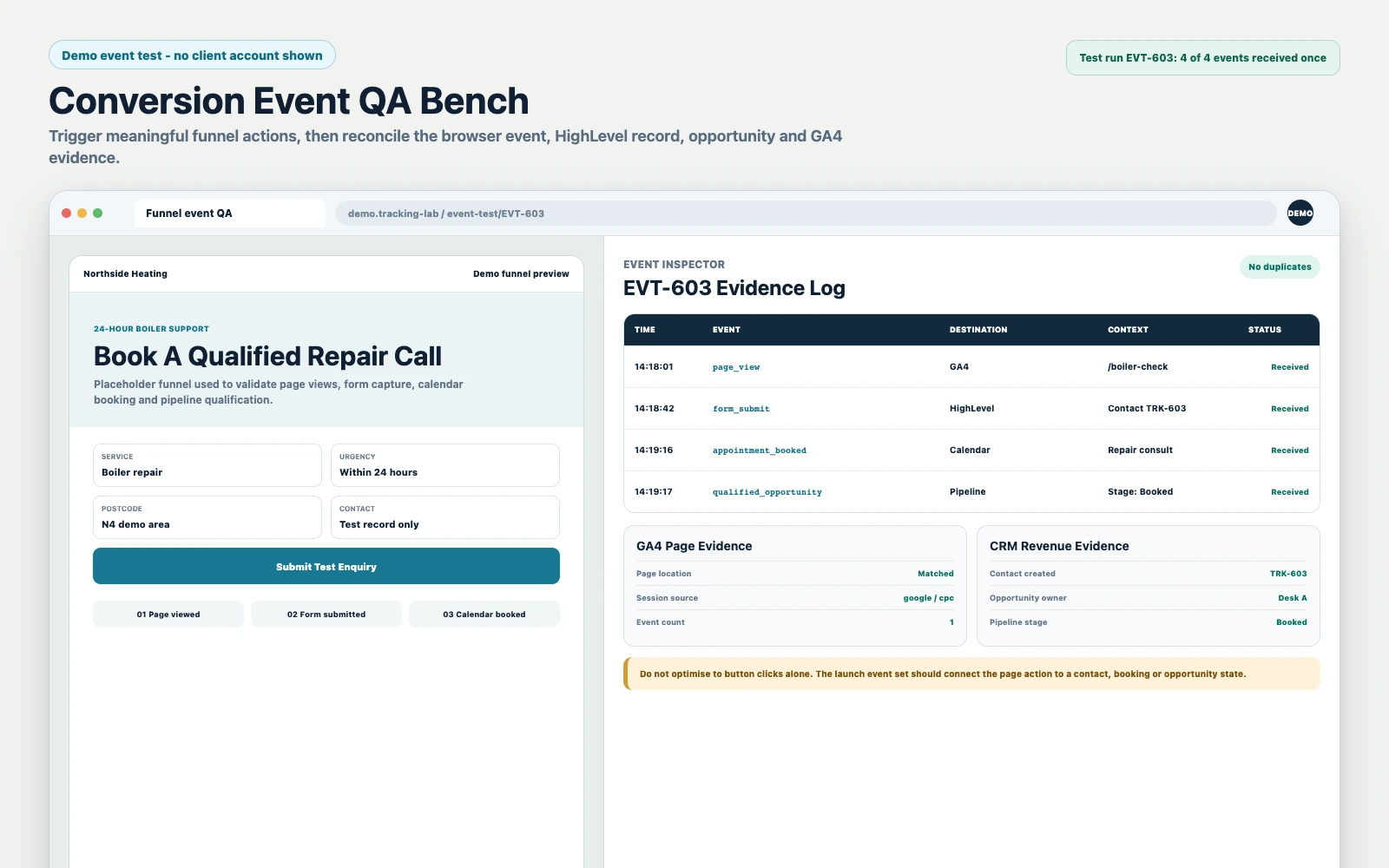
- lead_magnet_optin: a form submission that creates/updates a contact and triggers follow-up.
- affiliate_click: if you’re sending traffic to an affiliate offer or partner page, track outbound clicks so you can measure intent even when you don’t control the checkout.
If your funnel is a booked-call model, add:
- calendar_booking: a completed booking (not just a calendar page view).
- qualified_opportunity: a pipeline stage movement that indicates sales acceptance (SQL) or a completed intake.
Where To Track Events In GoHighLevel
Think in layers:
- Funnel layer: form submit, button click, thank-you page view.
- CRM layer: contact created, tag applied, custom field set.
- Pipeline layer: opportunity created, stage changed, value assigned.
- Follow-up layer: workflow started, SMS/email delivered, call attempt logged.
For GA4 specifically, GoHighLevel supports recording pageviews into GA4 for funnels and websites. If you’re using GA4 as a secondary validation layer, set it up correctly: How To Record Pageviews Into GA4 (GoHighLevel Help).
What A Strong Event Setup Looks Like
- Every opt-in triggers a workflow that stamps UTMs, applies a campaign tag, and creates an opportunity (if appropriate).
- Every booking triggers a stage change and a “booked” event you can count weekly.
- Outbound affiliate clicks are tracked as a measurable action (so you can compare creatives even without purchase data).
The Three Rules In Practice: A Pre-Launch Tracking Checklist
Use this as a hard gate before you turn on spend.
- UTM spec exists and is documented in one place (even a one-page SOP).
- All ads and emails use the spec (no exceptions, no “we’ll fix later”).
- First-touch fields do not overwrite after the first capture.
- Last-touch fields can update and are clearly labeled.
- Forms write UTMs into the contact record (test with real clicks, not just preview mode).
- Opt-in event is measurable in GoHighLevel (tag/workflow/opportunity) and optionally mirrored in GA4.
- Booking/qualification is measurable (pipeline stage definitions are clear and consistently used).
- Manual lead entry has a source rule (sales team can’t leave it blank).
- Reporting view is defined: which field(s) determine “source” in weekly decisions.
The Implementation Process
- Define Your Tracking Outcomes: decide what you will optimize for in the first 30 days (opt-ins, booked calls, qualified opportunities). Write the definitions in plain language.
- Create A UTM Naming Spec: lock utm_source/medium/campaign/content conventions. Keep a controlled vocabulary (meta, google, youtube) and ban synonyms.
- Build Contact Field Architecture: create custom fields for first-touch UTMs and last-touch UTMs. Add a simple “Reporting Source” field if you need a single view for the team.
- Configure Funnels And Forms: ensure your GoHighLevel funnel forms capture UTMs and write them into the correct fields. Test with live URLs containing UTMs.
- Set Attribution Rules: decide what overwrites and what never overwrites. Protect first-touch fields. Allow last-touch fields to update.
- Wire Workflows For Event Stamping: on form submit, apply tags (campaign, offer), stamp UTMs, and trigger the correct follow-up workflow. If you sell via pipeline, create/update an opportunity and set the initial stage.
- Align Pipeline Stages To Reporting: define stages like New Lead, Contacted, Booked, Showed, Qualified, Closed Won/Lost. Make sure stage changes are driven by clear triggers (booking, intake completion, sales acceptance).
- Connect Calendars And Booking States: ensure bookings create measurable outcomes (opportunity stage change, tag, notification). Avoid “calendar booked but no pipeline movement” gaps.
- Set Speed-To-Lead SLAs: configure internal notifications and task creation so new leads are contacted fast. Tracking without follow-up is just accounting.
- Validate Reporting End-To-End: run 5–10 test leads from different UTMs, devices, and browsers. Confirm the contact record, opportunity, and reports show the same story.
- Launch With A 7-Day QA Window: monitor unknown sources, missing UTMs, and stage drift daily. Fix issues before you increase spend.
| Tracking Layer | What You’re Verifying | Pass Condition | Fail Symptom |
|---|---|---|---|
| Ad Link | UTMs present and standardized | All live ads match the naming spec | Mixed naming, missing utm_campaign |
| Funnel Form | UTMs captured into contact fields | Test lead shows UTMs in record | Contact created with blank UTMs |
| Workflow | Event stamping and follow-up triggers | Tag applied + workflow started | No tags, no workflow, delayed response |
| Pipeline | Opportunity created and staged correctly | New lead appears in correct stage | Bookings exist but pipeline is empty |
| Reporting | Source-of-truth matches contact record | Reports align with sampled leads | Reports show “Unknown” or mismatch |
Common Problems And How To Fix Them
| Problem | What It Usually Means | Commercial Risk | Fix | Metric To Watch |
|---|---|---|---|---|
| Lots Of “Unknown” Or “Direct” Sources | UTMs not captured, or attribution overwritten | You scale the wrong campaign and waste spend | Enforce UTM spec; store first-touch UTMs in non-overwriting fields; audit form capture | % leads with utm_source + utm_campaign populated |
| Leads Show Source But Opportunities Don’t | Opportunity creation isn’t tied to the same workflow | Pipeline reporting is disconnected from marketing | Create/update opportunity on opt-in/booking; map source fields to opportunity context via tags/notes | % leads with opportunity created within X minutes |
| Bookings Happen But No One Follows Up Fast | No SLA automation, notifications, or task creation | Lower show rate and close rate | Add internal alerts, round-robin assignment, and “no response” escalation workflows | Median time-to-first-contact |
| Campaign Names Are Inconsistent Across Channels | No controlled vocabulary; multiple people naming campaigns | Reporting becomes unusable; optimization slows | Centralize naming; use a campaign registry; lock conventions in templates | # of unique utm_campaign values per offer |
| Retargeting “Steals Credit” From Prospecting | Only last-touch is being used for decisions | You kill top-of-funnel and starve growth | Report prospecting with first-touch; report conversion with last-touch; keep both fields | First-touch vs last-touch lead share |
| Manual Leads Have No Source | Sales team adds contacts without required fields | Blind spots in ROI and forecasting | Require source on manual entry; use dropdown options; train team on definitions | % manually created contacts with source set |
What This Means For Revenue
Tracking rules sound like “admin” until you see the revenue impact:
- Lead quality improves because you can separate intent-heavy campaigns (problem-aware, offer-aware) from low-intent traffic and adjust spend accordingly.
- Booked calls increase when you can identify which pages and messages create opt-ins that actually book, not just submit forms.
- Speed-to-lead gets measurable because events (opt-in, booking, stage change) create timestamps you can manage against.
- Close rate becomes diagnosable because you can compare close rates by source, campaign, and offer angle instead of guessing.
- Wasted ad spend becomes visible because you can see when a campaign generates contacts but not opportunities, or opportunities but not qualified stages.
The practical goal is simple: you should be able to trace a closed-won deal back to a campaign and see the path (opt-in → follow-up → booking → show → close). If you can’t, scaling is gambling.
What Reliable Tracking Looks Like In Practice
Most businesses don’t fail at GoHighLevel funnels because the pages are ugly. They fail because the tracking and CRM logic weren’t designed as a revenue system. The result is a funnel that “generates leads” but can’t answer basic operator questions like: which campaign produced qualified opportunities, what the sales team did with them, and where the drop-off actually happened.
SCALE builds GoHighLevel CRM, funnel and automation systems for businesses that need better lead quality, faster follow-up and clearer attribution. In practice, that means we treat tracking as an operational contract:
- One naming standard across ads, emails, and partner traffic.
- Two attribution views (first-touch and last-touch) stored separately so reporting doesn’t get political.
- Event definitions tied to pipeline reality (opt-in is not success; qualified is success).
- Edge-case proofing for manual leads, repeat visitors, multi-device behavior, and sales edits that overwrite data.
If you want the broader build context (offer, page structure, and cold traffic readiness), use the canonical hub: Go High Level Funnels Cold Traffic Checklist.
Conclusion
If you set UTM standards, lock your attribution truth, and track the events that matter (opt-in and booked/qualified), GoHighLevel becomes a revenue visibility system instead of a lead bucket. Do those three rules before launch and you’ll know what to scale, what to cut, and what to fix—without arguing over dashboards or guessing where the leads came from.
FAQs
How Do I Track UTMs In GoHighLevel Funnels?
Use a consistent UTM naming standard in every traffic link, then ensure your funnel forms capture those UTM parameters and write them into the contact record (custom fields and/or attribution fields). Test with live UTM links and confirm the values appear on the contact, not just in analytics.
Should I Use First-Touch Or Last-Touch Attribution In GoHighLevel?
Use first-touch when you’re optimizing acquisition (which campaigns create net-new leads efficiently). Use last-touch when you’re optimizing conversion (which touchpoint drives bookings/closures). The practical answer is to store both in separate fields, but pick one as the weekly reporting truth so decisions stay consistent.
Why Are My Leads Showing “Unknown Source” In GoHighLevel?
Usually because UTMs weren’t present, weren’t captured by the form, or your source field is being overwritten/cleared by workflows or manual edits. Fix it by enforcing UTMs, protecting first-touch fields from overwrites, and setting a default source rule for non-UTM traffic (like organic, referral, manual).
Can I Send GoHighLevel Funnel Data To GA4?
Yes. GoHighLevel supports recording pageviews into GA4 for funnels and websites, but GA4 should be a validation layer, not your only source of truth. Your sales team needs source data inside the contact and opportunity records to act on it.
What Events Should I Track Before Launching Paid Traffic?
At minimum: lead_magnet_optin (form submission) and the next revenue step (calendar booking or qualified opportunity). If you’re using affiliate or partner traffic, also track affiliate_click so you can measure outbound intent even when you don’t control the checkout.
How Do I Know If My Tracking Is “Good Enough” To Scale?
Sample 25 recent leads and verify: UTMs are populated, attribution doesn’t flip unexpectedly, opportunities are created/staged correctly, and you can answer “Which campaign produced this booked/qualified lead?” quickly. If you can’t do that reliably, scale will amplify confusion, not profit.
