
Quick Answer
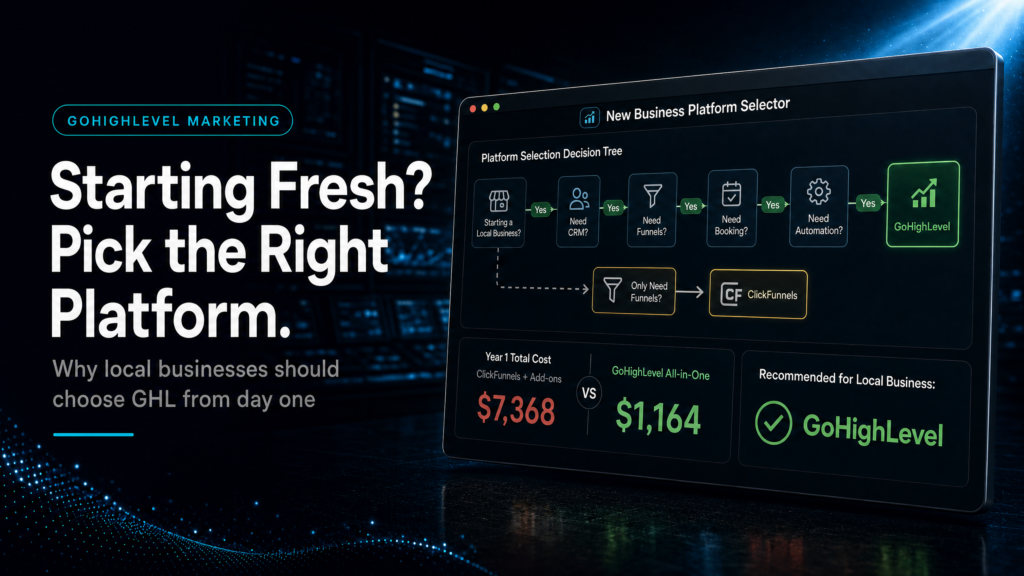
For a local business starting fresh, the best gohighlevel vs clickfunnels local business choice depends on whether you need a full CRM with automation and follow-up. Choose GoHighLevel if you want pipelines, texting, missed-call workflows, attribution, and multi-step nurturing. Choose ClickFunnels if you only need a simple funnel to capture leads and you’ll manage follow-up elsewhere.
TL;DR
- If you run ads and need speed-to-lead (text/call within minutes), GoHighLevel usually wins because CRM + automation + pipeline live in one place.
- If your only goal is “launch a landing page fast” and you already have a CRM, ClickFunnels can be enough.
- If you don’t track lead source to booked job, you’ll overspend on ads and under-invest in follow-up; GoHighLevel is built for that visibility.
- If you have multiple services, locations, or reps, GoHighLevel’s pipeline stages and routing reduce missed leads and double-bookings.
- If you rely on manual follow-up, both tools can “collect leads,” but GoHighLevel is better at preventing leakage after the form submit.
- If you’re starting fresh with no stack, GoHighLevel can replace multiple tools (funnels + CRM + automation) and simplify operations.
- If you’re not going to implement properly, the tool won’t save you; the build quality (pipeline, automations, tracking) matters more than the logo.
If you want the broader, platform-level comparison (pricing, features, and use cases across industries), use the hub page here: GoHighLevel vs ClickFunnels (honest comparison). This article is the “local business starting fresh” angle: what to pick when you have limited time, limited staff, and you need leads to turn into booked jobs reliably.
For the cost side of this decision, compare the full software bill in GoHighLevel vs ClickFunnels cost. If CRM consolidation is the real problem, use how GoHighLevel CRM can replace a fragmented stack to pressure-test whether one operating layer can reduce tool sprawl.
Who Should Build This and How
| Build Option | Best Fit | Risk | Speed | Revenue Visibility | When to Choose It |
|---|---|---|---|---|---|
| DIY / Internal Build | Owner-operator with time, basic tech confidence, and a simple offer (one service, one location) | High: missed edge cases (routing, attribution, follow-up), inconsistent data, “looks good but doesn’t convert” | Medium: fast to publish pages, slow to get automation and reporting right | Low to medium: usually stops at “leads captured,” not “lead-to-job tracked” | When you can commit 5–10 hours/week for 3–4 weeks and you’ll actually test calls, texts, and pipeline stages end-to-end |
| Cheap Freelancer / Template Implementer | Businesses that need something live quickly and accept a “good enough” first version | Very high: template mismatch, broken tracking, shallow automations, no handover, vendor lock-in | Fast: pages go live quickly | Low: often no real attribution, no pipeline hygiene, no reporting discipline | When you have a tight deadline and you’re prepared to rebuild once you see what’s missing |
| Specialist GoHighLevel Expert or SCALE-Style Growth Systems Build | Local businesses running ads, managing multiple lead sources, or needing reliable follow-up and reporting | Low to medium: depends on discovery quality and documentation | Medium-fast: slower than a template, faster to reach stable performance | High: lead source tracking, pipeline stages, speed-to-lead, and booked revenue visibility | When you want fewer tools, fewer leaks, and a system that your team can run without heroics |
Who This Helps:
- Local service businesses starting from zero (no CRM, no funnel, no automation) and needing a clean first build.
- Owners running Meta Ads or Google Ads who suspect leads are slipping through the cracks after the form submit.
- Teams with missed calls, slow replies, or inconsistent follow-up across staff.
- Businesses with multiple services (e.g., “emergency” and “non-urgent”) that need routing and prioritisation.
- Operators who want to see lead source → booked appointment → closed job without spreadsheet chaos.
- Founders who want to reduce tool sprawl (page builder + forms + SMS + CRM + reporting) into one operating system.
- Anyone comparing gohighlevel vs clickfunnels local business and trying to avoid buying the wrong platform first.
Start With the Real Question: Are You Buying a Funnel Tool or an Operating System?
Most “GoHighLevel vs ClickFunnels” comparisons get stuck on features. For a local business starting fresh, the decision is simpler: do you need a tool that publishes pages, or do you need a system that turns leads into booked jobs with consistent follow-up?
What to Check
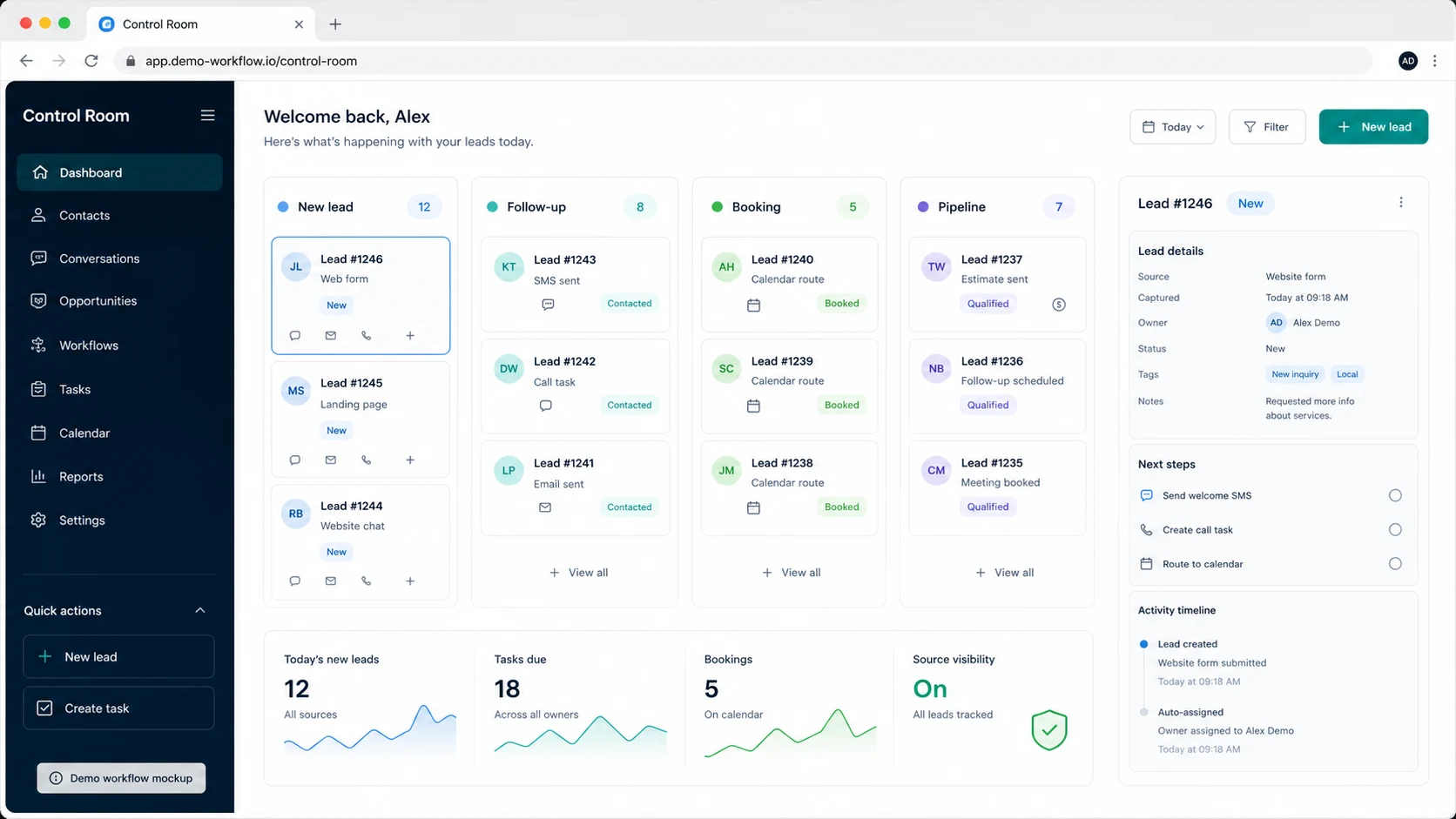
- Do you need a CRM pipeline to manage leads across days/weeks (not just capture them)?
- Do you need SMS + email + call workflows (missed call text-back, appointment reminders, reactivation)?
- Do you need lead routing (by service, location, urgency, or rep availability)?
- Do you need attribution (which ad, campaign, or source produced booked revenue)?
Why It Matters Commercially
Local businesses don’t usually lose money because their landing page is ugly. They lose money because:
- Leads wait too long for a response.
- Calls are missed and never recovered.
- Follow-up stops after one attempt.
- No one knows which lead sources produce real jobs, so ad spend gets misallocated.
How to Diagnose the Problem
Answer these with real numbers from the last 30 days:
- Median time-to-first-response (minutes) for form leads.
- % of missed calls that receive a text within 2 minutes.
- % of leads that get 6+ follow-up touches across 7 days.
- % of leads with a known source (Meta, Google, referral, organic, etc.).
- % of leads that reach an outcome stage (booked, won, lost, no-show).
Weak Setup vs Strong Setup
Weak: A funnel collects leads, sends one email, and the rest is manual. Leads sit in an inbox. No pipeline stages. No source tracking. No reactivation.
Strong: Lead capture routes into a pipeline, triggers immediate SMS + call tasks, books into a calendar, updates stages automatically, and reports on lead source to booked outcomes.
What SCALE Would Look For or Fix
SCALE will map your “lead journey” from click to cash: ad click → landing page → form/call → speed-to-lead → booked → show → close. Then we build the minimum system that prevents leakage at each step (not the fanciest funnel).
GoHighLevel vs ClickFunnels for Local Lead Flow: Where the Money Is Actually Made
For local businesses, the “conversion” is rarely the form submit. The conversion is the booked appointment, the estimate scheduled, or the job sold. That’s why the gohighlevel vs clickfunnels local business decision should be made around follow-up, routing, and visibility.
Lead Capture Is the Easy Part
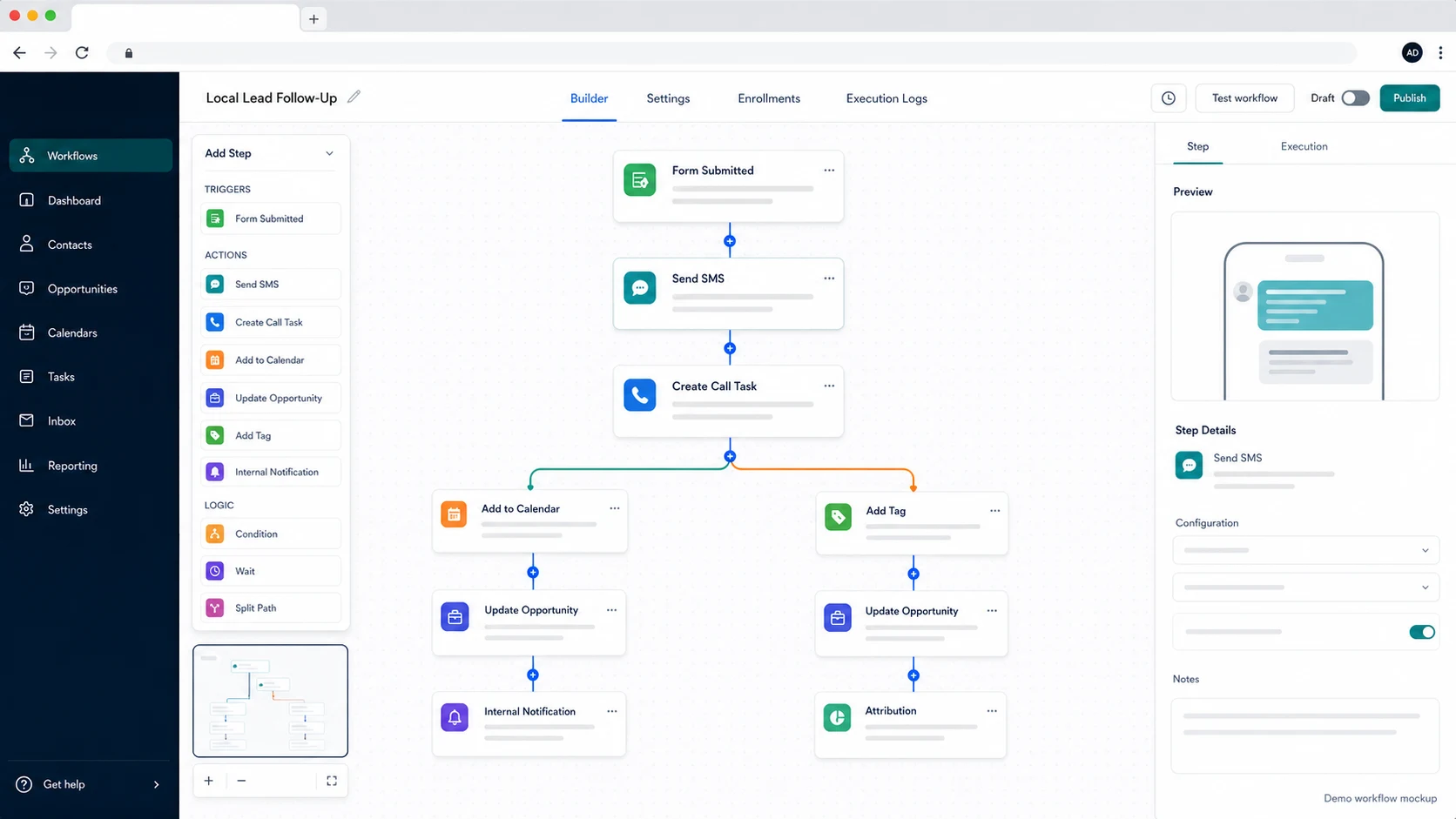
Both platforms can publish a page and collect a name/phone/email. The difference shows up immediately after the lead comes in:
- Speed-to-lead: Can you text/call within 1–5 minutes automatically?
- Consistency: Does every lead get the same follow-up sequence, even on weekends?
- Routing: Does the right person get the lead based on service/location/urgency?
- Outcomes: Do you track booked, no-show, won, lost with reasons?
What a Weak Local Setup Looks Like
- Form leads go to a shared email inbox.
- Someone “tries to call later.”
- Missed calls are lost forever.
- Appointments get booked manually with back-and-forth texting.
- No one can answer: “Which campaign produced the last 10 booked jobs?”
What a Strong Local Setup Looks Like
- Every lead enters a pipeline stage automatically (New Lead → Contacted → Booked → Showed → Won/Lost).
- Missed calls trigger an instant text-back and create a task for a callback.
- Form leads trigger SMS + email + ring attempt + voicemail drop (where appropriate) and then a 7-day follow-up cadence.
- Calendars enforce service areas, working hours, and round-robin assignment.
- Lead source is captured and reported through to booked outcomes.
What SCALE Would Fix First
We prioritise the “first 15 minutes” system: instant response, correct routing, and a clear next step (book, call, or quote). That’s where local businesses win or lose the lead.
Decision Criteria That Matter for a Local Business Starting Fresh
If you’re starting fresh, you’re not choosing between two “marketing tools.” You’re choosing what your business will run on for the next 12–24 months. Use these criteria to decide quickly.
1) Operational Control: Who owns the customer record?
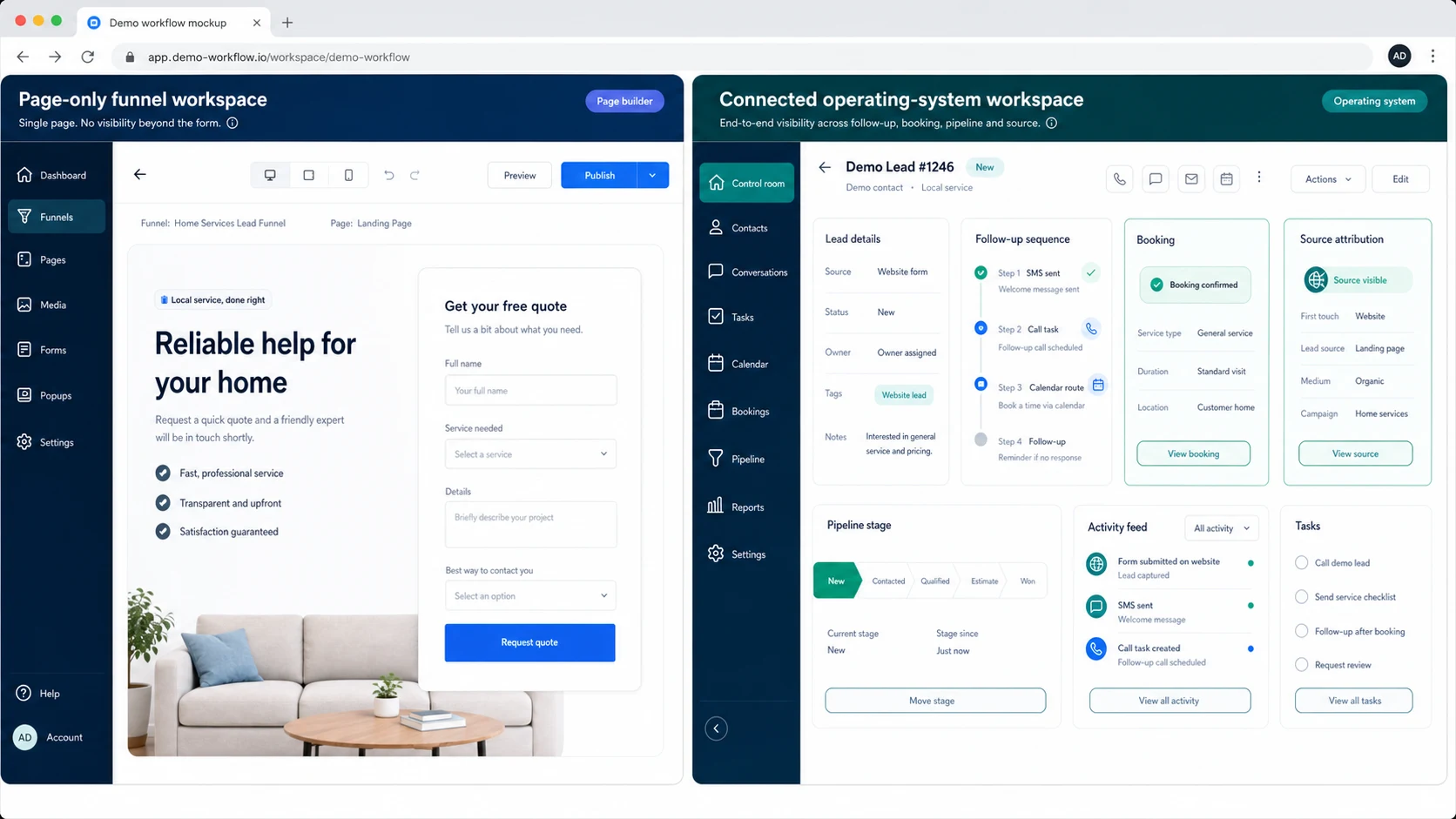
Check: Where will notes, call recordings, appointment history, and follow-up status live?
Commercial impact: If customer history is fragmented, you’ll lose upsells, reactivation revenue, and referrals because you can’t segment or follow up properly.
Diagnosis: If you can’t answer “How many leads are currently uncontacted?” in under 60 seconds, you don’t have operational control.
Weak: Leads live in ClickFunnels contacts, emails in another tool, texts in phones, appointments in Google Calendar, and outcomes in someone’s head.
Strong: One CRM record per lead/customer with timeline, tags, source, pipeline stage, and next action.
2) Speed-to-Lead: Can you respond in under 5 minutes?
Check: Do you have automated SMS + call workflows for forms and missed calls?
Commercial impact: Local leads are perishable. The first business to respond often wins the booking.
Diagnosis: Pull 20 recent leads and measure time-to-first-response. If it’s over 15 minutes on average, you’re donating leads to competitors.
Weak: “We respond within 24 hours.”
Strong: “Every lead gets an SMS in 30 seconds and a call attempt within 2 minutes during business hours.”
3) Routing and Scheduling: Can the lead book the right thing with the right person?
Check: Do you need multiple calendars (service types, locations, reps) and rules (buffers, travel time, qualification)?
Commercial impact: Bad scheduling creates no-shows, wasted drive time, and unprofitable jobs.
Diagnosis: If your team frequently reschedules because “it was booked wrong,” you need better calendar logic and pre-qualification.
Weak: One generic calendar link for everything.
Strong: Separate calendars by service and territory, with conditional questions that route correctly.
4) Attribution: Do you know what actually produces booked jobs?
Check: Can you see lead source and campaign for each booked appointment?
Commercial impact: Without attribution, you cut the wrong ads, scale the wrong offers, and misread seasonality.
Diagnosis: If your reporting is “we got 120 leads” but you can’t tie it to booked/won, you’re flying blind.
Weak: UTM tags exist but never make it into the CRM record.
Strong: Source fields are captured on every form and call, and pipeline reporting shows conversion rates by source.
The Implementation Process
- Define the offer and the “next step”: Decide whether the primary conversion is a call, a booked estimate, or a quote request. Write one clear promise and one clear CTA per page.
- Choose your operating model (GoHighLevel-first vs ClickFunnels + external CRM): If you want one system for CRM, funnels, automation, and lead follow-up, plan GoHighLevel as the core. If you already have a CRM you love, plan ClickFunnels as the front-end and integrate carefully.
- Design your CRM structure: Create one pipeline per core revenue motion (e.g., “New Leads → Booked → Completed → Won/Lost”). Define stage entry/exit rules and required fields (service, location, source, urgency).
- Build lead capture with clean data: Forms should capture phone (required for local), service type, and location/ZIP (for routing). Add hidden fields for UTM/source where possible.
- Set up calendars with rules: Create calendars by service and rep. Add buffers, working hours, and round-robin assignment. Add pre-qualification questions to reduce bad bookings.
- Implement speed-to-lead automations: For form leads: instant SMS + email, create task for call, and optionally auto-dial during business hours. For missed calls: instant text-back + voicemail instructions + callback task.
- Build a 7-day follow-up sequence: Mix SMS and email with clear CTAs (book now, reply with a question, call us). Include “breakup” messaging on day 7 to prompt responses without sounding desperate.
- Set lead source tracking: Standardise source values (Meta, Google Search, Google LSA, Referral, Organic, Repeat). Ensure every lead gets a source, even if it’s “Unknown” (then fix the capture).
- Reporting and pipeline hygiene: Create a weekly dashboard: new leads, contacted %, booked %, show %, won %, time-to-first-response, and conversion by source. Assign ownership for updating stages and loss reasons.
- Testing and handover: Run end-to-end tests: submit forms, book calendars, miss a call, reply to SMS, and confirm pipeline updates. Document “how we handle a lead” so staff follow one process.
Common Problems and How to Fix Them
| Problem | What it usually means | Commercial risk | Fix | Metric to watch |
|---|---|---|---|---|
| Leads submit forms but never book | No immediate response, unclear next step, weak follow-up cadence | High: you pay for leads you don’t convert | Add instant SMS + call task; simplify CTA to “Book now”; add 7-day follow-up | Time-to-first-response; booked rate |
| Missed calls disappear | No missed-call text-back or callback workflow | High: hottest leads are phone calls | Enable missed-call automation; create callback tasks; add after-hours message | % missed calls recovered; callback completion rate |
| Team says “lead quality is bad” | No qualification, wrong targeting, or slow follow-up causing decay | Medium-high: wasted ad spend and morale | Add qualifying questions; tighten service area; measure speed-to-lead before blaming ads | Contact rate; qualified-to-booked rate |
| Double bookings / wrong service booked | One generic calendar and no routing rules | Medium: operational chaos, refunds, no-shows | Separate calendars by service/territory; add conditional routing; enforce buffers | No-show rate; reschedule rate |
| Can’t tell which ads work | UTMs not captured into CRM; no consistent source field | High: scaling decisions are guesses | Standardise source fields; capture UTMs; report conversion by source | Booked rate by source; CAC by source |
| Pipeline is “not updated” | No ownership, unclear stage definitions, too many stages | Medium: forecasting and follow-up fail | Simplify stages; define rules; assign owner; weekly pipeline review | % leads with a stage; stage aging |
| Too many tools, nothing talks | Stack grew randomly; integrations are brittle | Medium-high: data loss, duplicated work | Consolidate around one CRM; reduce integrations; document the system | Manual touches per lead; error rate |
GoHighLevel vs ClickFunnels: Practical Recommendations by Local Business Scenario
Below are the scenarios we see most often when a local business is starting fresh. Use these as “if this, then that” rules.
If You’re Running Meta Ads or Google Ads and Need Booked Appointments
Recommendation: Bias toward GoHighLevel.
- You need speed-to-lead automations, missed-call recovery, and pipeline visibility.
- You need attribution from lead source to booked outcomes to avoid scaling the wrong campaign.
- You need consistent follow-up so ad spend doesn’t leak after the click.
If You Only Need a Single Landing Page and Already Have a CRM
Recommendation: ClickFunnels can be fine, if you integrate properly.
- Make sure form submissions create or update contacts in your CRM with source fields.
- Make sure your CRM triggers immediate SMS/call workflows (or you’ll lose leads).
- Make sure you can report on booked outcomes, not just form fills.
If You Have a Small Team and Leads Are Handled by Whoever Is Free
Recommendation: GoHighLevel, because routing and ownership matter.
- Assign leads automatically (round-robin or by territory/service).
- Create tasks and SLA rules (e.g., “call within 5 minutes”).
- Use pipeline stages so nothing sits “unowned.”
If You’re a Solo Operator and You Answer Every Call
Recommendation: Either can work, but don’t ignore follow-up.
- If you miss calls while on a job, missed-call text-back is non-negotiable.
- If you don’t want multiple tools, GoHighLevel reduces complexity.
- If you love simplicity and only need a page, ClickFunnels can be enough.
If You Plan to Add a Second Location or Second Service Line
Recommendation: GoHighLevel for structure and reporting.
- Separate pipelines or clearly segmented stages prevent operational confusion.
- Source tracking by location/service becomes essential for ad decisions.
- Automation reduces the “we forgot to follow up” problem as volume grows.
What This Means for Revenue
The platform choice affects revenue less through “page design” and more through operational execution: lead follow-up, speed-to-lead, and attribution. Here’s how it shows up on a P&L.
Lead Quality vs Lead Handling: Don’t Confuse the Two
Many local businesses blame “bad leads” when the real issue is slow response and inconsistent follow-up. If you take 2 hours to respond, even a good lead becomes a cold lead. A system that enforces fast response and multiple touches will make the same ad spend produce more booked calls.
Booked Calls and Estimates Are a Process, Not an Event
A funnel can generate a form submit. A revenue system converts that submit into:
- a conversation (contact rate),
- a booking (booked rate),
- a show (show rate),
- and a close (win rate).
GoHighLevel tends to support this end-to-end flow better because the CRM, automation, and pipeline reporting are designed to work together. ClickFunnels can still work, but you must build the “rest of the machine” elsewhere and ensure data doesn’t break between tools.
Attribution Prevents Wasted Ad Spend
If you can’t see conversion rates by source, you’ll optimise for the wrong thing (cheap leads instead of booked jobs). Proper attribution lets you:
- pause sources that generate low-contact or low-booked leads,
- shift budget to sources that produce higher show and close rates,
- adjust messaging based on which offers attract qualified buyers.
Follow-Up Automation Is a Margin Lever
Automation doesn’t replace sales. It protects your time and increases consistency:
- Fewer admin hours chasing leads manually.
- More recoveries from missed calls and no-responses.
- More reactivation revenue from old leads and past customers.
Conclusion
Most businesses make this decision based on what’s easiest to launch, not what’s easiest to operate. They pick a funnel builder, publish a page, and then wonder why revenue is inconsistent.
What we see in the wild:
- Funnels without follow-up: A nice page with no speed-to-lead system behind it.
- CRMs without discipline: A pipeline exists, but no one updates stages, so reporting is fiction.
- Attribution gaps: UTMs and source data never make it into the CRM record, so ad decisions are guesses.
- Overbuilt automations: Too many branches, not enough clarity; staff can’t troubleshoot when something breaks.
SCALE builds GoHighLevel CRM, funnel and automation systems for businesses that need better lead quality, faster follow-up and clearer attribution. Practically, that means we design the system around:
- one clear pipeline per revenue motion,
- fast response rules (especially for calls and form leads),
- simple but persistent follow-up sequences,
- clean source tracking and reporting that ties to booked outcomes,
- handover documentation so the business can run it without a “wizard.”
This is also why we treat the gohighlevel vs clickfunnels question as an operating decision: the tool is less important than the workflow it enforces.
FAQs
Is GoHighLevel better than ClickFunnels for a local service business?
Often, yes—if you need a CRM pipeline, automated lead follow-up (SMS/email), missed-call recovery, and reporting from lead source to booked outcomes. ClickFunnels can be enough for simple lead capture, but most local businesses lose money after the form submit, where GoHighLevel is typically stronger.
Can I use ClickFunnels and still have strong follow-up?
Yes, but you must connect ClickFunnels to a CRM or automation tool that can handle texting, tasks, pipelines, and appointment workflows. The risk is integration fragility: if source fields, tags, or triggers don’t sync cleanly, your follow-up and reporting will be inconsistent.
What should my pipeline stages be when starting fresh?
Keep it simple and operational: New Lead, Contacted, Booked, Showed, Won, Lost. Add “No-Show” if appointments matter. The goal is not a perfect CRM taxonomy; it’s visibility and consistent next actions so leads don’t stall.
What automations matter most for local businesses?
Start with (1) instant response for form leads, (2) missed-call text-back, (3) appointment confirmations and reminders, and (4) a 7-day follow-up sequence for non-responders. These four cover the majority of revenue leakage in local lead gen.
How do I know if my leads are “bad” or my follow-up is slow?
Measure time-to-first-response and contact rate. If you’re not responding within 5–15 minutes consistently, you can’t fairly judge lead quality. Also check how many touches happen in the first 72 hours; one call attempt is not a follow-up system.
What’s the biggest mistake when choosing between GoHighLevel and ClickFunnels?
Choosing based on page design or “what’s popular,” instead of choosing based on your operating needs: routing, speed-to-lead, pipeline visibility, and attribution. A local business starting fresh should prioritise the system that prevents missed leads and makes performance measurable.
If you’re comparing gohighlevel vs clickfunnels local business and starting fresh, decide based on operations: CRM ownership, funnels that route correctly, automation that enforces lead follow-up, and attribution that ties lead source to booked outcomes. GoHighLevel is usually the better “growth OS” for local businesses, while ClickFunnels can work as a front-end if the rest of your revenue system is already solid. SCALE helps businesses implement the full system—funnels, CRM, automation, lead follow-up, and attribution—so you can see what’s working and scale with control.
