
Quick Answer
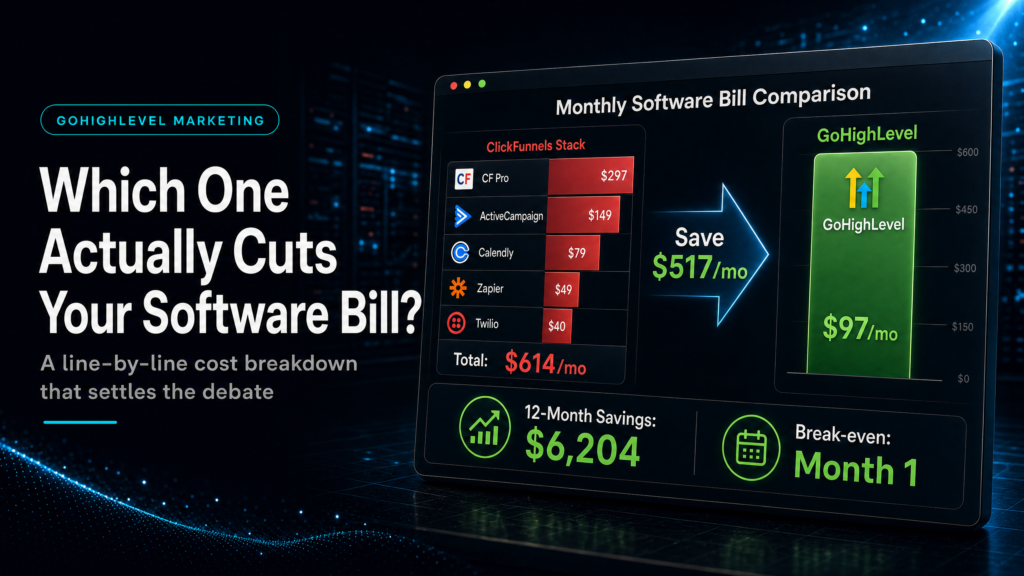
If your goal is lowering total stack spend (not just “funnel software”), gohighlevel vs clickfunnels cost usually comes down to consolidation: GoHighLevel can replace CRM, email/SMS follow-up, calendars, pipelines, and automation in one platform, while ClickFunnels often needs extra tools for CRM and nurture. If you only need simple funnels, ClickFunnels can be cheaper short-term.
TL;DR
- If you’re paying for a separate CRM + email automation + SMS + calendar + pipeline reporting, GoHighLevel typically reduces your monthly software bill by consolidating tools.
- If you only need a few landing pages and a checkout, ClickFunnels can be the lower-cost “funnel-only” option.
- The real cost isn’t the subscription; it’s duplicate tools, broken attribution, and slow lead follow-up that wastes ad spend.
- GoHighLevel wins when you need speed-to-lead, pipeline visibility, and automated follow-up across channels.
- ClickFunnels wins when your operation is simple and you don’t want to manage CRM stages, automations, and reporting.
- Most “GoHighLevel is expensive” complaints are implementation problems: messy pipelines, wrong triggers, no lead source tracking, and no reporting layer.
- Choose based on your revenue workflow (lead capture → follow-up → booking → sales pipeline), not feature checklists.
This is a support article to help you decide what actually reduces your monthly bill in the GoHighLevel vs ClickFunnels cluster. For the broader, full comparison, use the canonical hub: GoHighLevel vs ClickFunnels (honest comparison).
Decision table: what “cheapest” really looks like after 30 days
| Approach | Best fit | Risk | Speed | Revenue visibility | When to choose it |
|---|---|---|---|---|---|
| DIY / internal build | Operators with time, basic automation literacy, and a simple offer | High: missed triggers, messy data, inconsistent follow-up, poor attribution | Medium to slow | Low to medium (often “spreadsheet visibility”) | You have a low lead volume, can tolerate learning curve, and want maximum control |
| Cheap freelancer / template implementer | Businesses that need “something live” fast and don’t care about reporting depth | Very high: template mismatch, brittle automations, no handover, hidden recurring tool costs | Fast | Low (usually vanity metrics only) | You need a short-term stopgap and you’re willing to rebuild later |
| Specialist GoHighLevel expert or SCALE-style growth systems build | Teams running paid traffic, inbound lead gen, or multi-step sales (calls, quotes, follow-up) | Low to medium: depends on discovery and documentation quality | Fast to medium (done right once) | High: pipeline + attribution + speed-to-lead + conversion reporting | You want fewer tools, fewer leaks, and a system that sales and ops can actually run |
Who this is for
- Local service businesses (med spas, dental, home services) paying for multiple tools to handle leads and bookings
- Coaches/consultants selling high-ticket offers that require follow-up and pipeline management
- Agencies managing multiple client funnels and needing consistent reporting and attribution
- Founders running Meta Ads who suspect they’re wasting spend due to slow speed-to-lead
- Operators who already have ClickFunnels but still pay for a separate CRM, email, SMS, and calendar
- Teams considering migrating and worried about downtime, data loss, or broken tracking
- Businesses that want to reduce software costs without reducing lead volume or close rate
How to compare gohighlevel vs clickfunnels cost the right way (total stack, not subscription)
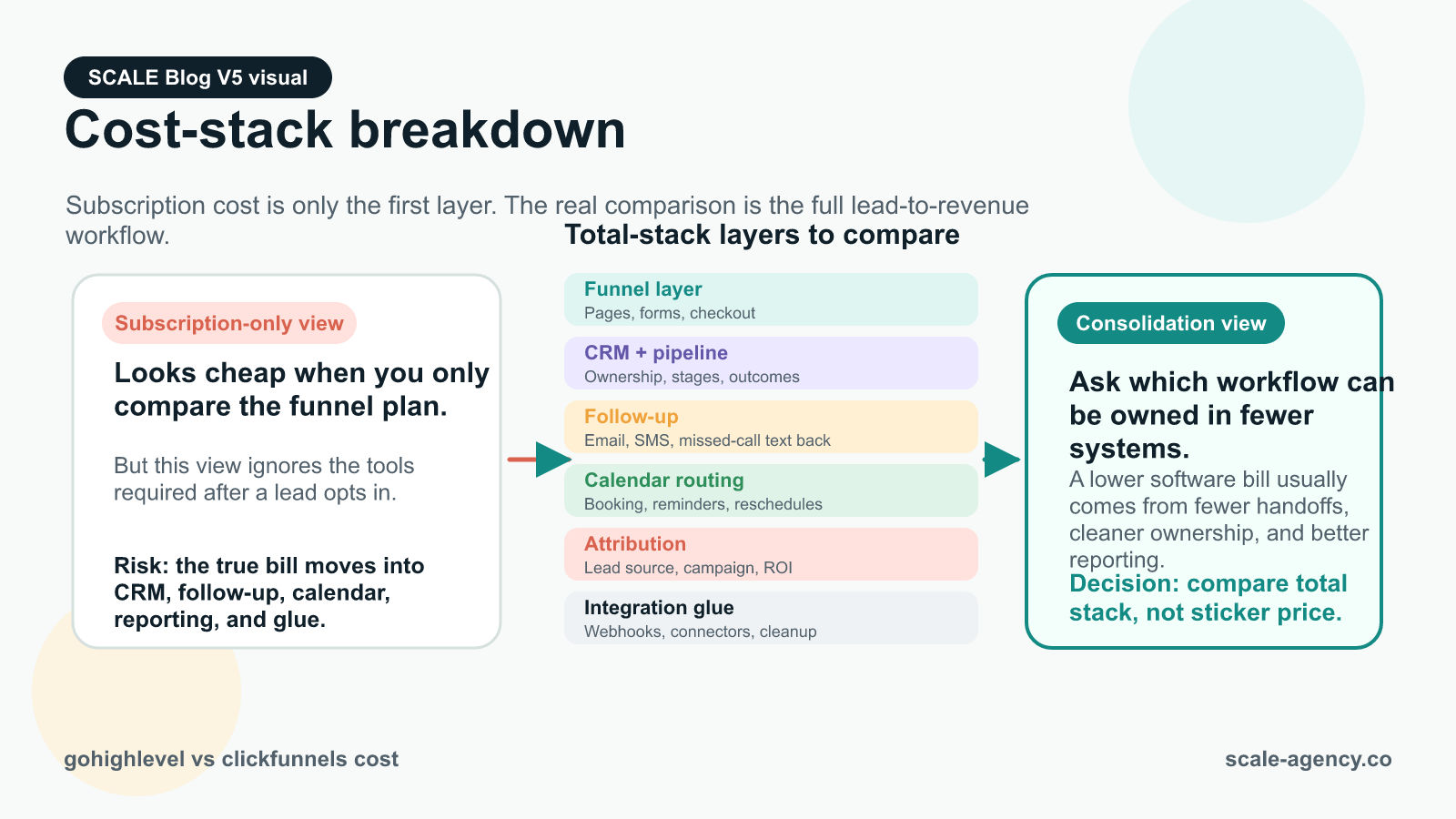
Most comparisons fail because they compare subscription prices in isolation. Your monthly software bill is the sum of:
- Front-end conversion layer (funnels/landing pages/forms)
- CRM and pipeline (lead stages, ownership, tasks, notes, outcomes)
- Follow-up (email, SMS, voicemail drops, missed-call text back, nurture)
- Calendars and routing (round robin, availability, reschedules, reminders)
- Attribution and reporting (lead source, campaign, pipeline value, ROI)
- Integrations glue (Zapier/Make, webhooks, tracking connectors)
What to check (buyer checklist)
- List every tool you pay for that touches a lead from click to close (including “small” add-ons).
- Identify which tool is the system of record (where the truth lives): CRM or spreadsheets.
- Map the workflow: lead capture → speed-to-lead → booking → sales pipeline → won/lost → reactivation.
- Count how many handoffs exist (form to CRM, CRM to calendar, calendar to reminders, etc.).
Why it matters commercially
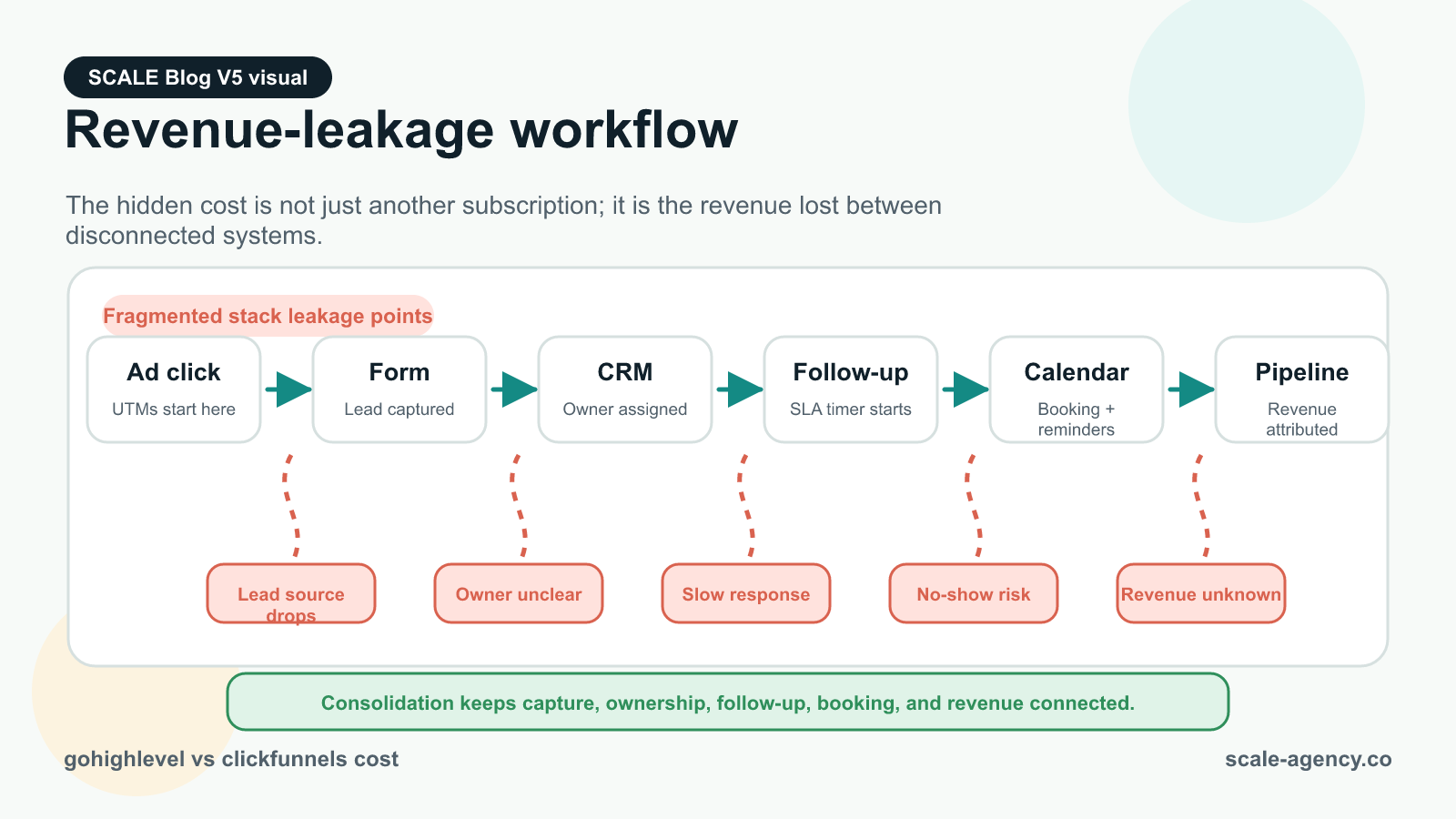
Every extra tool and integration is a failure point. Failure points create:
- Slower follow-up (lost leads)
- Duplicate records (bad reporting)
- Broken attribution (wasted ad spend)
- Manual admin time (hidden payroll cost)
Weak setup vs strong setup
Weak setup: ClickFunnels captures leads → Zapier pushes to a CRM → calendar tool sends reminders → email tool runs nurture → sales team updates a spreadsheet → owner guesses ROI.
Strong setup: One system captures leads, assigns ownership, triggers multi-channel follow-up, books appointments, tracks pipeline stages, and reports by lead source and campaign.
What SCALE would look for or fix: tool overlap, missing lead source fields, broken UTM capture, inconsistent pipeline stages, and automations that fire without guardrails (causing spam, missed tasks, or wrong assignments).
Where ClickFunnels can be cheaper (and when that “cheap” becomes expensive)
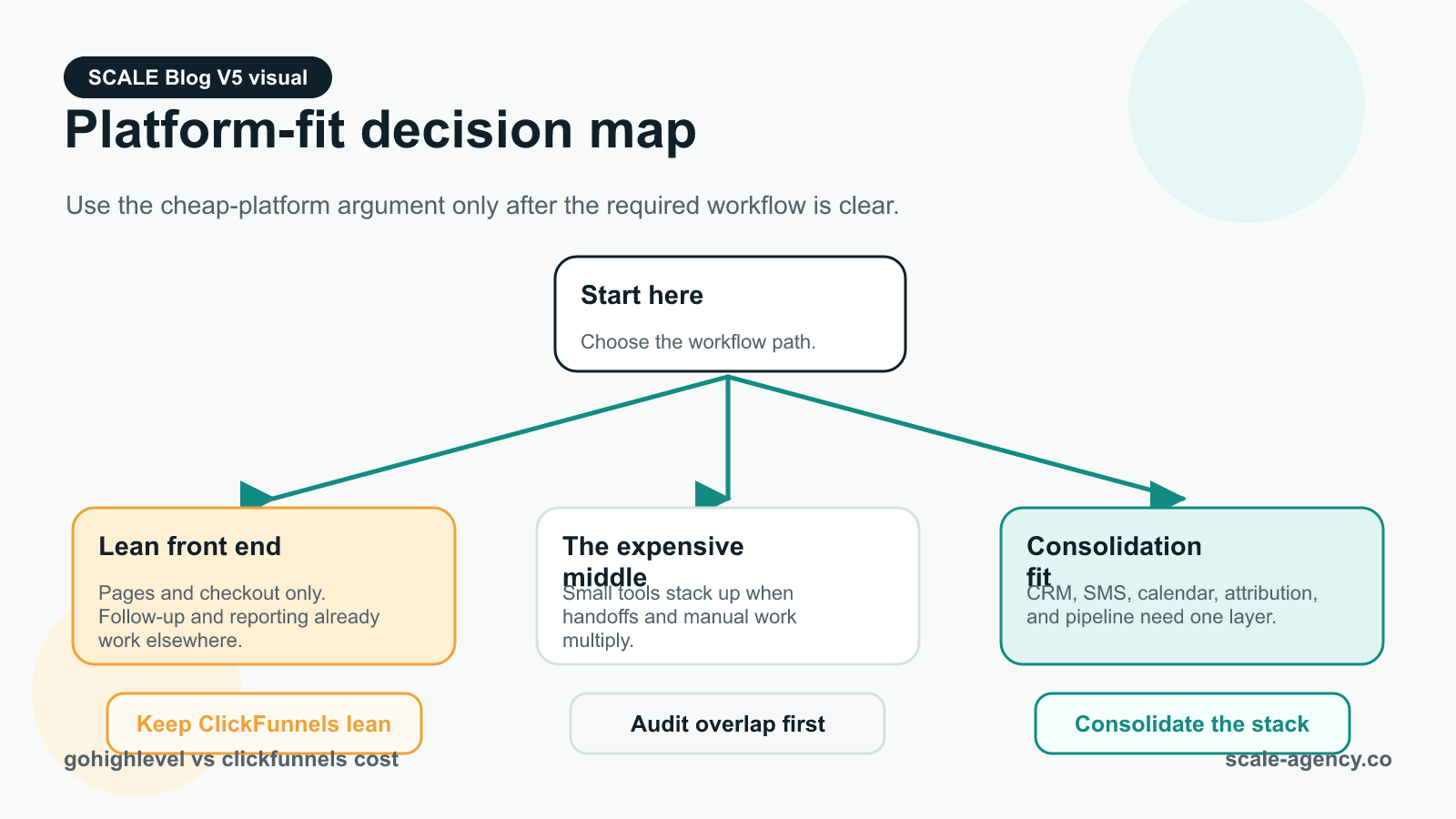
ClickFunnels can reduce your bill if your business only needs:
- A small number of funnels/landing pages
- Basic checkout/upsell flow
- Minimal follow-up (or you already have a separate system you won’t replace)
What the buyer should check
- Do you need a real CRM pipeline, or just a list of buyers/leads?
- Do you need SMS and missed-call text back?
- Do you need appointment routing (round robin, team calendars, reschedules)?
- Do you need to see revenue by lead source without manual work?
How to diagnose the “ClickFunnels is cheap but…” problem
If you answer “yes” to any of the above, ClickFunnels often becomes a front-end layer that forces you to add:
- A CRM (for pipeline and sales activity)
- An automation tool (for nurture and reactivation)
- A calendar tool (for booking and reminders)
- An integration tool (to connect everything)
Commercial risk: you save on the funnel subscription but pay more in total stack cost and operational drag. The bill you should care about is “software + integration + admin time + lost leads.”
What a weak setup looks like
- Leads submit a form but don’t get contacted for hours
- Sales reps forget to follow up because tasks aren’t created
- Booked calls no-show because reminders aren’t consistent
- Owner can’t answer: “Which campaign produced closed revenue last month?”
What a strong setup looks like (even if you keep ClickFunnels)
- Lead instantly enters a CRM with owner assignment and SLA timers
- Automated speed-to-lead sequence triggers within 60 seconds
- Calendar booking is tied to pipeline stage changes
- UTMs and lead source are captured and reported on closed-won deals
Where GoHighLevel reduces your monthly software bill (consolidation + fewer leaks)
GoHighLevel tends to reduce total monthly spend when you’re currently paying for multiple tools to do what is essentially one workflow: capture → follow-up → book → close → report.
For the CRM consolidation side of this decision, see how GoHighLevel CRM can replace a fragmented stack and cut costs.
What to check (the consolidation test)
- Are you paying for a separate CRM primarily to manage leads and deals?
- Are you paying for email automation and still not getting consistent follow-up?
- Are you paying for SMS separately (or not doing SMS at all)?
- Are you paying for a calendar tool and still manually confirming appointments?
- Are you paying for reporting/attribution tools because your CRM can’t show ROI?
Why it matters commercially
Consolidation is not just “saving money.” It’s reducing the number of places a lead can disappear. The fastest way to improve ROI is often not a new ad creative; it’s improving speed-to-lead and follow-up consistency.
How to diagnose if GoHighLevel will actually save you money
- Count your current tools and their monthly cost.
- Identify which ones GoHighLevel can replace without reducing capability.
- Estimate integration cost: Zapier/Make tasks, webhooks, and maintenance time.
- Estimate lead leakage: missed calls, unworked leads, no-shows, stale pipeline.
Weak setup in GoHighLevel (why some people think it’s “not worth it”): pipelines with 20 stages nobody uses, automations firing on the wrong triggers, no lead source tracking, and no reporting discipline. That creates noise, not savings.
Strong setup in GoHighLevel: a small number of pipeline stages aligned to your sales process, clean custom fields for lead source/UTMs, speed-to-lead automations with guardrails, and reporting that ties closed revenue back to source.
What SCALE would look for or fix: pipeline stage definitions, ownership rules, SLA timers, missed-call text back, appointment reminders, reactivation sequences, and attribution fields that are populated at the moment of lead capture (not “later”).
The hidden cost: attribution gaps and “unknown lead source” revenue
When owners compare gohighlevel vs clickfunnels cost, they often ignore the most expensive line item: ad spend that can’t be tied to revenue. If you can’t see which campaigns create closed-won deals, you either:
- Keep funding losers because they “feel busy,” or
- Turn off winners because you can’t prove they work.
What the buyer should check
- Do your leads store UTMs (source, medium, campaign, content) at capture?
- Does your CRM store first-touch and last-touch source?
- Can you report on closed revenue by source without exporting to spreadsheets?
- Do you have consistent naming conventions for campaigns and offers?
How to diagnose attribution problems in 15 minutes
- Pull the last 30 days of closed deals (or purchases).
- Check how many have a known lead source and campaign.
- If more than 20% are “unknown,” your reporting is lying to you.
- Check whether the “source” is manually entered by sales (high error rate) or captured automatically (low error rate).
Weak vs strong
Weak: “Lead source” is a dropdown sales reps forget to fill in; UTMs are lost between the funnel and CRM; offline conversions aren’t reconciled.
Strong: UTMs are captured on the form, stored on the contact and opportunity, and reported on pipeline and closed-won. Sales doesn’t have to remember anything.
Operational reality: the platform cost is small; the build quality is everything
Two businesses can pay the same subscription and have completely different monthly “cost” outcomes:
- Business A: low subscription, high leakage, high admin time, low visibility.
- Business B: slightly higher subscription, low leakage, automated follow-up, clear ROI.
What to check before you decide
- Do you have someone accountable for CRM hygiene (stages, outcomes, notes)?
- Do you have a defined follow-up policy (how many touches, over how many days)?
- Do you have a speed-to-lead SLA (e.g., under 5 minutes) and is it enforced?
- Do you have a reporting cadence (weekly pipeline review, monthly source ROI)?
What a weak setup looks like
- Automations exist but nobody trusts them
- Sales reps work from inboxes, not pipeline stages
- Appointments are booked but not tied to opportunities
- Owner asks for numbers and gets “we’ll pull it later”
What a strong setup looks like
- Every new lead creates an opportunity in the correct pipeline
- Ownership is assigned automatically (or via round robin)
- Follow-up sequences stop when a lead books, answers, or opts out
- Reporting shows leads, appointments, show rate, close rate, and revenue by source
The implementation process
- Inventory your current stack and bill. List every tool that touches lead capture, follow-up, booking, CRM, and reporting. Include Zapier/Make usage and any paid tracking add-ons.
- Define your revenue workflow. Write the exact steps from “new lead” to “closed-won” (and “lost”). If you can’t describe it, no platform will save you money.
- Design your CRM structure. Create one primary pipeline with 5–8 stages max, aligned to real sales actions (not vague statuses). Define stage entry/exit rules and required fields.
- Set up lead capture correctly. Build forms/landing pages with UTM capture, lead source fields, and consent language. Route leads to the right pipeline and owner.
- Build calendars and routing. Configure calendars by offer/service, add buffers, set round robin rules (if team-based), and ensure bookings update pipeline stages automatically.
- Implement speed-to-lead automations. Create a “new lead” workflow: instant SMS/email, call connect (if used), task creation, and escalation if no response within SLA.
- Implement nurture and reactivation. Build sequences for: no-show, no-response, lost opportunities, and past customers. Add stop conditions to prevent over-messaging.
- Lead source tracking and attribution. Store first-touch and last-touch UTMs on the contact/opportunity. Standardize campaign naming. Ensure reporting can group by source/campaign.
- Reporting and dashboards. Build a weekly operator dashboard: new leads, speed-to-lead, appointments booked, show rate, opportunities created, close rate, revenue by source.
- Handover and governance. Document pipeline definitions, automation logic, and “what to do when” playbooks. Assign owners for CRM hygiene and reporting cadence.
- Migration risk management (if switching). Export/import contacts and opportunities carefully, map fields, test automations in a sandbox, and run parallel tracking for 7–14 days before fully cutting over. If the switch is already on the table, use the companion GoHighLevel vs ClickFunnels migration savings guide before changing traffic routes.
- Testing and iteration. Run a 2-week test cycle: check deliverability, response rates, booking rates, and stage conversion. Fix bottlenecks before scaling spend.
Common problems and how to fix them
| Problem | What it usually means | Commercial risk | Fix | Metric to watch |
|---|---|---|---|---|
| “We have ClickFunnels but still need 4 other tools.” | ClickFunnels is acting as a front-end only; no unified CRM/follow-up | Higher total stack cost + integration failure points | Consolidate CRM + follow-up + calendars into one system (often GoHighLevel) or simplify workflow | Total monthly stack cost; number of integrations |
| Leads aren’t contacted fast enough | No speed-to-lead automation or no SLA enforcement | Lower conversion rate; wasted ad spend | Instant auto-response + task + escalation; call connect if appropriate | Median time-to-first-touch |
| “Unknown lead source” in CRM | UTMs not captured at form submit; manual entry reliance | Can’t optimize campaigns; budget misallocation | UTM capture fields + hidden fields + store on contact/opportunity | % opportunities with known source/campaign |
| Automations spam or double-send | Triggers lack guardrails; multiple workflows overlap | Brand damage; opt-outs; deliverability issues | Add stop conditions, tags, and suppression logic; audit triggers | Opt-out rate; complaint rate; duplicate message count |
| Pipeline stages don’t match reality | Stages are “ideas,” not operational steps | Forecasting errors; poor sales accountability | Reduce stages; define entry/exit rules; require outcomes | Stage-to-stage conversion; average days in stage |
| Booked calls no-show | Weak reminders and confirmations; no reschedule flow | Lost capacity; lower revenue per lead | Multi-channel reminders + confirmation prompts + easy reschedule | Show rate; reschedule rate |
| Owner can’t see ROI without spreadsheets | Reporting not designed; data not structured | Slow decisions; scaling the wrong offers | Dashboard tied to pipeline + source fields; weekly review cadence | Revenue by source; CAC by channel |
What this means for revenue
Your software bill is a cost line. Your revenue system is a profit line. The platform choice affects revenue in predictable ways:
Lead quality and conversion rate
Funnels influence conversion, but conversion isn’t just the page. It’s also what happens after the form submit. If your follow-up is slow or inconsistent, you effectively “buy” leads you never work properly.
- ClickFunnels-heavy stack risk: great pages, but follow-up lives elsewhere and breaks under load.
- GoHighLevel strength: capture + follow-up + pipeline in one place reduces the chance a lead goes cold.
Booked calls and show rate
Calendars, reminders, confirmations, and reschedule flows are revenue levers. If your booking and reminder system is fragmented, you’ll see more no-shows and more admin time.
- Watch: booking rate, show rate, and time-to-first-touch.
- Fix: tie booking events to pipeline stages and automate reminders with clear stop conditions.
Speed-to-lead (the silent ROI killer)
When paid traffic is involved, speed-to-lead is often the cheapest “optimization” available. If you’re responding in hours, you’re paying premium CPMs for leads that get contacted like it’s 2012.
- Watch: median and 90th percentile time-to-first-touch.
- Fix: instant SMS/email + task creation + escalation if no response.
Pipeline visibility and close rate
Close rate improves when sales activity is visible and managed. If your CRM is an afterthought, you’ll see stalled deals, unworked leads, and forecasting that’s basically guessing.
- Watch: stage conversion rates and average days in stage.
- Fix: fewer stages, clearer definitions, and required outcomes on lost deals.
Attribution and wasted ad spend
If you can’t tie revenue back to source and campaign, you can’t scale confidently. This is where “cheaper software” becomes expensive: you keep spending because you can’t see what’s working.
- Watch: % closed-won with known source/campaign.
- Fix: UTM capture at the form level and consistent reporting tied to opportunities.
If you’re trying to lower your total stack spend, the real gohighlevel vs clickfunnels cost decision is about operational consolidation and leakage control: GoHighLevel can unify CRM, funnels, automation, lead follow-up, calendars, and attribution so you pay for fewer tools and waste less ad spend, while ClickFunnels can be the right choice when you only need simple funnels. In the gohighlevel vs clickfunnels cluster, the winner is the platform (and implementation) that gives you clean pipeline visibility, reliable follow-up, and trustworthy attribution—exactly what SCALE builds and optimises for growth-focused teams.
Conclusion
Most businesses don’t lose money because they picked the “wrong” platform. They lose money because they built a disconnected revenue workflow: funnels in one place, CRM in another, follow-up in a third, and reporting in a spreadsheet no one trusts.
SCALE builds GoHighLevel CRM, funnel and automation systems for businesses that need better lead quality, faster follow-up and clearer attribution. The difference in outcomes usually comes from a few non-negotiables:
- Design the pipeline around decisions, not labels. Stages should reflect what sales actually does next.
- Capture attribution at the moment of intent. UTMs and lead source must be stored when the lead submits, not “when someone remembers.”
- Automations with guardrails. Every workflow needs stop conditions, suppression logic, and ownership rules to avoid spam and chaos.
- Speed-to-lead is engineered, not hoped for. Instant response, tasks, escalation, and visibility.
- Reporting is a product. If the dashboard doesn’t answer “what to do next,” it’s not reporting; it’s decoration.
If you’re deciding between platforms purely on subscription price, you’ll likely underinvest in the build and overpay in leakage. The goal is not “cheapest tool.” The goal is “lowest cost per closed-won deal with clean visibility.”
FAQs
Is GoHighLevel cheaper than ClickFunnels?
It depends on what you include in “cost.” If you only need funnels and checkout, ClickFunnels can be cheaper. If you also need CRM, pipelines, calendars, SMS/email automation, and reporting, GoHighLevel often reduces total monthly stack cost because it replaces multiple subscriptions and cuts integration overhead.
What’s the most common reason people don’t save money after switching to GoHighLevel?
Poor implementation: too many pipeline stages, missing lead source/UTM capture, automations without stop conditions, and no reporting discipline. The platform can consolidate tools, but only if your workflow is designed and documented so the team actually uses it.
Can I keep ClickFunnels and still reduce my software bill?
Yes, if you simplify the rest of your stack. Many businesses keep ClickFunnels for front-end pages but consolidate CRM, calendars, and follow-up into one system. The key is reducing the number of integrations and ensuring attribution and pipeline updates happen automatically.
What should I measure to decide if the switch is worth it?
Track: total monthly stack cost, median time-to-first-touch, appointment booking rate, show rate, close rate, and % of opportunities with known lead source/campaign. If these improve while tools decrease, you’re reducing both cost and leakage.
Will switching platforms break my tracking and attribution?
It can if you migrate without a plan. The safest approach is to map fields (including UTMs), test forms and events in a staging environment, and run parallel tracking for 7–14 days. Don’t cut over until you can see leads flowing into the CRM with correct source data.
Do I need an expert to implement GoHighLevel to save money?
If your business relies on paid leads, booked calls, and a sales pipeline, expert implementation usually pays for itself by preventing leakage and rework. If your workflow is simple and you have time to learn, DIY can work—but you should still follow a structured build and testing process.
What’s the fastest “cost win” regardless of platform?
Improve speed-to-lead and follow-up consistency. Even without changing your ads, faster first contact and better reminders typically increase booked calls and reduce wasted spend. Consolidating tools helps, but the immediate win is operational: response time, routing, and automation quality.
